element el-transfer穿梭框的重写,自定义穿梭框组件封装
通过element官方文档可以了解到 el-transfer穿梭框的基本使用方法,但是在实际业务需求中,官方组件已经无法满足产品设计和业务实际使用需求,官方提供的方法有限,无法满足各种定制化需求,今天就来封装一个Transfer 穿梭框组件,支持全流域自定义,方便、快捷、高效,开箱即用,满足各种业务场景及需求。
·
前言
通过element官方文档可以了解到 el-transfer穿梭框的基本使用方法,但是在实际业务需求中,官方组件已经无法满足产品设计和业务实际使用需求,官方提供的方法有限,无法满足各种定制化需求,今天就来封装一个Transfer 穿梭框组件,支持全流域自定义,方便、快捷、高效,开箱即用,满足各种业务场景及需求。
1、效果图
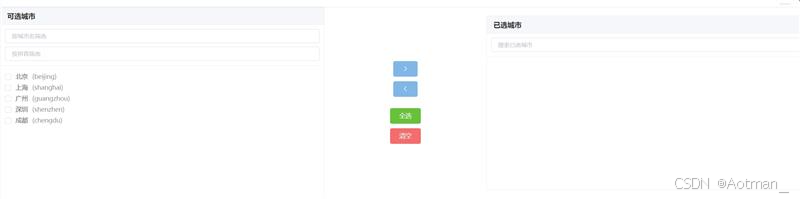
2、自定义组件
<template>
  <div class="enhanced-transfer">
    <!-- 左侧面板 -->
    <div class="transfer-panel">
      <div class="panel-header">
        <slot name="left-header">
          <span>{{ leftTitle }}</span>
        </slot>
      </div>
      <div class="panel-filters">
        <slot name="left-filters">
          <el-input
            v-for="(filter, index) in leftFilters"
            :key="'left-filter-'+index"
            v-model="leftFilterValues[index]"
            :placeholder="filter.placeholder"
            clearable
            size="small"
            @change="handleLeftFilterChange"
          />
        </slot>
      </div>
      <div class="panel-body">
        <el-checkbox-group v-model="leftChecked">
          <el-checkbox
            v-for="item in filteredLeftData"
            :key="item[keyProp]"
            :label="item[keyProp]"
            class="transfer-item"
          >
            <slot name="left-item" :item="item">
              {{ item[labelProp] }}
            </slot>
          </el-checkbox>
        </el-checkbox-group>
      </div>
    </div>

    <!-- 中间操作按钮 -->
    <div class="transfer-buttons">
      <el-button
        type="primary"
        icon="el-icon-arrow-right"
        :disabled="leftChecked.length === 0"
        @click="moveToRight"
      />
      <el-button
        type="primary"
        icon="el-icon-arrow-left"
        :disabled="rightChecked.length === 0"
        @click="moveToLeft"
      />
      <div class="custom-buttons">
        <slot name="center-buttons"></slot>
      </div>
    </div>

    <!-- 右侧面板 -->
    <div class="transfer-panel">
      <div class="panel-header">
        <slot name="right-header">
          <span>{{ rightTitle }}</span>
        </slot>
      </div>
      <div class="panel-filters">
        <slot name="right-filters">
          <el-input
            v-for="(filter, index) in rightFilters"
            :key="'right-filter-'+index"
            v-model="rightFilterValues[index]"
            :placeholder="filter.placeholder"
            clearable
            size="small"
            @change="handleRightFilterChange"
          />
        </slot>
      </div>
      <div class="panel-body">
        <el-checkbox-group v-model="rightChecked">
          <el-checkbox
            v-for="item in filteredRightData"
            :key="item[keyProp]"
            :label="item[keyProp]"
            class="transfer-item"
          >
            <slot name="right-item" :item="item">
              {{ item[labelProp] }}
            </slot>
          </el-checkbox>
        </el-checkbox-group>
      </div>
    </div>
  </div>
</template>

<script>
export default {
  name: 'EnhancedTransfer',
  props: {
    // 数据源
    data: {
      type: Array,
      default: () => []
    },
    // 已选择的数据(右侧数据)
    value: {
      type: Array,
      default: () => []
    },
    // 键名属性
    keyProp: {
      type: String,
      default: 'key'
    },
    // 显示文本属性
    labelProp: {
      type: String,
      default: 'label'
    },
    // 左侧标题
    leftTitle: {
      type: String,
      default: '列表'
    },
    // 右侧标题
    rightTitle: {
      type: String,
      default: '已选'
    },
    // 左侧筛选条件配置
    leftFilters: {
      type: Array,
      default: () => [
        { placeholder: '请输入筛选条件' }
      ]
    },
    // 右侧筛选条件配置
    rightFilters: {
      type: Array,
      default: () => [
        { placeholder: '请输入筛选条件' }
      ]
    },
    // 自定义筛选函数
    filterMethod: {
      type: Function,
      default: null
    }
  },
  data() {
    return {
      leftChecked: [], // 左侧选中项
      rightChecked: [], // 右侧选中项
      leftFilterValues: [], // 左侧筛选值
      rightFilterValues: [] // 右侧筛选值
    }
  },
  computed: {
    // 左侧数据(总数据减去已选数据)
    leftData() {
      return this.data.filter(
        item => !this.value.some(
          selectedItem => selectedItem[this.keyProp] === item[this.keyProp]
        )
      )
    },
    // 右侧数据(已选数据)
    rightData() {
      return this.value
    },
    // 筛选后的左侧数据
    filteredLeftData() {
      if (this.filterMethod) {
        return this.filterMethod(this.leftData, this.leftFilterValues, 'left')
      }
      return this.defaultFilter(this.leftData, this.leftFilterValues)
    },
    // 筛选后的右侧数据
    filteredRightData() {
      if (this.filterMethod) {
        return this.filterMethod(this.rightData, this.rightFilterValues, 'right')
      }
      return this.defaultFilter(this.rightData, this.rightFilterValues)
    }
  },
  methods: {
    // 默认筛选方法
    defaultFilter(data, filterValues) {
      if (!filterValues || filterValues.every(val => !val)) {
        return data
      }
      return data.filter(item => {
        return filterValues.every(filterValue => {
          if (!filterValue) return true
          return Object.values(item).some(
            val => String(val).toLowerCase().includes(filterValue.toLowerCase())
          )
        })
      })
    },
    // 左侧筛选变化
    handleLeftFilterChange() {
      this.leftChecked = []
    },
    // 右侧筛选变化
    handleRightFilterChange() {
      this.rightChecked = []
    },
    // 移动到右侧
    moveToRight() {
      const movedItems = this.leftData.filter(item =>
        this.leftChecked.includes(item[this.keyProp])
      )
      this.$emit('input', [...this.value, ...movedItems])
      this.$emit('change', [...this.value, ...movedItems], 'right', movedItems)
      this.leftChecked = []
    },
    // 移动到左侧
    moveToLeft() {
      const remainingItems = this.rightData.filter(
        item => !this.rightChecked.includes(item[this.keyProp])
      )
      this.$emit('input', remainingItems)
      this.$emit(
        'change',
        remainingItems,
        'left',
        this.rightData.filter(item =>
          this.rightChecked.includes(item[this.keyProp])
        )
      )
      this.rightChecked = []
    }
  }
}
</script>

<style scoped>
.enhanced-transfer {
  display: flex;
  justify-content: space-between;
  align-items: center;
}

.transfer-panel {
  width: 40%;
  border: 1px solid #ebeef5;
  border-radius: 4px;
  overflow: hidden;
  background: #fff;
}

.panel-header {
  height: 40px;
  line-height: 40px;
  background: #f5f7fa;
  padding: 0 15px;
  border-bottom: 1px solid #ebeef5;
  color: #333;
  font-weight: bold;
}

.panel-filters {
  padding: 10px;
  border-bottom: 1px solid #ebeef5;
}

.panel-filters .el-input {
  margin-bottom: 8px;
}

.panel-filters .el-input:last-child {
  margin-bottom: 0;
}

.panel-body {
  height: 300px;
  overflow-y: auto;
  padding: 10px;
}

.transfer-item {
  display: block;
  margin: 5px 0;
}

.transfer-buttons {
  display: flex;
  flex-direction: column;
  align-items: center;
  padding: 0 20px;
}

.transfer-buttons .el-button {
  margin: 5px 0;
}

.custom-buttons {
  margin-top: 15px;
  display: flex;
  flex-direction: column;
}
</style>
3、组件使用
<template>
  <div>
    <enhanced-transfer
      v-model="selectedData"
      :data="allData"
      :left-title="'可选城市'"
      :right-title="'已选城市'"
      :left-filters="[
        { placeholder: '按城市名筛选' },
        { placeholder: '按拼音筛选' }
      ]"
      :right-filters="[
        { placeholder: '搜索已选城市' }
      ]"
      @change="handleTransferChange"
    >
      <!-- 自定义中间按钮 -->
      <template #center-buttons>
        <el-button type="success" @click="selectAll">全选</el-button>
        <el-button type="danger" @click="clearAll">清空</el-button>
      </template>

      <!-- 自定义左侧项显示 -->
      <template #left-item="{ item }">
        <span>{{ item.label }}</span>
        <span style="color: #999; margin-left: 10px;">({{ item.pinyin }})</span>
      </template>
    </enhanced-transfer>
  </div>
</template>

<script>
import EnhancedTransfer from './EnhancedTransfer.vue'

export default {
  components: {
    EnhancedTransfer
  },
  data() {
    return {
      allData: [
        { key: 'bj', label: '北京', pinyin: 'beijing' },
        { key: 'sh', label: '上海', pinyin: 'shanghai' },
        { key: 'gz', label: '广州', pinyin: 'guangzhou' },
        { key: 'sz', label: '深圳', pinyin: 'shenzhen' },
        { key: 'cd', label: '成都', pinyin: 'chengdu' }
      ],
      selectedData: []
    }
  },
  methods: {
    handleTransferChange(newData, direction, movedItems) {
      console.log('数据变化:', newData, direction, movedItems)
    },
    selectAll() {
      this.selectedData = [...this.allData]
    },
    clearAll() {
      this.selectedData = []
    }
  }
}
</script>
欢迎加入 MCP 技术社区!与志同道合者携手前行,一同解锁 MCP 技术的无限可能!
更多推荐


 10
10 0
0- 0


 已为社区贡献3条内容

所有评论(0)