el-dialog 封装组件
el-dialog 封装组件
·
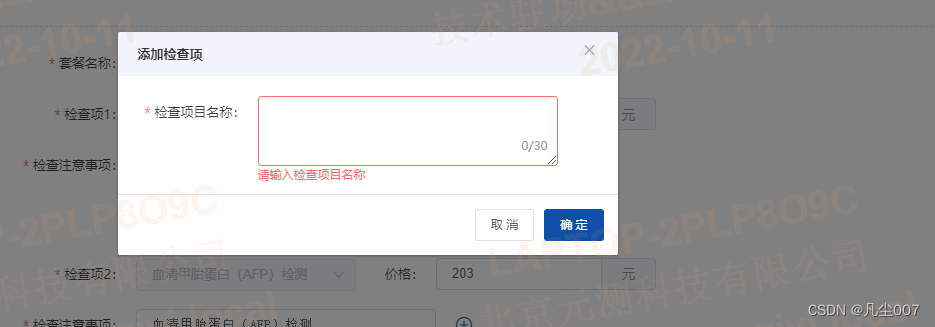
首先在父组件中引入子组件,给子组件传入值,在父组件中做关闭弹窗操作
<AddConfigItemDialog v-if="dialog.config" :isVisible="dialog.config"
 @close="dialog.config = false" @refresh="handleRefresh()" />

data () {
    return{
        dialog: {
        config: false
      }
    }
},

methods:{
    关闭弹窗
    handleRefresh () {
      this.dialog.config = false
    },
}
子组件打开弹窗,都是父组件传过来进行赋值,不可以在子组件直接修改值
<template>
  <el-dialog title="添加" :visible.sync="value" width="500px" :close-on-click-modal="false" :close-on-press-escape="false" @close="handleClose()">
    <div class="dialog-main">
      <el-form :model="ruleForm" :rules="rules" ref="ruleForm" label-width="120px" class="demo-ruleForm">
        <el-form-item label="名称" prop="checkItem">
          <el-input type="textarea" style="width: 300px" :rows="3" v-model="ruleForm.checkItem" :maxlength="30" show-word-limit></el-input>
        </el-form-item>
      </el-form>
    </div>
    <span slot="footer" class="dialog-footer">
      <el-button @click="handleClose()">取 消</el-button>
      <el-button type="primary" @click="handleSubmit()">确 定</el-button>
    </span>
  </el-dialog>
</template>
<script>
export default {
  props: {
    isVisible: {
      type: Boolean,
      default: false
    }
  },
  data () {
    return {
      value: this.isVisible,
      ruleForm: {
        checkItem: ''
      },
      rules: {
        checkItem: [
          { required: true, message: '请输入检查项目名称', trigger: 'blur' }
        ]
      }
    }
  },
  methods: {
    handleClose () {
      // 清空数据
      this.ruleForm.checkItem = ''
      // 传递关闭事件给父组件
      this.$emit('close')
    },
    handleSubmit () {
        // 必填项校验
      this.$refs.ruleForm.validate(async (valid) => {
        if (valid) {
            // 掉接口
          const res = await postPayScreenCheckSave(this.ruleForm)
          if (res.code === 200) {
            this.$message.success('添加成功')
            // 传递关闭事件给父组件
            this.$emit('refresh')
          }
        }
      })
    }
  }
}
</script>
欢迎加入 MCP 技术社区!与志同道合者携手前行,一同解锁 MCP 技术的无限可能!
更多推荐


 0
0 0
0- 0


 已为社区贡献3条内容

所有评论(0)