taro微信小程序封装公共按钮组件
封装悬浮按钮组件新建组件src/components/AddButton/index.jsximport React from 'react';import { Button } from '@tarojs/components';import './index.scss';const AddButton = ({ title, show = true, style, onClick }) =&g
·
封装悬浮按钮组件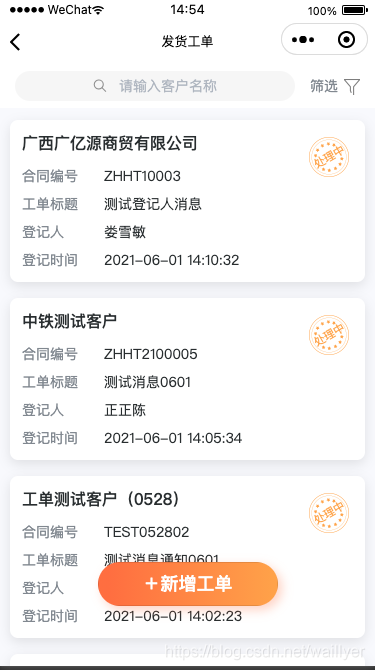
新建组件
src/components/AddButton/index.jsx
import React from 'react';
import { Button } from '@tarojs/components';
import './index.scss';

const AddButton = ({ title, show = true, style, onClick }) => {
    return (
        <Button
            className={`zeaho-button__add ${!show ? 'zeaho-button__add-hidden' : ''}`}
            style={style}
            onClick={onClick}
        >
            +{title}
        </Button>
    );
};

export default AddButton;
//index.scss
.zeaho-button__add {
    position: fixed;
    bottom: 120px;
    left: 50%;
    display: inline-block;
    width: 360px;
    color: #fff;
    font-size: 36px;
    font-family: PingFangSC-Medium;
    line-height: 88px;
    background-image: linear-gradient(90deg, #ff7a45 6%, #fdad4e 100%);
    border: none;
    border-radius: 44px;
    box-shadow: 8px 8px 20px 0 rgba(255, 122, 69, 0.3);
    transform: translateX(-50%);
    opacity: 1;
}
.zeaho-button__add-hidden {
    display: none;
}
使用
import AddButton from '@/components/AddButton';
import { AtSearchBar, AtActivityIndicator } from 'taro-ui';
return (
        <View className={`${'container'} ${isFixed ? 'fixed' : ''}`}>
            <View className="zeaho-search">
                <AtSearchBar
                    className="zeaho-searchBar"
                    placeholder="请输入客户名称 "
                    value={listParams?.client_name || ''}
                    onClear={() => {
                        handleListParamsChange('client_name', '');
                        handleListParamsChange('page', 1);
                        query();
                    }}
                    onConfirm={e => {
                        handleListParamsChange('client_name', e.detail.value);
                        handleListParamsChange('page', 1);
                        query();
                    }}
                />
                <View
                    className={`${'zeaho-filter'} ${isFilter ? 'zeaho-filter-active' : null}`}
                    onClick={() => {
                        dispatch({
                            type: 'shipOrderList/overrideStateProps',
                            payload: {
                                drawerShow: true,
                            },
                        });
                    }}
                >
                    筛选
                    <Image src={isFilter ? filterActiveIcon : filterIcon} />
                </View>
            </View>
            <Filter></Filter>
            {listParams?.page === 1 && loading.effects['shipOrderList/fetchShipOrderList'] ? (
                <AtActivityIndicator size="38" mode="center" content="努力加载中..." />
            ) : (
                <View className="customer-wrapper">
                    {shipOrderList?.length ? (
                        <>
                            {shipOrderList?.map(item => {
                                return <OrderInfo key={item.id} item={item} />;
                            })}
                        </>
                    ) : (
                        <Empty />
                    )}
                    <ActivityIndicator
                        loading={loading.effects['shipOrderList/fetchShipOrderList']}
                    />
                </View>
            )}
            <AddButton
                title="新增工单"
                show={!drawerShow && isWorkOrderDeliveryCreateIncludes}
                onClick={handleClick}
            />
        </View>
    );
}

欢迎加入 MCP 技术社区!与志同道合者携手前行,一同解锁 MCP 技术的无限可能!
更多推荐


 0
0 0
0- 0


 已为社区贡献1条内容

所有评论(0)