使用书生万象InternVL大模型进行自定义视频数据集微调时没有petrel_client导致NoneType异常
7月4日下午,世界人工智能大会科学前沿论坛, 代季峰老师代表InternVL研究团队发布了2.0版本,中文正式名称为"书生·万象”。它是目前已知性能开源大模型(见数值对比表),也是国内。数学基准MathVista的测试中、书生·万象的得分为66.3%,。在通用图表基准ChartQA、文档类基准DocVQA、信息图表类基准InfographicVQA中以及通用视觉问答基准MMBench (v1.1)
使用书生万象InternVL大模型进行自定义视频数据集微调时没有petrel_client导致NoneType异常
1、项目
7月4日下午,世界人工智能大会科学前沿论坛, 代季峰老师代表InternVL研究团队发布了2.0版本,中文正式名称为"书生·万象”。它是目前已知性能最强的开源多模态大模型(见数值对比表),也是国内首个在MMMU(多学科问答)上突破60的模型。数学基准MathVista的测试中、书生·万象的得分为66.3%,显著高于其他闭源商业和开源模型。在通用图表基准ChartQA、文档类基准DocVQA、信息图表类基准InfographicVQA中以及通用视觉问答基准MMBench (v1.1)中,书生万象也取得了最先进(SOTA)的表现。科学图表基准AI2D的测试中,书生万象大幅领先其他优秀的开源模型,并与商业闭源模型不相上下。
项目的官方地址:
https://github.com/OpenGVLab/InternVL?tab=readme-ov-file
2、问题
在本文中,使用的是最新发布的InternVL2.0版本,并且将视频作为输入,进行模型的lora微调。
在最新的代码(如下图),我们依据github上的教程使用shell脚本进行lora微调时,实际上就是运行internvl_chat_finetune.py文件: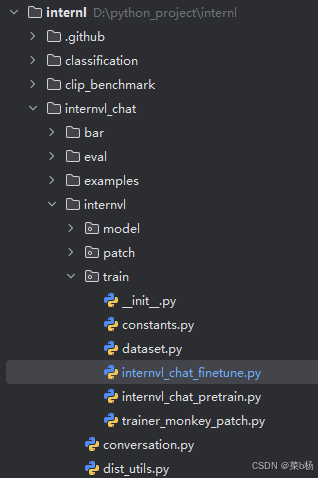
在将视频作为模型输入时,我们会在下面这段代码中遇到报错:
 # Load the video frames using tcs_loader
 # TODO: Load videos without using tcsloader.
 image_list = self.tcs_loader(
     video_path,
     image_type='video',
     max_num_frames=self.max_num_frame,
     min_num_frames=self.min_num_frame,
     sample=self.sampling_method,
     clip=data_item.get('clip', None))
在加载tcs_loader时,会遇到NoneType异常,实际上就是tcs_loader为None,而为什么如此呢?我们查看代码发现,tcs_loader来自于这行代码:
tcs_loader = TCSLoader('~/petreloss.conf') if has_tcs_loader else None
而has_tcs_loader这个布尔值由下面这段逻辑决定:
try:
    from petrel_client.client import Client
    from petrel_client.common.config import Config
    has_tcs_loader = True
except ImportError as E:
    print('petrel_client is not installed. Using PIL to load images.')
    has_tcs_loader = False
查看环境得知,作者给到的环境中并不包含petrel_client这个库,这就导致了tcs_loader为None而出现NoneType异常。
3、解决方案
在github上,作者给出了模型推理的实例代码,其中包含了对视频文件的处理,即抽帧的方式。由此,我仿照推理的实例代码对internvl_chat_finetune文件进行修改,最终实现lora微调。
-
首先,在
LazySupervisedDataset类中加入两个方法。def get_index(self, bound, fps, max_frame, first_idx=0, num_segments=32): if bound: start, end = bound[0], bound[1] else: start, end = -100000, 100000 start_idx = max(first_idx, round(start * fps)) end_idx = min(round(end * fps), max_frame) seg_size = float(end_idx - start_idx) / num_segments frame_indices = np.array([ int(start_idx + (seg_size / 2) + np.round(seg_size * idx)) for idx in range(num_segments) ]) return frame_indices def load_video(self, video_path, bound=None, input_size=448, max_num=1, num_segments=32): vr = VideoReader(video_path, ctx=cpu(0), num_threads=1) max_frame = len(vr) - 1 fps = float(vr.get_avg_fps()) pixel_values_list = [] frame_indices = self.get_index(bound, fps, max_frame, first_idx=0, num_segments=num_segments) for frame_index in frame_indices: img = Image.fromarray(vr[frame_index].asnumpy()).convert('RGB') img = dynamic_preprocess(img, image_size=input_size, use_thumbnail=True, max_num=max_num) # pixel_values = [transform(tile) for tile in img] # pixel_values = torch.stack(pixel_values) pixel_values_list.append(img) return pixel_values_list -
其次,注释生成
tcs_loader的代码,替换如下:# Load the video frames using tcs_loader # TODO: Load videos without using tcsloader. # image_list = self.tcs_loader( # video_path, # image_type='video', # max_num_frames=self.max_num_frame, # min_num_frames=self.min_num_frame, # sample=self.sampling_method, # clip=data_item.get('clip', None)) image_list = self.load_video(video_path)
将代码更改之后,再次运行shell脚本,就可以顺利实现lora微调。

欢迎加入 MCP 技术社区!与志同道合者携手前行,一同解锁 MCP 技术的无限可能!
更多推荐


 24
24 0
0- 0


 已为社区贡献1条内容

所有评论(0)