通过scp在两台设备之间传输文件的sh脚本
通过scp在两台设备之间传输文件的sh脚本
·
前言
因项目需要,需要在两台设备发送大的文件,使用了Libcurl和libssh 和 libsftp等库,发现各种文件,连官方的demo都有文件,于是想到干脆写脚本还简单一些。
环境安装:
sudo apt-get install expect
发送:
send.sh
#!/usr/bin/expect -f
set user [lindex $argv 0]
set ip [lindex $argv 1]
set passwd [lindex $argv 2]
set sendpath [lindex $argv 3]
set recevpath [lindex $argv 4]
set timeout 30
spawn scp $sendpath $user@$ip:$recevpath
expect {
"*yes/no*"
{
send "yes\r"
expect "*password:*" { send "$passwd\r" }
}
"*password:*"
{
send "$passwd\r"
}
}
expect eof
使用方式:
send.sh 用户名 目的设备IP 目的设备密码 发送本地文件全路径 发送到目的地址路径
例如:
send.sh user 192.168.1.130 root /home/user/Videos/test.yuv /home/root/Videos/111.yuv
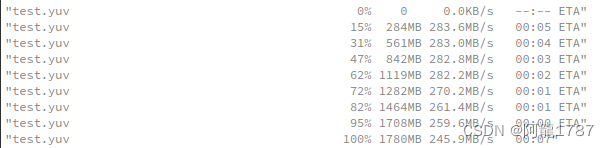
接收:
recv.sh
#!/usr/bin/expect -f
set user [lindex $argv 0]
set ip [lindex $argv 1]
set passwd [lindex $argv 2]
set sendpath [lindex $argv 3]
set recevpath [lindex $argv 4]
set timeout 30
spawn scp $user@$ip:$recevpath $sendpath
expect {
"*yes/no*"
{
send "yes\r"
expect "*password:*" { send "$passwd\r" }
}
"*password:*"
{
send "$passwd\r"
}
}
expect eof
使用方法类似:
recv.sh 目的用户名 目的设备IP 目的设备密码 本地接收文件的全路径 想接收的目的文件路径
更高级方法请参考:

欢迎加入 MCP 技术社区!与志同道合者携手前行,一同解锁 MCP 技术的无限可能!
更多推荐


 10
10 0
0- 0


 已为社区贡献1条内容

所有评论(0)