SpringAI系列|第8篇:MCP模型上下文协议
Spring AI 实战系列 | 第 8 篇:MCP 模型上下文协议
📄 约 7000 字 | ⏱️ 阅读约 17 分钟
系列说明:本文是《Spring AI 实战系列》第 8 篇,全面讲解 MCP(Model Context Protocol)协议的概念与架构、Spring AI MCP Client/Server 集成、第三方 Server 接入,以及企业级 MCP 实战方案。
前置知识:已完成第 6 篇,掌握 Tool Calling 基础用法。
前言
Tool Calling 使 AI 能调用 Java 方法,但有个根本问题——每个框架各搞一套:
Spring AI  → @Tool 注解     → Java 方法
LangChain   → @tool 装饰器   → Python 函数
LlamaIndex  → Tool 接口      → Python 类
...
各自为政,互不兼容
若开发者写了一个天气查询工具,想同时给 Spring AI 和 Claude Desktop 使用,就得写两遍。
MCP(Model Context Protocol)正是为了解决此问题而生。 它是 Anthropic 提出的开放协议,目标是成为 AI 应用领域的"HTTP"——标准化 AI 与外部系统之间的通信。
本文从概念到实战,将 MCP 论述透彻。
一、MCP 核心概念
1.1 一句话理解 MCP
就像 HTTP 标准化了浏览器和服务器的通信,MCP 标准化了 AI 模型和外部工具/数据源之间的通信。
没有 MCP(现状):
  Spring AI → @Tool 注解 → Java 方法
  LangChain  → @tool 装饰 → Python 函数
  Claude Desktop → 内部格式 → 本地进程
  ↑ 各家各搞一套,工具无法复用

有 MCP(目标):
  Spring AI ──┐
  LangChain  ──┼──→ MCP Server → 工具/数据
  Claude Desktop─┘
  ↑ 统一协议,一次编写,到处使用
1.2 MCP 与 Tool Calling 的关系
MCP 并非替代 Tool Calling,而是在更高层次上做标准化:
| 维度 | Tool Calling | MCP |
|---|---|---|
| 层级 | 框架内部机制 | 跨框架开放协议 |
| 范围 | 单个框架内使用 | 多框架 / 多语言通用 |
| 复杂度 | 简单,开箱即用 | 稍复杂,需要部署 Server |
| 适用场景 | 项目内部的工具调用 | 跨项目 / 跨框架共享工具 |
| 传输方式 | 内存函数调用 | stdio / SSE (HTTP) |
简单记:Tool Calling 是"自己用",MCP 是"分享着用"。
1.3 MCP 架构总览
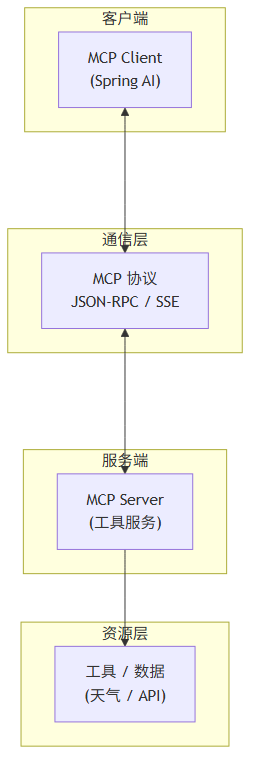
MCP 采用分层架构,Client 和 Server 通过 JSON-RPC 协议通信:
1.4 MCP 的三大核心能力
| 能力 | 说明 | 示例 |
|---|---|---|
| Tools(工具) | Server 暴露的可执行操作 | 查询天气、创建 Issue、执行 SQL |
| Resources(资源) | Server 提供的只读数据 | 文件内容、数据库记录、API 返回值 |
| Prompts(提示词模板) | Server 提供的预定义 Prompt | 代码审查模板、周报生成模板 |
二、Spring AI MCP Client 接入
2.1 添加依赖
<dependency>
    <groupId>org.springframework.ai</groupId>
    <artifactId>spring-ai-mcp-client-spring-boot-starter</artifactId>
</dependency>
2.2 配置 MCP Client
方式一:stdio 模式(本地进程)
spring:
  ai:
    mcp:
      client:
        enabled: true
        name: my-mcp-client
        version: 1.0.0
        request-timeout: 30s
        stdio:
          servers:
            filesystem:
              command: npx
              args:
                - "-y"
                - "@modelcontextprotocol/server-filesystem"
                - "/data/documents"
方式二:SSE 模式(远程服务)
spring:
  ai:
    mcp:
      client:
        enabled: true
        sse:
          connections:
            weather-server:
              url: http://localhost:8081/mcp/sse
            github-server:
              url: http://localhost:8082/mcp/sse
2.3 在 ChatClient 中使用 MCP 工具
MCP Client 获取到的工具可以像 @Tool 一样直接挂载到 ChatClient:
@Service
public class McpChatService {

    private final ChatClient chatClient;

    public McpChatService(ChatClient.Builder builder, McpClient mcpClient) {
        this.chatClient = builder
            .defaultTools(mcpClient.getToolCallbacks())  // 将 MCP 工具注册到 ChatClient
            .build();
    }

    public String chat(String message) {
        return chatClient.prompt()
            .user(message)
            .call()
            .content();
    }
}
对 AI 来说,MCP 工具和 @Tool 工具没有任何区别。 它只知道"我有这些工具可以用",不关心工具从哪来。
2.4 多个 MCP Server 组合使用
@Service
public class MultiMcpService {

    private final ChatClient chatClient;

    public MultiMcpService(ChatClient.Builder builder, List<McpClient> mcpClients) {
        // 合并所有 MCP Server 的工具
        List<ToolCallback> allTools = mcpClients.stream()
            .flatMap(client -> client.getToolCallbacks().stream())
            .collect(Collectors.toList());

        this.chatClient = builder
            .defaultTools(allTools)
            .build();
    }

    public String chat(String message) {
        return chatClient.prompt()
            .system("你可以使用文件操作、GitHub 操作和数据库查询等工具。")
            .user(message)
            .call()
            .content();
    }
}
配置多个 Server:
spring:
  ai:
    mcp:
      client:
        stdio:
          servers:
            weather:
              command: npx
              args: ["-y", "@modelcontextprotocol/server-weather"]
            filesystem:
              command: npx
              args: ["-y", "@modelcontextprotocol/server-filesystem", "/data"]
            postgres:
              command: npx
              args: ["-y", "@modelcontextprotocol/server-postgres",
                     "postgresql://localhost:5432/mydb"]
三、开发自定义 MCP Server
除接入第三方 Server 外,开发者也可将自身服务封装为 MCP Server 供其他应用使用。
3.1 添加依赖
<dependency>
    <groupId>org.springframework.ai</groupId>
    <artifactId>spring-ai-mcp-server-spring-boot-starter</artifactId>
</dependency>
3.2 定义 Server 工具
MCP Server 的工具定义方式和 @Tool 完全一致——这也是 MCP 的优雅之处:
@Service
public class WeatherMcpServer {

    private final RestTemplate restTemplate = new RestTemplate();

    @Tool(name = "getWeather",
          description = "获取指定城市的当前实时天气,包括温度、天气状况")
    public WeatherResult getWeather(
            @ToolParam(description = "城市名称,如北京、上海") String city) {

        String url = "https://api.weather.com/current?city=" +
            URLEncoder.encode(city, StandardCharsets.UTF_8);
        WeatherApiResponse response = restTemplate.getForObject(url, WeatherApiResponse.class);

        return new WeatherResult(city, response.getTemperature(), response.getCondition());
    }

    @Tool(name = "getWeatherForecast",
          description = "获取指定城市未来几天的天气预报")
    public List<WeatherResult> getForecast(
            @ToolParam(description = "城市名称") String city,
            @ToolParam(description = "预报天数,范围 1-7") int days) {

        String url = String.format("https://api.weather.com/forecast?city=%s&days=%d",
            URLEncoder.encode(city, StandardCharsets.UTF_8), days);
        ForecastResponse response = restTemplate.getForObject(url, ForecastResponse.class);

        return response.getDaily().stream()
            .map(d -> new WeatherResult(city, d.getTemp(), d.getCondition()))
            .collect(Collectors.toList());
    }

    public record WeatherResult(String city, int temperature, String condition) {}
}
3.3 配置 Server
stdio 模式(适合本地/容器化部署):
spring:
  ai:
    mcp:
      server:
        enabled: true
        name: weather-mcp-server
        version: 1.0.0
        stdio: true  # 通过标准输入输出通信
SSE 模式(适合远程部署):
spring:
  ai:
    mcp:
      server:
        enabled: true
        name: weather-mcp-server
        version: 1.0.0
        sse:
          enabled: true
          path: /mcp/sse              # SSE 端点
          message-endpoint: /mcp/messages  # 消息端点
server:
  port: 8081
3.4 启动 Server
@SpringBootApplication
public class WeatherMcpServerApplication {
    public static void main(String[] args) {
        SpringApplication.run(WeatherMcpServerApplication.class, args);
    }
}
启动后,该 Server 即可被任何 MCP Client 接入——不管是 Spring AI、LangChain 还是 Claude Desktop。
3.5 企业 API 封装实战
将企业内部 REST API 封装为 MCP Server,供所有 AI 应用使用:
@Service
public class EnterpriseMcpServer {

    private final RestTemplate restTemplate = new RestTemplate();

    @Tool(name = "queryEmployee",
          description = "查询员工基本信息。当用户询问员工姓名、部门、邮箱时使用")
    public EmployeeInfo queryEmployee(
            @ToolParam(description = "员工工号,如 E001") String employeeId) {

        return restTemplate.getForObject(
            "https://internal-api.company.com/api/v1/employees/" + employeeId,
            EmployeeInfo.class
        );
    }

    @Tool(name = "queryDepartment",
          description = "查询部门信息,包括负责人和人数")
    public DepartmentInfo queryDepartment(
            @ToolParam(description = "部门编码,如 D101") String deptCode) {

        return restTemplate.getForObject(
            "https://internal-api.company.com/api/v1/departments/" + deptCode,
            DepartmentInfo.class
        );
    }

    @Tool(name = "submitLeaveRequest",
          description = "提交请假申请。需要员工ID、类型和日期")
    public LeaveResult submitLeaveRequest(
            @ToolParam(description = "员工工号") String employeeId,
            @ToolParam(description = "请假类型:年假/病假/事假/调休") String type,
            @ToolParam(description = "开始日期,格式 yyyy-MM-dd") String startDate,
            @ToolParam(description = "结束日期,格式 yyyy-MM-dd") String endDate) {

        return restTemplate.postForObject(
            "https://internal-api.company.com/api/v1/leave",
            Map.of("employeeId", employeeId, "type", type,
                   "startDate", startDate, "endDate", endDate),
            LeaveResult.class
        );
    }

    public record EmployeeInfo(String id, String name, String department,
                               String email, String position) {}
    public record DepartmentInfo(String code, String name, String manager,
                                  int headcount) {}
    public record LeaveResult(boolean success, String message, String requestId) {}
}
一个 MCP Server,全公司的 AI 助手都能用。 此即标准化的价值。
四、传输方式详解
4.1 stdio vs SSE 对比
| 维度 | stdio | SSE (HTTP) |
|---|---|---|
| 通信方式 | 标准输入输出 | HTTP + Server-Sent Events |
| 部署形态 | 子进程 | 独立 Web 服务 |
| 适用场景 | 本地开发、容器化部署 | 远程服务、微服务架构 |
| 并发能力 | 单连接 | 支持多客户端 |
| 网络要求 | 本地即可 | 需要网络可达 |
| 典型用途 | Claude Desktop、CLI 工具 | 生产环境 Server |
4.2 选择建议
开发/测试阶段 → 用 stdio,零配置,npx 启动
生产环境部署 → 用 SSE,独立服务,方便运维和扩缩容
容器化环境 → 都可以,stdio 更轻量
微服务架构 → 必须用 SSE,通过服务发现注册
五、第三方 MCP Server 接入
MCP 生态正在快速发展,社区已提供了大量现成的 Server。
5.1 常用社区 Server
| Server | 功能 | NPM 包名 |
|---|---|---|
| 文件系统 | 读写本地文件 | @modelcontextprotocol/server-filesystem |
| GitHub | 操作仓库/Issue/PR | @modelcontextprotocol/server-github |
| PostgreSQL | 执行 SQL 查询 | @modelcontextprotocol/server-postgres |
| SQLite | 查询 SQLite 数据库 | @modelcontextprotocol/server-sqlite |
| Slack | 发消息/查频道 | @modelcontextprotocol/server-slack |
| Puppeteer | 浏览器自动化 | @modelcontextprotocol/server-puppeteer |
5.2 快速接入示例
文件系统 Server —— 让 AI 能读写文件:
spring:
  ai:
    mcp:
      client:
        stdio:
          servers:
            filesystem:
              command: npx
              args:
                - "-y"
                - "@modelcontextprotocol/server-filesystem"
                - "/home/user/projects"  # 允许访问的目录
接入后 AI 即可读取代码、编辑文件:
用户:帮我看看 src/main/java 下有哪些 Java 文件
AI:调用 filesystem/list_directory 工具... 找到 15 个 Java 文件

用户:读取 UserService.java 的内容
AI:调用 filesystem/read_file 工具... 返回文件内容
GitHub Server —— 让 AI 能操作代码仓库:
spring:
  ai:
    mcp:
      client:
        stdio:
          servers:
            github:
              command: npx
              args: ["-y", "@modelcontextprotocol/server-github"]
              env:
                GITHUB_PERSONAL_ACCESS_TOKEN: ${GITHUB_TOKEN}
PostgreSQL Server —— 让 AI 能直接查数据库:
spring:
  ai:
    mcp:
      client:
        stdio:
          servers:
            postgres:
              command: npx
              args:
                - "-y"
                - "@modelcontextprotocol/server-postgres"
                - "postgresql://user:pass@localhost:5432/mydb"
⚠️ 安全提示: 直接让 AI 查数据库要谨慎,建议:
- 使用只读账号
- 限制可访问的表/Schema
- 在 MCP Server 层面做 SQL 审计
六、生产级部署方案
6.1 与 Spring Cloud Gateway 集成
通过 Gateway 统一管理 MCP Server 的路由:
@Configuration
public class McpGatewayConfig {

    @Bean
    public RouteLocator mcpRoutes(RouteLocatorBuilder builder) {
        return builder.routes()
            .route("mcp-weather", r -> r
                .path("/mcp/weather/**")
                .filters(f -> f.stripPrefix(1))
                .uri("lb://weather-mcp-server"))
            .route("mcp-enterprise", r -> r
                .path("/mcp/enterprise/**")
                .filters(f -> f.stripPrefix(1))
                .uri("lb://enterprise-mcp-server"))
            .build();
    }
}
Client 连接 Gateway 即可:
spring:
  ai:
    mcp:
      client:
        sse:
          connections:
            weather:
              url: http://gateway:8080/mcp/weather/sse
            enterprise:
              url: http://gateway:8080/mcp/enterprise/sse
6.2 Kubernetes 部署
# MCP Server Deployment
apiVersion: apps/v1
kind: Deployment
metadata:
  name: enterprise-mcp-server
spec:
  replicas: 2
  selector:
    matchLabels:
      app: enterprise-mcp-server
  template:
    metadata:
      labels:
        app: enterprise-mcp-server
    spec:
      containers:
        - name: mcp-server
          image: my-registry/enterprise-mcp-server:1.0.0
          ports:
            - containerPort: 8080
          env:
            - name: SPRING_AI_MCP_SERVER_SSE_ENABLED
              value: "true"
          resources:
            requests:
              memory: "256Mi"
              cpu: "200m"
            limits:
              memory: "512Mi"
              cpu: "500m"
---
apiVersion: v1
kind: Service
metadata:
  name: enterprise-mcp-server
spec:
  selector:
    app: enterprise-mcp-server
  ports:
    - port: 8080
  type: ClusterIP
6.3 安全最佳实践
| 安全措施 | 说明 |
|---|---|
| 认证鉴权 | MCP Server 端加 API Key 或 OAuth2 校验 |
| 网络隔离 | Server 只允许内网访问,通过 Gateway 暴露 |
| 权限控制 | Server 内部按角色限制可用工具 |
| 审计日志 | 记录所有工具调用,包括调用者、参数、结果 |
| TLS 加密 | SSE 模式强制 HTTPS |
| 输入校验 | 所有参数做校验和清洗,防止注入攻击 |
// MCP Server 安全过滤示例
@Component
public class McpSecurityInterceptor implements AroundAdvisor {

    @Override
    public AdvisedRequest adviseRequest(AdvisedRequest request, Map<String, Object> context) {
        // 校验 API Key
        String apiKey = request.chatOptions().getCustomOption("X-API-Key");
        if (!isValidApiKey(apiKey)) {
            throw new SecurityException("无效的 API Key");
        }

        // SQL 注入检测
        String userText = request.userText();
        if (containsSqlInjection(userText)) {
            throw new SecurityException("检测到非法输入");
        }

        return request;
    }
}
七、MCP vs @Tool 选型指南
什么时候用 MCP,什么时候直接用 @Tool?
| 场景 | 推荐方案 | 原因 |
|---|---|---|
| 工具只在当前 Spring AI 项目中使用 | @Tool 注解 | 最简单,零额外配置 |
| 工具需要给多个 Spring AI 项目用 | MCP Server (SSE) | 一次部署,多处消费 |
| 工具需要跨框架使用(Spring AI + LangChain) | MCP Server | 协议标准化,跨框架兼容 |
| 需要接入社区已有的工具生态 | MCP Client | 直接复用社区 Server |
| 工具逻辑简单且不需要独立维护 | @Tool 注解 | 开发效率最高 |
| 工具涉及敏感数据/复杂权限 | MCP Server | 独立部署,便于安全管控 |
| 需要 CLI 工具或 IDE 插件接入 | MCP (stdio) | Claude Desktop / Cursor 原生支持 |
一句话总结:自己用 @Tool,分享用 MCP。
八、常见问题
Q1:MCP 现在成熟吗?
MCP 协议本身已经相对稳定(v2024-11-05),但生态还在快速发展中。核心功能(Tools/Resources/Prompts)已经可用,高级特性还在迭代。
Q2:MCP 性能有损耗吗?
相比直接的 @Tool 内存调用,MCP 多了一层序列化和网络传输。stdio 模式损耗很小(进程间管道通信),SSE 模式取决于网络延迟。对于大多数场景,这个损耗可以忽略。
Q3:MCP Server 挂了怎么办?
- Client 端应该实现降级策略(fallback)
- 关键工具可以做本地缓存
- SSE 模式支持多实例部署 + 负载均衡
Q4:怎么调试 MCP 通信?
开启 DEBUG 日志可以看到完整的 JSON-RPC 交互:
logging:
  level:
    org.springframework.ai.mcp: DEBUG
日志会显示每次请求和响应的完整 payload。
写在总结
MCP 的愿景很大——成为 AI 应用的通用集成协议。虽然现在还在早期阶段,但方向是对的。
回顾核心要点:
| 要点 | 关键信息 |
|---|---|
| 定位 | AI 领域的"HTTP",标准化工具/数据集成 |
| 三大能力 | Tools(工具)、Resources(资源)、Prompts(提示词模板) |
| 两种传输 | stdio(本地)、SSE(远程) |
| 选型原则 | 自己用 @Tool,分享用 MCP |
| 生产要点 | Gateway 路由、K8s 部署、安全加固 |
下一篇进入 AI Agent 开发,这是 Spring AI 的终极形态——让 AI 自主规划、自主决策、自主执行。
系列目录:
- 第一篇-SpringAI概述与快速上手
- 第二篇-模型集成与对话基础
- 第三篇-结构化输出与多模态
- 第四篇-Embedding与向量数据库
- 第五篇-RAG检索增强生成
- 第六篇-Tool-Calling工具调用
- 第七篇-Advisor机制与对话管理
- 第八篇-MCP模型上下文协议 ✅(本文)
- 第九篇-AI-Agent开发
- 第十篇-企业级应用与最佳实践
若本文对您有所帮助,欢迎点赞、收藏与关注,系列持续更新中!

欢迎加入 MCP 技术社区!与志同道合者携手前行,一同解锁 MCP 技术的无限可能!
更多推荐

 15
15 0
0- 0


 已为社区贡献1条内容

所有评论(0)