Codebuddy接入Spec Coding MCP 开发初体验
·
Spec Coding(规格驱动编码)可以看作是 Vibe Coding 的“工程化升级” 。它通过“先写规格,再写代码”的方式,解决复杂项目中AI容易“越做越偏”、代码质量不可控等问题。
简单来说,Spec Coding的开展可以分为准备、定义、实施、验收四个核心步骤。
规格驱动开发的关键是 “Spec 文件夹”—— 每个功能模块对应一个 Spec 文件夹,包含 3 个核心文件,通过结构化文档将需求、设计、任务 “落地”:
-
1.requirements.md(需求文档)—— 用EARS 语法(简易需求语法)编写用户故事和验收标准,避免模糊表达。
-
2.design.md(技术方案)—— 包含架构设计、流程逻辑、技术选型、潜在风险等细节。
-
3.tasks.md(任务清单)—— 将技术方案拆分为可执行的具体任务(todolist)
话不多说,直接开始体验吧
1、先下载Spec Coding MCP插件
2、解压到指定目录
我这里的解压后的路径是在E:\MCPServe\rSpecCodingMcpServer.exe
3、配置mcp server

{
  "mcpServers": {
    "spec-coding": {
      "disabled": false,
      "timeout": 120,
      "type": "stdio",
      "command": "E:/MCPServer/SpecCodingMcpServer.exe",
      "args": [],
      "env": {},
      "cwd": "E:/MCPServer"
    }
  }
}
4、处理问题
报错如下:
MCP error -32000: Connection closed You must install .NET to run this application. App: E:\MCPServer\SpecCodingMcpServer.exe Architecture: x64 App host version: 8.0.18 .NET location: Not found Learn more: https://aka.ms/dotnet/app-launch-failed Download the .NET runtime: https://aka.ms/dotnet-core-applaunch?missing_runtime=true&arch=x64&rid=win-x64&os=win10&apphost_version=8.0.18这个是因为spec coding是使用.net开发的,本地环境没有安装.net
这里贴上下载地址安装即可
.NET Runtime 10.x.x
然后刷新下mcp的配置

5、开始体验spec coding
对话框输入:
start spec coding
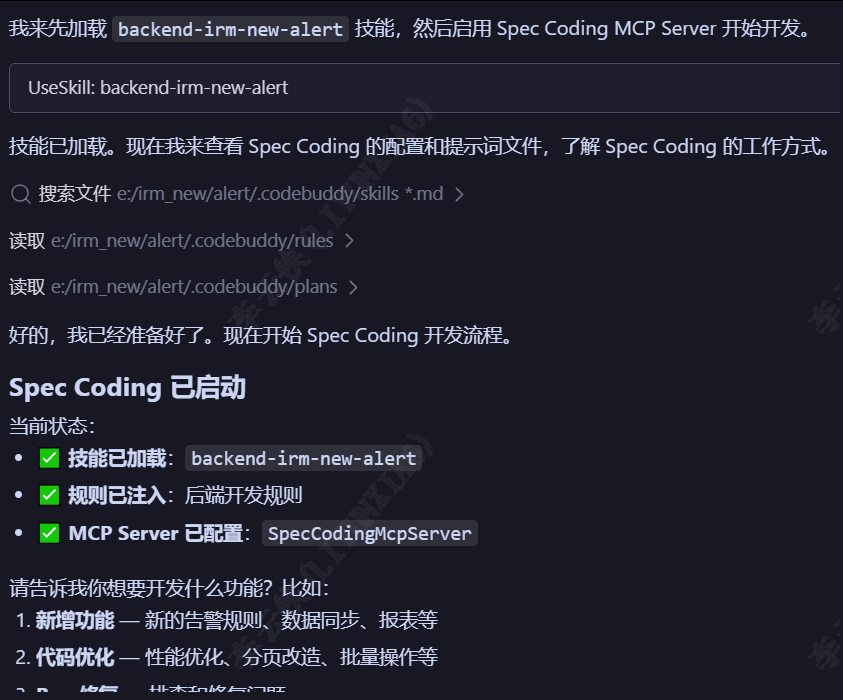
然后就可以根据自己的需求开发spec coding了,快试试吧

欢迎加入 MCP 技术社区!与志同道合者携手前行,一同解锁 MCP 技术的无限可能!
更多推荐

 6
6 0
0- 0


 已为社区贡献1条内容

所有评论(0)