MCP 文件管理demo实现
一、MCP server
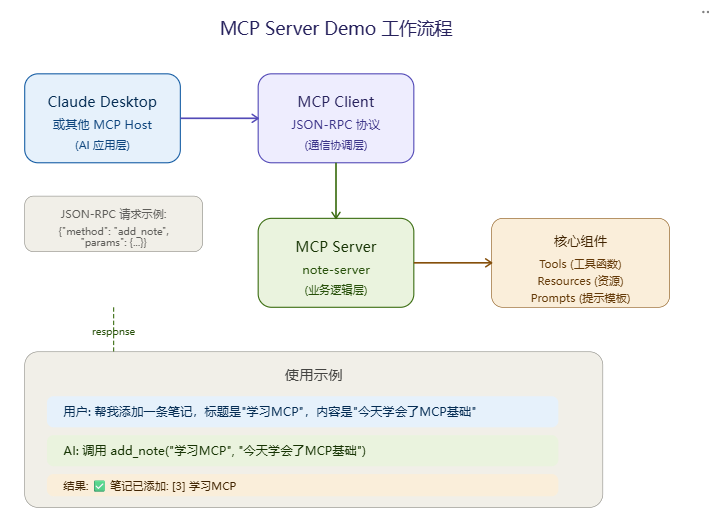
实现对某个文件目录:文件目录: C:\Users\test\mcp_demo_files 的文件管理,实现如下功能
║ 可用工具: ║
║ • list_files - 列出文件 ║
║ • create_file - 创建文件 ║
║ • read_file - 读取文件 ║
║ • delete_file - 删除文件 ║
║ • search_files - 搜索文件 ║
║ • get_server_info - 服务器信息 ║
mcp_file_server.py
"""
MCP Server 网络版 - 完整 Demo
智码接入示例

功能:简单的文件管理系统
依赖:pip install mcp["server"] httpx uvicorn
"""

import asyncio
import json
from pathlib import Path
from datetime import datetime
from typing import Any

from mcp.server import Server
from mcp.server.sse import SseServerTransport
from mcp.server.models import InitializationOptions
from mcp.types import Tool, TextContent, Resource
import starlette.applications
import starlette.routing
from starlette.responses import Response

# ============================================
# 配置
# ============================================
SERVER_NAME = "FileManager"
SERVER_VERSION = "1.0.0"
BASE_DIR = Path.home() / "mcp_demo_files"

# 确保目录存在
BASE_DIR.mkdir(exist_ok=True)

# ============================================
# 初始化 Server
# ============================================
server = Server(name=SERVER_NAME, version=SERVER_VERSION)

# ============================================
# 工具定义
# ============================================

@server.list_tools()
async def list_tools() -> list[Tool]:
    """列出所有可用工具"""
    return [
        Tool(
            name="list_files",
            description="列出指定目录下的所有文件和文件夹",
            inputSchema={
                "type": "object",
                "properties": {
                    "path": {
                        "type": "string",
                        "description": "目录路径,默认为 BASE_DIR",
                        "default": str(BASE_DIR)
                    },
                    "recursive": {
                        "type": "boolean",
                        "description": "是否递归显示子目录",
                        "default": False
                    }
                }
            }
        ),
        Tool(
            name="create_file",
            description="创建新文件",
            inputSchema={
                "type": "object",
                "properties": {
                    "filename": {
                        "type": "string",
                        "description": "文件名"
                    },
                    "content": {
                        "type": "string",
                        "description": "文件内容"
                    },
                    "directory": {
                        "type": "string",
                        "description": "目录路径,默认为 BASE_DIR",
                        "default": str(BASE_DIR)
                    }
                },
                "required": ["filename", "content"]
            }
        ),
        Tool(
            name="read_file",
            description="读取文件内容",
            inputSchema={
                "type": "object",
                "properties": {
                    "filepath": {
                        "type": "string",
                        "description": "文件完整路径"
                    }
                },
                "required": ["filepath"]
            }
        ),
        Tool(
            name="delete_file",
            description="删除文件",
            inputSchema={
                "type": "object",
                "properties": {
                    "filepath": {
                        "type": "string",
                        "description": "要删除的文件完整路径"
                    }
                },
                "required": ["filepath"]
            }
        ),
        Tool(
            name="search_files",
            description="搜索包含关键字的文件",
            inputSchema={
                "type": "object",
                "properties": {
                    "keyword": {
                        "type": "string",
                        "description": "搜索关键字"
                    },
                    "directory": {
                        "type": "string",
                        "description": "搜索目录",
                        "default": str(BASE_DIR)
                    }
                },
                "required": ["keyword"]
            }
        ),
        Tool(
            name="get_server_info",
            description="获取服务器信息",
            inputSchema={
                "type": "object",
                "properties": {}
            }
        ),
    ]

@server.call_tool()
async def call_tool(name: str, arguments: dict) -> list[TextContent]:
    """处理工具调用"""

    try:
        if name == "list_files":
            return await list_files_handler(arguments)
        elif name == "create_file":
            return await create_file_handler(arguments)
        elif name == "read_file":
            return await read_file_handler(arguments)
        elif name == "delete_file":
            return await delete_file_handler(arguments)
        elif name == "search_files":
            return await search_files_handler(arguments)
        elif name == "get_server_info":
            return await get_server_info_handler()
        else:
            return [TextContent(type="text", text=f"❌ 未知工具: {name}")]
    except Exception as e:
        return [TextContent(type="text", text=f"❌ 错误: {str(e)}")]

# ============================================
# 工具处理器
# ============================================

async def list_files_handler(args: dict) -> list[TextContent]:
    """列出文件"""
    path = Path(args.get("path", BASE_DIR))
    recursive = args.get("recursive", False)

    if not path.exists():
        return [TextContent(type="text", text=f"❌ 目录不存在: {path}")]

    result = [f"📁 目录: {path}\n"]

    try:
        if recursive:
            items = sorted(path.rglob("*"))
        else:
            items = sorted(path.iterdir())

        dirs = [f for f in items if f.is_dir()]
        files = [f for f in items if f.is_file()]

        result.append(f"📂 文件夹 ({len(dirs)}):")
        for d in dirs:
            result.append(f"   📁 {d.name}/")

        result.append(f"\n📄 文件 ({len(files)}):")
        for f in files:
            size = f.stat().st_size
            size_str = format_size(size)
            result.append(f"   📄 {f.name} ({size_str})")

        return [TextContent(type="text", text="\n".join(result))]
    except PermissionError:
        return [TextContent(type="text", text="❌ 无权限访问该目录")]

async def create_file_handler(args: dict) -> list[TextContent]:
    """创建文件"""
    filename = args["filename"]
    content = args["content"]
    directory = Path(args.get("directory", BASE_DIR))

    # 安全检查:防止路径遍历
    if ".." in filename or filename.startswith("/"):
        return [TextContent(type="text", text="❌ 文件名无效")]

    filepath = directory / filename

    try:
        filepath.parent.mkdir(parents=True, exist_ok=True)
        filepath.write_text(content, encoding="utf-8")
        return [TextContent(type="text", text=f"✅ 文件已创建: {filepath}\n大小: {format_size(len(content.encode()))}")]
    except Exception as e:
        return [TextContent(type="text", text=f"❌ 创建失败: {str(e)}")]

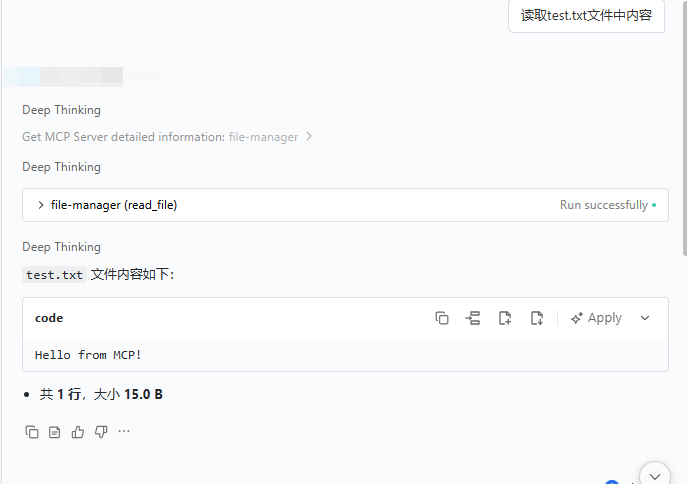
async def read_file_handler(args: dict) -> list[TextContent]:
    """读取文件"""
    filepath = Path(args["filepath"])

    # 安全检查:确保在 BASE_DIR 内
    try:
        filepath = filepath.resolve()
        if not str(filepath).startswith(str(BASE_DIR.resolve())):
            return [TextContent(type="text", text="❌ 路径超出允许范围")]
    except ValueError:
        return [TextContent(type="text", text="❌ 路径无效")]

    if not filepath.exists():
        return [TextContent(type="text", text=f"❌ 文件不存在: {filepath}")]

    if not filepath.is_file():
        return [TextContent(type="text", text="❌ 这不是文件")]

    try:
        content = filepath.read_text(encoding="utf-8")
        lines = content.split("\n")
        preview = content[:500] + ("..." if len(content) > 500 else "")
        return [TextContent(
            type="text",
            text=f"📄 文件: {filepath}\n📊 行数: {len(lines)} | 大小: {format_size(len(content.encode()))}\n\n内容:\n{preview}"
        )]
    except Exception as e:
        return [TextContent(type="text", text=f"❌ 读取失败: {str(e)}")]

async def delete_file_handler(args: dict) -> list[TextContent]:
    """删除文件"""
    filepath = Path(args["filepath"])

    try:
        filepath = filepath.resolve()
        if not str(filepath).startswith(str(BASE_DIR.resolve())):
            return [TextContent(type="text", text="❌ 路径超出允许范围")]
    except ValueError:
        return [TextContent(type="text", text="❌ 路径无效")]

    if not filepath.exists():
        return [TextContent(type="text", text=f"❌ 文件不存在: {filepath}")]

    try:
        filepath.unlink()
        return [TextContent(type="text", text=f"✅ 已删除: {filepath}")]
    except Exception as e:
        return [TextContent(type="text", text=f"❌ 删除失败: {str(e)}")]

async def search_files_handler(args: dict) -> list[TextContent]:
    """搜索文件"""
    keyword = args["keyword"].lower()
    directory = Path(args.get("directory", BASE_DIR))

    if not directory.exists():
        return [TextContent(type="text", text=f"❌ 目录不存在: {directory}")]

    result = [f"🔍 搜索 '{keyword}' 在 {directory}:\n"]
    found = []

    try:
        for filepath in directory.rglob("*"):
            if filepath.is_file():
                # 检查文件名
                if keyword in filepath.name.lower():
                    found.append(f"   📄 {filepath}")
                # 检查文件内容
                else:
                    try:
                        content = filepath.read_text(encoding="utf-8", errors="ignore")
                        if keyword in content.lower():
                            found.append(f"   📄 {filepath} (内容匹配)")
                    except:
                        pass

        if found:
            result.append(f"找到 {len(found)} 个结果:")
            result.extend(found[:50])  # 限制显示50个
            if len(found) > 50:
                result.append(f"   ... 还有 {len(found) - 50} 个结果")
        else:
            result.append("未找到匹配的文件")

        return [TextContent(type="text", text="\n".join(result))]
    except Exception as e:
        return [TextContent(type="text", text=f"❌ 搜索失败: {str(e)}")]

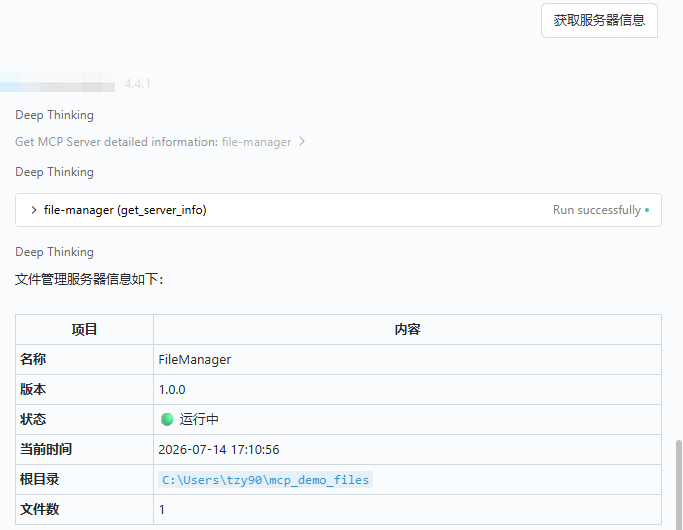
async def get_server_info_handler() -> list[TextContent]:
    """获取服务器信息"""
    info = [
        f"🖥️ MCP Server 信息",
        f"━━━━━━━━━━━━━━━━",
        f"名称: {SERVER_NAME}",
        f"版本: {SERVER_VERSION}",
        f"状态: 运行中",
        f"时间: {datetime.now().strftime('%Y-%m-%d %H:%M:%S')}",
        f"",
        f"📁 文件管理范围:",
        f"根目录: {BASE_DIR}",
        f"文件数: {len(list(BASE_DIR.rglob('*')))}",
    ]
    return [TextContent(type="text", text="\n".join(info))]

# ============================================
# 辅助函数
# ============================================

def format_size(size: int) -> str:
    """格式化文件大小"""
    for unit in ["B", "KB", "MB", "GB"]:
        if size < 1024:
            return f"{size:.1f} {unit}"
        size /= 1024
    return f"{size:.1f} TB"

# ============================================
# 资源定义
# ============================================

@server.list_resources()
async def list_resources() -> list[Resource]:
    """列出可用资源"""
    return [
        Resource(
            uri="server://info",
            name="server_info",
            description="服务器信息",
            mimeType="application/json"
        ),
        Resource(
            uri="server://status",
            name="server_status",
            description="服务器状态",
            mimeType="application/json"
        ),
    ]

@server.read_resource()
async def read_resource(uri: str) -> str:
    """读取资源"""
    if uri == "server://info":
        return json.dumps({
            "name": SERVER_NAME,
            "version": SERVER_VERSION,
            "base_dir": str(BASE_DIR),
            "timestamp": datetime.now().isoformat()
        }, indent=2)
    elif uri == "server://status":
        file_count = len([f for f in BASE_DIR.rglob("*") if f.is_file()])
        return json.dumps({
            "status": "running",
            "uptime": "connected",
            "file_count": file_count
        }, indent=2)
    raise ValueError(f"未知资源: {uri}")

# ============================================
# 主程序
# ============================================

async def main():
    """启动服务器"""
    import argparse

    parser = argparse.ArgumentParser(description=f"{SERVER_NAME} MCP Server")
    parser.add_argument("--host", default="0.0.0.0", help="监听地址 (默认: 0.0.0.0)")
    parser.add_argument("--port", type=int, default=8765, help="监听端口 (默认: 8765)")

    args = parser.parse_args()

    print(f"""
╔════════════════════════════════════════════════════╗
║          {SERVER_NAME} v{SERVER_VERSION} - MCP Server                    ║
╠════════════════════════════════════════════════════╣
║  状态: 🟢 运行中                                    ║
║  地址: http://{args.host}:{args.port}                       ║
║  SSE端点: http://{args.host}:{args.port}/sse                   ║
║                                                      ║
║  可用工具:                                            ║
║    • list_files - 列出文件                           ║
║    • create_file - 创建文件                          ║
║    • read_file - 读取文件                           ║
║    • delete_file - 删除文件                          ║
║    • search_files - 搜索文件                        ║
║    • get_server_info - 服务器信息                    ║
║                                                      ║
║  文件目录: {BASE_DIR}                      ║
╚════════════════════════════════════════════════════╝
    """)

    # 创建 SSE transport
    sse = SseServerTransport("/messages/")

    # 单条 ASGI 应用,手动路由
    async def mcp_app(scope, receive, send):
        if scope["type"] != "http":
            return
        path = scope.get("path", "")

        # GET /sse 或 /sse/ → SSE 连接建立
        if scope["method"] == "GET" and path.rstrip("/") == "/sse":
            async with sse.connect_sse(scope, receive, send) as (read_stream, write_stream):
                await server.run(
                    read_stream,
                    write_stream,
                    server.create_initialization_options(),
                )
        # POST /sse/messages/?session_id=xxx → 客户端消息
        elif scope["method"] == "POST" and "/messages" in path:
            await sse.handle_post_message(scope, receive, send)
        else:
            response = Response("Not Found", status_code=404)
            await response(scope, receive, send)

    app = starlette.applications.Starlette(
        routes=[
            starlette.routing.Mount("/", app=mcp_app),
        ],
    )

    import uvicorn
    config = uvicorn.Config(app, host=args.host, port=args.port, log_level="info")
    uvi_server = uvicorn.Server(config)
    await uvi_server.serve()

if __name__ == "__main__":
    asyncio.run(main())
启动mcp server
python mcp_file_server.py --port 8765
╔════════════════════════════════════════════════════╗
║ FileManager v1.0.0 - MCP Server ║
╠════════════════════════════════════════════════════╣
║ 状态: 🟢 运行中 ║
║ 地址: http://0.0.0.0:8765 ║
║ SSE端点: http://0.0.0.0:8765/sse ║
║ ║
║ 可用工具: ║
║ • list_files - 列出文件 ║
║ • create_file - 创建文件 ║
║ • read_file - 读取文件 ║
║ • delete_file - 删除文件 ║
║ • search_files - 搜索文件 ║
║ • get_server_info - 服务器信息 ║
║ ║
║ 文件目录: C:\Users\test\mcp_demo_files ║
╚════════════════════════════════════════════════════╝
二、AI助手接入MCP
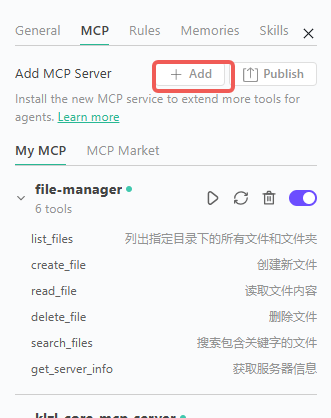
{
"mcpServers": {
"file-manager": {
"url": "http://localhost:8765/sse",
"headers": {}
},
三、测试:

欢迎加入 MCP 技术社区!与志同道合者携手前行,一同解锁 MCP 技术的无限可能!
更多推荐


 5
5 0
0- 0


 已为社区贡献1条内容

所有评论(0)