MCP+A2A 从0到1构建类Manus多Agent全栈应用
·
1、深入理解DeepSeek与GPT模型的工具调用
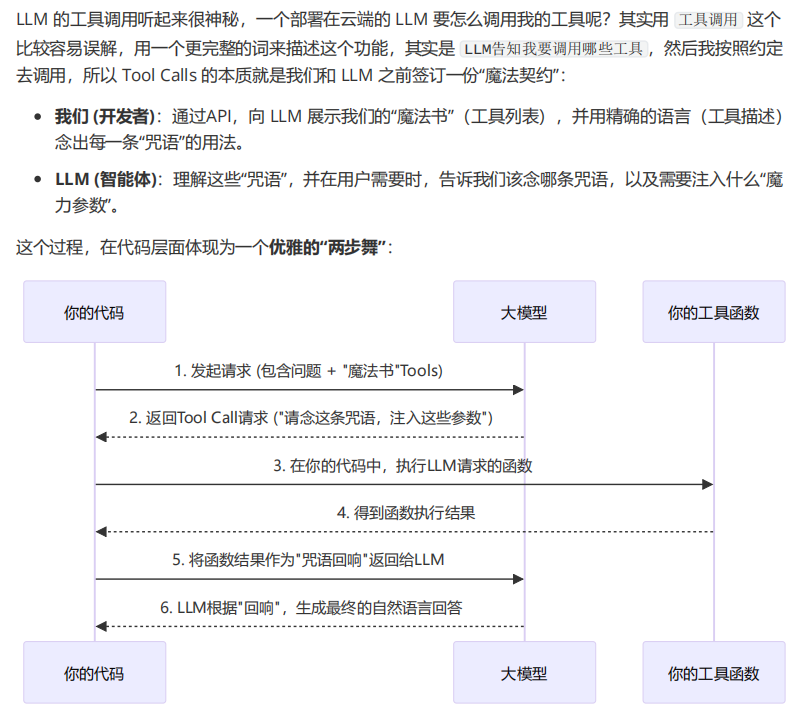
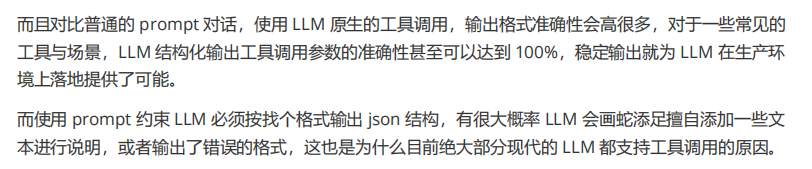
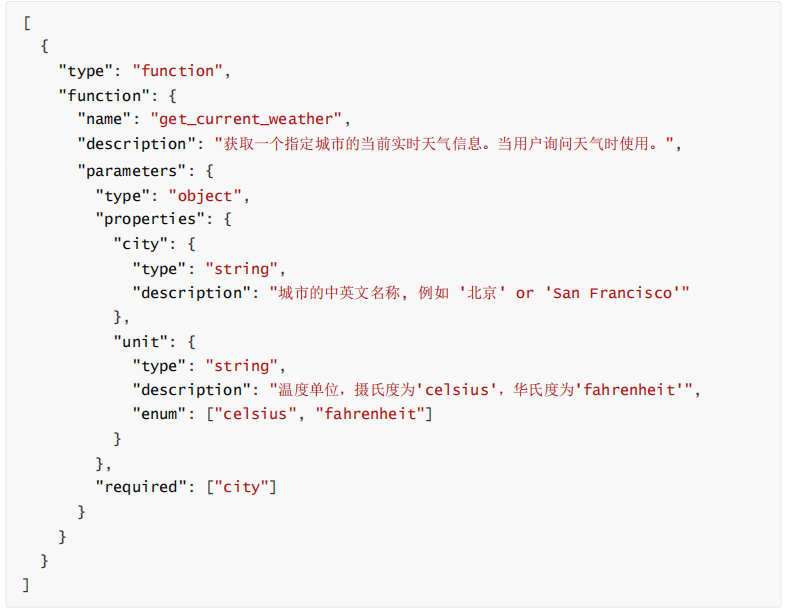
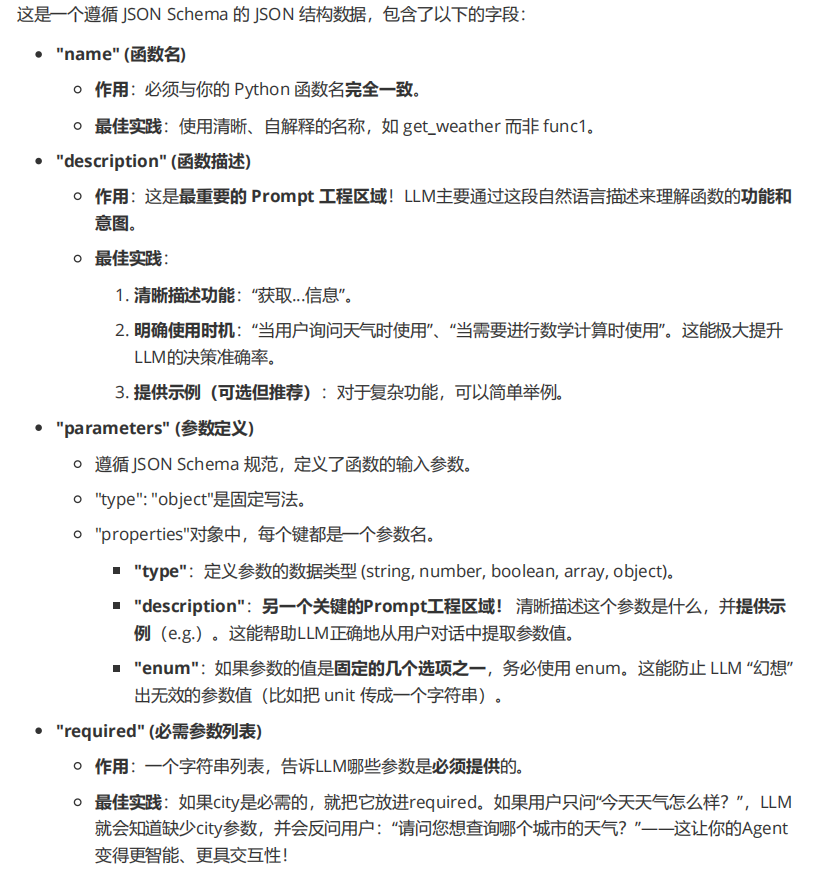
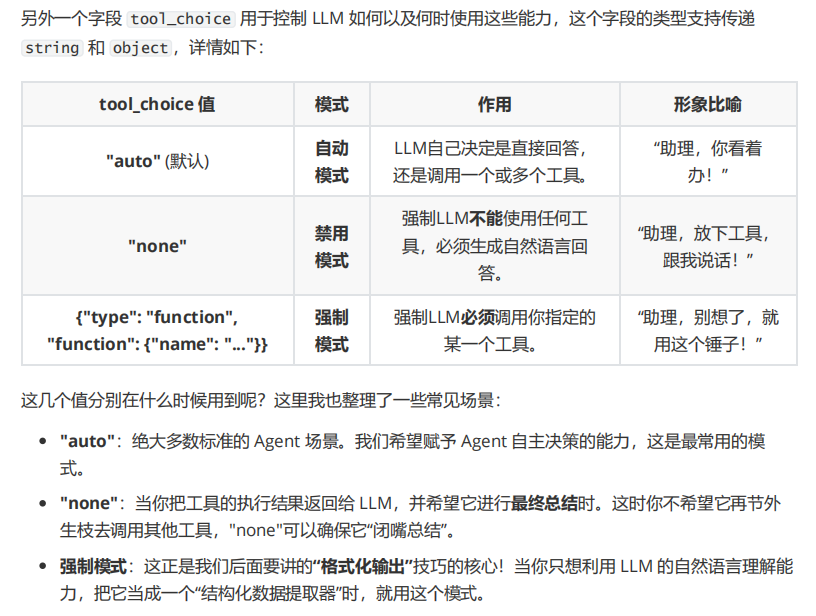
1、工具调用参数精细化解读


#!/usr/bin/env python
# -*- coding: utf-8 -*-
"""
@Time    : 2025/7/5 0:36
@Author  : thezehui@gmail.com
@File    : 3_7_为ReAct Agent添加计算工具.py
"""
import json

import dotenv
from openai import OpenAI

dotenv.load_dotenv()


def calculator(expression: str) -> str:
    """一个简单的计算器,可以执行数学表达式"""
    try:
        result = eval(expression)
        return json.dumps({"result": result})
    except Exception as e:
        return json.dumps({"error": f"无效表达式, 错误信息: {str(e)}"})


class ReActAgent:
    def __init__(self):
        self.client = OpenAI(base_url="http://192.168.8.221:9026/v1")
        self.messages = [
            {
                "role": "system",
                "content": "你是一个强大的聊天机器人,请根据用户的提问进行答复,如果需要调用工具请直接调用,不知道请直接回复不清楚"
            }
        ]
        self.model = "Qwen3.5-27B-FP8"
        self.available_tools = {"calculator": calculator}
        self.tools = [
            {
                "type": "function",
                "function": {
                    "name": "calculator",
                    "description": "一个可以计算数学表达式的计算器",
                    "parameters": {
                        "type": "object",
                        "properties": {
                            "expression": {
                                "type": "string",
                                "description": "需要计算的数学表达式,例如:'123+456+789'"
                            }
                        },
                        "required": ["expression"]
                    }
                }
            }
        ]

    def process_query(self, query: str) -> str:
        """使用deepseek处理用户输出"""
        self.messages.append({"role": "user", "content": query})

        # 调用deepseek发起请求
        response = self.client.chat.completions.create(
            model=self.model,
            messages=self.messages,
            tools=self.tools,
        )

        # 获取响应消息+工具响应
        response_message = response.choices[0].message
        tool_calls = response_message.tool_calls

        # 将模型第一次回复添加到历史消息中
        self.messages.append(response_message.model_dump())

        # 判断是否执行工具调用
        if tool_calls:

            # 循环执行工具调用
            for tool_call in tool_calls:
                print("Tool Call: ", tool_call.function.name)
                tool_name = tool_call.function.name   # 工具名称
                tool_args = json.loads(tool_call.function.arguments)   # 所需参数
                function_to_call = self.available_tools[tool_name]   # 工具函数

                # 调用工具
                result = function_to_call(**tool_args)
                print(f"Tool [{tool_name}] Result: {result}")

                # 将工具结果添加到历史消息中
                self.messages.append({
                    "tool_call_id": tool_call.id,
                    "role": "tool",
                    "name": tool_name,
                    "content": result,
                })

            # 再次调用模型,让它基于工具调用的结果生成最终回复内容
            second_response = self.client.chat.completions.create(
                model=self.model,
                messages=self.messages,
                tools=self.tools,
                tool_choice="none",
            )

            self.messages.append(second_response.choices[0].message.model_dump())
            return "Assistant: " + second_response.choices[0].message.content
        else:
            return "Assistant: " + response_message.content

    def chat_loop(self):
        """运行循环对话"""
        while True:
            try:
                # 获取用户的输入
                query = input("\nQuery: ").strip()
                if query.lower() == "quit":
                    break
                print(self.process_query(query))
            except Exception as e:
                print(f"\nError: {str(e)}")


if __name__ == "__main__":
    ReActAgent().chat_loop()
2、Pydantic数据校验即数据解析
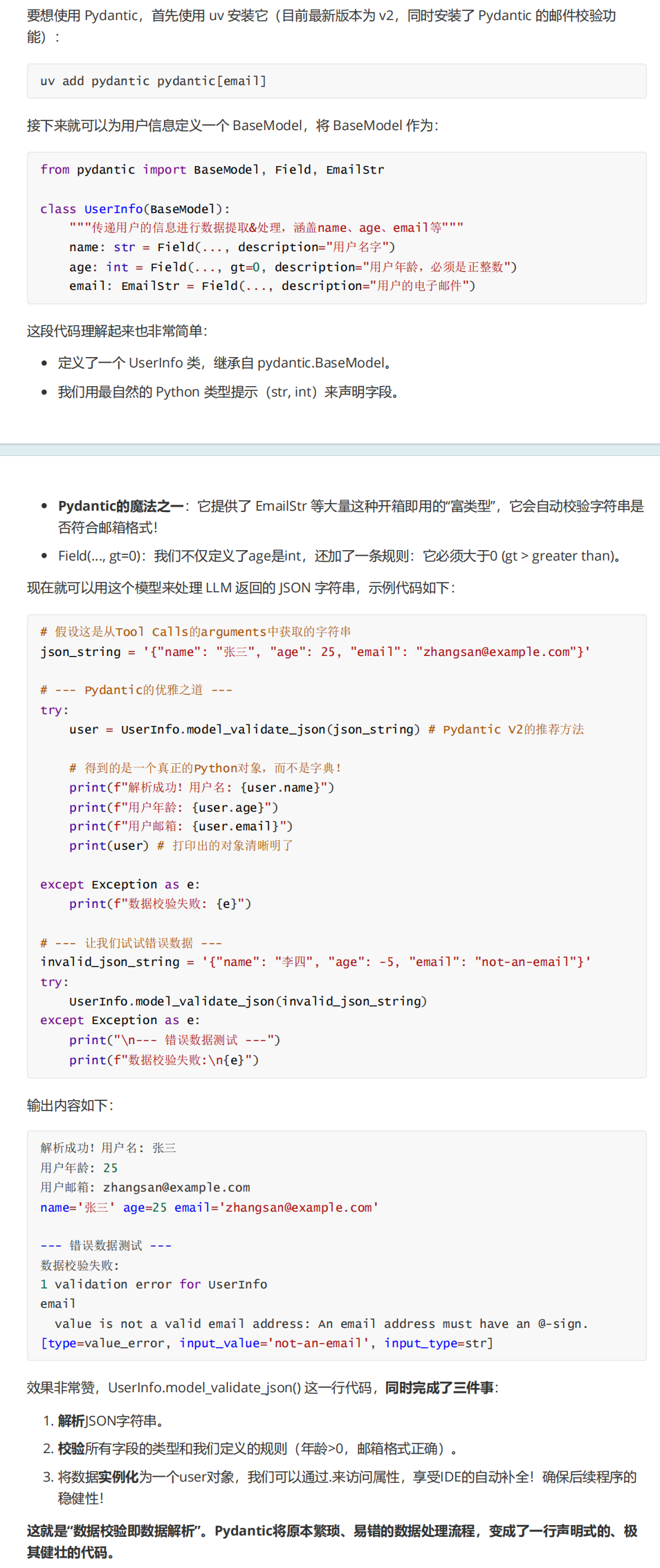
uv add pydantic pydantic[email]

#!/usr/bin/env python
# -*- coding: utf-8 -*-
"""
@Time    : 2025/7/6 20:28
@Author  : thezehui@gmail.com
@File    : 3_8_Pydantic解析数据.py
"""
from pydantic import BaseModel, Field, EmailStr


class UserInfo(BaseModel):
    """传递用户的信息进行数据提取&处理,涵盖name、age、email等"""
    name: str = Field(..., description="用户名字")
    age: int = Field(..., description="用户年龄,必须是正整数")
    email: EmailStr = Field(..., description="用户的电子邮件")


# 假设这是从Tool Calls的arguments中获取的字符串
json_string = '{"name": "张三", "age": 25, "email": "zhangsan@example.com"}'

# --- Pydantic的优雅之道 ---
try:
    user = UserInfo.model_validate_json(json_string)  # Pydantic V2的推荐方法

    # 得到的是一个真正的Python对象,而不是字典!
    print(f"解析成功!用户名: {user.name}")
    print(f"用户年龄: {user.age}")
    print(f"用户邮箱: {user.email}")
    print(user)  # 打印出的对象清晰明了

except Exception as e:
    print(f"数据校验失败: {e}")

# --- 让我们试试错误数据 ---
invalid_json_string = '{"name": "李四", "age": -5, "email": "not-an-email"}'
try:
    UserInfo.model_validate_json(invalid_json_string)
except Exception as e:
    print("\n--- 错误数据测试 ---")
    print(f"数据校验失败:\n{e}")

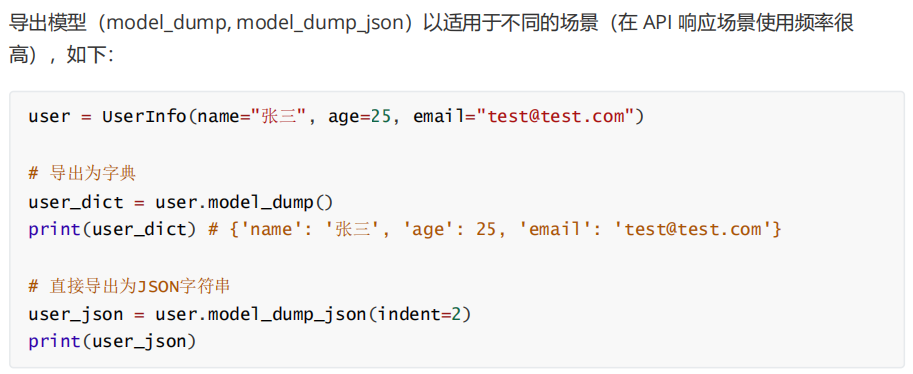
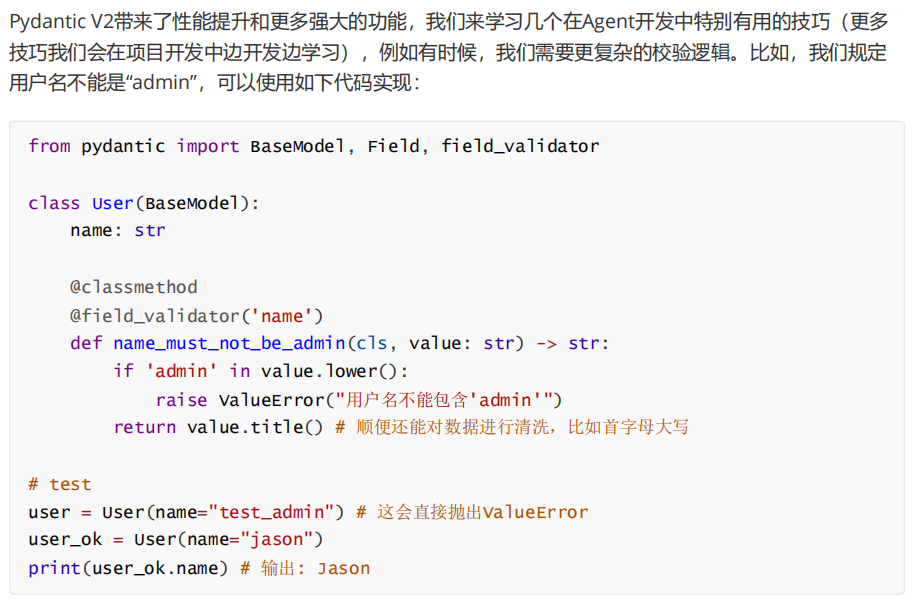

#!/usr/bin/env python
# -*- coding: utf-8 -*-
"""
@Time    : 2025/7/5 11:50
@Author  : thezehui@gmail.com
@File    : 3_8_Pydantic结合Tool Calls实现数据提取.py
"""
import dotenv
from openai import OpenAI
from pydantic import BaseModel, Field, EmailStr

dotenv.load_dotenv()


class UserInfo(BaseModel):
    """传递用户的信息进行数据提取&处理,涵盖name、age、email"""
    name: str = Field(..., description="用户名字")
    age: int = Field(..., gt=0, description="用户年龄,必须是正整数")
    email: EmailStr = Field(..., description="用户的电子邮件")


client = OpenAI(base_url="http://192.168.8.221:9026/v1")

response = client.chat.completions.create(
    model="Qwen3.5-27B-FP8",
    messages=[
        {"role": "user", "content": "我叫泽辉呀,今年18岁,我的联系方式是zehuiya@163.com"}
    ],
    tools=[
        {   # 这里注册的并不是 Python 函数,而是告诉 LLM:"请按照这个 JSON Schema 输出数据。"
            "type": "function",
            "function": {
                "name": UserInfo.__name__,
                "description": UserInfo.__doc__,
                "parameters": UserInfo.model_json_schema(),
            }
        }
    ],
    tool_choice={"type": "function", "function": {"name": UserInfo.__name__}}    # 强制要求大模型调用指定的 Tool(Function)。
)


print(response.choices[0].message.tool_calls[0].function.arguments)
print("-----------------------------------------------------------")

user_info = UserInfo.model_validate_json(response.choices[0].message.tool_calls[0].function.arguments)

print(user_info.name)

print("-----------------------------------------------------------")

print(UserInfo.model_json_schema())


#!/usr/bin/env python
# -*- coding: utf-8 -*-
"""
@Time    : 2025/7/6 1:01
@Author  : thezehui@gmail.com
@File    : 3_9_DeepSeek JSON Output示例.py
"""
import dotenv
from openai import OpenAI
from pydantic import BaseModel, Field

dotenv.load_dotenv()


class SplitTask(BaseModel):
    task_count: int = Field(..., gt=0, le=10, description="拆分的子任务总数")
    tasks: list[str] = Field(..., description="拆分的任务列表")


client = OpenAI(base_url="http://192.168.8.221:9026/v1")

system_prompt = """用户将提问一个问题,请拆解这个问题为多个串联的小任务,拆解的小任务数量不超过10个,你可以使用任何假设的工具、LLM、代码等。
并以json格式输出,其中task_count字段代表拆分任务的总数,tasks为拆分的任务数组(tasks数组内的每个元素都是一个字符串,有顺序之分)。

示例输入:
今天广州的天气怎样?

示例输出:
{
    "task_count": 3,
    "tasks": ["调用浏览器搜索今天的时间", "调用浏览器搜索广州的天气", "综合搜索的结果/内容调用LLM整理答案并回复用户"]
}
"""

while True:
    user_prompt = input("Query: ").strip()
    if user_prompt.lower() == "quit":
        break

    messages = [
        {"role": "system", "content": system_prompt},
        {"role": "user", "content": user_prompt},
    ]

    response = client.chat.completions.create(
        model="Qwen3.5-27B-FP8",
        messages=messages,
        response_format={"type": "json_object"}
    )

    split_task = SplitTask.model_validate_json(response.choices[0].message.content)     # 把大模型返回的 JSON字符串,解析成 SplitTask 这个 Pydantic 模型对象,并进行字段校验 + 类型转换。

    print(split_task)

    print("拆解任务数: ", split_task.task_count)
    for idx, task in enumerate(split_task.tasks):
        print(f"{str(idx + 1).zfill(2)}.{task}")

    print("===============\n")


欢迎加入 MCP 技术社区!与志同道合者携手前行,一同解锁 MCP 技术的无限可能!
更多推荐
 0
0 0
0- 0


 已为社区贡献1条内容

所有评论(0)