【GUI-Agent】阿里通义MAI-UI 代码阅读(2)--- 实现
MAI-UI 的两类核心Agent如下,本篇会介绍这两类Agent:
| Agent | 文件 | 任务 | 输出协议 |
|---|---|---|---|
| MAIGroundingAgent | src/mai_grounding_agent.py | UI 元素定位(单步) | <grounding_think>.</grounding_think>{"coordinate":[x,y]},坐标基于 SCALE_FACT0R=999 归一化 |
| MAIUINavigationAgent | src/mai_navigation_agent.py | 多步移动端GUI导航,支持ask_user与mcp_call | .<tool_call>{json}</tool_call>,多轮带历史截图 |
0x01 工程实现特色
MAI-UI 工程实现的三个特色如下。
1.1 特色1
特色1:三套系统提示词对应三种Agent形态:grounding / 纯导航 / ask_user + MCP 增强导航
src/prompt.py同时维护:
- MAI_MOBILE_SYS_PROMPT_GROUNDING 一 单步元素定位
- MAI_MOBILE_SYS_PROMPT 一 标准多步导航
- MAI_MOBILE_SYS_PROMPT_ASK_USER_MCP 一 在导航动作集里叠加两个特殊工具:
- ask_user(question):模型主动反问用户、把任务“打回去"
- mcp_call(tool,args):调外部MCP工具(如高德导航)补全设备端做不到的能力
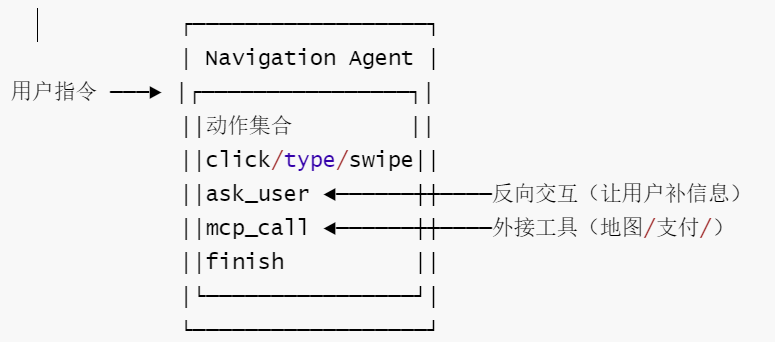
意义:
- 这是"Agent-User Interaction +MCP Augmentation" 范式在代码层面的真实落点一不是新API、就是同一个模型在不同system prompt下解锁不同动作集。
- 新增交互类工具的正确姿势就是改prompt.py+parse_tagged_text的 schema,而不是另起一个Agent类。
1.2 特色2
特色2是:归一化坐标空间SCALE_FACTOR = 999 + XML标签输出协议(而非function-calling)。
- src/mai_grounding_agent.py 与 src/mai_naivigation_agent.py 都硬编码为 SCALE_FACTOR=
999;模型永远输出[0,999]区间整数,由客户端按当前截图(W,H)反归一化。 - 输出不是OpenAI function-calling,而是裸文本里的 XML 标签:
- Grounding:<grounding_think>...</grounding_think>{"coordinate":[x,y]}
- Navigation:.<tool_call>{json}</tool_call>(兼容 thinking 模型的)
- 解析器:parse_grounding_response、parse_tagged_text,错误统一抛 ValueError。
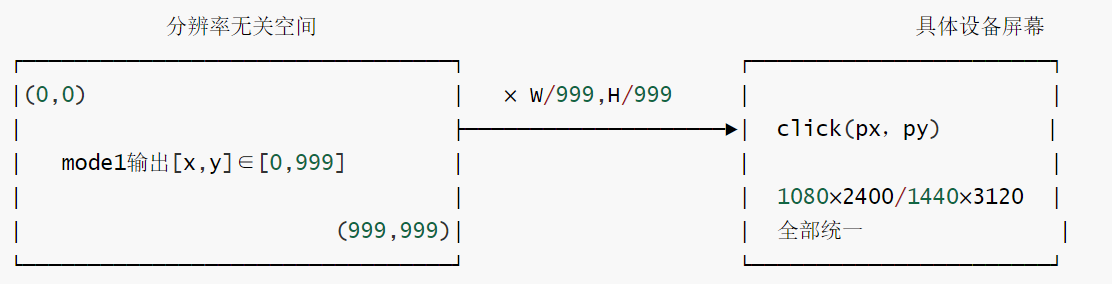
意义:
- 跨分辨率泛化:同一个模型同一个权重无缝服务任意手机分辨率,不需要在 prompt里写屏幕尺寸;
- 协议无关于推理后端一VLLM0.11.0、HFtransformers 本地推理、DashScope都能用,因为只解析纯文本,不依赖任何后端的tool-call结构;
- 代价:解析鲁棒性必须由客户端自己保证(所以两个parser都做了容错+显式异常)
1.3 特色 3
特色 3:无状态服务端 +客户端自管TrajMemory,每步把历史截图重塞回 messages:
- BaseAgent 持有 traj_memory:TrajMemory,每个 TrajStep 同时存 screenshot: Image 和 screenshot_bytes:bytes(渲染vs序列化双用)
- MAIUINaivigationAgent._build_messages() 按 runtime_conf["history_n"] 把最近 N 步的“截图+模型回复“重组成多轮user/assistant对话再发给vLLM一一一vLLM 端零会话状态。
- save_traj()/load_traj()走bytes,可被序列化/回放/做评测离线分析。
- stept的请求体(每步独立、无状态)如下:
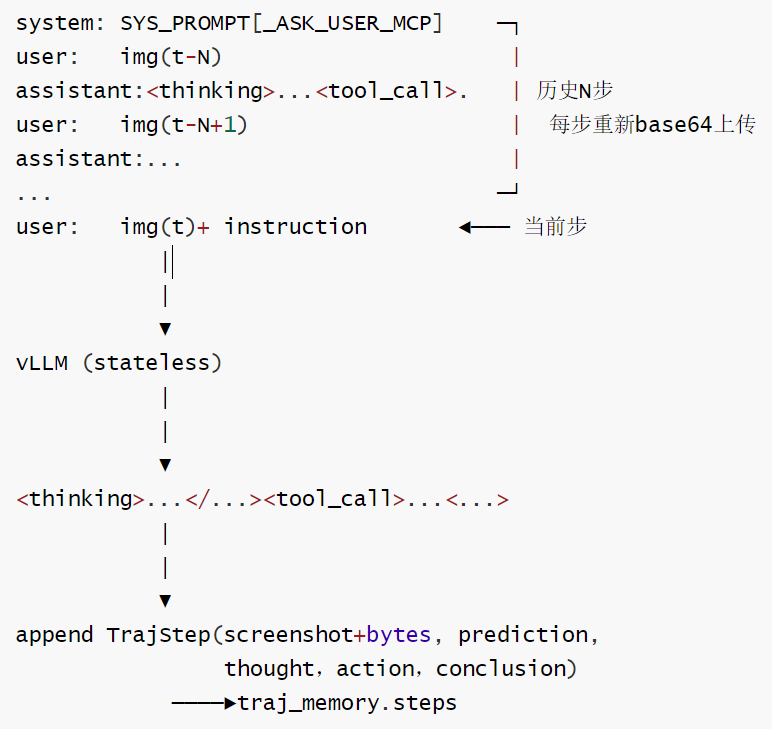
意义:
- 可回放、可评测、可断点续跑—save_traj出dict、load_traj直接灌回,离线replay,不需要真机/模拟器;
- 横向扩展友好一VLLM可以集群水平扩,因为没有会话粘性,这正契合 scaling parallel environments up to 512"的训l练形态在推理侧的对应做法;
- 代价:每步N张图都要重传,带宽与 prefill 成本随 history_n线性增长,调小 history_n是常见的省 token 技巧。
1.4 小结
MAI-UI的工程独到之处不是模型本身,而是这套客户端契约:分辨率无关的999坐标空间 + XML标签协议(与后端解耦)+ 无状态多轮重放(与历史长度解耦)+ 三档 prompt解锁的grounding/导航/ask_user+MCP
三种形态一一一后续任何二次开发都沿着这四条线走,而不是去改模型契约。
0x02 提示词
2.1 提示词代码
以下是提示词代码。
MAI_MOBILE_SYS_PROMPT
MAI_MOBILE_SYS_PROMPT = """You are a GUI agent. You are given a task and your action history, with screenshots. You need to perform the next action to complete the task.

## Output Format
For each function call, return the thinking process in <thinking> </thinking> tags, and a json object with function name and arguments within <tool_call></tool_call> XML tags:
```
<thinking>
...
</thinking>
<tool_call>
{"name": "mobile_use", "arguments": <args-json-object>}
</tool_call>
```

## Action Space

{"action": "click", "coordinate": [x, y]}
{"action": "long_press", "coordinate": [x, y]}
{"action": "type", "text": ""}
{"action": "swipe", "direction": "up or down or left or right", "coordinate": [x, y]} # "coordinate" is optional. Use the "coordinate" if you want to swipe a specific UI element.
{"action": "open", "text": "app_name"}
{"action": "drag", "start_coordinate": [x1, y1], "end_coordinate": [x2, y2]}
{"action": "system_button", "button": "button_name"} # Options: back, home, menu, enter
{"action": "wait"}
{"action": "terminate", "status": "success or fail"}
{"action": "answer", "text": "xxx"} # Use escape characters \\', \\", and \\n in text part to ensure we can parse the text in normal python string format.

## Note
- Write a small plan and finally summarize your next action (with its target element) in one sentence in <thinking></thinking> part.
- Available Apps: `["Camera","Chrome","Clock","Contacts","Dialer","Files","Settings","Markor","Tasks","Simple Draw Pro","Simple Gallery Pro","Simple SMS Messenger","Audio Recorder","Pro Expense","Broccoli APP","OSMand","VLC","Joplin","Retro Music","OpenTracks","Simple Calendar Pro"]`.
You should use the `open` action to open the app as possible as you can, because it is the fast way to open the app.
- You must follow the Action Space strictly, and return the correct json object within <thinking> </thinking> and <tool_call></tool_call> XML tags.
""".strip()
MAI_MOBILE_SYS_PROMPT_NO_THINKING
MAI_MOBILE_SYS_PROMPT_NO_THINKING = """You are a GUI agent. You are given a task and your action history, with screenshots. You need to perform the next action to complete the task.

## Output Format
For each function call, return a json object with function name and arguments within <tool_call></tool_call> XML tags:
```
<tool_call>
{"name": "mobile_use", "arguments": <args-json-object>}
</tool_call>
```

## Action Space

{"action": "click", "coordinate": [x, y]}
{"action": "long_press", "coordinate": [x, y]}
{"action": "type", "text": ""}
{"action": "swipe", "direction": "up or down or left or right", "coordinate": [x, y]} # "coordinate" is optional. Use the "coordinate" if you want to swipe a specific UI element.
{"action": "open", "text": "app_name"}
{"action": "drag", "start_coordinate": [x1, y1], "end_coordinate": [x2, y2]}
{"action": "system_button", "button": "button_name"} # Options: back, home, menu, enter
{"action": "wait"}
{"action": "terminate", "status": "success or fail"}
{"action": "answer", "text": "xxx"} # Use escape characters \\', \\", and \\n in text part to ensure we can parse the text in normal python string format.


## Note
- Available Apps: `["Camera","Chrome","Clock","Contacts","Dialer","Files","Settings","Markor","Tasks","Simple Draw Pro","Simple Gallery Pro","Simple SMS Messenger","Audio Recorder","Pro Expense","Broccoli APP","OSMand","VLC","Joplin","Retro Music","OpenTracks","Simple Calendar Pro"]`.
You should use the `open` action to open the app as possible as you can, because it is the fast way to open the app.
- You must follow the Action Space strictly, and return the correct json object within <thinking> </thinking> and <tool_call></tool_call> XML tags.
""".strip()
MAI_MOBILE_SYS_PROMPT_ASK_USER_MCP
# Placeholder prompts for future features
MAI_MOBILE_SYS_PROMPT_ASK_USER_MCP = Template(
    """You are a GUI agent. You are given a task and your action history, with screenshots. You need to perform the next action to complete the task.

## Output Format
For each function call, return the thinking process in <thinking> </thinking> tags, and a json object with function name and arguments within <tool_call></tool_call> XML tags:
```
<thinking>
...
</thinking>
<tool_call>
{"name": "mobile_use", "arguments": <args-json-object>}
</tool_call>
```

## Action Space

{"action": "click", "coordinate": [x, y]}
{"action": "long_press", "coordinate": [x, y]}
{"action": "type", "text": ""}
{"action": "swipe", "direction": "up or down or left or right", "coordinate": [x, y]} # "coordinate" is optional. Use the "coordinate" if you want to swipe a specific UI element.
{"action": "open", "text": "app_name"}
{"action": "drag", "start_coordinate": [x1, y1], "end_coordinate": [x2, y2]}
{"action": "system_button", "button": "button_name"} # Options: back, home, menu, enter
{"action": "wait"}
{"action": "terminate", "status": "success or fail"}
{"action": "answer", "text": "xxx"} # Use escape characters \\', \\", and \\n in text part to ensure we can parse the text in normal python string format.
{"action": "ask_user", "text": "xxx"} # you can ask user for more information to complete the task.
{"action": "double_click", "coordinate": [x, y]}

{% if tools -%}
## MCP Tools
You are also provided with MCP tools, you can use them to complete the task.
{{ tools }}

If you want to use MCP tools, you must output as the following format:
```
<thinking>
...
</thinking>
<tool_call>
{"name": <function-name>, "arguments": <args-json-object>}
</tool_call>
```
{% endif -%}


## Note
- Available Apps: `["Contacts", "Settings", "Clock", "Maps", "Chrome", "Calendar", "files", "Gallery", "Taodian", "Mattermost", "Mastodon", "Mail", "SMS", "Camera"]`.
- Write a small plan and finally summarize your next action (with its target element) in one sentence in <thinking></thinking> part.
""".strip()
)
MAI_MOBILE_SYS_PROMPT_GROUNDING
MAI_MOBILE_SYS_PROMPT_GROUNDING = """
You are a GUI grounding agent.
## Task
Given a screenshot and the user's grounding instruction. Your task is to accurately locate a UI element based on the user's instructions.
First, you should carefully examine the screenshot and analyze the user's instructions,  translate the user's instruction into a effective reasoning process, and then provide the final coordinate.
## Output Format
Return a json object with a reasoning process in <grounding_think></grounding_think> tags, a [x,y] format coordinate within <answer></answer> XML tags:
<grounding_think>...</grounding_think>
<answer>
{"coordinate": [x,y]}
</answer>
""".strip()
2.2 移动系统提示词差异一览
只有 MAI_MOBILE_SYS_PROMPT_ASK_USER_MCP 模板支持 MCP 工具集成,且通过 Jinja2 条件语法实现动态插入;其余提示词版本均不包含 MCP 功能。
| 提示词 ID | 核心用途 | 思考标签 | 操作空间 | 特殊功能 |
|---|---|---|---|---|
| MAI_MOBILE_SYS_PROMPT | 标准 GUI 代理 | `` 必须 | 点击/长按/输入/滑动等全功能 | 无 |
| MAI_MOBILE_SYS_PROMPT_NO_THINKING | 快速响应 | 无思考标签 | 同上 | 省略思考,直接返回 JSON |
| MAI_MOBILE_SYS_PROMPT_ASK_USER_MCP | 模板化+用户询问 | 可选 | 同上 | ask_user、double_click、Jinja2 模板、MCP 工具集成 |
| MAI_MOBILE_SYS_PROMPT_GROUNDING | 纯定位专用 | `` | 仅元素识别 | 输出 [x,y] 坐标,无操作命令 |
2.3 工具集成差异
MCP 功能只在 MAI_MOBILE_SYS_PROMPT_ASK_USER_MCP 模板层集成,其余版本需外部桥接。
-
集成位置
- 仅 MAI_MOBILE_SYS_PROMPT_ASK_USER_MCP 内置 MCP 工具调用入口(通过 Jinja2 模板动态注入)。
- 其余版本无 MCP 工具入口,需外部调用。
-
提示词层差异
- 标准版:无 MCP 占位符,纯 JSON 输出。
- MCP 版:模板内预留
{{mcp_tools}}变量,运行时注入具体工具描述。
-
运行时差异
- 标准版:LLM 输出传统动作 JSON,由外部框架手动转发至 MCP。
- MCP 版:渲染后提示词包含完整 MCP 工具 JSON,LLM 可直接调用。
-
条件性集成(仅 MAI_MOBILE_SYS_PROMPT_ASK_USER_MCP)
- 使用 Jinja2 模板语法
{%if tools -%}...{%endif -%}实现动态集成 - 独立
## MCP Tools区域存放 MCP 工具描述 - 通过
{{tools}}变量动态插入可用工具信息 - 输出格式与标准移动操作不同:`` 内直接嵌入 MCP 函数调用
- 使用 Jinja2 模板语法
0x03 输出
3.1 输出格式区别
非 MCP 版本(MAI_MOBILE_SYS_PROMPT)
-
统一格式:所有操作通过
mobile_use函数调用 -
固定结构:GUI 操作封装在
arguments字段 -
示例:
<thinking>...</thinking>
<tool_call>
{"name":"mobile_use","arguments":<args-json-object>}
</tool_call>
MCP 版本(MAI_MOBILE_SYS_PROMPT_ASK_USER_MCP)
-
双重格式:支持标准 GUI 操作和 MCP 工具调用
-
工具特定格式:MCP 工具调用使用实际函数名作为
name -
示例:
<thinking>...</thinking>
<tool_call>
{"name":<function-name>,"arguments":<args-json-object>}
</tool_call>
下面代码把LLM的输出转换为结构化输出
def parse_action_to_structure_output(text: str) -> Dict[str, Any]:
    """
    Parse model output text into structured action format.

    Args:
        text: Raw model output containing thinking and tool_call tags.

    Returns:
        Dictionary with keys:
            - "thinking": The model's reasoning process
            - "action_json": Parsed action with normalized coordinates

    Note:
        Coordinates are normalized to [0, 1] range by dividing by SCALE_FACTOR.
    """
    text = text.strip()

    results = parse_tagged_text(text)
    thinking = results["thinking"]
    tool_call = results["tool_call"]
    action = tool_call["arguments"]

    # Normalize coordinates from SCALE_FACTOR range to [0, 1]
    if "coordinate" in action:
        coordinates = action["coordinate"]
        if len(coordinates) == 2:
            point_x, point_y = coordinates
        elif len(coordinates) == 4:
            x1, y1, x2, y2 = coordinates
欢迎加入 MCP 技术社区!与志同道合者携手前行,一同解锁 MCP 技术的无限可能!
更多推荐

 7
7 0
0- 0


 已为社区贡献1条内容

所有评论(0)