十、LangGraph能力详解:LangGraph 持久化(Persistence)
目录
2.3.2 不应该将 interrupt() 调用包裹在 try/except 代码块中
2.4.1 批准或拒绝(Approve or reject)
2.4.2 查看和编辑状态(Review and edit state)
2.4.3 在工具中中断(Interrupts in tools)
2.4.4 验证人工输入(Validating human input)
持久化实现的三大应用能力
1. 记忆(Memory)
1.1 记忆概念
记忆,是一种能够记住之前互动信息的系统。对于人工智能代理来说,记忆至关重要,因为它使他们能够记住之前的互动,从反馈中学习,并根据用户偏好进行调整。随着代理处理涉及大量用户交互的更复杂任务,这一能力对效率和用户满意度都变得至关重要。
注意要区分记忆和持久化的概念:
-
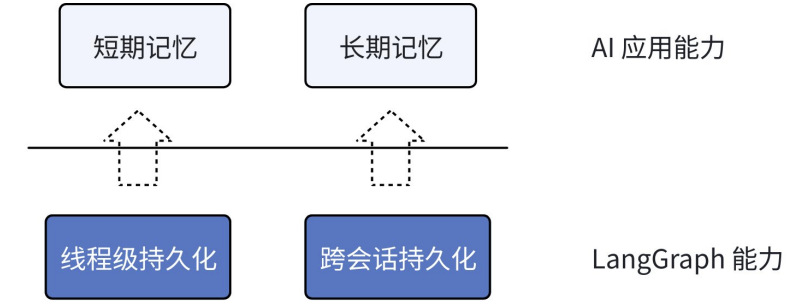
持久化为 LangGraph 底层能力,包含【线程级】持久化和【跨会话】持久化
-
记忆为 LangGraph 能实现的应用层能力,包含【短期记忆】和【长期记忆】
在应用层,短期记忆就由线程级持久化实现,长期记忆由跨会话持久化实现。
-
短期记忆:单次会话中保持的上下文信息
-
长期记忆:跨会话保存的用户或应用数据
1.2 管理短期记忆
对应短期记忆和长期记忆是如何添加的就不过多演示了(就是持久化部分的内容)。但在应用层,我们还需要掌握在应用系统中,出现一些具体场景时,如何对记忆进行管理。例如当消息记录过多,我们需要进行消息裁剪、总结消息、消息删除等操作。
要再说明一点,既然是应用层能力,我们应该对记忆的存储方式有所选择:
# 开发阶段:内存存储
from langgraph.checkpoint.memory import InMemorySaver
from langgraph.store.memory import InMemoryStore
# 生产阶段:数据库
from langgraph.checkpoint.postgres import PostgresSaver
from langgraph.store.postgres import PostgresStore1.2.1 修剪消息
大多数 LLM 都有一个最大支持的上下文窗口。决定何时截断消息的一种方法是对消息历史记录中的令牌进行计数,并在接近该限制时截断。
消息裁剪方法可以参考 LangChain 篇章部分的内容。
from langchain_core.messages.utils import trim_messages
from langchain.chat_models import init_chat_model
from langgraph.checkpoint.memory import InMemorySaver
from langgraph.graph import StateGraph, START, MessagesState
model = init_chat_model("gpt-4o-mini", temperature=0)
def call_model(state: MessagesState):
# 只保留最近的128个token的消息
messages = trim_messages(
state["messages"],
strategy="last", # 策略:保留最后的部分
token_counter=model, # 计算token数量
max_tokens=128, # 最大token数
start_on="human", # 从用户消息开始
end_on=("human", "tool"), # 结束于用户或工具消息
)
response = model.invoke(messages)
return {"messages": [response]}
checkpoint = InMemorySaver()
builder = StateGraph(MessagesState)
builder.add_node(call_model)
builder.add_edge(START, "call_model")
graph = builder.compile(checkpoint=checkpoint)
config = {"configurable": {"thread_id": "1"}}
graph.invoke({"messages": "hi, my name is bob"}, config)
graph.invoke({"messages": "write a short poem about cats"}, config)
graph.invoke({"messages": "now do the same but for dogs"}, config)
final_response = graph.invoke({"messages": "what's my name?"}, config)
final_response["messages"][-1].pretty_print()1.2.2 删除消息
可以从图状态中删除消息以管理消息历史记录。当想要删除特定消息或清除整个消息历史记录时,这非常有用。
from langchain_core.messages import RemoveMessage
def call_model(state: MessagesState):
messages = state["messages"]
if len(messages) > 6:
# 删除最早的6条消息
return {
"messages": [RemoveMessage(id=m.id) for m in messages[:6]]
}
response = model.invoke(messages)
return {"messages": [response]}
# 测试:可以发现只剩最后一条消息了
for message in final_response["messages"]:
message.pretty_print()删除所有消息:
from langgraph.graph.message import REMOVE_ALL_MESSAGES
def call_model(state: MessagesState):
return {"messages": [RemoveMessage(id=REMOVE_ALL_MESSAGES)]}注意:删除后消息无法恢复,要确保删除后的对话仍然是有效的。
1.2.3 总结消息
实际上,修剪或删除消息也会存在问题:可能会因删除消息而丢失信息。因此,某些应用更希望将消息历史记录进行总结,把旧的对话内容总结成简短摘要,保留关键信息,以代替冗长的历史记录。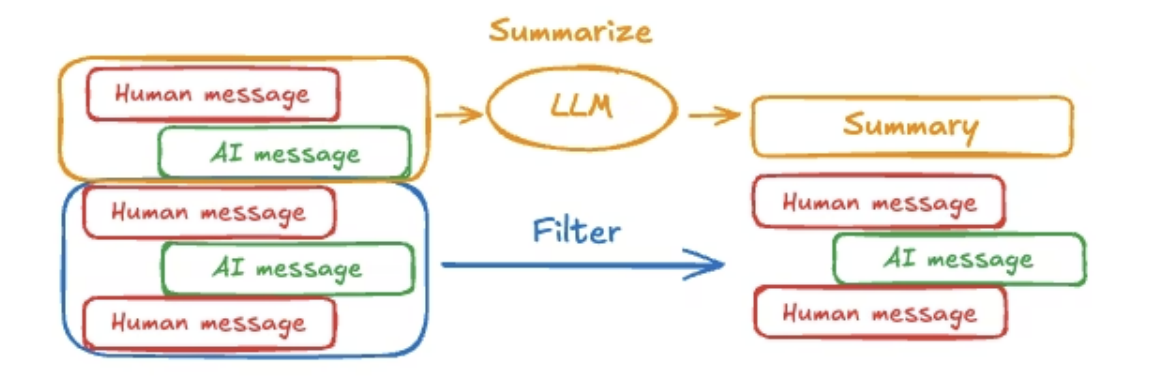
我们可以先将 State 进行扩展,除了对话记录,还包含一个总结摘要字段:
from langgraph.graph import MessagesState
class State(MessagesState):
summary: str现在要求:
-
对话记录:记录新的对话与结果
-
摘要:每次对话完成,需要进行总结。
-
完成总结摘要后,可以删除历史对话。
那么,在每次调用 LLM 时,便可以根据【新的请求】与【总结摘要信息】共同构建提示词来完成请求。
完整代码如下所示:
from langchain.chat_models import init_chat_model
from langchain_core.messages import HumanMessage, RemoveMessage
from langgraph.checkpoint.memory import InMemorySaver
from langgraph.graph import StateGraph, START, MessagesState
model = init_chat_model("gpt-4o-mini", temperature=0)
class State(MessagesState):
summary: str
def call_model(state: State):
# 使用历史总结+最新消息发起调用
summary = state.get("summary", "")
messages = model.invoke([HumanMessage(content=summary)] + state["messages"])
return {"messages": messages}
def summarize_conversation(state: State):
""" 生成历史总结 """
# 1. 创建总结提示词
summary = state.get("summary", "")
if summary: # 有摘要,扩展
summary_message = (
f"这是到目前为止的对话摘要:{summary}\n\n"
"基于上面的新消息扩展摘要:"
)
else: # 无摘要,新增
summary_message = "创建上面对话的摘要:"
# 2. 生成新总结:【消息列表】+【历史总结】调用模型
messages = state["messages"] + [HumanMessage(content=summary_message)]
response = model.invoke(messages)
# 3. 删除历史对话:除了最新的AI消息,都可以删除
return {
"summary": response.content, # 历史总结
"messages": [RemoveMessage(id=m.id) for m in state["messages"][:-1]] # 保留最后的消息是为了打印结果
}
checkpoint = InMemorySaver()
builder = StateGraph(State)
builder.add_node(call_model)
builder.add_node("summarize", summarize_conversation)
builder.add_edge(START, "call_model")
builder.add_edge("call_model", "summarize") # 每次对话完,进行总结
graph = builder.compile(checkpoint=checkpoint)
config = {"configurable": {"thread_id": "1"}}
graph.invoke({"messages": "hi, my name is bob"}, config)
graph.invoke({"messages": "write a short poem about cats"}, config)
graph.invoke({"messages": "now do the same but for dogs"}, config)
final_response = graph.invoke({"messages": "what's my name?"}, config)
final_response["messages"][-1].pretty_print()
print("\nSummary:", final_response["summary"])实际上,无需每次调用后都进行总结,可设置阈值进行总结。只需判断 消息数量 > 阈值,再进行总结与删除即可。
扩展:LangMem 是一个由 LangChain 维护的库。它提供了可与任何存储系统一起使用的功能原语,也提供了与 LangGraph 存储层的本机集成。例如上述我们手动完成的汇总消息功能,在 LangMem 中专门提供了记忆管理库(如:SummarizationNode),简化了总结消息的过程。
2. 人机交互(Human-in-the-loop)
什么是人机交互?想象有以下场景:
-
AI 自动发送邮件前,你想亲自最后确认一遍内容
-
AI 生成文章后,你想亲自手动修改几个段落
-
...
在 AI 系统中,我们希望可以在 AI 自动流程中插入一个"暂停键",等待人类输入后再继续,这就是人机交互功能。
2.1 核心概念:中断(Interrupts)
想要完成 人机交互 能力,需要用到 LangGraph 基于持久化实现的【中断】能力!中断就像打游戏一样,当玩家无法通关某关卡时,希望暂停游戏(中断),攻略一下后再继续游戏:
-
用户可以在游戏过程中主动按下"存档键";
-
此时会将游戏当前状态等信息进行存档,保存下来;(实现游戏过程的中断)
-
当我们攻略后想继续游戏时,就可以读取存档继续玩。(恢复游戏继续)
在 LangGraph 中,中断允许工作流执行时在特定点暂停,等待外部输入后再继续执行。
2.2 中断如何实现?
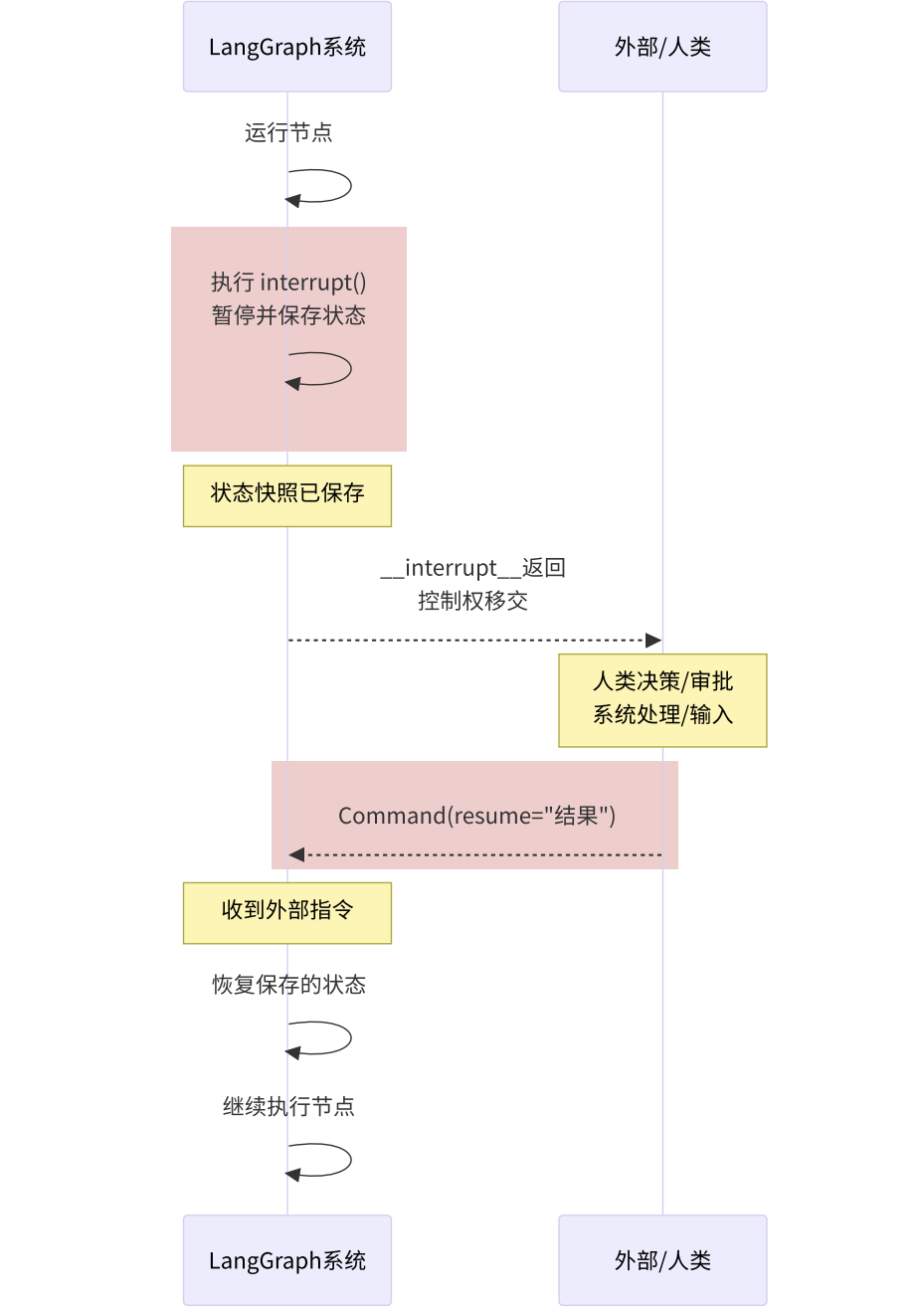
在工作流中,想要实现暂停与恢复很简单,只需要:
-
通过调用
interrupt()方法中断执行流程,依靠持久化能力,保存当前状态。 -
外部用户通过发送
Command对象,使得工作流恢复执行流程。
交互流程如下图所示:
代码:
from typing import TypedDict
from langgraph.checkpoint.memory import InMemorySaver
from langgraph.constants import START
from langgraph.graph import StateGraph
from langgraph.types import interrupt, Command
class State(TypedDict):
input: str
output: str
def hello_node(state: State):
# 主动喊"停!",并传递提示信息
human = interrupt("暂停,是否继续?") # 第一次运行会停在这里
if human == "yes":
return {"output": "你好,我是你的贴心助手!"}
else:
return {"output": "拜拜"}
builder = StateGraph(State)
builder.add_node(hello_node)
builder.add_edge(START, "hello_node")
# 必须指定checkpointer,以在每个步骤后保存图状态。
graph = builder.compile(checkpointer=InMemorySaver())
# 必须使用thread_id运行 Graph,相当于告诉系统读哪个存档。
config = {"configurable": {"thread_id": "human_1"}}
# 步骤1:启动,触发暂停
first = graph.invoke({"input": "hi"}, config=config)
print(first) # 看到提问:__interrupt__
# 步骤2:恢复,把答案交回去
second = graph.invoke(Command(resume="no"), config=config)
print(second["output"])代码关键点:
-
编译图时:必须指定
checkpointer,以在每个步骤后保存图状态。 -
调用
interrupt()时:表示主动喊"停!",并传递提示信息。 -
使用
invoke/stream恢复执行,需使用Command(resume=...)语法。 -
resume表示传回 AI 的响应值 -
必须使用
thread_id运行 Graph,相当于告诉系统读哪个存档。
因此实现了中断,便是实现了人机交互模式。
2.3 中断的黄金法则(规则和限制)
2.3.1 只传能序列化的简单数据
复杂值无法进行传递,例如不要传函数、类实例、数据库连接等。只传能序列化的简单数据,如字符串、数字、布尔、简单字典/列表。
正面示例:
# 正确:传递可序列化的简单类型
def node_a(state: State):
    name = interrupt("What's your name?")
    count = interrupt(42)
    approved = interrupt(True)

    return {"name": name, "count": count, "approved": approved}

#正确:传递带有简单值的字典
def node_a(state: State):
    response = interrupt({
        "question": "Enter user details",
        "fields": ["name", "email", "age"],
        "current_values": state.get("user", {})
    })

    return {"user": response}
反面示例:
#错误:传递一个函数来实现中断(函数不能被序列化)
def validate_input(value):
    return len(value) > 0

def node_a(state: State):
    response = interrupt({
        "question": "What's your name?",
        "validator": validate_input
    })
    return {"name": response}

#错误:传递一个类实例来实现中断(实例不能被序列化)
class DataProcessor:
    def __init__(self, config):
        self.config = config

def node_a(state: State):
    processor = DataProcessor({"mode": "strict"})
    response = interrupt({
        "question": "Enter data to process",
        "processor": processor  # This will fail
    })
    return {"result": response}
2.3.2 不应该将 interrupt() 调用包裹在 try/except 代码块中
错误做法是:如果将 interrupt() 调用包裹在通用的 try/except Exception 或 try/except(空)代码块中,你编写的代码会提前捕获这个特殊异常。这会导致运行时系统无法感知到中断,从而使 interrupt() 功能失效。
反面示例:
# 错误:在try/except中包装中断
def node_a(state: State):
    try:
        interrupt("What's your name?")
    except Exception as e:
        print(e)
    return state
根本原因是 interrupt() 函数内部通过抛出一个特殊的异常来实现暂停执行。 这个异常需要被 LangGraph 的运行时系统捕获,以触发状态的保存和等待。
正确做法:
-
分离逻辑:将 interrupt() 调用与可能引发其他异常的代码分开。先调用 interrupt(),然后再处理可能出错的操作。
-
精确捕获:在 try/except 块中只捕获你预期会发生的、非常具体的异常类型(例如 NetworkException)。这样,interrupt() 抛出的特殊异常就不会被你的代码捕获,而能顺利传递给运行时系统。
正面示例:
#正确:先中断,再处理
def node_a(state: State):
    interrupt("What's your name?")
    try:
        # 将中断调用与易出错代码分开
        fetch_data()
    except Exception as e:
        print(e)
    return state

#正确:捕捉特定的异常类型
def node_a(state: State):
    name = interrupt("What's your name?")
    try:
        fetch_data()
    except NetworkException as e:
        print(e)
    return state
这部分是一个重要的警告,旨在避免开发者因使用常规的错误处理模式而导致 interrupt() 机制失效。其核心是必须让 interrupt() 抛出的特殊异常能够"逃逸"出你编写的节点函数,以便被 LangGraph 运行时正确处理。
2.3.3 中断前的动作要"幂等"
非常重要的是:当节点恢复执行时,发起中断的节点会从头再跑一遍。 因此,对于中断前的代码,会多重复执行!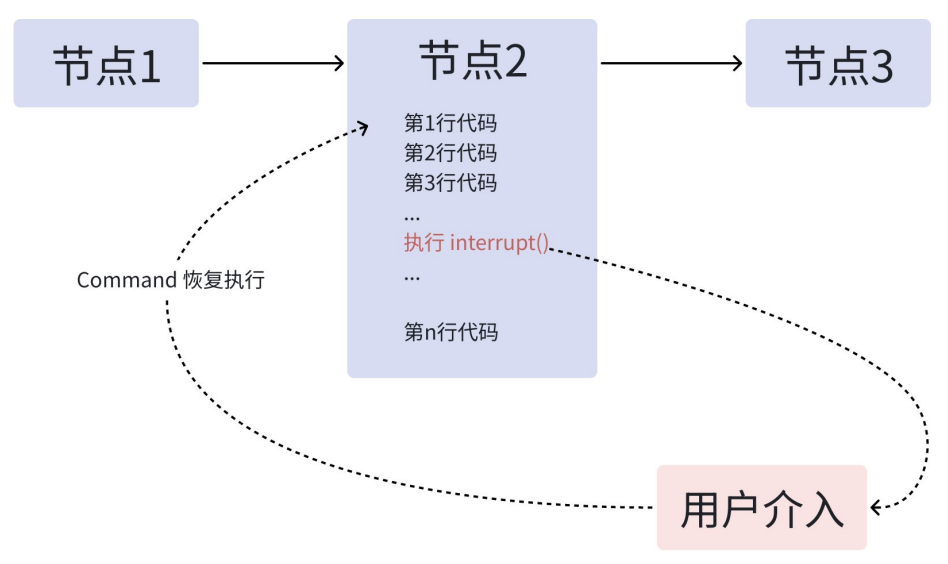
如果这些代码包含非幂等的副作用操作(如创建记录、发送消息、扣款等),每次恢复都会重复这些操作。这可能导致数据重复、不一致或意外行为。
幂等性:一个操作无论执行一次还是多次,产生的效果都相同。
正面示例:
#正确:使用 upsert(更新或插入)操作,多次执行结果一致
def node_a(state: State):
    db.upsert_user(
        user_id=state["user_id"],
        status="pending_approval"
    )
    approved = interrupt("Approve this change?")
    return {"approved": approved}

#正确:先中断,获得批准后再执行副作用
def node_a(state: State):
    approved = interrupt("Approve this change?")
    if approved:
        db.create_audit_log(
            user_id=state["user_id"],
            action="approved"
        )
    return {"approved": approved}

#正确:副作用在独立节点中,仅在获得批准后执行一次
def approval_node(state: State):
    approved = interrupt("Approve this change?")
    return {"approved": approved}

def notification_node(state: State):
    if state["approved"]:
        send_notification(user_id=state["user_id"], status="approved")
    return state
反面示例:
#错误:每次恢复都会创建新的审计记录
def node_a(state: State):
    audit_id = db.create_audit_log({
        "user_id": state["user_id"],
        "action": "pending_approval",
        "timestamp": datetime.now()
    })
    approved = interrupt("Approve this change?")
    return {"approved": approved, "audit_id": audit_id}

#错误:每次恢复都会重复追加相同条目
def node_a(state: State):
    db.append_to_history(
        state["user_id"],
        "approval_requested"
    )
    approved = interrupt("Approve this change?")
    return {"approved": approved}
这一规则的核心是:确保在 interrupt() 调用之前执行的所有操作都是幂等的,或者将非幂等操作移到 interrupt() 调用之后。这是为了避免因节点重新执行而导致的重复副作用,确保系统的数据一致性和预期行为。
2.3.4 中断顺序固定
在同一个节点中使用多个 interrupt() 调用时需要注意的顺序和索引匹配规则。LangGraph 使用严格的索引顺序来匹配恢复值:
-
恢复执行从头开始:节点恢复时会从开头重新运行,而不是从中断的精确行继续。
-
索引匹配:LangGraph 为每个执行任务维护一个恢复值列表。遇到 interrupt() 时,按顺序从这个列表中取对应的值。
-
顺序必须一致:中断调用的顺序在每次执行中必须完全相同。
正面示例:
#正确:中断调用顺序固定
def node_a(state: State):
    name = interrupt("What's your name?")     # 索引0
    age = interrupt("What's your age?")       # 索引1
    city = interrupt("What's your city?")     # 索引2

    return {"name": name, "age": age, "city": city}
反面示例:
#错误:第一次可能跳过,恢复时可能不跳过,导致索引错乱
def node_a(state: State):
    name = interrupt("What's your name?")     # 索引0

    if state.get("needs_age"):
        age = interrupt("What's your age?")   # 索引1(有时存在)

    city = interrupt("What's your city?")     # 索引1或2(不确定)

#错误:中断数量随动态列表变化
def node_a(state: State):
    results = []
    for item in state.get("dynamic_list", []):
        # 列表可能在不同执行中变化
        result = interrupt(f"Approve {item}?")  # 中断数量不确定
        results.append(result)
2.4 人机交互的应用场景
使用中断来实现需要人工介入的交互式工作流有四种常见模式:
-
审批或拒绝:在执行关键操作(如 API 调用、数据库更改)之前暂停流程,等待人工批准或拒绝。根据返回的指令,流程图会路由到不同的分支。
-
审查和编辑状态:暂停流程,让人工可以审查并修改流程图当前的状态(例如,LLM 生成的文本内容),然后将编辑后的内容传回,更新状态并继续执行。
-
在工具中中断:将中断直接置于工具函数内部。当 LLM 调用该工具时,流程会自动暂停,允许人工在工具实际执行前审查、编辑其调用参数或直接取消调用。
-
验证人工输入:通过循环使用中断,反复要求人工输入,直到输入内容通过验证(例如,确保输入一个有效的正数年龄)。这适用于需要收集和验证数据的场景。
这部分的核心思想是:中断功能解锁了"暂停执行并等待外部输入"的能力,从而使得构建 人机交互(human-in-the-loop) 的应用成为可能。每个模式都附带了简明的代码示例,展示了如何在中途暂停、如何将信息传递给外部系统,以及如何在获得响应后恢复执行。
2.4.1 批准或拒绝(Approve or reject)
这是中断功能最常见的一种用途。在执行关键性操作(例如调用 API、修改数据库、进行金融交易等)之前,暂停图(graph)的执行,等待人工(如管理员、用户)的批准或拒绝。
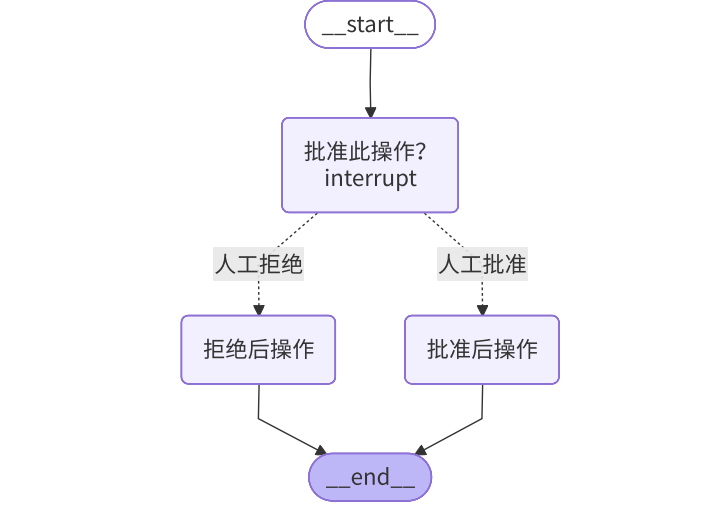
实现方式:
-
在节点中使用
interrupt()函数暂停执行。传入一个包含审批问题、操作详情等信息的JSON可序列化对象,该对象会显示在调用结果result["interrupt"]中。 -
当图被暂停后,外部系统(如 UI 界面)可以根据 interrupt 中的信息向用户展示审批请求。
-
人工做出决定(批准或拒绝)后,通过再次调用图并传入
Command(resume=...)来恢复执行。 -
恢复时,传入
Command(resume=True)表示批准,传入Command(resume=False)表示拒绝。 -
节点代码会接收这个 resume 值作为 interrupt() 函数的返回值,然后根据该值,使用
Command(goto=...)将流程路由到不同的后续节点(例如"proceed"节点或"cancel"节点)。
练习:AI 转账前进行人工审批
from typing import Literal, Optional, TypedDict

from langgraph.checkpoint.memory import MemorySaver
from langgraph.graph import StateGraph, START, END
from langgraph.types import Command, interrupt

class ApprovalState(TypedDict):
    action_details: str           # 操作详情(如"转账30000元")
    status: Optional[Literal["等待", "批准", "拒绝"]]   # 审批状态

def approval_node(state: ApprovalState) -> Command[Literal["proceed", "cancel"]]:
    # 中断执行,将审批请求传递给调用者
    decision = interrupt({
        "question": "批准此操作?",
        "details": state["action_details"],
    })

    # 恢复后路由到适当的节点
    return Command(goto="proceed" if decision else "cancel")

def proceed_node(state: ApprovalState):
    return {"status": "批准"}

def cancel_node(state: ApprovalState):
    return {"status": "拒绝"}

# 构建图
builder = StateGraph(ApprovalState)
builder.add_node("approval", approval_node)
builder.add_node("proceed", proceed_node)
builder.add_node("cancel", cancel_node)
builder.add_edge(START, "approval")
builder.add_edge("proceed", END)
builder.add_edge("cancel", END)

graph = builder.compile(checkpointer=MemorySaver())

# 运行图(首次调用会触发中断)
config = {"configurable": {"thread_id": "123"}}
initial = graph.invoke(
    {"action_details": "转账30000元", "status": "等待"},
    config=config,
)
print(initial["__interrupt__"])   # -> [Interrupt(value={'question': ..., 'details': ...})]

# 用决策恢复执行:True路由到proceed, False路由到cancel
resumed = graph.invoke(Command(resume=True), config=config)
print(resumed["status"])   # -> "批准"
2.4.2 查看和编辑状态(Review and edit state)
该场景表示在流程执行过程,使用中断功能让人进行审查和编辑状态内容。

练习:人工审核 AI 文档内容,并进行编辑
from typing import TypedDict

from langgraph.checkpoint.memory import InMemorySaver
from langgraph.graph import StateGraph, START, END
from langgraph.types import Command, interrupt

class ReviewState(TypedDict):
    generated_text: str

def review_node(state: ReviewState):
    # 请求审阅者编辑生成的内容
    updated = interrupt({
        "instruction": "查看并编辑此内容",
        "content": state["generated_text"],
    })
    return {"generated_text": updated}

# 构建图
builder = StateGraph(ReviewState)
builder.add_node("review", review_node)
builder.add_edge(START, "review")
builder.add_edge("review", END)

graph = builder.compile(checkpointer=InMemorySaver())

config = {"configurable": {"thread_id": "42"}}
initial = graph.invoke({"generated_text": "初稿"}, config=config)
print(initial["__interrupt__"])   # -> [Interrupt(value={'instruction': ..., 'content': ...})]

# 用审阅者编辑后的文本恢复执行
final_state = graph.invoke(
    Command(resume="审稿后的改进稿"),
    config=config,
)
print(final_state["generated_text"])   # -> "审稿后的改进稿"
除此之外,还允许:
-
人工审查和修改LLM生成的内容(如文本、数据)
# 生成营销文案后让营销专家审核
interrupt({
"instruction": "为社交媒体优化营销文案",
"content": "...", # 待审核文案
"platform": "douyin"
})-
在继续执行前纠正错误、添加信息或进行微调
# 提取结构化数据后让专家验证
interrupt({
"instruction": "验证和纠正提取的产品规格",
"content": "...", # 提取的规格
"required_fields": ["尺寸", "重量", "材料"]
})-
适用于需要质量控制或专业审核的自动化流程
# 生成代码后让开发人员审查
interrupt({
"instruction": "查看生成的Python函数的效率和最佳实践",
"content": "...", # 待审核代码
"language": "Python"
})
注意恢复时传入的内容会完全替换原始内容。如果需要部分编辑,可以在中断载荷中标记可编辑部分。
2.4.3 在工具中中断(Interrupts in tools)
还支持将中断功能直接嵌入到工具(tool)函数内部,从而实现在工具调用前进行人工审查和干预的能力。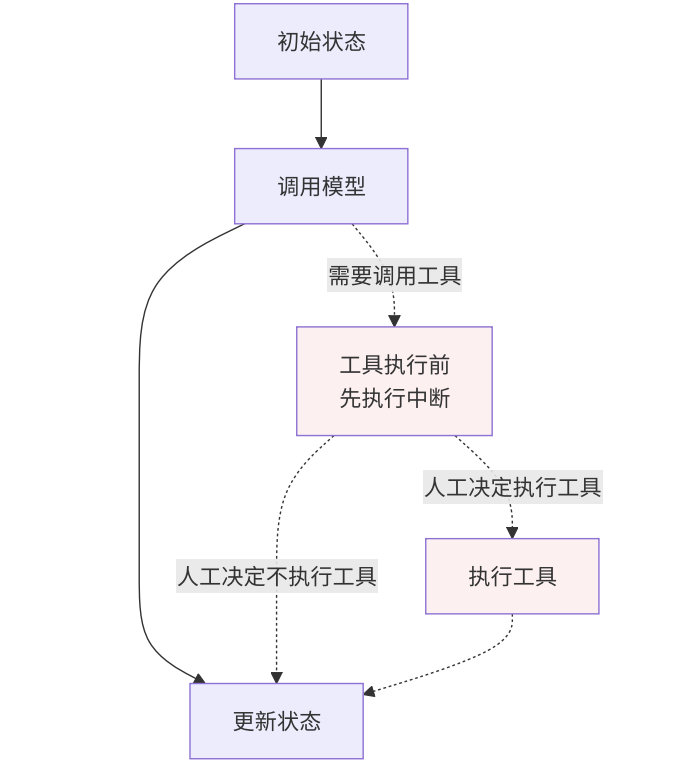
关键特点如下:
-
中断逻辑内置于工具,而非图的节点中。
-
工具变得"智能",知道何时需要人工批准。
-
工具可以在任何图中使用,自动具备中断能力
练习:AI 发送邮件前,人工审查邮件内容
import operator
from typing import TypedDict, Annotated

from langchain.chat_models import init_chat_model
from langchain.tools import tool
from langchain_core.messages import AnyMessage, SystemMessage, ToolMessage, HumanMessage
from langgraph.checkpoint.memory import InMemorySaver
from langgraph.constants import START, END
from langgraph.graph import StateGraph
from langgraph.types import interrupt, Command

class MessagesState(TypedDict):
    messages: Annotated[list[AnyMessage], operator.add]

@tool
def send_email(to: str, subject: str, body: str):
    """发送电子邮件给收件人"""

    # 在发送前暂停
    response = interrupt({
        "action": "发送邮件",
        "to": to,
        "subject": subject,
        "body": body,
        "message": "同意发送这封邮件吗?",
    })

    if response.get("action") == "同意":
        final_to = response.get("to", to)
        final_subject = response.get("subject", subject)
        final_body = response.get("body", body)
        # 实际发送邮件(此处为示例,仅打印)
        email_info = f"收件人:{final_to} 主题:{final_subject} 正文:{final_body}"
        print(f"[发送邮件] {email_info}")
        return email_info

    return "用户取消邮件"

# 使用绑定工具的模型
model_with_tools = init_chat_model("gpt-4o-mini", temperature=0).bind_tools([send_email])
def llm_call(state: dict):
    """LLM决定是否调用工具"""
    messages = model_with_tools.invoke(
        [SystemMessage(content="你支持调用工具进行邮件发送。")]
        + state["messages"]
    )

    # 直接调用工具(为了演示效果)
    if messages.tool_calls:
        tool_call = messages.tool_calls[0]
        tool_result = send_email.invoke(tool_call["args"])
        return {"messages": [ToolMessage(content=tool_result, tool_call_id=tool_call["id"])]}

    return {"messages": [messages]}

builder = StateGraph(MessagesState)
builder.add_node("llm_call", llm_call)
builder.add_edge(START, "llm_call")
builder.add_edge("llm_call", END)

graph = builder.compile(checkpointer=InMemorySaver())

config = {"configurable": {"thread_id": "email-workflow"}}
initial = graph.invoke(
    {"messages": [HumanMessage(content="发送电子邮件至alice@example.com,主题是:请假,内容是:理由如下...")]},
    config=config
)
print(initial["__interrupt__"])   # -> [Interrupt(value={'action': '...', ...})]

# 用批准和可选编辑的参数恢复
resumed = graph.invoke(
    # Command(resume={"action": "同意", "subject": "病假"}),
    Command(resume={"action": "不同意"}),
    config=config,
)
print(resumed["messages"][-1])   # -> 工具调用结果
2.4.4 验证人工输入(Validating human input)
该场景使用中断功能在循环中验证人类输入,直到输入有效为止。

练习:用户注册流程中的年龄验证
from typing import TypedDict

from langgraph.checkpoint.memory import InMemorySaver
from langgraph.graph import StateGraph, START, END
from langgraph.types import Command, interrupt

class FormState(TypedDict):
    age: int | None

def get_age_node(state: FormState):
    prompt = "你多大了?"

    while True:
        answer = interrupt(prompt)   # 有效载荷出现在 result["__interrupt__"] 中

        if isinstance(answer, int) and answer > 0:
            return {"age": answer}
        # 每次验证失败后,提示信息会更新
        prompt = f"'{answer}' 不是一个有效的年龄。请输入正数。"

# 构建图
builder = StateGraph(FormState)
builder.add_node(get_age_node)
builder.add_edge(START, "get_age_node")
builder.add_edge("get_age_node", END)
graph = builder.compile(checkpoint=InMemorySaver())

config = {"configurable": {"thread_id": "form-1"}}
# 首次调用:显示初始提示
first = graph.invoke({"age": None}, config=config)
print(first["__interrupt__"])   # -> [Interrupt(value='你多大了?', ...)]

# 提供无效数据:节点重新提示
retry = graph.invoke(Command(resume="三十"), config=config)
print(retry["__interrupt__"])   # -> [Interrupt(value="'三十' 不是一个有效的年龄...", ...)]

# 提供有效数据:循环退出,状态更新
final = graph.invoke(Command(resume=30), config=config)
print(final["age"])   # -> 30
3. 时间旅行(Time Travel)
3.1 时间旅行是什么?
AI工作流具有非确定性:大语言模型每次运行可能产生不同结果。且复杂任务需要多个 AI 调用协同完成时,错误可能出现在任何步骤,难以定位。
LangGraph 的工作方式:每个节点执行后都会自动"存档"。时间旅行允许用户重放先前的执行以查看或调试特定的步骤。
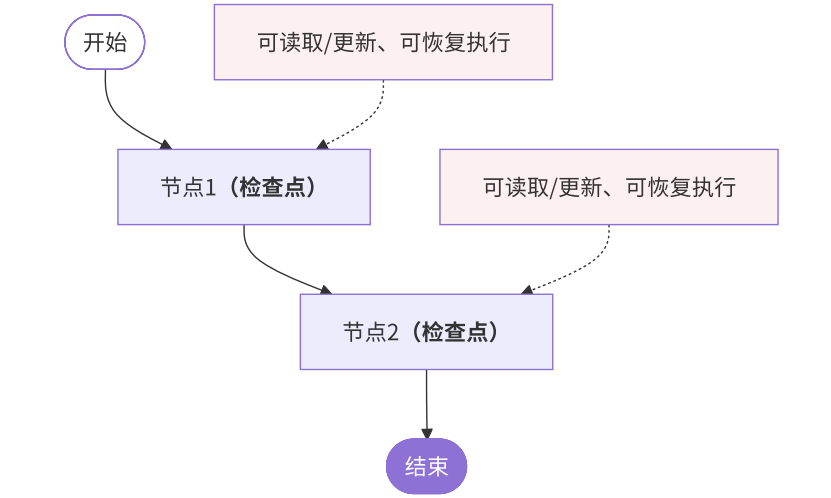
这个能力会很有用:
-
分析推理过程:理解 AI 如何得出最终结果,学习成功的决策路径。(看看AI是怎么"想"出好答案的)
-
定位和修复错误:精确找到错误发生的节点,测试修复方案而不影响原始流程。(找出AI在哪一步"想歪了")
-
探索替代方案:尝试不同的输入或中间状态,比较不同路径的效果。(试试不同的选择会不会更好)
3.2 时间旅行四步法
(伪代码)
3.2.1 第一步:初始执行工作流
# 编译需要checkpointer
graph = workflow.compile(checkpointer=InMemorySaver())

# 创建执行线程
import uuid
config = {
    "configurable": {
        "thread_id": uuid.uuid4(),   # 唯一线程标识
    }
}

# 执行工作流
state = graph.invoke({}, config)
3.2.2 第二步:查看历史检查点
# 获取所有历史状态(按时间倒序)
states = list(graph.get_state_history(config))

for state in states:
    print(f"检查点ID: {state.config['configurable']['checkpoint_id']}")
    print(f"下一步节点: {state.next}")
    print(f"当前状态: {state.values}")
    print("-" * 50)

# 输出示例:
# 检查点ID: 1f0d4d2b-bdc2-6f06-8002-9b67bb1d3867
# 下一步节点: ()
# 当前状态: {'...': '...'}

# 检查点ID: 1f0d4d2b-9506-6bf8-8001-6af0cdc2fea0
# 下一步节点: ('write_joke',)
# 当前状态: {'...': '...'}

# 检查点ID: 1f0d4d2b-7a6e-6dd7-8000-5cc1931477df
# 下一步节点: ('generate_topic',)
# 当前状态: {}

# 检查点ID: 1f0d4d2b-7a6c-643e-bfff-77054fa568c8
# 下一步节点: ('__start__',)
# 当前状态: {}
3.2.3 第三步:修改状态(可选)
-
update_state更新状态(会创建新的检查点分支) -
原始检查点保持不变
-
新分支可以独立发展
# 选择特定检查点
selected_state = states[1]   # 写笑话之前的检查点

# 修改状态数据
new_config = graph.update_state(
    selected_state.config,       # 原始配置
    values={"topic": "程序员"}   # 修改主题
)
3.2.4 第四步:从检查点恢复执行
-
输入为
None,因为状态已在检查点中 -
配置必须包含有效的
checkpoint_id:通过指定thread_id和checkpoint_id来调用图,可以从历史某个检查点开始重放执行,用于调试或探索不同路径。 -
执行从指定检查点继续,生成新的历史分支
# 从修改后的检查点继续执行
result = graph.invoke(None, new_config)   # 输入为None,因为状态已存在
print(result["joke"])                     # 输出关于程序员的新笑话
3.3 【完整示例】AI 笑话生成器
我们要创建一个生成笑话的系统:
-
第一步:想一个主题
-
第二步:根据主题写笑话
3.3.1 状态类型定义
from typing_extensions import TypedDict, NotRequired

class State(TypedDict):
    topic: NotRequired[str]   # 笑话主题,可选字段
    joke: NotRequired[str]    # 笑话内容,可选字段
3.3.2 节点函数实现
model = init_chat_model("gpt-4o-mini")
def generate_topic(state: State):
    """第一个AI调用:生成主题"""
    response = model.invoke("给我一个搞笑的笑话主题")
    return {"topic": response.content}   # 更新状态

def write_joke(state: State):
    """第二个AI调用:编写笑话"""
    response = model.invoke(f"写一个关于{state['topic']}的笑话")
    return {"joke": response.content}    # 更新状态
3.3.3 工作流构建
# 创建状态图
workflow = StateGraph(State)

# 添加节点
workflow.add_node("generate_topic", generate_topic)
workflow.add_node("write_joke", write_joke)

# 连接节点
workflow.add_edge(START, "generate_topic")
workflow.add_edge("generate_topic", "write_joke")
workflow.add_edge("write_joke", END)

# 编译并启用检查点
graph = workflow.compile(checkpointer=InMemorySaver())
执行工作流:

config = {"configurable": {"thread_id": "1"}}
result = graph.invoke({}, config)
print(result["joke"])
3.3.4 时间旅行调试过程
发现问题:最终笑话主题太宽泛
回溯分析:
# 查看所有检查点
states = list(graph.get_state_history(config))

# 检查主题生成节点后的状态
topic_state = states[1]   # generate_topic之后的检查点
print("AI生成的主题: ", topic_state.values["topic"])
修改测试:
# 修改为更具体的主题
new_config = graph.update_state(
    topic_state.config,
    values={"topic": "程序员调试代码时的趣事"}
)

# 重新执行
new_result = graph.invoke(None, new_config)
print("改进后的笑话: ", new_result["joke"])
持久化小结
在 LangGraph 中,持久化能力提供了:
-
自动化:在使用 LangGraph 时,持久化基础设施(检查点和存储)是自动处理的,无需手动配置。
-
多种存储后端:提供了多种检查点存储后端,包括内存(InMemorySaver 用于开发测试)、Postgres(PostgresSaver 用于生产)。
基于上述技术,LangGraph 支持以下强大功能:
| 功能 | 说明 |
|---|---|
| 状态查询 |
|
| 时间旅行与重放 | 通过指定 thread_id 和 checkpoint_id 来调用图,可以从历史某个检查点开始重放执行,用于调试或探索不同路径。 |
| 状态编辑 | graph.update_state(config, values):允许直接修改线程的当前状态。修改会遵循状态模式中定义的规则(例如,对列表是追加而非覆盖)。 |
| 人机交互 | 允许在执行的特定步骤暂停,让人工审查和修改状态后再继续。 |
| 记忆 |
线程自动记录完整的交互历史,实现多轮对话的记忆。 短期记忆:单次会话中保持的上下文信息; 长期记忆:跨会话保存的用户或应用数据 |
掌握了这些能力,我们就能构建出复杂、可靠、且包含记忆能力的 AI 系统。

欢迎加入 MCP 技术社区!与志同道合者携手前行,一同解锁 MCP 技术的无限可能!
更多推荐

 7
7 0
0- 0


 已为社区贡献4条内容

所有评论(0)