LangGraph 客服 Agent 是怎么搭起来的:从 AgentState 到四个节点
如果你想把这篇文章和源码对着看,可以先留意文中出现的几个文件名。这个系列会继续按源码往后拆;
这一篇只看一个文件:
TEXT
server/src/services/customerServiceAgent.js
它是本项目的客服 Agent 编排中心。
如果说 /api/chat 是聊天接口入口,那么 customerServiceAgent.js 就是:
TEXT
用户消息进入后,真正按步骤处理客服任务的流程图。
这个 Agent 做了什么
用户发来一句话以后,系统不是直接调用 DeepSeek。
它会按顺序做 4 件事:
TEXT
1. recognizeIntent:识别意图2. runBusinessAction:执行业务动作3. retrieveKnowledge:检索知识库4. generateReply:生成回复
源码里的图是这样搭的:
JS
const graph = new StateGraph(AgentState) .addNode('recognizeIntent', recognizeIntent) .addNode('runBusinessAction', runBusinessAction) .addNode('retrieveKnowledge', retrieveKnowledge) .addNode('generateReply', generateReply) .addEdge(START, 'recognizeIntent') .addEdge('recognizeIntent', 'runBusinessAction') .addEdge('runBusinessAction', 'retrieveKnowledge') .addEdge('retrieveKnowledge', 'generateReply') .addEdge('generateReply', END) .compile();
画成图:
Mermaid 流程图静态示意
START
↓
recognizeIntent / 识别意图
A
↓
runBusinessAction / 执行业务动作
B
↓
retrieveKnowledge / 检索知识库
C
↓
generateReply / 生成回复流
D
↓
END
4.1 引入的 LangGraph 方法
文件开头引入了:
JS
const { Annotation, END, START, StateGraph } = require('@langchain/langgraph');
这几个东西分别可以这样理解:
| 名称 | 作用 |
|---|---|
StateGraph |
创建一张可执行的流程图 |
Annotation |
定义图里的状态字段 |
START |
图的起点 |
END |
图的终点 |
本项目的 LangGraph 用法比较清晰:
TEXT
先定义状态 AgentState再定义节点函数再 addNode再 addEdge最后 compile
这就是搭一个 Agent 图的基本步骤。
4.2 定义 AgentState
项目里的 AgentState 是:
JS
const AgentState = Annotation.Root({ message: Annotation(), session: Annotation(), intentResult: Annotation(), loginRequired: Annotation(), actionResult: Annotation(), retrievedKnowledge: Annotation(), history: Annotation(), messages: Annotation(), stream: Annotation(),});
可以把它理解成:
TEXT
贯穿整个 Agent 流程的共享状态包。
每个节点都从里面拿东西,也往里面放东西。
字段含义:
| 字段 | 含义 |
|---|---|
message |
用户当前消息 |
session |
当前聊天会话 |
intentResult |
意图识别结果 |
loginRequired |
是否需要登录 |
actionResult |
业务动作结果 |
retrievedKnowledge |
知识库检索结果 |
history |
历史对话 |
messages |
给大模型的消息列表 |
stream |
大模型回复流 |
比如第一个节点返回:
JS
return { intentResult };
后面的节点就能通过:
JS
state.intentResult
拿到它。
4.3 节点 1:recognizeIntent
第一个节点:
JS
async function recognizeIntent(state) { const intentResult = await intentService.process(state.message, state.session); return { intentResult };}
它做的事是:
TEXT
根据用户消息和当前会话,识别用户想干什么。
例如用户说:
TEXT
南屿 AirBuds 2 还有货吗?
识别结果可能是:
JSON
{ "intent": "PRODUCT_INQUIRY", "entities": { "product_name": "南屿 AirBuds 2 主动降噪耳机" }, "emotion": "neutral", "retrievalQuery": "南屿 AirBuds 2 还有货吗?"}
这个节点本身不直接调 DeepSeek,而是交给:
TEXT
intentService.process()
因为意图识别还有规则修正、多轮上下文、情绪记录等逻辑。
4.3 节点 2:runBusinessAction
第二个节点:
JS
async function runBusinessAction(state) { const { intentResult, session } = state; if (!intentResult || intentResult.type === 'clarification') { return { actionResult: null, loginRequired: false }; } if (isLoginRequired(intentResult.intent, session)) { return { actionResult: null, loginRequired: true }; } const actionResult = await actionService.execute( intentResult.intent, intentResult.entities, session.user_id, session.id ); return { actionResult, loginRequired: false };}
这个节点的关键词是:
TEXT
业务动作。
它会根据意图调用 actionService.execute()。
例如:
| 意图 | 业务动作 |
|---|---|
QUERY_ORDER |
查询订单 |
CANCEL_ORDER |
取消订单 |
REFUND |
创建退款申请 |
COMPLAINT |
创建投诉 |
PRODUCT_INQUIRY |
查询商品 |
它还会判断是否需要登录:
JS
const loginRequiredIntents = ['QUERY_ORDER', 'CANCEL_ORDER', 'REFUND'];
所以游客问商品可以继续,游客要退款会被拦截。
4.3 节点 3:retrieveKnowledge
第三个节点:
JS
async function retrieveKnowledge(state) { if (!state.intentResult || state.intentResult.type === 'clarification' || state.loginRequired) { return { retrievedKnowledge: [] }; } const retrievedKnowledge = await knowledgeService.search( state.intentResult.retrievalQuery || state.message, { intent: state.intentResult.intent, } ); return { retrievedKnowledge };}
它做的是:
TEXT
按用户问题和意图检索知识库。
不是所有场景都检索。
比如:
- 需要澄清时,不检索
- 需要登录但未登录时,不检索
- 商品咨询、通用问答、投诉,更适合检索
这样可以避免不必要的知识库调用。
4.3 节点 4:generateReply
第四个节点:
JS
async function generateReply(state) { if (!state.intentResult || state.intentResult.type === 'clarification' || state.loginRequired) { return { stream: null }; } const history = await contextService.getContext(state.session.id); const messages = [...history, new HumanMessage(state.message)]; const stream = await deepseekService.chat(messages, { businessData: state.actionResult && state.actionResult.data, actionMessage: state.actionResult && state.actionResult.message, retrievedKnowledge: state.retrievedKnowledge, intent: state.intentResult.intent, entities: state.intentResult.entities, emotion: state.intentResult.emotion, sootheMode: state.intentResult.sootheMode, settings: state.intentResult.settings, }); return { history, messages, stream };}
这个节点把所有材料汇总起来:
- 历史对话
- 当前消息
- 业务数据
- 知识库内容
- 意图和实体
- 情绪信息
- 店铺设置
然后调用:
TEXT
deepseekService.chat()
得到一个流式回复 stream。
4.4 把节点连接成图
前面 4 个节点定义完以后,项目用 addEdge 串起来:
JS
.addEdge(START, 'recognizeIntent').addEdge('recognizeIntent', 'runBusinessAction').addEdge('runBusinessAction', 'retrieveKnowledge').addEdge('retrieveKnowledge', 'generateReply').addEdge('generateReply', END)
这就是流程顺序。
最后:
JS
.compile();
表示把这张图编译成可执行对象。
调用入口是:
JS
async function prepareReply({ message, session }) { return graph.invoke({ message, session, retrievedKnowledge: [], loginRequired: false, });}
聊天接口只需要调用:
JS
customerServiceAgent.prepareReply({ message, session })
就能拿到整张图执行后的状态。
用一个例子串起来
用户问:
TEXT
南屿 AirBuds 2 主动降噪耳机还有货吗?
流程可能是:
TEXT
recognizeIntent-> 识别 PRODUCT_INQUIRY,提取 product_namerunBusinessAction-> actionService.queryProduct() 查 MySQL,拿到库存 86、价格 399retrieveKnowledge-> Qdrant 检索商品说明,找到主动降噪、续航等知识generateReply-> DeepSeek 结合业务数据和知识库生成回复流
最终回复可能是:
TEXT
有货的。南屿 AirBuds 2 当前库存是 86 件,价格是 399 元。这款支持最高 42dB 混合主动降噪,单次续航约 7 小时,适合通勤和办公室使用。
这句话里:
- 库存、价格来自 MySQL
- 降噪、续航来自知识库/商品说明
- 表达方式来自大模型
- 流程顺序由 LangGraph 保证
最后用一句话记住
这个项目里的 LangGraph Agent 不是神秘东西。
它就是一张按顺序执行的客服流程图:
TEXT
识别意图-> 执行业务动作-> 检索知识库-> 生成回复
AgentState 负责在节点之间传数据,addNode 定义每一步,addEdge 定义顺序,graph.invoke() 真正执行。
看懂 customerServiceAgent.js,就看懂了这个 AI 客服的主干编排。
学AI大模型的正确顺序,千万不要搞错了
🤔2026年AI风口已来!各行各业的AI渗透肉眼可见,超多公司要么转型做AI相关产品,要么高薪挖AI技术人才,机遇直接摆在眼前!
有往AI方向发展,或者本身有后端编程基础的朋友,直接冲AI大模型应用开发转岗超合适!
就算暂时不打算转岗,了解大模型、RAG、Prompt、Agent这些热门概念,能上手做简单项目,也绝对是求职加分王🔋
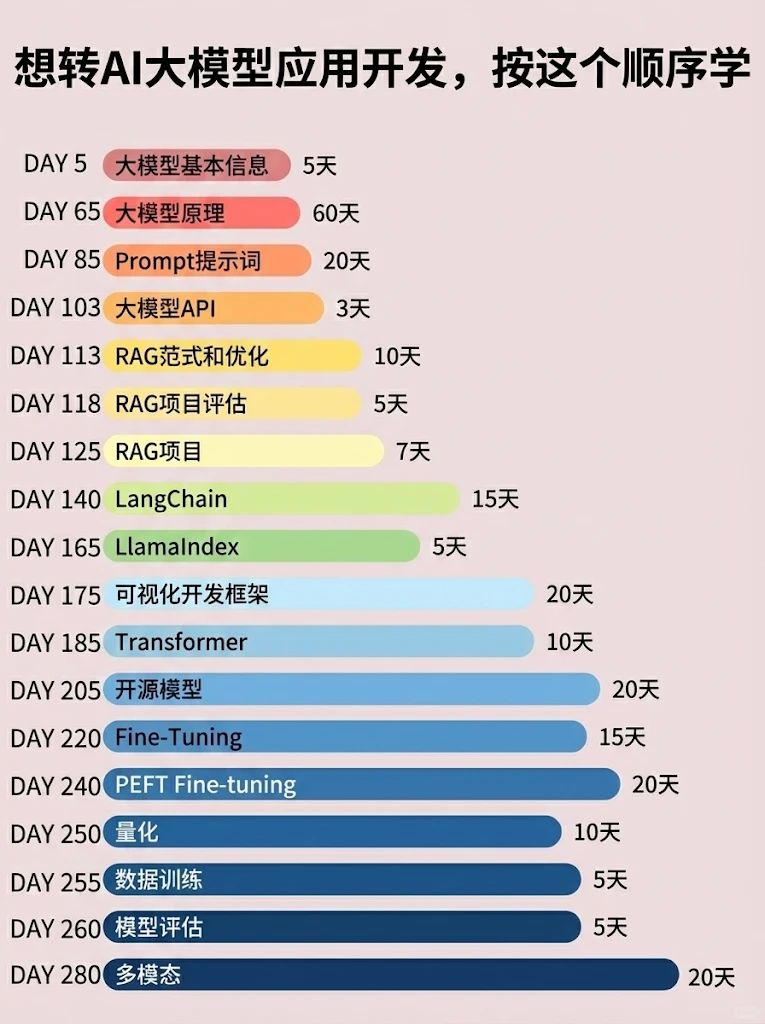
📝给大家整理了超全最新的AI大模型应用开发学习清单和资料,手把手帮你快速入门!👇👇
学习路线:
✅大模型基础认知—大模型核心原理、发展历程、主流模型(GPT、文心一言等)特点解析
✅核心技术模块—RAG检索增强生成、Prompt工程实战、Agent智能体开发逻辑
✅开发基础能力—Python进阶、API接口调用、大模型开发框架(LangChain等)实操
✅应用场景开发—智能问答系统、企业知识库、AIGC内容生成工具、行业定制化大模型应用
✅项目落地流程—需求拆解、技术选型、模型调优、测试上线、运维迭代
✅面试求职冲刺—岗位JD解析、简历AI项目包装、高频面试题汇总、模拟面经
以上6大模块,看似清晰好上手,实则每个部分都有扎实的核心内容需要吃透!
我把大模型的学习全流程已经整理📚好了!抓住AI时代风口,轻松解锁职业新可能,希望大家都能把握机遇,实现薪资/职业跃迁~
这份完整版的大模型 AI 学习资料已经上传CSDN,朋友们如果需要可以微信扫描下方CSDN官方认证二维码免费领取【保证100%免费】


欢迎加入 MCP 技术社区!与志同道合者携手前行,一同解锁 MCP 技术的无限可能!
更多推荐
 7
7 0
0- 0


 已为社区贡献52条内容

所有评论(0)