Spring AI中模型调用耗时高响应慢问题分析
Spring AI 中模型调用耗时高响应慢问题分析
摘要
本文针对 Spring AI + Spring AI Alibaba 框架调用阿里云 DashScope 大模型 API 时出现的响应耗时异常问题(20-30秒 vs 网页端秒级响应),从框架源码层面深入分析并定位了两个核心原因:
- Qwen3 系列模型默认启用思考模式:由于
enable-thinking参数未显式配置,DashScope 服务端默认启用思考模式,导致模型在生成可见回复前进行大量内部推理,耗时约20秒。 - HTTP 客户端无连接池:默认使用
SimpleClientHttpRequestFactory(基于HttpURLConnection),每次请求需新建 TCP+TLS 连接,增加2-5秒延迟。
文章提供了完整的解决方案:通过配置 enable-thinking=false 关闭思考模式,并自定义 RestClient.Builder 配置 Apache HttpClient5 连接池。两项修复结合可将响应时间从20-30秒降至2-3秒,显著提升应用性能。
base-ai-assistant
基于 Spring Boot、Spring AI、Spring AI Alibaba 实现的 RAG、MCP、Agent 智能体基础服务框架应用。智能客服、智能运维、智能助手、简单工作流/垂直领域智能体的基础应用架构版本,按需拓展。
开源地址:https://github.com/endcy/base-ai-assistant
1. 背景
在使用 Spring AI + Spring AI Alibaba 框架调用阿里云 DashScope 大模型 API 时,出现接口响应耗时异常偏高的情况。通过阿里云百炼控制台的在线测试页面使用同一 API Key 调用相同模型,响应速度正常(秒级),但通过工程代码调用同一接口,耗时可达 20 秒以上。
本文从 Spring AI Alibaba 框架源码角度出发,分析导致调用慢的两个框架层面原因,并给出解决方案。无论是Qwen3系列模型还是其他引入DashScope的模型配置方式,均可尝试优化。
2. 问题现象
- 通过 Spring AI ChatClient 调用 DashScope 模型,简单问答场景耗时 20~30 秒
- 使用相同 API Key 在阿里云百炼网页端测试,响应秒级返回
- 模型版本为 Qwen3 系列
3. 调用链路全景
这里以基于开源工程(base-ai-assistant)改造的企业项目智能客服工单系统为例,做功能调用。
定位问题之前,先梳理从 HTTP 请求到 DashScope API 的完整调用链路,明确请求经过了哪些组件。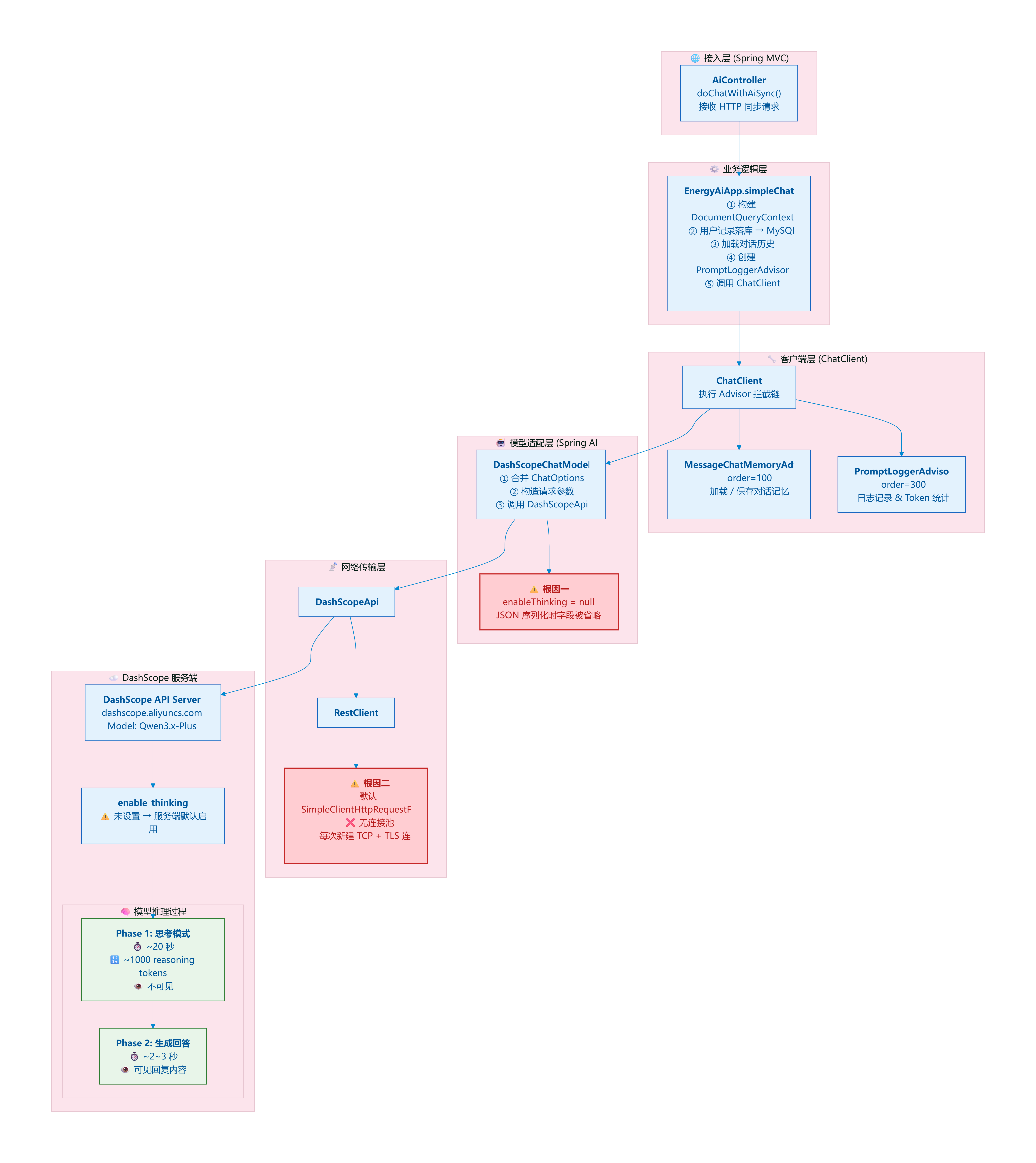
简介根因分析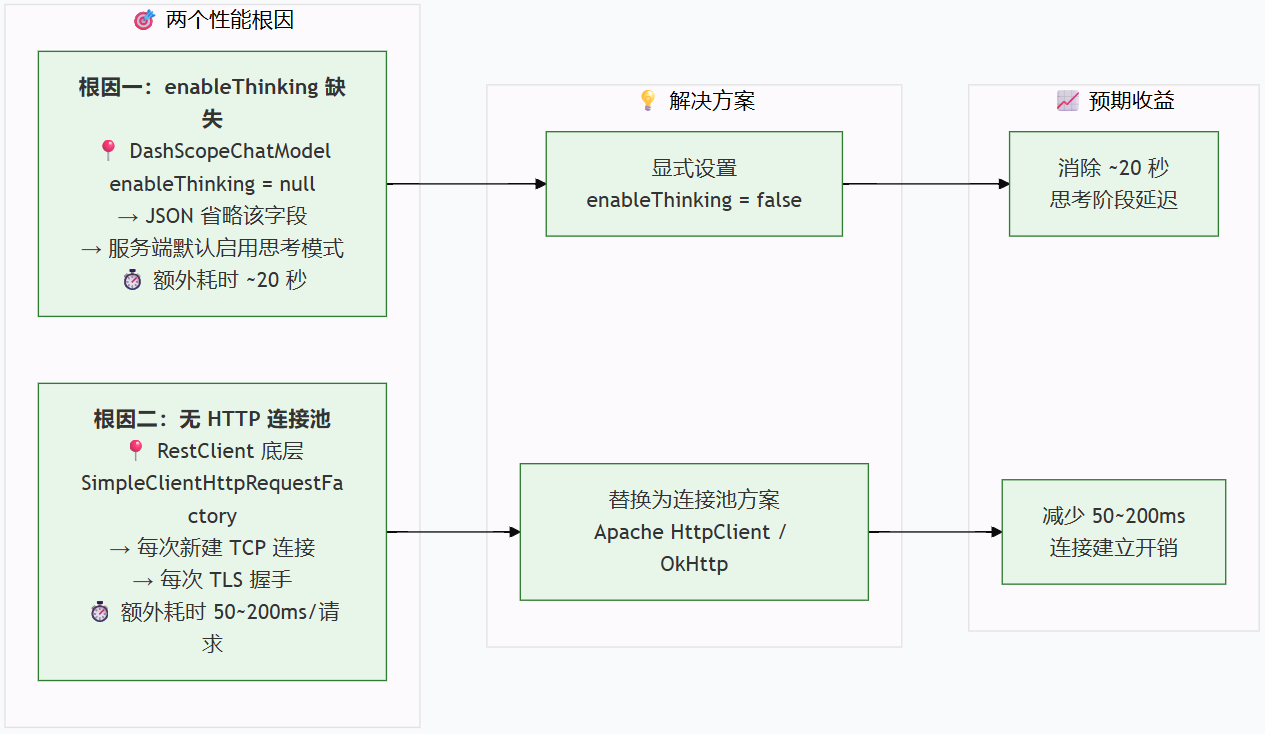
从链路中可以看到,请求在到达 DashScope API 服务端之前经过了 Spring AI 的 Advisor 链和 ChatModel 抽象层。两个导致慢的根因分别位于链路的不同层级:根因一在 DashScopeChatModel 构造请求参数阶段,根因二在 DashScopeApi 的 HTTP 传输阶段。
4. 原因分析
经过排查,慢请求由两个独立因素叠加造成:
| 因素 | 影响程度 | 状态 |
|---|---|---|
| Qwen3 模型思考模式默认启用 | ~90% | 需修复 |
| HTTP 客户端无连接池 | ~10% | 建议修复 |
4.1 根因一:Qwen3 及之后模型思考模式默认启用(主要原因)
4.1.1 现象特征
DashScope API 返回的响应时间异常长,但模型实际输出的可见文本内容并不多。这说明模型在生成可见内容之前,进行了大量不可见的内部处理。
4.1.2 源码分析
请求参数的构建链路:
Spring AI Alibaba 的 DashScopeChatModel 在发起 API 调用时,会将 DashScopeChatOptions 中的参数序列化为 JSON 请求体发送给 DashScope 服务端。关键类是 ChatCompletionRequestParameter(DashScope API 请求参数 Record):
// spring-ai-alibaba-dashscope 中的 ChatCompletionRequestParameter(简化)
@JsonInclude(JsonInclude.Include.NON_NULL)   // <-- 关键注解
public record ChatCompletionRequestParameter(
    @JsonProperty("model") String model,
    @JsonProperty("messages") List<ChatCompletionMessage> messages,
    @JsonProperty("enable_thinking") Boolean enableThinking,
    @JsonProperty("thinking_budget") Integer thinkingBudget,
    // ...其他参数
) {}
@JsonInclude(JsonInclude.Include.NON_NULL) 意味着:当字段值为 null 时,该字段不会出现在 JSON 请求体中。
DashScopeChatOptions 中 enableThinking 的默认值:
// DashScopeChatOptions(简化)
public class DashScopeChatOptions implements ChatOptions {
    private Boolean enableThinking;     // 包装类 Boolean,默认 null
    private Integer thinkingBudget;     // 默认 null
    // ...
}
enableThinking 是 Boolean 包装类型,构造器中未赋初始值,默认为 null。
完整的逻辑链:
DashScopeChatOptions.enableThinking = null(未配置时的默认值)
    ↓ Jackson 序列化(@JsonInclude NON_NULL)
JSON 请求体中不包含 "enable_thinking" 字段(字段被彻底省略)
    ↓ DashScope 服务端行为
对于 Qwen3 系列模型,服务端在未收到 enable_thinking 参数时,
默认启用思考模式(Thinking Mode)
    ↓ 模型行为
模型在生成可见回复前,先进行大量内部推理(生成 reasoning tokens),
耗时可达 20 秒以上,但这些推理内容对用户不可见
4.1.3 为什么网页端测试很快?
阿里云百炼控制台的在线测试页面,在调用 Qwen3 模型时显式关闭了思考模式(或使用了不同的默认配置),因此模型直接生成可见回复,无需经过内部推理阶段。
4.1.4 解决方案
方案 A:通过配置项全局关闭(推荐)
在 Spring Boot 配置文件(或 Apollo/Nacos 等配置中心)中添加:
spring.ai.dashscope.chat.options.enable-thinking=false
该配置会被 DashScopeChatProperties 读取并设置到默认的 DashScopeChatOptions 中,最终序列化时请求体中会包含 "enable_thinking": false,DashScope 服务端收到后关闭思考模式。
方案 B:通过代码在 ChatClient 级别设置
@Bean("simpleChatClient")
public ChatClient simpleChatClient(DashScopeChatModel dashscopeChatModel) {
    return ChatClient.builder(dashscopeChatModel)
        .defaultOptions(DashScopeChatOptions.builder()
            .withEnableThinking(false)   // 关闭思考模式
            .build())
        .build();
}
注意:spring-ai-alibaba v1.1.2.3 中,
DashScopeChatOptionsBuilder的新方法enableThinking(false)存在失效问题,建议暂时使用已废弃的withEnableThinking(false)方法替代。
方案 C:对需要思考能力的场景限制推理预算
如果某些复杂场景(如 RAG、Agent 推理)需要保留思考能力,可以限制推理 token 上限:
# 全局关闭思考(简单问答场景)
spring.ai.dashscope.chat.options.enable-thinking=false
// 对需要思考的 ChatClient 单独配置推理预算
@Bean("ragChatClient")
public ChatClient ragChatClient(DashScopeChatModel dashscopeChatModel) {
    return ChatClient.builder(dashscopeChatModel)
        .defaultOptions(DashScopeChatOptions.builder()
            .withEnableThinking(true)
            .withThinkingBudget(4096)   // 限制推理 token 上限
            .build())
        .build();
}
4.2 根因二:HTTP 客户端无连接池(次要原因)
4.2.1 源码分析
DashScopeChatAutoConfiguration 在创建 DashScopeChatModel 时,会通过 ObjectProvider<RestClient.Builder> 获取 RestClient.Builder Bean:
// DashScopeChatAutoConfiguration(反编译简化)
@AutoConfiguration(after = {RestClientAutoConfiguration.class, ...})
public DashScopeChatModel dashScopeChatModel(
    ...
    ObjectProvider<RestClient.Builder> restClientBuilderProvider,
    ...
) {
    RestClient.Builder builder = restClientBuilderProvider
        .getIfAvailable(() -> RestClient.builder());   // 无自定义 Bean 时使用默认
    // ...
}
当项目中没有自定义 RestClient.Builder Bean 时,DashScopeApi 内部会使用默认创建逻辑:
// DashScopeApi 内部的默认 Builder(反编译简化)
private static RestClient.Builder createDefaultRestClientBuilder() {
    SimpleClientHttpRequestFactory factory = new SimpleClientHttpRequestFactory();
    factory.setConnectTimeout(60000);   // 60s
    factory.setReadTimeout(180000);     // 180s
    return RestClient.builder().requestFactory(factory);
}
SimpleClientHttpRequestFactory 底层使用 Java 原生 HttpURLConnection,不支持连接池:
- 每次 API 请求都需新建 TCP 连接 + TLS 握手
- 建连耗时约 500ms ~ 3s(视网络环境)
- 高并发下可能引发端口耗尽
4.2.2 解决方案
自定义 RestClient.Builder Bean,使用 Apache HttpClient5 替换默认的 SimpleClientHttpRequestFactory。Spring AI Alibaba 的自动配置会优先消费该 Bean。
@Configuration
public class RestClientTimeoutConfig {

    @Bean
    public RestClient.Builder restClientBuilder() {
        // 连接池管理器
        PoolingHttpClientConnectionManager connManager = new PoolingHttpClientConnectionManager();
        connManager.setMaxTotal(50);                        // 最大连接数
        connManager.setDefaultMaxPerRoute(20);              // 单路由最大连接数
        connManager.setDefaultConnectionConfig(
            ConnectionConfig.custom()
                .setConnectTimeout(Timeout.of(10, TimeUnit.SECONDS))
                .setSocketTimeout(Timeout.of(180, TimeUnit.SECONDS))
                .build());

        // 请求配置
        RequestConfig requestConfig = RequestConfig.custom()
            .setConnectionRequestTimeout(Timeout.of(10, TimeUnit.SECONDS))
            .setResponseTimeout(Timeout.of(180, TimeUnit.SECONDS))
            .build();

        // HttpClient 实例
        CloseableHttpClient httpClient = HttpClientBuilder.create()
            .setConnectionManager(connManager)
            .setDefaultRequestConfig(requestConfig)
            .evictIdleConnections(TimeValue.of(60, TimeUnit.SECONDS))
            .build();

        HttpComponentsClientHttpRequestFactory factory =
            new HttpComponentsClientHttpRequestFactory(httpClient);

        return RestClient.builder().requestFactory(factory);
    }
}
配置后,DashScopeApi 构造时通过 restClientBuilder.clone() 复用该 Builder 的连接池配置,在其基础上追加 baseUrl 和 API Key 等 DashScope 特有参数。
5. 修复效果对比
| 修复项 | 解决的问题 | 预计节省耗时 |
|---|---|---|
配置 enable-thinking=false |
消除模型内部推理延迟 | ~20s |
自定义 RestClient.Builder 连接池 |
消除每次请求的 TCP+TLS 建连延迟 | ~2-5s |
两项修复全部应用后,简单问答场景的总耗时预计从20~30 秒降至 2~3 秒。
6. 总结
Spring AI Alibaba 调用 DashScope 模型响应慢,主要有两个框架层面的原因:
-
Qwen3 系列模型默认启用思考模式:当
enable-thinking未显式配置时,DashScopeChatOptions.enableThinking为null,经 Jackson@JsonInclude(NON_NULL)序列化后请求体中不包含该字段,DashScope 服务端按 Qwen3 默认行为启用思考模式,模型在回答前进行大量内部推理(耗时约 20 秒)。解决方式:配置spring.ai.dashscope.chat.options.enable-thinking=false。 -
HTTP 客户端默认无连接池:未自定义
RestClient.BuilderBean 时,DashScopeApi使用SimpleClientHttpRequestFactory(基于HttpURLConnection,无连接池),每次请求需新建 TCP+TLS 连接。解决方式:自定义RestClient.BuilderBean,配置 Apache HttpClient5 连接池。
两项修复相互独立,建议同时应用。

欢迎加入 MCP 技术社区!与志同道合者携手前行,一同解锁 MCP 技术的无限可能!
更多推荐

 3
3 0
0- 0


 已为社区贡献2条内容

所有评论(0)