设计模式之备忘录模式
1 概念定义
备忘录模式是一种行为型设计模式,它允许在不破坏封装性的前提下,捕获并外部化一个对象的内部状态,以便在将来某个时刻可以将该对象恢复到之前保存的状态。
2 核心思想
-
状态保存:在不暴露对象实现细节的情况下保存对象状态
-
恢复机制:能够将对象恢复到之前的状态
-
封装保护:备忘录对象保护状态不被外部直接访问
-
职责分离:发起人负责状态管理,备忘录负责状态存储,负责人负责状态保存
3 主要角色
Originator(发起人):需要保存和恢复状态的对象
Memento(备忘录):存储发起人内部状态的对象
Caretaker(负责人):负责保存和管理备忘录,但不能操作备忘录内容
4 应用场景
以文本编辑器系统为例:
用户可以编辑文档内容
支持撤销(Undo)和重做(Redo)操作
需要保存文档的历史状态
不能暴露文档的内部数据结构
需要管理多个历史版本
5 UML
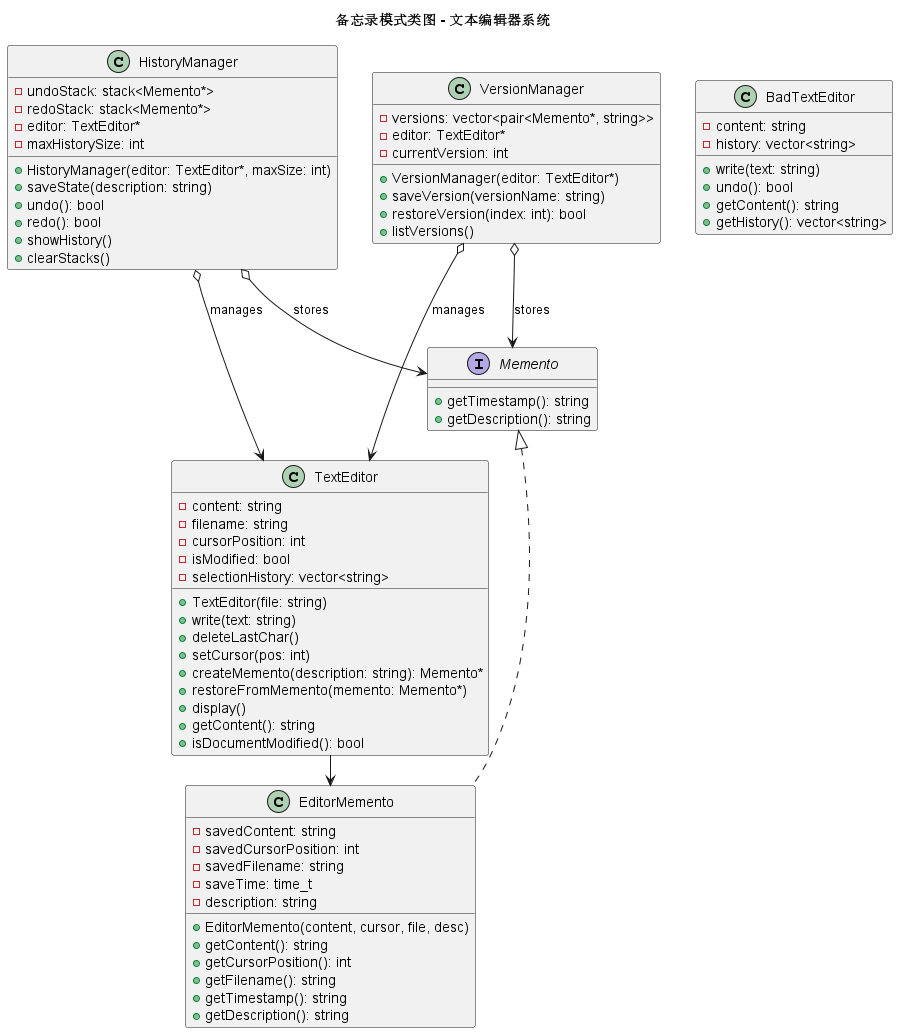
6 C++代码实现
#include <iostream>
#include <string>
#include <vector>
#include <memory>
#include <stack>
#include <ctime>
#include <sstream>
using namespace std;

// ========== 备忘录接口(窄接口) ==========
class Memento {
public:
    virtual ~Memento() = default;

    // 通常只提供元数据访问,不提供状态访问
    virtual string getTimestamp() const = 0;
    virtual string getDescription() const = 0;
};

// ========== 发起人:文本编辑器 ==========
class TextEditor {
private:
    string content;
    string filename;
    int cursorPosition;
    bool isModified;
    vector<string> selectionHistory;

public:
    TextEditor(const string& file = "untitled.txt")
        : filename(file), cursorPosition(0), isModified(false) {
        cout << "创建新文档: " << filename << endl;
    }

    // 编辑操作
    void write(const string& text) {
        content += text;
        cursorPosition = content.length();
        isModified = true;
        cout << "写入文本: \"" << text << "\"" << endl;
    }

    void deleteLastChar() {
        if (!content.empty()) {
            char deleted = content.back();
            content.pop_back();
            cursorPosition = content.length();
            isModified = true;
            cout << "删除字符: '" << deleted << "'" << endl;
        }
    }

    void setCursor(int pos) {
        if (pos >= 0 && pos <= content.length()) {
            cursorPosition = pos;
            cout << "光标移动到位置: " << pos << endl;
        }
    }

    // 保存当前状态到备忘录
    class EditorMemento : public Memento {
    private:
        string savedContent;
        int savedCursorPosition;
        string savedFilename;
        time_t saveTime;
        string description;

    public:
        EditorMemento(const string& content, int cursor, const string& file,
                      const string& desc = "")
            : savedContent(content), savedCursorPosition(cursor),
              savedFilename(file), saveTime(time(nullptr)), description(desc) {}

        // 只允许发起人访问这些方法
        friend class TextEditor;

        string getContent() const { return savedContent; }
        int getCursorPosition() const { return savedCursorPosition; }
        string getFilename() const { return savedFilename; }

        string getTimestamp() const override {
            char buffer[80];
            struct tm* timeinfo = localtime(&saveTime);
            strftime(buffer, sizeof(buffer), "%Y-%m-%d %H:%M:%S", timeinfo);
            return string(buffer);
        }

        string getDescription() const override {
            return description.empty() ? "自动保存" : description;
        }
    };

    // 创建备忘录
    Memento* createMemento(const string& description = "") {
        cout << "创建备忘录: " << description << endl;
        return new EditorMemento(content, cursorPosition, filename, description);
    }

    // 从备忘录恢复
    void restoreFromMemento(Memento* memento) {
        EditorMemento* editorMemento = dynamic_cast<EditorMemento*>(memento);
        if (editorMemento) {
            cout << "恢复备忘录: " << editorMemento->getDescription()
                 << " (创建于: " << editorMemento->getTimestamp() << ")" << endl;

            content = editorMemento->getContent();
            cursorPosition = editorMemento->getCursorPosition();
            filename = editorMemento->getFilename();
            isModified = true;
        }
    }

    // 显示当前内容
    void display() const {
        cout << "\n=== 文档内容 ===" << endl;
        cout << "文件名: " << filename << endl;
        cout << "光标位置: " << cursorPosition << endl;
        cout << "修改状态: " << (isModified ? "已修改" : "未修改") << endl;
        cout << "内容: \"" << content << "\"" << endl;
        cout << string(50, '-') << endl;
    }

    string getContent() const { return content; }
    bool isDocumentModified() const { return isModified; }
};

// ========== 负责人:历史记录管理器 ==========
class HistoryManager {
private:
    stack<Memento*> undoStack;      // 撤销栈
    stack<Memento*> redoStack;      // 重做栈
    TextEditor* editor;             // 关联的编辑器
    int maxHistorySize;              // 最大历史记录数

public:
    HistoryManager(TextEditor* e, int maxSize = 20)
        : editor(e), maxHistorySize(maxSize) {}

    ~HistoryManager() {
        clearStacks();
    }

    // 保存当前状态(在执行操作前调用)
    void saveState(const string& description = "") {
        // 检查历史记录数量
        if (undoStack.size() >= maxHistorySize) {
            // 删除最老的记录
            delete undoStack.front();
            // 注意:stack不能直接访问front,这里仅为示例
            // 实际应用可能需要使用deque
        }

        // 创建新备忘录并压入撤销栈
        Memento* memento = editor->createMemento(description);
        undoStack.push(memento);

        // 清空重做栈(新操作使重做历史失效)
        while (!redoStack.empty()) {
            delete redoStack.top();
            redoStack.pop();
        }

        cout << "历史记录已保存,当前撤销栈大小: " << undoStack.size() << endl;
    }

    // 撤销操作
    bool undo() {
        if (undoStack.empty()) {
            cout << "没有可以撤销的操作!" << endl;
            return false;
        }

        cout << "\n执行撤销操作..." << endl;

        // 获取当前状态(用于重做)
        Memento* current = editor->createMemento("当前状态");
        redoStack.push(current);

        // 恢复到上一个状态
        Memento* previous = undoStack.top();
        undoStack.pop();
        editor->restoreFromMemento(previous);

        // 清理不再需要的备忘录
        delete previous;

        return true;
    }

    // 重做操作
    bool redo() {
        if (redoStack.empty()) {
            cout << "没有可以重做的操作!" << endl;
            return false;
        }

        cout << "\n执行重做操作..." << endl;

        // 获取当前状态(用于撤销)
        Memento* current = editor->createMemento("当前状态");
        undoStack.push(current);

        // 恢复到重做状态
        Memento* next = redoStack.top();
        redoStack.pop();
        editor->restoreFromMemento(next);

        // 清理不再需要的备忘录
        delete next;

        return true;
    }

    // 查看历史记录
    void showHistory() const {
        cout << "\n=== 历史记录 ===" << endl;

        // 创建临时栈来遍历
        stack<Memento*> temp = undoStack;
        int index = 0;

        while (!temp.empty()) {
            Memento* m = temp.top();
            temp.pop();
            cout << "[" << index++ << "] " << m->getDescription()
                 << " (保存于: " << m->getTimestamp() << ")" << endl;
        }

        if (index == 0) {
            cout << "暂无历史记录" << endl;
        }
        cout << string(50, '-') << endl;
    }

    void clearStacks() {
        while (!undoStack.empty()) {
            delete undoStack.top();
            undoStack.pop();
        }
        while (!redoStack.empty()) {
            delete redoStack.top();
            redoStack.pop();
        }
    }
};

// ========== 扩展:支持多个历史版本 ==========
class VersionManager {
private:
    vector<pair<Memento*, string>> versions;  // 版本列表
    TextEditor* editor;
    int currentVersion;

public:
    VersionManager(TextEditor* e) : editor(e), currentVersion(-1) {}

    ~VersionManager() {
        for (auto& v : versions) {
            delete v.first;
        }
    }

    // 保存版本
    void saveVersion(const string& versionName) {
        Memento* memento = editor->createMemento(versionName);
        versions.push_back({memento, versionName});
        currentVersion = versions.size() - 1;
        cout << "保存版本: " << versionName << " (v" << currentVersion + 1 << ")" << endl;
    }

    // 恢复到指定版本
    bool restoreVersion(int index) {
        if (index < 0 || index >= versions.size()) {
            cout << "无效的版本索引!" << endl;
            return false;
        }

        cout << "恢复到版本: " << versions[index].second << endl;
        editor->restoreFromMemento(versions[index].first);
        currentVersion = index;
        return true;
    }

    // 显示所有版本
    void listVersions() const {
        cout << "\n=== 版本历史 ===" << endl;
        for (size_t i = 0; i < versions.size(); ++i) {
            cout << "v" << i + 1 << ": " << versions[i].second;
            if (i == currentVersion) {
                cout << " (当前)";
            }
            cout << " - 创建于: " << versions[i].first->getTimestamp() << endl;
        }
        cout << string(50, '-') << endl;
    }
};

// ========== 不使用备忘录模式的直接实现(对比) ==========
class BadTextEditor {
private:
    string content;
    vector<string> history;  // 直接保存内容,暴露了内部状态

public:
    void write(const string& text) {
        // 问题:需要手动管理历史
        history.push_back(content);  // 保存前状态
        content += text;
    }

    bool undo() {
        if (!history.empty()) {
            content = history.back();
            history.pop_back();
            return true;
        }
        return false;
    }

    // 问题1:无法保存多个相关的状态(如光标位置、格式等)
    // 问题2:历史记录直接暴露了内容
    // 问题3:无法控制对历史记录的访问
    // 问题4:如果内容很大,频繁复制会浪费内存
    // 问题5:无法添加元数据(时间戳、描述等)

    string getContent() const { return content; }
    const vector<string>& getHistory() const { return history; }  // 暴露内部状态
};

// ========== 客户端代码 ==========
int main() {
    cout << "=== 备忘录模式演示:文本编辑器 ===\n" << endl;

    // 创建编辑器和历史管理器
    TextEditor editor("document.txt");
    HistoryManager history(&editor);
    VersionManager versions(&editor);

    // 显示初始状态
    editor.display();

    // 1. 基本编辑操作
    cout << "\n【1. 基本编辑操作】" << endl;

    history.saveState("初始状态");
    editor.write("Hello");
    history.saveState("写入Hello");

    editor.write(" World");
    history.saveState("写入World");

    editor.display();

    // 2. 撤销操作
    cout << "\n【2. 撤销操作】" << endl;
    history.undo();  // 撤销 " World"
    editor.display();

    history.undo();  // 撤销 "Hello"
    editor.display();

    // 3. 重做操作
    cout << "\n【3. 重做操作】" << endl;
    history.redo();  // 重做 "Hello"
    editor.display();

    history.redo();  // 重做 " World"
    editor.display();

    // 4. 查看历史
    cout << "\n【4. 查看历史记录】" << endl;
    history.showHistory();

    // 5. 版本管理
    cout << "\n【5. 版本管理】" << endl;

    editor.write("!");
    versions.saveVersion("添加感叹号");

    editor.write(" How are you?");
    versions.saveVersion("添加问候语");

    editor.display();

    versions.listVersions();

    // 恢复到第一个版本
    versions.restoreVersion(0);
    editor.display();

    // 6. 复杂操作序列
    cout << "\n【6. 复杂操作序列】" << endl;

    TextEditor editor2("complex.txt");
    HistoryManager history2(&editor2);

    // 模拟一系列编辑操作
    history2.saveState("开始编辑");
    editor2.write("第1行: 这是第一行文本\n");
    history2.saveState("添加第一行");

    editor2.write("第2行: 这是第二行文本\n");
    history2.saveState("添加第二行");

    editor2.setCursor(5);
    editor2.deleteLastChar();  // 删除一个字符
    history2.saveState("删除字符");

    editor2.write("【修改】");
    history2.saveState("插入文本");

    editor2.display();

    // 多次撤销
    cout << "\n多次撤销:" << endl;
    history2.undo();  // 撤销插入文本
    editor2.display();

    history2.undo();  // 撤销删除字符
    editor2.display();

    history2.undo();  // 撤销添加第二行
    editor2.display();

    // 7. 对比:不使用备忘录模式
    cout << "\n=== 对比:不使用备忘录模式 ===" << endl;

    BadTextEditor badEditor;
    badEditor.write("Hello");
    badEditor.write(" World");

    cout << "当前内容: " << badEditor.getContent() << endl;

    // 问题:可以直接修改历史记录
    auto& history = badEditor.getHistory();
    history.clear();  // 可以随意清空历史

    badEditor.undo();  // 现在无法正常工作
    cout << "撤销后内容: " << badEditor.getContent() << endl;

    return 0;
}
7 总结
不使用备忘录模式的坏处
如果不使用备忘录模式,可能会采用以下几种实现方式:
方式1:直接保存状态到历史列表
class TextEditorWithHistory {
private:
    string content;
    vector<string> contentHistory;  // 直接保存内容副本
    int cursorPosition;
    vector<int> cursorHistory;      // 分开保存光标位置

public:
    void saveState() {
        contentHistory.push_back(content);
        cursorHistory.push_back(cursorPosition);
    }

    void undo() {
        if (!contentHistory.empty()) {
            content = contentHistory.back();
            contentHistory.pop_back();
            cursorPosition = cursorHistory.back();
            cursorHistory.pop_back();
        }
    }

    // 问题1:需要为每个状态属性维护一个历史列表
    // 问题2:如果添加新属性,需要修改所有历史相关代码
    // 问题3:历史记录直接暴露了内部数据
    // 问题4:无法添加元数据(时间戳、操作描述等)
    // 问题5:多个相关列表容易导致数据不一致
};
方式2:使用序列化保存完整对象
class SerializableEditor {
private:
    string content;
    int cursor;
    string filename;

public:
    string serialize() {
        // 将对象转换为字符串
        return content + "|" + to_string(cursor) + "|" + filename;
    }

    void deserialize(const string& data) {
        // 从字符串恢复对象
        // 需要解析字符串,容易出错
    }

    void saveState() {
        string state = serialize();
        history.push_back(state);
    }

    // 问题1:序列化格式脆弱,难以维护
    // 问题2:性能开销大
    // 问题3:如果对象结构变化,旧数据无法恢复
    // 问题4:二进制数据序列化更复杂
};
方式3:使用命令模式记录操作
class CommandBasedEditor {
private:
    vector<function<void()>> undoOperations;

public:
    void write(const string& text) {
        string oldContent = content;
        content += text;

        // 保存撤销操作
        undoOperations.push_back([this, oldContent]() {
            content = oldContent;
        });
    }

    // 问题1:只能撤销操作,不能保存任意状态
    // 问题2:复杂操作(如移动光标)难以记录
    // 问题3:内存中保存了大量闭包
    // 问题4:无法实现"跳转到任意历史版本"
};
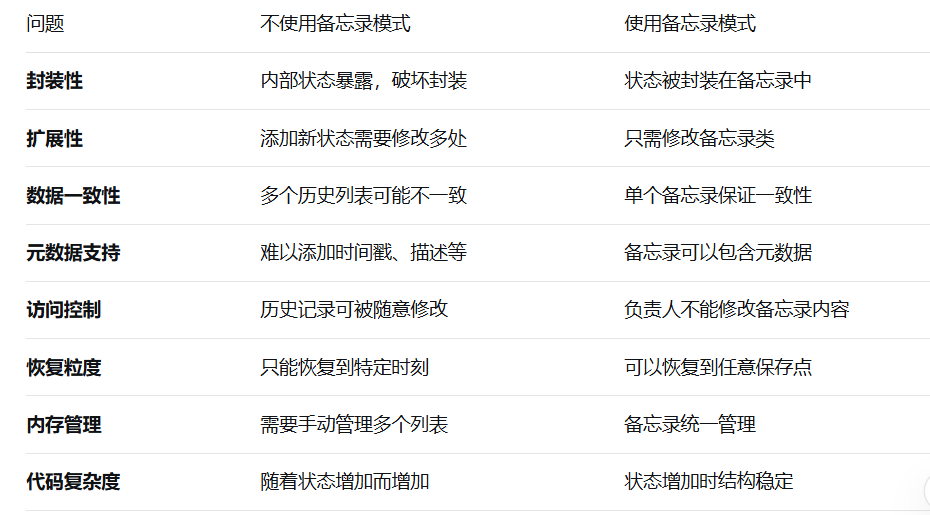
备忘录模式的优势
-
保持封装:不暴露发起人的内部状态
-
简化发起人:发起人不需要管理历史记录
-
职责清晰:发起人负责状态管理,负责人负责历史管理
-
易于扩展:添加新状态只需修改备忘录类
-
灵活恢复:可以恢复到任意保存的历史状态
-
元数据支持:备忘录可以包含额外的元数据
-
安全访问:负责人不能修改备忘录内容
8 备忘录模式的使用场景
撤销/重做功能:文本编辑器、绘图软件
事务回滚:数据库操作、文件系统
游戏存档:保存游戏进度
版本控制:文档版本管理
工作流恢复:业务流程中断恢复
配置管理:系统配置的备份和恢复
快照功能:系统状态的快照保存
备忘录模式通过将状态保存和恢复的职责分离,提供了一个优雅的解决方案来实现对象的撤销/重做和历史版本管理。它在保持封装性的同时,为对象状态的保存和恢复提供了灵活而安全的机制。

欢迎加入 MCP 技术社区!与志同道合者携手前行,一同解锁 MCP 技术的无限可能!
更多推荐


 6
6 0
0- 0


 已为社区贡献1条内容

所有评论(0)