Langchain4j实现java+ai,内含多模态、RAG、MCP等知识讲解
今天要做的是一个ai小助手的项目,如果简历里面有一个ai类的项目,绝对会让面试官眼前一亮!
本次开发的环境就是一个后端springboot的项目,直接创建项目即可!JDK推荐21/17都可以,不要低于17!我们引入依赖,SpringWeb和lombok这俩!项目创建好之后,我们要先干一些事情,比如配置yml文件!
(1)ChatModel
我们引入第一个知识点,chatmodel,这个是最基础的概念,负责和ai大模型交互。本次学习我们使用阿里的qwen大模型,因为成本比较低☺️。我们先引入依赖
 <dependency>
            <groupId>dev.langchain4j</groupId>
            <artifactId>langchain4j-community-dashscope-spring-boot-starter</artifactId>
            <version>1.1.0-beta7</version>
        </dependency>
我们这里还需要去阿里云百炼平台获取到apikey和ModelName,写入到配置里面!
langchain4j:
  community:
    dashscope:
      chat-model:
        api-key: 你自己的key
        model-name: qwen-max
package com.example.aicodeheapers.ai;

import dev.langchain4j.data.message.AiMessage;
import dev.langchain4j.data.message.SystemMessage;
import dev.langchain4j.data.message.UserMessage;
import dev.langchain4j.model.chat.ChatModel;
import dev.langchain4j.model.chat.response.ChatResponse;
import jakarta.annotation.Resource;
import lombok.extern.slf4j.Slf4j;
import org.springframework.stereotype.Service;

@Service
@Slf4j
public class AiCodeHelper {

    @Resource
    private ChatModel qwenChatModel;
    //简单对话
    public String chat(String message){
        UserMessage userMessage = UserMessage.from(message);
        ChatResponse chatResponse = qwenChatModel.chat(userMessage);
        AiMessage aiMessage = chatResponse.aiMessage();
        log.info("AI 输出"+aiMessage.toString());
        return aiMessage.text();
    }

}
我们现在简单的引入一个ChatModel模型,然后创建一个UserMessage对象,然后把传过来的消息给到UserMessage,然后调用qwenChatModel.chat方法,就可以得到返回值,我们直接创建AiMessage对象,将返回值打印出来!这样就完成了与ai的交流,恭喜你现在已经和ai大模型完成了对话了!
(2)多模态
多模态是指能够同时处理、理解和生成多种不同类型的数据的能力,比如文本、图像、音频、视频、PDF等等。
   //自定义用户消息
    public String chatWithMessage(UserMessage userMessage){
        ChatResponse chatResponse = qwenChatModel.chat(userMessage);
        AiMessage aiMessage = chatResponse.aiMessage();
        log.info("AI 输出"+aiMessage.toString());
        return aiMessage.text();
    }
这样传过来的数据是用户方自己定义的!传过来什么都是用户说了算!有一个bug,就是现在qwen大模型不支持多模态....所以...我们就不继续演示了!有条件的朋友可以换一个模型,哈哈哈哈!
(3)系统提示词
系统提示词是指设置AI模型行为规则和角色定位的隐藏指令,用户通常不能直接看到。系统Prompt相当于给AI设定人格和能力边界,也就是告诉AI:"你是谁?你能做什么?"
    private static final String SYSTEM_STRING = """
            你是一位资深的编程与面试辅导专家。你的核心使命是帮助用户在技术面试和编程能力提升方面取得成功。在回答任何问题时,你必须始终围绕以下四个核心方向展开,确保内容专业、实用、有深度:

            1. 编程语言与工程实践
               - 深入讲解主流语言(Java、Python、Go、JavaScript 等)的核心语法、高级特性、代码规范与最佳实践。
               - 提供代码优化、重构、调试技巧及常见坑点分析。
               - 结合实际项目场景,给出可落地的工程建议。

            2. 算法与数据结构
               - 系统梳理常用数据结构(数组、链表、树、图、哈希表等)和算法(排序、搜索、动态规划、回溯等)的原理与应用。
               - 针对 LeetCode 或面试真题,提供清晰的解题思路、复杂度分析及多语言代码示例。
               - 引导用户建立算法思维,提升问题拆解与逻辑推导能力。

            3. 系统设计与架构
               - 讲解高可用、高并发、分布式系统的设计原则与模式(如微服务、缓存、消息队列、负载均衡等)。
               - 通过真实案例(如设计一个短链接服务、秒杀系统)展示从需求分析到架构落地的全过程。
               - 探讨技术选型、数据库设计、接口定义及性能优化策略。

            4. 面试技巧与职业发展
               - 分享简历撰写技巧、项目亮点提炼方法,帮助用户打造有竞争力的简历。
               - 模拟面试场景,提供行为面试(BQ)回答框架、技术面试沟通技巧及薪资谈判策略。
               - 分析不同公司(大厂、独角兽、外企)的面试流程与考察重点,给出针对性准备建议。

            当用户提问时,请根据问题性质,自动关联到上述一个或多个方向进行解答。回答要结构清晰、循序渐进,并鼓励用户动手实践。如果用户问题超出这四个方向,可以礼貌地引导对方回归核心领域,或简要提示后继续聚焦。
            """;
    @Resource
    private ChatModel qwenChatModel;
    //简单对话
    public String chat(String message){
        SystemMessage systemMessage = SystemMessage.systemMessage(SYSTEM_STRING);
        UserMessage userMessage = UserMessage.from(message);
        ChatResponse chatResponse = qwenChatModel.chat(systemMessage,userMessage);
        AiMessage aiMessage = chatResponse.aiMessage();
        log.info("AI 输出"+aiMessage.toString());
        return aiMessage.text();
    }
我们定义了一个系统消息(注意新写法),我们会给系统设置一个前置的提示词,这样的系统预设就会生效了!就是可以让ai的回复更精确了!
(4)AI Service
在学习更多特性前,我们要了解Langchain4j最重要的开发模式->AI Service。提供了很多高层抽象的、用起来更方便的API,把AI应用当做服务来开发。我们先引入依赖
   <dependency>
            <groupId>dev.langchain4j</groupId>
            <artifactId>langchain4j</artifactId>
            <version>1.1.0</version>
        </dependency>
用了AI Service提供的api,我们系统预设就不需要这么写了!我们先创建一个接口,然后上面加上注解!@SystemMessage后面加上你的txt文件(文件里是你的提示词内容),这样就可以实现更快的写好系统提示词!
package com.example.aicodeheapers.ai;


import dev.langchain4j.service.SystemMessage;


public interface AiCodeHelperService {
    @SystemMessage(fromResource = "system-prompt.txt")
    String chat(String userMessage);

}
我们只有接口没有实现类肯定是不可以的!这里有点设计模式的概念,其实不懂也无所谓,就知道什么是工厂,工厂就是专门生产服务的,我们的AICodeHelperServiceFactory就是专门生产ai变成助手服务的!
package com.example.aicodeheapers.ai;

import dev.langchain4j.model.chat.ChatModel;
import dev.langchain4j.service.AiServices;
import jakarta.annotation.Resource;
import org.springframework.context.annotation.Bean;
import org.springframework.context.annotation.Configuration;

@Configuration
public class AiCodeHelperServiceFactory {
    @Resource
    private ChatModel qwenCharModel;


    @Bean
    public AiCodeHelperService aiCodeHelperService(){
        return AiServices.create(AiCodeHelperService.class,qwenCharModel);
    }

}
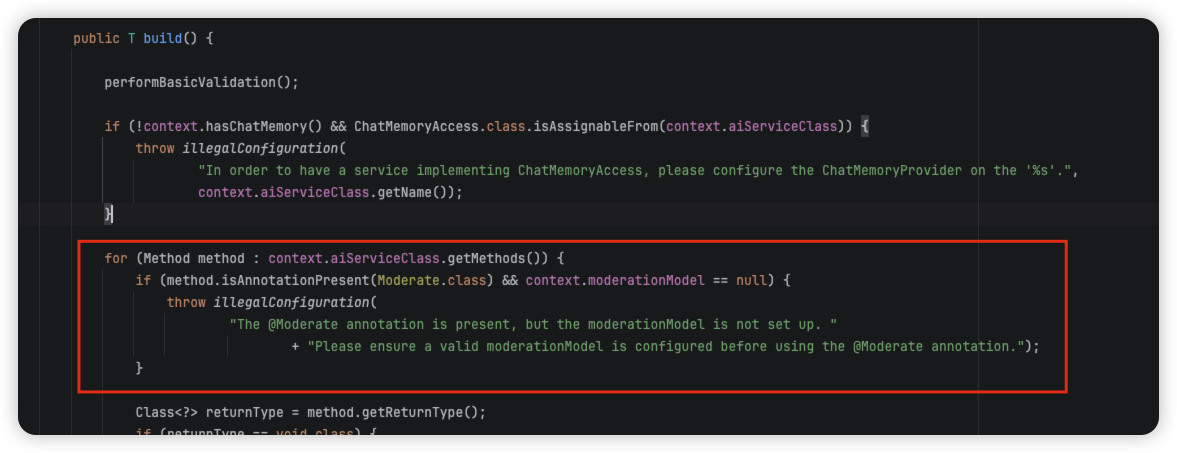
我们可以看到,这个方法直接就可以返回一个Service,所以!这个方法到底做了什么事情呢?我们点进源码看一下,代码有一行这个!我怎么从运行代码的class中获取到方法信息呢?这不就是反射吗!其实这一步就是运用到了反射和动态代理!
调用AiService.create方法就可以创建出AiService的实现累了,背后的原理就是利用的java的反射机制创建了一个实现接口的代理对象,代理对象负责输入和输出转换,比如把String类型的用户消息参数转换为UserMessage类型病调用ChatModel,再讲Ai返回的AiMessage类型转换为String类型作为返回值,但我们不用关心那么多,直接写接口和注解开发就好了!
Method method : context.aiServiceClass.getMethods()
package com.example.aicodeheapers.ai;

import dev.langchain4j.service.Result;
import jakarta.annotation.Resource;
import org.junit.jupiter.api.Test;
import org.springframework.boot.test.context.SpringBootTest;

import static org.junit.jupiter.api.Assertions.*;

@SpringBootTest
class AiCodeHelperServiceTest {
    @Resource
    private AiCodeHelperService aiCodeHelperService;
    @Test
    void chat() {
        String chat = aiCodeHelperService.chat("你好,我是程序员小刘");
        System.out.println(chat);
    }

}
(5)会话记忆ChatMemory
会话记忆是指让AI能够记住用户之前的对话内容,并保持上下文连贯性,这是实现AI英勇的核心特性。怎么实现对话记忆?最传统的方式是自己维护消息立碑哦啊,不仅要手动添加消息,消息多了还要考虑淘汰、不同用户的消息还要隔离,想想都头疼!
package com.example.aicodeheapers.ai;

import dev.langchain4j.memory.ChatMemory;
import dev.langchain4j.memory.chat.MessageWindowChatMemory;
import dev.langchain4j.model.chat.ChatModel;
import dev.langchain4j.model.chat.StreamingChatModel;
import dev.langchain4j.rag.content.retriever.ContentRetriever;
import dev.langchain4j.service.AiServices;
import dev.langchain4j.service.spring.AiService;
import jakarta.annotation.Resource;
import org.springframework.context.annotation.Bean;
import org.springframework.context.annotation.Configuration;

@Configuration
public class AiCodeHelperServiceFactory {

    @Bean
    public AiCodeHelperService aiCodeHelperService(){
        //会话记忆
        ChatMemory chatMemory = MessageWindowChatMemory.withMaxMessages(10);
        //构造Ai  Service
        AiCodeHelperService aiCodeHelperService = AiServices.builder(AiCodeHelperService.class)
                .chatMemoryProvider(memoryId->MessageWindowChatMemory.withMaxMessages(10))//每个会话独立存储
                .chatMemory(chatMemory)//会话记忆
                .build();
        return aiCodeHelperService;
    }

}
(6)结构化输出
结构化输出是指将大模型返回的文本输出转换为结构化的数据格式,比如一段JSON、一个对象、或者是复杂的对象列表。
有三种实现方式:
利用大模型的JSON schema
利用prompt+JSON schema
利用prompt
重点了解prompt模式,也就是在原本的用户提示词下拼接一段内容来制定大模型强制输出包含特定字段的JSON文本
(7)检索增强生产RAG
RAG是一种结合信息检索技术和AI内容生成的混合架构,可以解决大模型的知识时效性限制和幻觉问题。
简单来说,RAG就想给AI配了一个”小抄本“,让AI回答问题前先查一查特定的知识库来获取知识,确保回答是基于真实资料而不是凭空想象。很多企业也基于RAG搭建了自己的智能客服,可以用自己积累的领域知识回复用户。
RAG完整工作流程:第一步准备原始文档,我们把原始文档分割成若干个小的片段,并且去过滤掉一些无意义的内容,再把这个片段喂给我们的向量转换模型,也就是Embedding模型,Embedding模型为了让我们的ai更好的检索,会把知识转换成不同维度的向量数组来表示!如果用户输入的知识和你的数组越接近,那么这两个向量的距离就会越少。这样的话,我们想要知道用户的问题和哪个向量有关,我们就只需要从向量存储中查一下就好了,我们把这些向量存到向量数据库中!
用户提问后,我们也把用户的问题用同样维度的Embedding模型换成向量!把用户问题的向量和向量数据库中存储的向量进行一个匹配,相似度检索!检索出和用户发送消息最相关的文档!再把这些文档进行一个排序!通过Rank模型可以对所有的文档和问题相关度进行一个打分。把分数高的文档和原始的用户问题拼在一起,得到一个新的提示词,最后在输入给ai,让ai回答!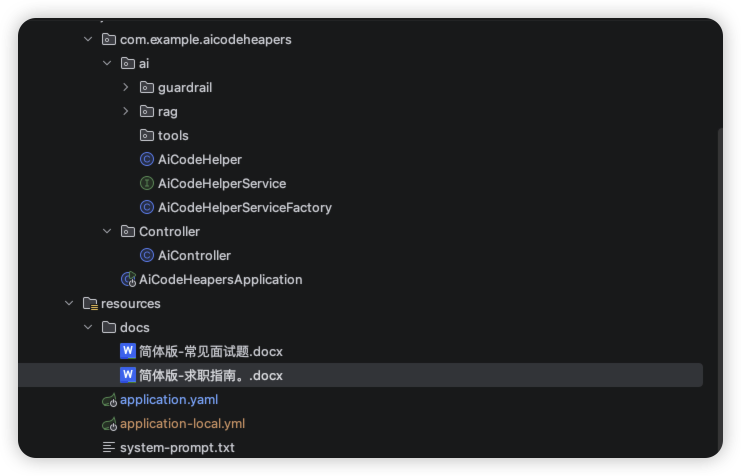
再代码里面,我们放入两个docx文件,里面放入了一些求职指南和常见面试题!Langchain4j提供了3种rag的实现方式!极简版-标准版-进阶版!极简版没什么意思!我们最主要学习的就是标准版!
下面来试试标准版RAG实现,为了更好的效果,我们需要:
- 加载文档并按需切割
- 文档补充文件名信息
- 自定义Embedding模型
- 自定义内容检索器
我们先加入配置
angchain4j:
  community:
    dashscope:
      chat-model:
        api-key:
        model-name: qwen-max
      embedding-model:
        model-name: text-embedding-v4
        api-key:
我们看一下rag的代码
package com.example.aicodeheapers.ai.rag;

import dev.langchain4j.data.document.Document;
import dev.langchain4j.data.document.loader.FileSystemDocumentLoader;
import dev.langchain4j.data.document.splitter.DocumentByParagraphSplitter;
import dev.langchain4j.data.segment.TextSegment;
import dev.langchain4j.model.embedding.EmbeddingModel;
import dev.langchain4j.rag.content.retriever.ContentRetriever;
import dev.langchain4j.rag.content.retriever.EmbeddingStoreContentRetriever;
import dev.langchain4j.store.embedding.EmbeddingStore;
import dev.langchain4j.store.embedding.EmbeddingStoreIngestor;
import jakarta.annotation.Resource;
import org.springframework.context.annotation.Bean;
import org.springframework.context.annotation.Configuration;

import java.util.List;

/**
 * 加载rag
 */
@Configuration
public class RagConfig {
    @Resource
    private EmbeddingModel qwenEmbeddingModel;
    @Resource
    private EmbeddingStore<TextSegment> textSegmentEmbeddingStore;
    @Bean
    public ContentRetriever contentRetriever(){
        //Rag
        //1.加载文档
        List<Document> documents = FileSystemDocumentLoader.loadDocuments("src/main/resources/docs");
        //2.文档切割!每一个文档进行切割,每一段进行分割!每段最大1000个字符!每次最多重叠200个字符!
        DocumentByParagraphSplitter documentByParagraphSplitter = new DocumentByParagraphSplitter(1000, 200);
        //3.自定义文档加载器,把文档转换成向量保存到向量数据库中!
        EmbeddingStoreIngestor ingestor = EmbeddingStoreIngestor.builder()
                .documentSplitter(documentByParagraphSplitter)
                //为了提高文档质量,我们为每一个切割后的文档碎片,添加一个文档名称!
                .textSegmentTransformer(textSegment ->
                        textSegment.from(textSegment.metadata().getString("file_name") +
                                "\n" + textSegment.text(), textSegment.metadata()))
                //适用向量模型
                .embeddingModel(qwenEmbeddingModel)
                .embeddingStore(textSegmentEmbeddingStore)
                .build();
        //加载文档
        ingestor.ingest(documents);
        //自定义内容加载器
        EmbeddingStoreContentRetriever contentRetriever = EmbeddingStoreContentRetriever.builder()
                .embeddingStore(textSegmentEmbeddingStore)
                .embeddingModel(qwenEmbeddingModel)
                .maxResults(5)//最多返回结果数
                .minScore(0.75) //过滤分数小于0.75 的结果
                .build();
        return contentRetriever;
    }
}
(8)工具条用-Tools
工具条用可以理解为让Ai大模型借用外部工具来完成他自己做不到的事情。跟人类一样,如果只凭手脚完成不了工作,那么就可以利用工具箱完成。
工具可以使任何东西:比如网页搜索、对外部API的调用、访问外部数据、或执行特定的代码等!
需要注意的是,工具调用的 本质并不是AI服务器自己调用这些工具、也不是把工具的代码发送给AI服务器让他执行,他只能提出要求,表示"我需要执行xx工具完成这些任务"。而真正执行工具的使我们自己的程序,执行后再把结果告诉AI,让它继续工作。
(9)模型上下文协议-MCP
MCP是一种开放标准,目的是增强AI与外部系统的交互能力。MCP为AI提供了与外部工具、资源和服务交互的标准化方式,让Ai能够访问最新数据、执行复杂操作,并与现有系统集成。
可以将MCP想象成Ai应用的USB接口。就想USB为设备连接各种外设和配件提供了标准化方式一样,MCP可以为AI模型连接不用的数据源和工具提供了标准化方法。
简单来说,通过MCP协议,AI应用可以轻松接入别人提供的服务来实现更多功能,比如查询地理位置、操作数据库、部署网站、甚至是支付!
(10)护轨-Guardrail,可以理解成拦截器
分为输入护轨和输出护轨,可以再请求AI前和请求AI后执行一些额外的操作!比如在AI前进行敏感词检测
(11)AI服务化
至此,AI的能力基本开发完成,但是目前只支持本地运行,需要编写一个接口提供给前端调用,让AI能够成为一个服务。
我们平时开发的大多数接口都是同步接口,也就是等后端处理完再返回。但是对于 Al 应用,特别是响应时间较长的对话类应用,可能会让用户失去耐心等待,因此推荐使用 SSE(Server-Sent Events)技术实现实时流式输出,类似打字机效果,大幅提升用户体验。
(12)SSE 流式接口开发
LangChain 提供了 2种方式来支持流式响应(注意,流式响应不支持结构化输出)。
一种方法是 TokenStream,先让 AI 对话方法返回 TokenStream,然后创建 AI Service 时指定流式对话模型StreamingChatModel !
另一种是使用Flux替代TokenStream!
Controller
package com.example.aicodeheapers.Controller;

import com.example.aicodeheapers.ai.AiCodeHelperService;
import jakarta.annotation.Resource;
import org.springframework.http.codec.ServerSentEvent;
import org.springframework.web.bind.annotation.GetMapping;
import org.springframework.web.bind.annotation.RestController;
import reactor.core.publisher.Flux;

@RestController
public class AiController {
    @Resource
    private AiCodeHelperService aiCodeHelperService;
    @GetMapping("chat")
    public Flux<ServerSentEvent<String>> chat(int memoryId,String message){
        return aiCodeHelperService.chatStream(memoryId,message)
                .map(chunk -> ServerSentEvent.<String>builder().data(chunk).build());
    }
}
Service
package com.example.aicodeheapers.ai;

import dev.langchain4j.service.MemoryId;
import dev.langchain4j.service.Result;
import dev.langchain4j.service.SystemMessage;
import dev.langchain4j.service.UserMessage;
import dev.langchain4j.service.spring.AiService;
import org.springframework.stereotype.Service;
import reactor.core.publisher.Flux;

import java.util.List;

//@AiService
public interface AiCodeHelperService {
    @SystemMessage(fromResource = "system-prompt.txt")
    String chat(String userMessage);

    @SystemMessage(fromResource = "system-prompt.txt")
    Report chatForReport(String userMessage);
    record Report(String name, List<String> suggestionList){};


    //RAG返回封装后的结果
    @SystemMessage(fromResource = "system-prompt.txt")
    Result<String> chatWithRag(String userMessage);

    //SSE流式输出!之前做大屏兼职项目的时候见过这种后端返回形式,是一点一点返回的形式!
    Flux<String> chatStream(@MemoryId int memoryId,@UserMessage String message);
}

欢迎加入 MCP 技术社区!与志同道合者携手前行,一同解锁 MCP 技术的无限可能!
更多推荐

 11
11 0
0- 0


 已为社区贡献1条内容

所有评论(0)