使用 Pixso 和前端代码双工同步
1、准备工作
- 开发IDE,我推荐使用TraeCN(免费使用,付费是国内模型)或者Trae(部分功能免费不支持,付费可以选国外模型)
- 注册 Pixso 账号
- 下载 Pixso客户端
- 待同步的前端代码仓
2、将 TraeCN IDE 和 Pixso客户端 使用 MCP 联通
- 启动本地的
Pixso客户端随便进入到一个设计文件中,进入之后点击左上角的三按钮如下图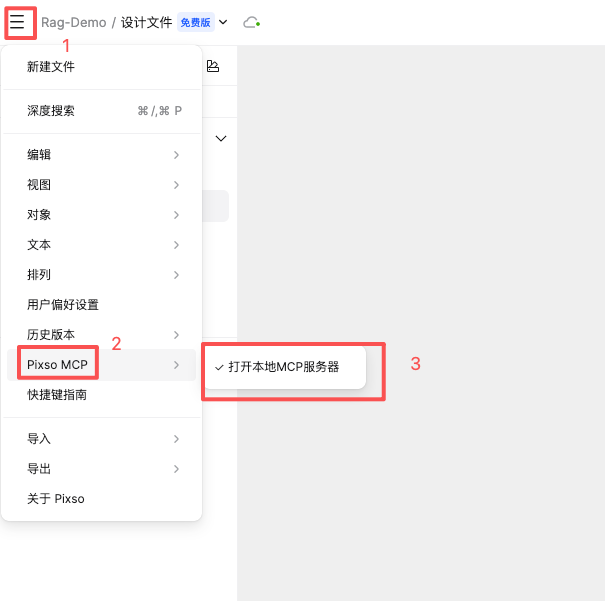
启动好会在客户端的最下方有如下图的提示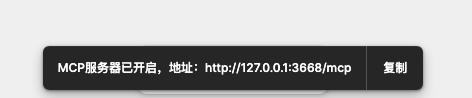
- 在
TraeCN IDE中配置MCP,选择手动添加,将下面的代码贴进去即可
{
  "mcpServers": {
    "pixso": {
      "url": "http://localhost:3667/mcp"
    }
  }
}
如下图的状态即代表联通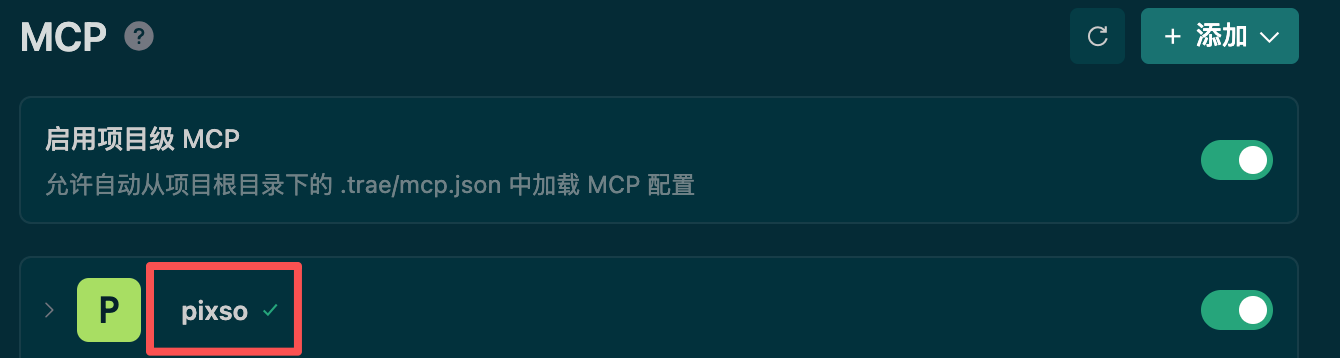
3、同步组件或者页面到画布中
3.1、需要先打开开发模式,显示如图状态即可(后面实测不是研发模式也可以,当做选配吧(#.#))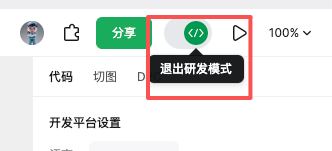
3.2 、把分享模式改成“互联网上的任何人”、“可编辑”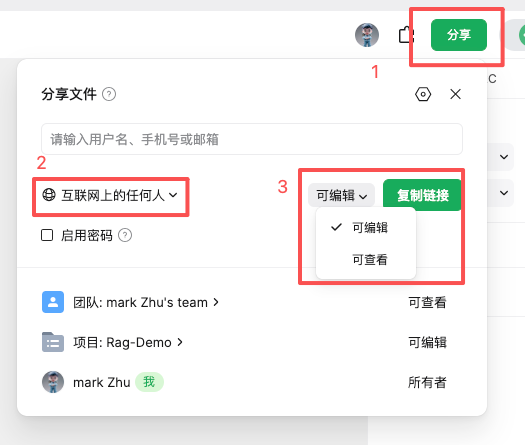
3.3、在 Pixso 新建一个同名页面,我要同步的页面路径src/pages/index.tsx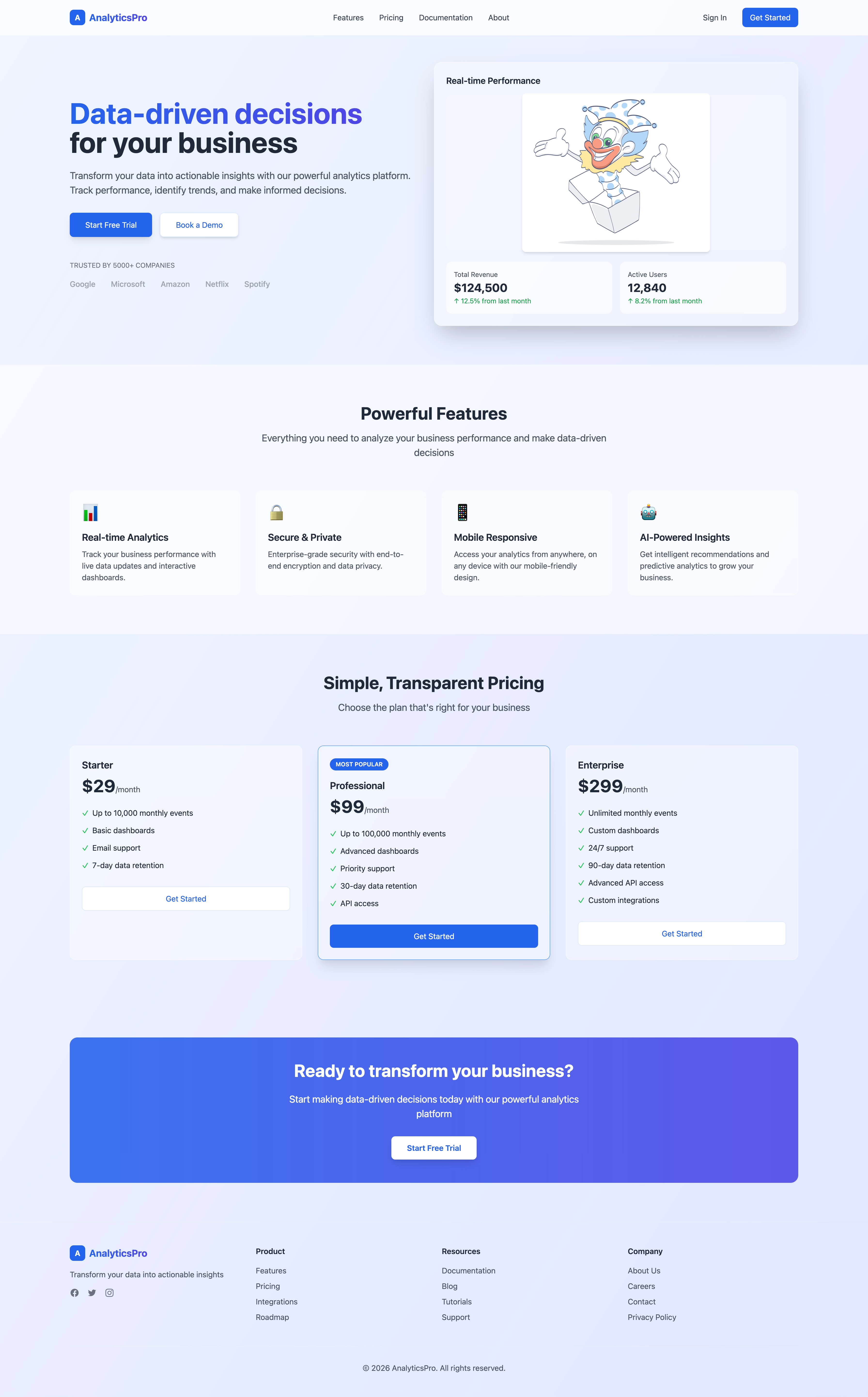
3.4 在编辑器的agent里面输入下面的提示词使用peaks-pixso-code-sync这个技能,把 /Users/yuanyuan/Desktop/work/prompt-project/prompt-project/src/pages/index.tsx 同步到画布中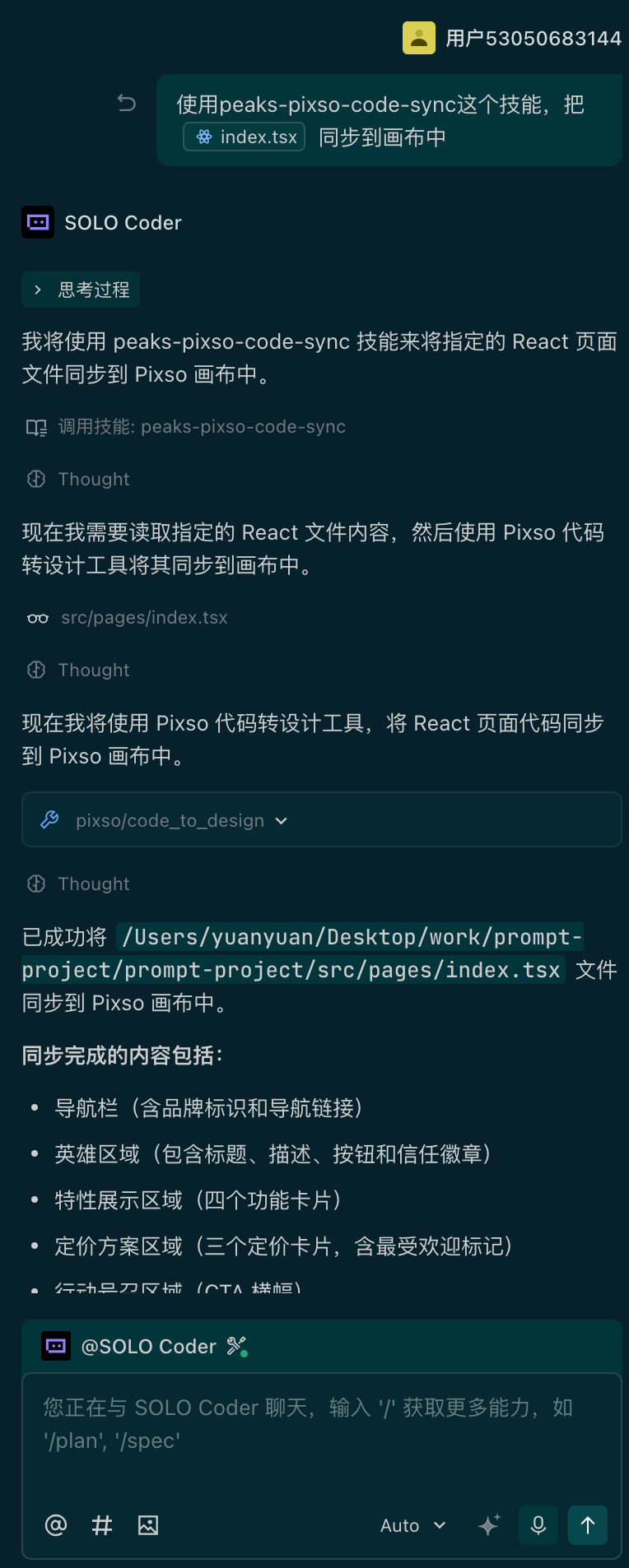
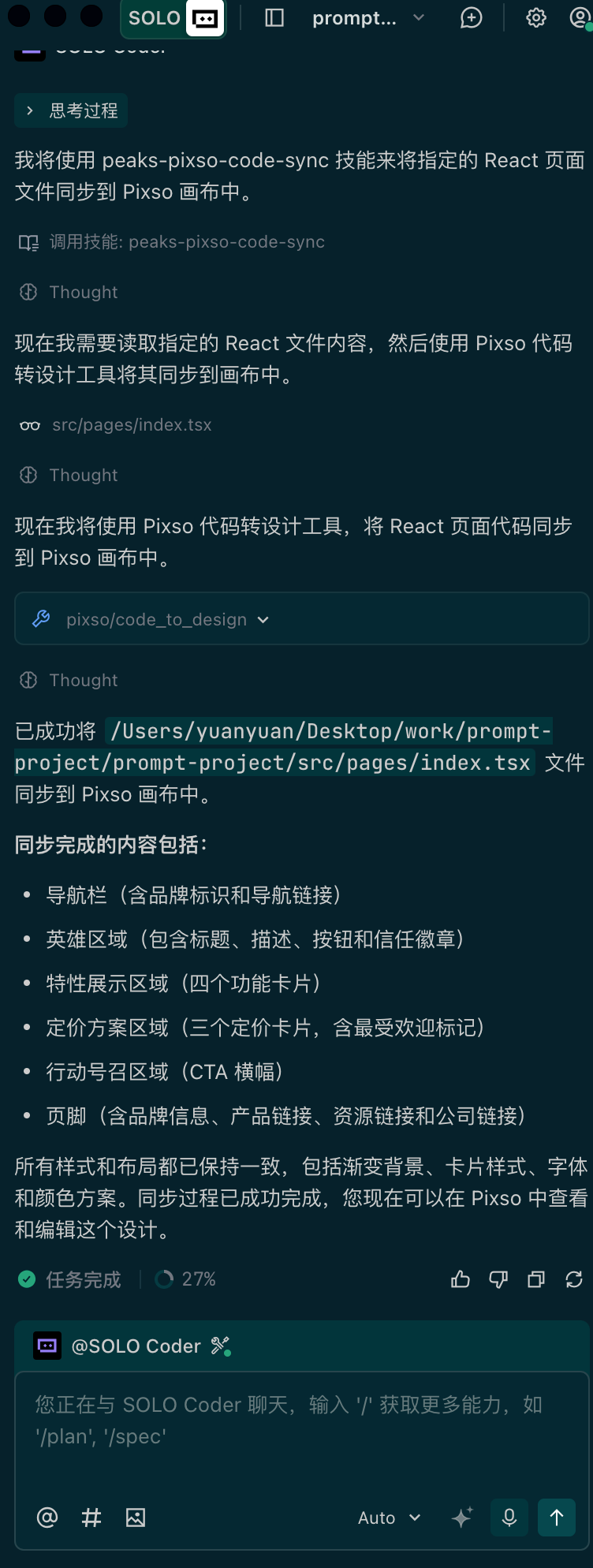
3.5 在Pixso的画布同步的效果图,粗看除了图片显示和标题下面的介绍的排版问题外,大致还原99%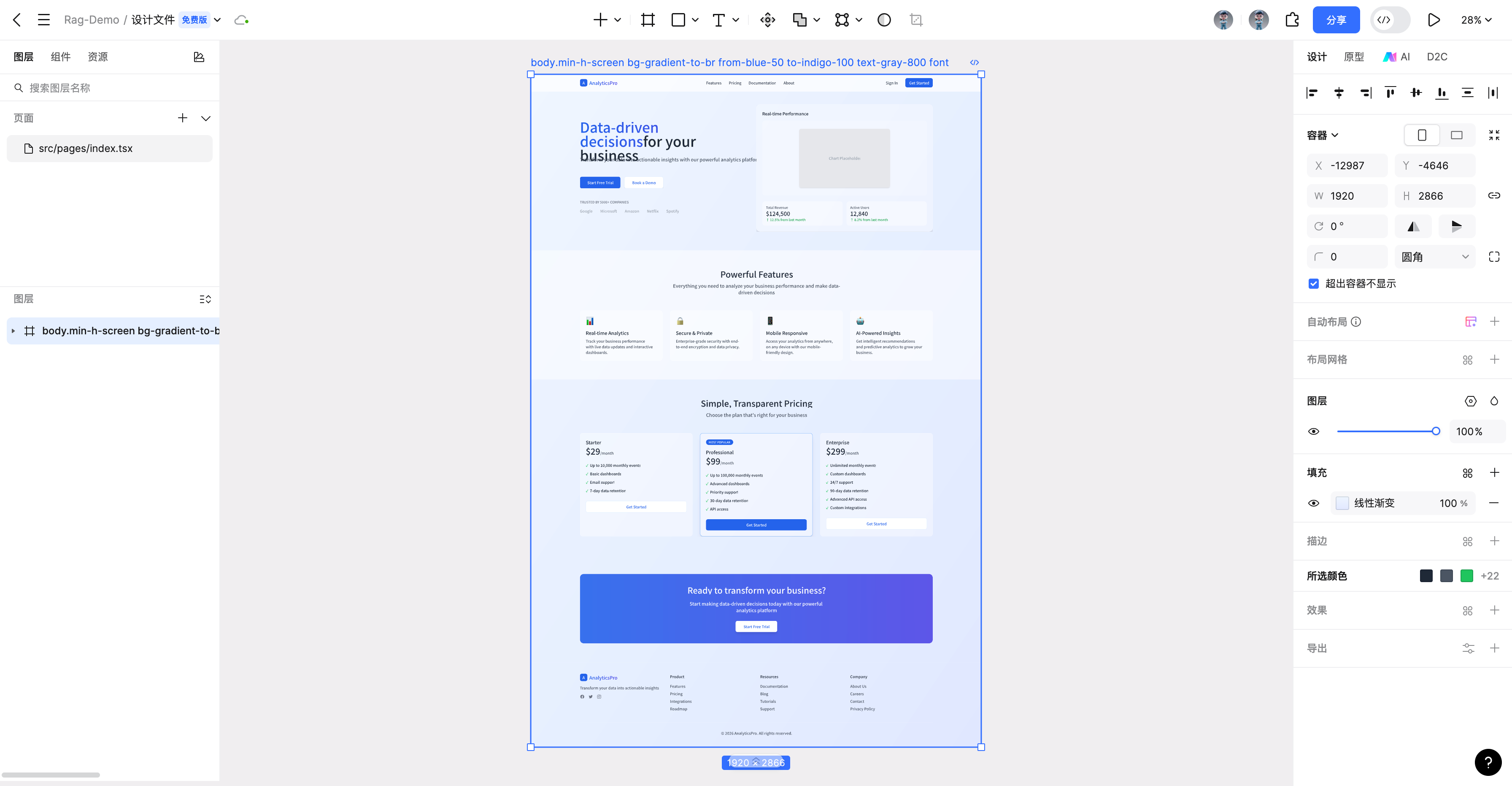
4、设计稿同步到代码中
4.1、使用第三步同步好的设计稿,然后把代码清空,清空完显示如下图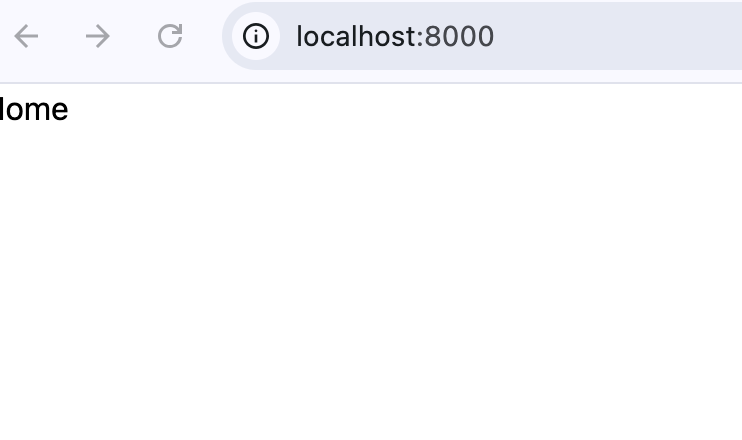
4.2、设计稿使用3.5步骤中生成的
4.3、看看实际同步的效果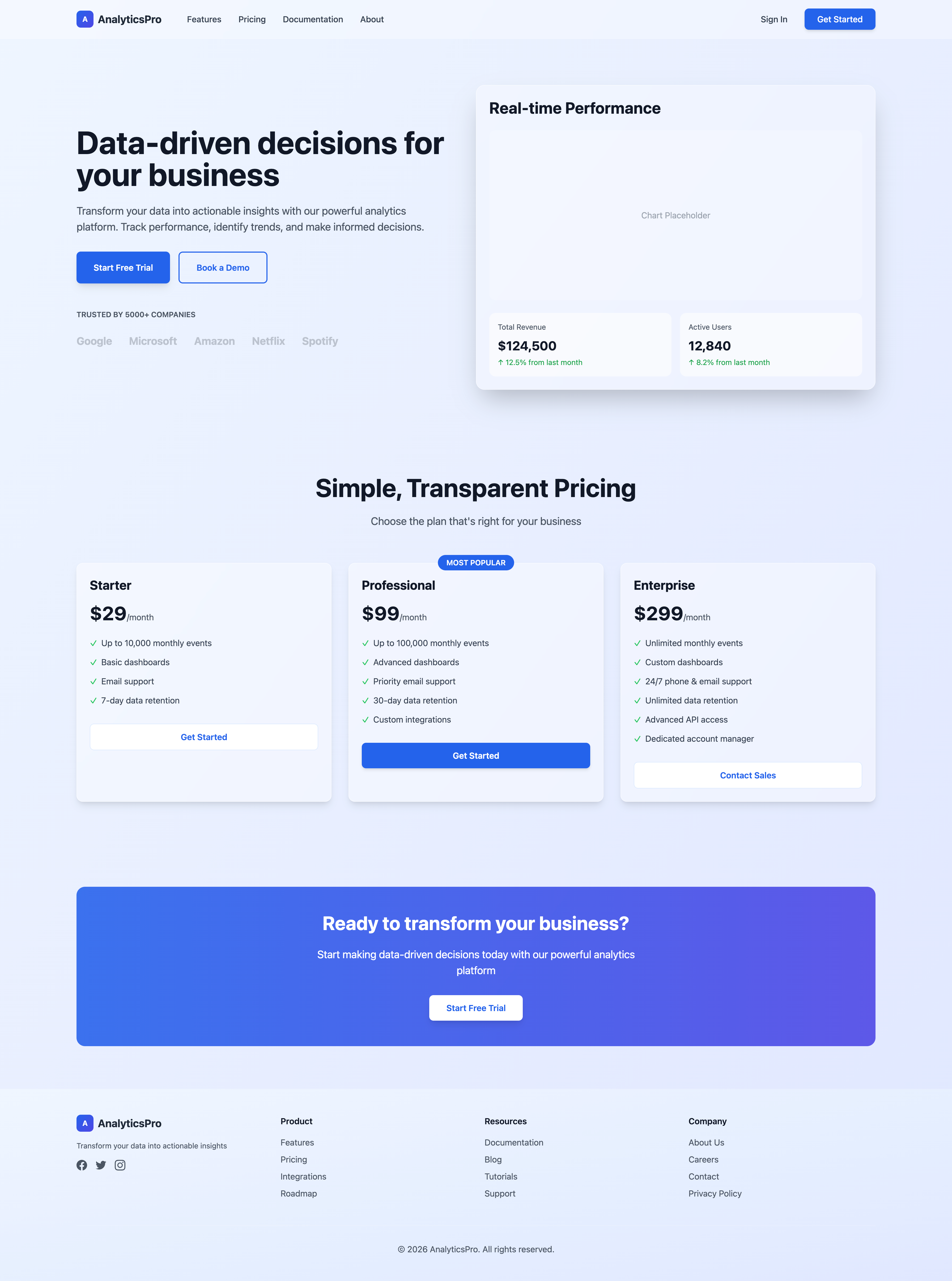
4.4、生成的代码
import { memo } from 'react';
const Home = () => {
return (
<div className="min-h-screen bg-gradient-to-br from-blue-50 to-indigo-100 font-sans text-gray-800">
{/* 导航栏 - 固定顶部,带毛玻璃效果 */}
{/* 从 Pixso 设计稿同步:包含 Logo、导航链接和操作按钮 */}
<nav className="fixed z-50 w-full border-b border-white/20 bg-white/30 backdrop-blur-md">
<div className="container mx-auto px-4 py-4">
<div className="flex items-center justify-between">
{/* 左侧:Logo + 导航链接 */}
<div className="flex items-center space-x-12">
{/* Logo 区域 */}
<div className="flex items-center space-x-2">
<div className="flex h-8 w-8 items-center justify-center rounded-lg bg-gradient-to-br from-blue-600 to-indigo-600">
<span className="text-sm font-bold text-white">A</span>
</div>
<span className="text-xl font-bold text-gray-800">
AnalyticsPro
</span>
</div>
{/* 导航链接 - 在移动端隐藏 */}
<div className="hidden items-center space-x-8 md:flex">
<a
href="#features"
className="font-medium text-gray-700 transition-colors hover:text-blue-600"
>
Features
</a>
<a
href="#pricing"
className="font-medium text-gray-700 transition-colors hover:text-blue-600"
>
Pricing
</a>
<a
href="#documentation"
className="font-medium text-gray-700 transition-colors hover:text-blue-600"
>
Documentation
</a>
<a
href="#about"
className="font-medium text-gray-700 transition-colors hover:text-blue-600"
>
About
</a>
</div>
</div>
{/* 右侧:操作按钮 */}
<div className="flex items-center space-x-4">
<button className="px-4 py-2 font-medium text-gray-700 transition-colors hover:text-blue-600">
Sign In
</button>
<button className="rounded-lg bg-blue-600 px-6 py-2 font-medium text-white shadow-md transition-colors hover:bg-blue-700">
Get Started
</button>
</div>
</div>
</div>
</nav>
{/* 主内容区域 - 占位,实际内容需要继续同步其他区块 */}
<main className="pt-20">
{/* 提示:当前仅同步了导航栏组件 */}
<div className="container mx-auto px-4 py-20">
<div className="text-center">
<h1 className="mb-4 text-4xl font-bold text-gray-700">
导航栏组件已同步完成
</h1>
<p className="text-gray-600">请继续同步其他区块以完成整个页面 Data-driven decisions for your business
</h1>
{/* 副标题 */}
<p className="text-xl text-gray-600 mb-8 max-w-2xl">
Transform your data into actionable insights with our powerful analytics
platform. Track performance, identify trends, and make informed decisions.
</p>
{/* CTA 按钮组 */}
<div className="flex gap-4 mb-12">
<button className="px-8 py-4 bg-blue-600 text-white rounded-lg hover:bg-blue-700 transition-colors font-semibold shadow-lg">
Start Free Trial
</button>
<button className="px-8 py-4 border-2 border-blue-600 text-blue-600 rounded-lg hover:bg-blue-50 transition-colors font-semibold">
Book a Demo
</button>
</div>
{/* 公司 Logo 展示区 */}
<div>
<p className="text-gray-600 font-semibold mb-6 text-sm">TRUSTED BY 5000+ COMPANIES</p>
<div className="flex flex-wrap items-center gap-6 md:gap-8 opacity-60">
<div className="text-xl font-bold text-gray-400">Google</div>
<div className="text-xl font-bold text-gray-400">Microsoft</div>
<div className="text-xl font-bold text-gray-400">Amazon</div>
<div className="text-xl font-bold text-gray-400">Netflix</div>
<div className="text-xl font-bold text-gray-400">Spotify</div>
</div>
</div>
</div>
{/* 右侧仪表板区域 */}
<div className="md:w-1/2">
<div className="backdrop-blur-lg bg-white/30 rounded-2xl shadow-2xl p-6 border border-white/50">
{/* 标题 */}
<h2 className="text-3xl font-bold text-gray-900 mb-6">Real-time Performance</h2>
{/* 图表占位区域 */}
<div className="h-80 bg-white/20 rounded-xl mb-6 flex items-center justify-center">
<div className="text-gray-400">Chart Placeholder</div>
</div>
{/* 指标卡片区域 */}
<div className="grid grid-cols-2 gap-4">
{/* Total Revenue 卡片 */}
<div className="backdrop-blur-md bg-white/40 rounded-xl p-4">
<p className="text-sm text-gray-600 mb-2">Total Revenue</p>
<p className="text-2xl font-bold text-gray-900 mb-1">$124,500</p>
<p className="text-sm text-green-600">↑ 12.5% from last month</p>
</div>
{/* Active Users 卡片 */}
<div className="backdrop-blur-md bg-white/40 rounded-xl p-4">
<p className="text-sm text-gray-600 mb-2">Active Users</p>
<p className="text-2xl font-bold text-gray-900 mb-1">12,840</p>
<p className="text-sm text-green-600">↑ 8.2% from last month</p>
</div>
</div>
</div>
</div>
</div>
</section>
{/* 定价区域 - 从 Pixso 设计稿同步 */}
{/* 包含标题、副标题和 3 个定价卡片 */}
<section className="container mx-auto px-4 py-20">
<div className="text-center mb-16">
<h2 className="text-5xl font-bold text-gray-900 mb-6">Simple, Transparent Pricing</h2>
<p className="text-xl text-gray-600 max-w-3xl mx-auto">
Choose the plan that's right for your business
</p>
</div>
<div className="grid grid-cols-1 md:grid-cols-3 gap-8">
{/* 定价卡片 1 - Starter */}
<div className="backdrop-blur-md bg-white/40 rounded-xl p-6 border border-white/50 shadow-lg">
<h3 className="text-2xl font-bold text-gray-900 mb-4">Starter</h3>
<div className="mb-6">
<span className="text-4xl font-bold text-gray-900">$29</span>
<span className="text-gray-600">/month</span>
</div>
<ul className="space-y-3 mb-8">
<li className="flex items-start">
<span className="text-green-500 mr-2">✓</span>
<span className="text-gray-700">Up to 10,000 monthly events</span>
</li>
<li className="flex items-start">
<span className="text-green-500 mr-2">✓</span>
<span className="text-gray-700">Basic dashboards</span>
</li>
<li className="flex items-start">
<span className="text-green-500 mr-2">✓</span>
<span className="text-gray-700">Email support</span>
</li>
<li className="flex items-start">
<span className="text-green-500 mr-2">✓</span>
<span className="text-gray-700">7-day data retention</span>
</li>
</ul>
<button className="w-full py-3 rounded-lg transition-all transform hover:scale-105 bg-white text-blue-600 hover:bg-gray-50 border border-blue-100 font-semibold">
Get Started
</button>
</div>
{/* 定价卡片 2 - Professional (MOST POPULAR) */}
<div className="backdrop-blur-md bg-white/40 rounded-xl p-6 border border-white/50 shadow-lg relative">
<div className="absolute -top-4 left-1/2 transform -translate-x-1/2 bg-blue-600 text-white px-4 py-1 rounded-full text-sm font-semibold">
MOST POPULAR
</div>
<h3 className="text-2xl font-bold text-gray-900 mb-4">Professional</h3>
<div className="mb-6">
<span className="text-4xl font-bold text-gray-900">$99</span>
<span className="text-gray-600">/month</span>
</div>
<ul className="space-y-3 mb-8">
<li className="flex items-start">
<span className="text-green-500 mr-2">✓</span>
<span className="text-gray-700">Up to 100,000 monthly events</span>
</li>
<li className="flex items-start">
<span className="text-green-500 mr-2">✓</span>
<span className="text-gray-700">Advanced dashboards</span>
</li>
<li className="flex items-start">
<span className="text-green-500 mr-2">✓</span>
<span className="text-gray-700">Priority email support</span>
</li>
<li className="flex items-start">
<span className="text-green-500 mr-2">✓</span>
<span className="text-gray-700">30-day data retention</span>
</li>
<li className="flex items-start">
<span className="text-green-500 mr-2">✓</span>
<span className="text-gray-700">Custom integrations</span>
</li>
</ul>
<button className="w-full py-3 rounded-lg transition-all transform hover:scale-105 bg-blue-600 text-white hover:bg-blue-700 font-semibold shadow-md">
Get Started
</button>
</div>
{/* 定价卡片 3 - Enterprise */}
<div className="backdrop-blur-md bg-white/40 rounded-xl p-6 border border-white/50 shadow-lg">
<h3 className="text-2xl font-bold text-gray-900 mb-4">Enterprise</h3>
<div className="mb-6">
<span className="text-4xl font-bold text-gray-900">$299</span>
<span className="text-gray-600">/month</span>
</div>
<ul className="space-y-3 mb-8">
<li className="flex items-start">
<span className="text-green-500 mr-2">✓</span>
<span className="text-gray-700">Unlimited monthly events</span>
</li>
<li className="flex items-start">
<span className="text-green-500 mr-2">✓</span>
<span className="text-gray-700">Custom dashboards</span>
</li>
<li className="flex items-start">
<span className="text-green-500 mr-2">✓</span>
<span className="text-gray-700">24/7 phone & email support</span>
</li>
<li className="flex items-start">
<span className="text-green-500 mr-2">✓</span>
<span className="text-gray-700">Unlimited data retention</span>
</li>
<li className="flex items-start">
<span className="text-green-500 mr-2">✓</span>
<span className="text-gray-700">Advanced API access</span>
</li>
<li className="flex items-start">
<span className="text-green-500 mr-2">✓</span>
<span className="text-gray-700">Dedicated account manager</span>
</li>
</ul>
<button className="w-full py-3 rounded-lg transition-all transform hover:scale-105 bg-white text-blue-600 hover:bg-gray-50 border border-blue-100 font-semibold">
Contact Sales
</button>
</div>
</div>
</section>
{/* CTA 区域 - 从 Pixso 设计稿同步 */}
{/* 蓝色渐变背景,带毛玻璃效果的行动号召区域 */}
<section className="container mx-auto px-4 py-20">
<div className="backdrop-blur-lg bg-gradient-to-r from-blue-600/90 to-indigo-600/90 rounded-2xl p-12 text-white text-center">
<h2 className="text-3xl md:text-4xl font-bold mb-6">
Ready to transform your business?
</h2>
<p className="text-xl mb-8 max-w-2xl mx-auto">
Start making data-driven decisions today with our powerful analytics platform
</p>
<button className="px-8 py-3 bg-white text-blue-600 rounded-lg hover:bg-gray-100 transition-all transform hover:scale-105 shadow-lg font-semibold">
Start Free Trial
</button>
</div>
</section>
</main>
{/* Footer 区域 - 从 Pixso 设计稿同步 */}
{/* 包含 Logo、标语、链接列和版权信息 */}
<footer className="py-12 bg-gradient-to-br from-blue-50 to-indigo-100 border-t border-white/20">
<div className="container mx-auto px-4">
{/* 链接区域 */}
<div className="grid grid-cols-1 md:grid-cols-4 gap-8 mb-12">
{/* Logo 和标语列 */}
<div>
<div className="flex items-center space-x-2 mb-4">
<div className="w-8 h-8 bg-gradient-to-br from-blue-600 to-indigo-600 rounded-lg flex items-center justify-center">
<span className="text-white font-bold text-sm">A</span>
</div>
<span className="text-xl font-bold text-gray-800">AnalyticsPro</span>
</div>
<p className="text-gray-600 text-sm mb-4">
Transform your data into actionable insights
</p>
{/* 社交媒体图标 */}
<div className="flex space-x-4">
<a href="#facebook" className="text-gray-600 hover:text-blue-600 transition-colors">
<svg className="w-5 h-5" fill="currentColor" viewBox="0 0 24 24"><path d="M24 12.073c0-6.627-5.373-12-12-12s-12 5.373-12 12c0 5.99 4.388 10.954 10.125 11.854v-8.385H7.078v-3.47h3.047V9.43c0-3.007 1.792-4.669 4.533-4.669 1.312 0 2.686.235 2.686.235v2.953H15.83c-1.491 0-1.956.925-1.956 1.874v2.25h3.328l-.532 3.47h-2.796v8.385C19.612 23.027 24 18.062 24 12.073z"/></svg>
</a>
<a href="#twitter" className="text-gray-600 hover:text-blue-600 transition-colors">
<svg className="w-5 h-5" fill="currentColor" viewBox="0 0 24 24"><path d="M23.953 4.57a10 10 0 01-2.825.775 4.958 4.958 0 002.163-2.723c-.951.555-2.005.959-3.127 1.184a4.92 4.92 0 00-8.384 4.482C7.69 8.095 4.067 6.13 1.64 3.162a4.822 4.822 0 00-.666 2.475c0 1.71.87 3.213 2.188 4.096a4.904 4.904 0 01-2.228-.616v.06a4.923 4.923 0 003.946 4.827 4.996 4.996 0 01-2.212.085 4.936 4.936 0 004.604 3.417 9.867 9.867 0 01-6.102 2.105c-.39 0-.779-.023-1.17-.067a13.995 13.995 0 007.557 2.209c9.053 0 13.998-7.496 13.998-13.985 0-.21 0-.42-.015-.63A9.935 9.935 0 0024 4.59z"/></svg>
</a>
<a href="#instagram" className="text-gray-600 hover:text-blue-600 transition-colors">
<svg className="w-5 h-5" fill="currentColor" viewBox="0 0 24 24"><path d="M12 2.163c3.204 0 3.584.012 4.85.07 3.252.148 4.771 1.691 4.919 4.919.058 1.265.069 1.645.069 4.849 0 3.205-.012 3.584-.069 4.849-.149 3.225-1.664 4.771-4.919 4.919-1.266.058-1.644.07-4.85.07-3.204 0-3.584-.012-4.849-.07-3.26-.149-4.771-1.699-4.919-4.92-.058-1.265-.07-1.644-.07-4.849 0-3.204.013-3.583.07-4.849.149-3.227 1.664-4.771 4.919-4.919 1.266-.057 1.645-.069 4.849-.069zM12 0C8.741 0 8.333.014 7.053.072 2.695.272.273 2.69.073 7.052.014 8.333 0 8.741 0 12c0 3.259.014 3.668.072 4.948.2 4.358 2.618 6.78 6.98 6.98C8.333 23.986 8.741 24 12 24c3.259 0 3.668-.014 4.948-.072 4.354-.2 6.782-2.618 6.979-6.98.059-1.28.073-1.689.073-4.948 0-3.259-.014-3.667-.072-4.947-.196-4.354-2.617-6.78-6.979-6.98C15.668.014 15.259 0 12 0zm0 5.838a6.162 6.162 0 100 12.324 6.162 6.162 0 000-12.324zM12 16a4 4 0 110-8 4 4 0 010 8zm6.406-11.845a1.44 1.44 0 100 2.881 1.44 1.44 0 000-2.881z"/></svg>
</a>
</div>
</div>
{/* Product 列 */}
<div>
<h3 className="font-semibold mb-4 text-gray-900">Product</h3>
<ul className="space-y-2">
<li>
<a href="#features" className="text-gray-600 hover:text-blue-600 transition-colors">
Features
</a>
</li>
<li>
<a href="#pricing" className="text-gray-600 hover:text-blue-600 transition-colors">
Pricing
</a>
</li>
<li>
<a href="#integrations" className="text-gray-600 hover:text-blue-600 transition-colors">
Integrations
</a>
</li>
<li>
<a href="#roadmap" className="text-gray-600 hover:text-blue-600 transition-colors">
Roadmap
</a>
</li>
</ul>
</div>
{/* Resources 列 */}
<div>
<h3 className="font-semibold mb-4 text-gray-900">Resources</h3>
<ul className="space-y-2">
<li>
<a href="#documentation" className="text-gray-600 hover:text-blue-600 transition-colors">
Documentation
</a>
</li>
<li>
<a href="#blog" className="text-gray-600 hover:text-blue-600 transition-colors">
Blog
</a>
</li>
<li>
<a href="#tutorials" className="text-gray-600 hover:text-blue-600 transition-colors">
Tutorials
</a>
</li>
<li>
<a href="#support" className="text-gray-600 hover:text-blue-600 transition-colors">
Support
</a>
</li>
</ul>
</div>
{/* Company 列 */}
<div>
<h3 className="font-semibold mb-4 text-gray-900">Company</h3>
<ul className="space-y-2">
<li>
<a href="#about" className="text-gray-600 hover:text-blue-600 transition-colors">
About Us
</a>
</li>
<li>
<a href="#careers" className="text-gray-600 hover:text-blue-600 transition-colors">
Careers
</a>
</li>
<li>
<a href="#contact" className="text-gray-600 hover:text-blue-600 transition-colors">
Contact
</a>
</li>
<li>
<a href="#privacy" className="text-gray-600 hover:text-blue-600 transition-colors">
Privacy Policy
</a>
</li>
</ul>
</div>
</div>
{/* 底部版权信息 */}
<div className="mt-12 pt-8 border-t border-white/20 text-center text-gray-600">
<p>© 2026 AnalyticsPro. All rights reserved.</p>
</div>
</div>
</footer>
</div>
);
};
export default memo(Home);
配置问题记录
1、Pixso这个MCP,目前能力还是有限,当页面比较复杂(我自测的这个就算很复杂了),它的mcp_pixso_get_node_dsl等api能力有上下文长度限制,会自动截断,造成无法以页面维度一次生成,不过可以把一个页面拆分成多个子部分去生成,虽然比代码同步设计稿多了几部,但是还是提效了不少,而且我测试的是单页同步,正常应该是组件拼接,后续我会出更细致的使用教程
2、我其实是自己借助AI写了一份skill,peaks-pixso-code-sync,目前还没有开源。后续我调好后开源出来,所以你在参考这个文档自测的时候,没有我文章中任意模型,简短提示词生成的效率快效果好
3、最开始我以为必须要研发模式才行,而且figma的研发模式个人使用也是要收费,所以我舍弃了figma,使用了Pixso。后面空闲的时候再调研下figma的code connect的能力,直觉感觉应该是会更强,figma比Pixso多了一个code connect的cli工具https://www.npmjs.com/package/@figma/code-connect,我文中所调研的目前是最具性价比的
寄语
我刚开始玩的时候,感觉前端的天塌陷的速度更快了,随着我实际验证设计稿完全生成代码的时候,发现所谓的前端的岗位要消失了,其实是你还能不能适应和拥抱变化,有了AI编码水平,编码经验,调优能力已经不再是你我之间的差异化,更多的是如何将“万物”为我所用,还有就是不一定非要用能力最强的模型助力开发,驾驶AE86依旧不会影响你成为秋名山车神,一定要有很明晰的想法,实现“万物”为我所用。

欢迎加入 MCP 技术社区!与志同道合者携手前行,一同解锁 MCP 技术的无限可能!
更多推荐

 12
12 0
0- 0


 已为社区贡献1条内容

所有评论(0)