LangGraph:基于图的 AI Agent 编排框架深度解析
点击上方 程序员成长指北,关注公众号
回复1,加入高级Node交流群
LangGraph:基于图的 AI Agent 编排框架深度解析
引言
在 AI Agent 开发领域,如何优雅地编排复杂的工作流一直是个挑战。传统的链式调用(Chain)虽然简单,但面对复杂的业务场景时显得力不从心。LangGraph 作为 LangChain 生态的重要组成部分,通过引入图(Graph)的概念,为 AI Agent 的编排提供了更加灵活和强大的解决方案。
本文将从图论基础开始,深入探讨 LangGraph 的核心概念、应用场景和最佳实践,并结合实际项目案例,帮助读者全面理解这一强大的工具。
一、图论基础:理解 LangGraph 的理论基础
1.1 什么是图(Graph)?
在计算机科学中,图(Graph) 是一种非线性数据结构,由节点(Node/Vertex)和边(Edge)组成:
-
节点(Node):表示实体或状态
-
边(Edge):表示节点之间的关系或转换
图可以用来建模各种复杂的关系和流程,例如:
-
社交网络中的人际关系
-
地图中的路线规划
-
工作流中的任务依赖
1.2 图的分类
1.2.1 有向图(Directed Graph)vs 无向图(Undirected Graph)
-
有向图:边有方向,从一个节点指向另一个节点
A → B → C -
无向图:边没有方向,节点之间是双向关系
A — B — C
LangGraph 使用的是有向图,因为 AI Agent 的工作流通常是单向的,从一个状态流转到下一个状态。
1.2.2 有环图(Cyclic Graph)vs 无环图(Acyclic Graph)
-
有环图:图中存在环路,可以从某个节点出发,经过若干节点后回到起点
A → B → C → A -
无环图(DAG - Directed Acyclic Graph):图中不存在环路
A → B → C
A → D → C
LangGraph 支持有环图,这是它相比传统 Chain 的重要优势之一,可以实现循环、重试等复杂逻辑。
1.3 图的遍历算法
图的遍历是指按照某种规则访问图中所有节点的过程,常见的遍历算法有:
1.3.1 深度优先搜索(DFS - Depth-First Search)
从起点开始,沿着一条路径一直走到底,然后回溯到上一个节点,继续探索其他路径。
A
   / \
  B   C
 /     \
D       E

DFS 遍历顺序:A → B → D → C → E
1.3.2 广度优先搜索(BFS - Breadth-First Search)
从起点开始,先访问所有相邻节点,然后再访问这些节点的相邻节点。
A
   / \
  B   C
 /     \
D       E

BFS 遍历顺序:A → B → C → D → E
LangGraph 的执行流程类似于 BFS,它会按照图的拓扑顺序执行节点,确保每个节点在其依赖节点执行完毕后才执行。
1.4 图在 AI Agent 中的应用
将图论应用到 AI Agent 编排中,可以带来以下优势:
-
灵活的流程控制:通过条件边(Conditional Edge)实现动态路由
-
循环和重试:支持有环图,可以实现循环处理和错误重试
-
并行执行:多个独立节点可以并行执行,提高效率
-
状态管理:图的状态在节点间流转,便于追踪和调试
-
可视化:图结构天然适合可视化,便于理解和维护
二、LangGraph 核心概念
2.1 LangGraph 是什么?
LangGraph 是 LangChain 生态中用于构建有状态、多步骤 AI 应用的框架。它将 AI Agent 的工作流建模为一个有向图(Directed Graph),其中:
-
节点(Node):代表执行的任务或操作(如调用 LLM、执行函数、调用工具等)
-
边(Edge):定义节点之间的流转关系
-
状态(State):在节点间传递和更新的数据
2.2 核心组件
2.2.1 StateGraph
StateGraph 是 LangGraph 的核心类,用于定义和构建工作流图。
import { StateGraph } from '@langchain/langgraph';

// 定义状态结构
const MyState = Annotation.Root({
  input: Annotation<string>,
  output: Annotation<string>,
});

// 创建图
const graph = new StateGraph(MyState);
2.2.2 Annotation(状态定义)
Annotation 用于定义图的状态结构,支持类型安全和状态更新策略。
import { Annotation } from'@langchain/langgraph';

const MyState = Annotation.Root({
// 简单字段
  query: Annotation<string>,

// 带默认值的字段
  count: Annotation<number>({
    default: () =>0,
  }),

// 带 reducer 的字段(用于状态合并)
  messages: Annotation<string[]>({
    reducer: (prev, next) => [...prev, ...next],
    default: () => [],
  }),
});
Reducer 的作用:当多个节点更新同一个字段时,reducer 定义如何合并这些更新。
2.2.3 节点(Node)
节点是图中的执行单元,可以是一个函数、一个 LLM 调用、或者一个工具调用。
// 定义节点函数
asyncfunction myNode(state: typeof MyState.State) {
// 执行业务逻辑
const result = await someOperation(state.input);

// 返回状态更新
return {
    output: result,
  };
}

// 添加节点到图
graph.addNode('my_node', myNode);
2.2.4 边(Edge)
边定义节点之间的流转关系,分为三种类型:
1. 普通边(Normal Edge)
直接连接两个节点,无条件执行。
graph.addEdge('node_a', 'node_b');2. 条件边(Conditional Edge)
根据条件动态决定下一个节点。
function routeFunction(state: typeof MyState.State): string {
if (state.count > 10) {
    return'node_b';
  } else {
    return'node_c';
  }
}

graph.addConditionalEdges(
'node_a',
  routeFunction,
  {
    'node_b': 'node_b',
    'node_c': 'node_c',
  }
);
3. 起点和终点
-
START:图的起点,所有执行从这里开始 -
END:图的终点,执行到这里结束
import { START, END } from '@langchain/langgraph';

graph.addEdge(START, 'first_node');
graph.addEdge('last_node', END);
2.2.5 编译和执行
定义好图结构后,需要编译成可执行的工作流。
// 编译图
const workflow = graph.compile();

// 执行工作流
const result = await workflow.invoke({
  input: 'Hello, LangGraph!',
});

console.log(result.output);
2.3 状态管理机制
LangGraph 的状态管理是其核心特性之一,它通过以下机制确保状态的正确传递和更新:
2.3.1 状态流转
初始状态 → 节点A(更新状态) → 节点B(更新状态) → 最终状态每个节点接收当前状态,执行逻辑后返回状态更新,LangGraph 会自动合并这些更新。
2.3.2 状态合并策略
const MyState = Annotation.Root({
// 覆盖策略(默认)
  name: Annotation<string>,

// 累加策略
  count: Annotation<number>({
    reducer: (prev, next) => prev + next,
  }),

// 数组合并策略
  items: Annotation<string[]>({
    reducer: (prev, next) => [...prev, ...next],
  }),

// 对象合并策略
  metadata: Annotation<Record<string, any>>({
    reducer: (prev, next) => ({ ...prev, ...next }),
  }),
});
2.3.3 状态持久化
LangGraph 支持状态持久化,可以在执行过程中保存状态快照,用于:
-
断点续传
-
错误恢复
-
审计和调试
三、LangGraph vs 传统 Chain
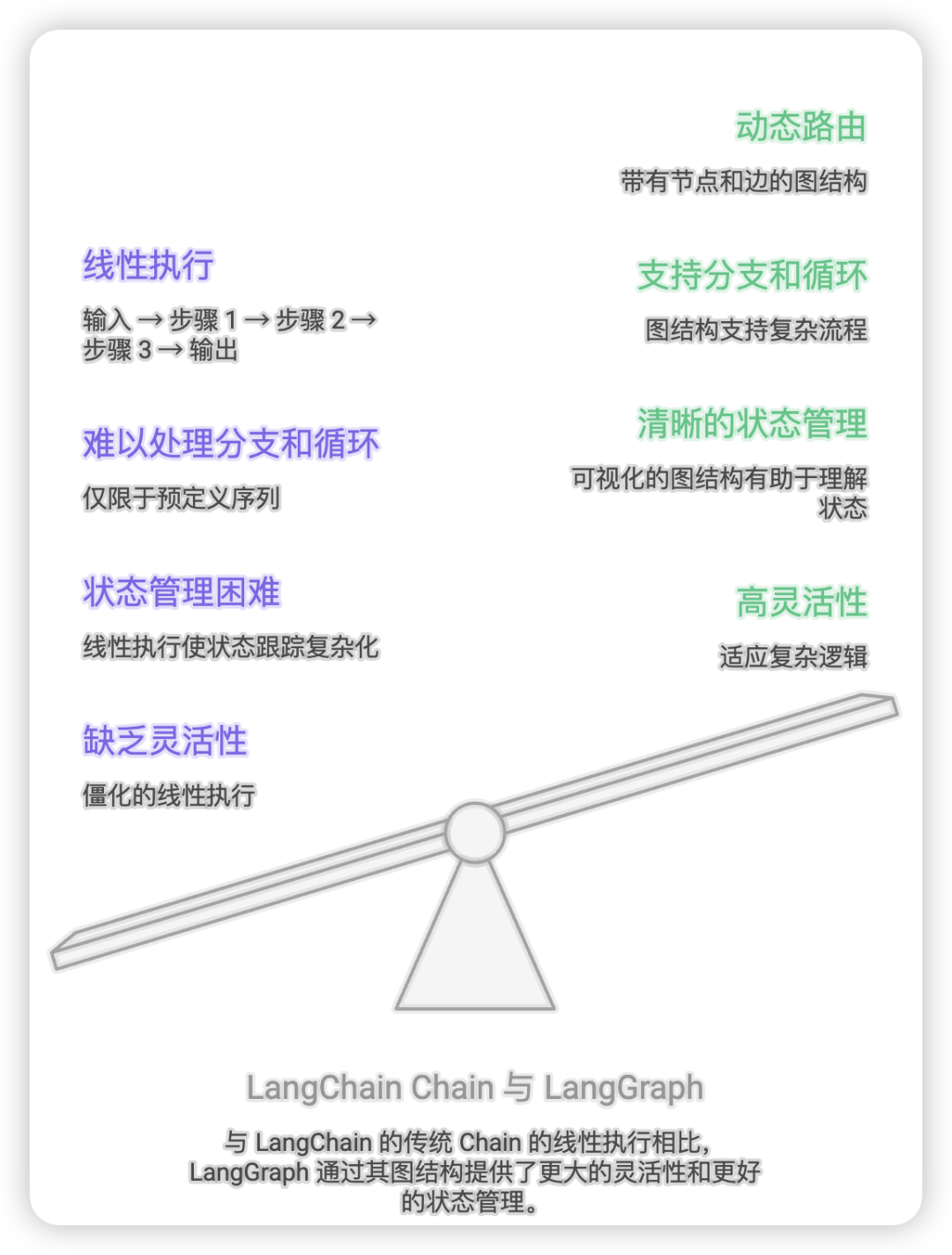
3.1 传统 Chain 的局限性
LangChain 的 Chain 是一种线性的执行模式:
Input → Step 1 → Step 2 → Step 3 → Output局限性:
-
缺乏灵活性:只能按照预定义的顺序执行
-
难以处理分支:无法根据条件动态选择路径
-
不支持循环:无法实现重试、迭代等逻辑
-
状态管理困难:状态在步骤间传递不够清晰
3.2 LangGraph 的优势
LangGraph 通过图结构解决了这些问题:
┌─────────┐
    ┌───→│ Node B  │───┐
    │    └─────────┘   │
┌───┴───┐            ┌─▼────┐
│ Node A│            │ Node D│
└───┬───┘            └───────┘
    │    ┌─────────┐   ▲
    └───→│ Node C  │───┘
└─────────┘优势:
-
动态路由:根据状态条件选择不同路径
-
循环支持:可以回到之前的节点
-
并行执行:独立节点可以并行处理
-
清晰的状态管理:状态在图中流转,易于追踪
-
可视化:图结构直观,便于理解和维护
3.3 对比示例
传统 Chain 实现
const chain = prompt
  .pipe(llm)
  .pipe(parser)
  .pipe(outputFormatter);

const result = await chain.invoke({ input: 'query' });
LangGraph 实现
const graph = new StateGraph(MyState);

graph.addNode('llm_call', llmNode);
graph.addNode('parse', parseNode);
graph.addNode('format', formatNode);

graph.addEdge(START, 'llm_call');
graph.addConditionalEdges('llm_call', routeFunction, {
'parse': 'parse',
'retry': 'llm_call',
});
graph.addEdge('parse', 'format');
graph.addEdge('format', END);

const workflow = graph.compile();
const result = await workflow.invoke({ input: 'query' });
四、LangGraph 应用场景
4.1 多 Agent 协作系统
场景:构建一个 Hub + Sub Agent 架构,Hub Agent 负责意图识别和路由,Sub Agent 负责具体任务执行。
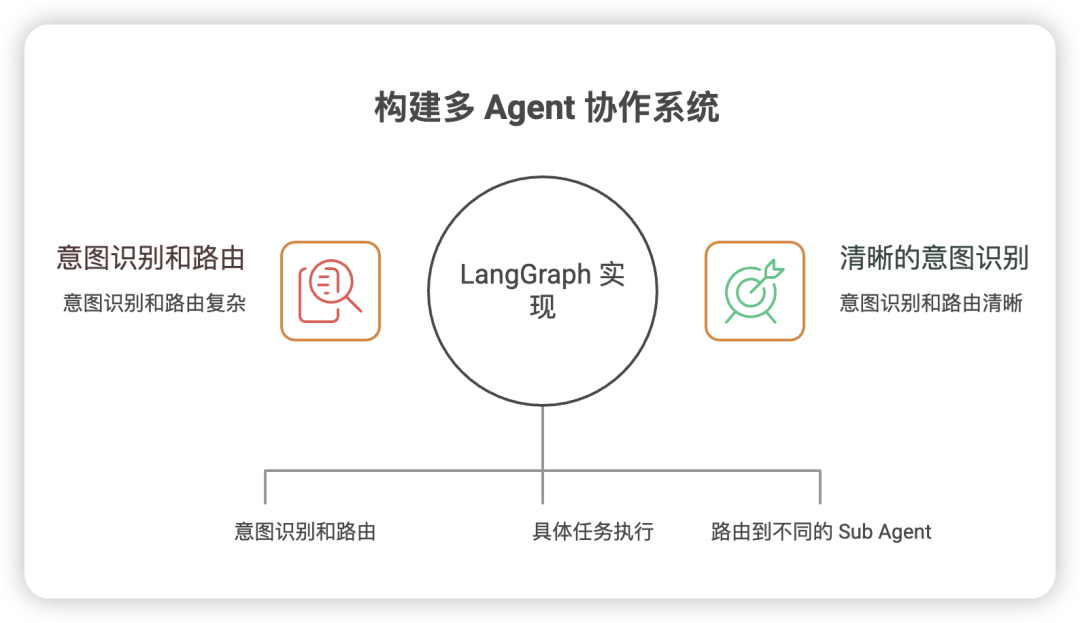
LangGraph 实现:
// Hub Agent 工作流
const hubGraph = new StateGraph(HubState);

// 添加意图识别节点
hubGraph.addNode('intent_recognition', intentRecognitionNode);

// 添加 Sub Agent 节点
hubGraph.addNode('activity_info_agent', activityInfoAgentNode);
hubGraph.addNode('timeline_agent', timelineAgentNode);
hubGraph.addNode('config_map_agent', configMapAgentNode);

// 起点连接到意图识别
hubGraph.addEdge(START, 'intent_recognition');

// 条件路由到不同的 Sub Agent
hubGraph.addConditionalEdges(
'intent_recognition',
  routeToAgent,
  {
    'activity_info_agent': 'activity_info_agent',
    'timeline_agent': 'timeline_agent',
    'config_map_agent': 'config_map_agent',
    END: END,
  }
);

// Sub Agent 执行完毕后结束
hubGraph.addEdge('activity_info_agent', END);
hubGraph.addEdge('timeline_agent', END);
hubGraph.addEdge('config_map_agent', END);

const hubWorkflow = hubGraph.compile();优势:
-
清晰的意图识别和路由逻辑
-
各 Sub Agent 独立开发和维护
-
易于扩展新的 Sub Agent
4.2 复杂决策流程
场景:实现一个需要多次 LLM 调用、工具调用和决策的复杂流程。
示例:智能客服系统
const customerServiceGraph = new StateGraph(ServiceState);

// 添加节点
customerServiceGraph.addNode('classify_intent', classifyIntentNode);
customerServiceGraph.addNode('search_knowledge', searchKnowledgeNode);
customerServiceGraph.addNode('call_llm', callLLMNode);
customerServiceGraph.addNode('verify_answer', verifyAnswerNode);
customerServiceGraph.addNode('escalate_human', escalateHumanNode);

// 构建流程
customerServiceGraph.addEdge(START, 'classify_intent');

customerServiceGraph.addConditionalEdges(
'classify_intent',
(state) => {
    if (state.intent === 'simple_query') {
      return'search_knowledge';
    } else {
      return'call_llm';
    }
  },
  {
    'search_knowledge': 'search_knowledge',
    'call_llm': 'call_llm',
  }
);

customerServiceGraph.addEdge('search_knowledge', 'verify_answer');
customerServiceGraph.addEdge('call_llm', 'verify_answer');

customerServiceGraph.addConditionalEdges(
'verify_answer',
(state) => {
    if (state.confidence > 0.8) {
      return END;
    } elseif (state.retryCount < 3) {
      return'call_llm';
    } else {
      return'escalate_human';
    }
  },
  {
    END: END,
    'call_llm': 'call_llm',
    'escalate_human': 'escalate_human',
  }
);

customerServiceGraph.addEdge('escalate_human', END);优势:
-
支持多次重试和错误处理
-
可以根据置信度动态决策
-
清晰的升级机制
4.3 数据处理管道
场景:构建一个数据处理管道,包括数据提取、转换、验证和加载。
const dataProcessingGraph = new StateGraph(DataState);

dataProcessingGraph.addNode('extract', extractNode);
dataProcessingGraph.addNode('transform', transformNode);
dataProcessingGraph.addNode('validate', validateNode);
dataProcessingGraph.addNode('load', loadNode);
dataProcessingGraph.addNode('error_handler', errorHandlerNode);

dataProcessingGraph.addEdge(START, 'extract');
dataProcessingGraph.addEdge('extract', 'transform');
dataProcessingGraph.addEdge('transform', 'validate');

dataProcessingGraph.addConditionalEdges(
'validate',
(state) => state.isValid ? 'load' : 'error_handler',
  {
    'load': 'load',
    'error_handler': 'error_handler',
  }
);

dataProcessingGraph.addEdge('load', END);
dataProcessingGraph.addEdge('error_handler', END);
4.4 工作流自动化
场景:实现一个自动化工作流,如审批流程、任务分配等。
const approvalGraph = new StateGraph(ApprovalState);

approvalGraph.addNode('submit', submitNode);
approvalGraph.addNode('manager_review', managerReviewNode);
approvalGraph.addNode('director_review', directorReviewNode);
approvalGraph.addNode('approved', approvedNode);
approvalGraph.addNode('rejected', rejectedNode);

approvalGraph.addEdge(START, 'submit');
approvalGraph.addEdge('submit', 'manager_review');

approvalGraph.addConditionalEdges(
'manager_review',
(state) => {
    if (state.managerApproved) {
      return state.amount > 10000 ? 'director_review' : 'approved';
    } else {
      return'rejected';
    }
  },
  {
    'director_review': 'director_review',
    'approved': 'approved',
    'rejected': 'rejected',
  }
);

approvalGraph.addConditionalEdges(
'director_review',
(state) => state.directorApproved ? 'approved' : 'rejected',
  {
    'approved': 'approved',
    'rejected': 'rejected',
  }
);

approvalGraph.addEdge('approved', END);
approvalGraph.addEdge('rejected', END);
五、LangGraph 最佳实践
5.1 状态设计原则
5.1.1 保持状态简洁
只在状态中保存必要的信息,避免冗余数据。
// ❌ 不好的设计
const BadState = Annotation.Root({
  rawData: Annotation<any>,
  processedData: Annotation<any>,
  intermediateResult1: Annotation<any>,
  intermediateResult2: Annotation<any>,
// ... 太多字段
});

// ✅ 好的设计
const GoodState = Annotation.Root({
  input: Annotation<string>,
  context: Annotation<Record<string, any>>({
    reducer: (prev, next) => ({ ...prev, ...next }),
    default: () => ({}),
  }),
  output: Annotation<string>,
});
5.1.2 使用合适的 Reducer
根据数据类型选择合适的合并策略。
const MyState = Annotation.Root({
// 简单覆盖
  currentStep: Annotation<string>,

// 累加
  totalCost: Annotation<number>({
    reducer: (prev, next) => prev + next,
  }),

// 数组追加
  logs: Annotation<string[]>({
    reducer: (prev, next) => [...prev, ...next],
  }),

// 对象合并
  metadata: Annotation<Record<string, any>>({
    reducer: (prev, next) => ({ ...prev, ...next }),
  }),
});
5.1.3 使用共享状态传递上下文
在多 Agent 系统中,使用共享状态在 Agent 间传递上下文信息。
const HubState = Annotation.Root({
  query: Annotation<string>,
  intent: Annotation<AgentIntent>,

  // 共享状态,用于 Agent 间传递信息
  sharedState: Annotation<Record<string, any>>({
    reducer: (prev, next) => ({ ...prev, ...next }),
    default: () => ({}),
  }),

  output: Annotation<string>,
});
5.2 节点设计原则
5.2.1 单一职责
每个节点只负责一个明确的任务。
// ❌ 不好的设计:一个节点做太多事情
asyncfunction badNode(state: typeof MyState.State) {
const data = await fetchData();
const processed = processData(data);
const validated = validateData(processed);
const formatted = formatData(validated);
return { output: formatted };
}

// ✅ 好的设计:拆分成多个节点
asyncfunction fetchNode(state: typeof MyState.State) {
const data = await fetchData();
return { rawData: data };
}

asyncfunction processNode(state: typeof MyState.State) {
const processed = processData(state.rawData);
return { processedData: processed };
}

asyncfunction validateNode(state: typeof MyState.State) {
const validated = validateData(state.processedData);
return { validatedData: validated };
}

asyncfunction formatNode(state: typeof MyState.State) {
const formatted = formatData(state.validatedData);
return { output: formatted };
}
5.2.2 错误处理
在节点中妥善处理错误,避免整个工作流崩溃。
async function robustNode(state: typeof MyState.State) {
try {
    const result = await riskyOperation();
    return {
      success: true,
      result: result,
    };
  } catch (error) {
    return {
      success: false,
      error: error.message,
    };
  }
}

// 在路由函数中根据错误状态决定下一步
function routeFunction(state: typeof MyState.State): string {
if (state.success) {
    return'next_node';
  } else {
    return'error_handler';
  }
}
5.2.3 日志和监控
在关键节点添加日志,便于调试和监控。
async function loggingNode(state: typeof MyState.State) {
const startTime = Date.now();

try {
    const result = await operation();

    const duration = Date.now() - startTime;
    console.log(`Node executed successfully in ${duration}ms`);

    return {
      result: result,
      logs: [`Success: ${duration}ms`],
    };
  } catch (error) {
    const duration = Date.now() - startTime;
    console.error(`Node failed after ${duration}ms:`, error);

    return {
      error: error.message,
      logs: [`Error: ${error.message}`],
    };
  }
}
5.3 图结构设计原则
5.3.1 避免过度复杂
保持图结构清晰,避免过多的条件分支和循环。
// ❌ 不好的设计:过于复杂
graph.addConditionalEdges('node_a', routeA, { ... }); // 10+ 分支
graph.addConditionalEdges('node_b', routeB, { ... }); // 10+ 分支
// ...

// ✅ 好的设计:拆分成子图
const subGraph1 = buildSubGraph1();
const subGraph2 = buildSubGraph2();

graph.addNode('sub_graph_1', subGraph1);
graph.addNode('sub_graph_2', subGraph2);
5.3.2 使用子图(Sub-Graph)
对于复杂的工作流,将其拆分成多个子图。
// 构建子图
function buildSubAgentGraph(): CompiledStateGraph {
const subGraph = new StateGraph(SubAgentState);

  subGraph.addNode('step1', step1Node);
  subGraph.addNode('step2', step2Node);
  subGraph.addNode('step3', step3Node);

  subGraph.addEdge(START, 'step1');
  subGraph.addEdge('step1', 'step2');
  subGraph.addEdge('step2', 'step3');
  subGraph.addEdge('step3', END);

return subGraph.compile();
}

// 在主图中使用子图
const mainGraph = new StateGraph(MainState);
const subWorkflow = buildSubAgentGraph();

mainGraph.addNode('sub_agent', async (state) => {
const result = await subWorkflow.invoke({
    input: state.input,
  });
return { output: result.output };
});
5.3.3 设置合理的循环限制
对于有环图,设置最大循环次数,避免无限循环。
const MyState = Annotation.Root({
  query: Annotation<string>,
  retryCount: Annotation<number>({
    default: () =>0,
  }),
  maxRetries: Annotation<number>({
    default: () =>3,
  }),
});

function routeFunction(state: typeof MyState.State): string {
if (state.success) {
    return END;
  } elseif (state.retryCount < state.maxRetries) {
    return'retry_node';
  } else {
    return'error_node';
  }
}

asyncfunction retryNode(state: typeof MyState.State) {
// 执行重试逻辑
return {
    retryCount: state.retryCount + 1,
  };
}
5.4 性能优化
5.4.1 并行执行
利用图的并行特性,让独立节点并行执行。
// LangGraph 会自动识别可以并行执行的节点
graph.addNode('fetch_data_a', fetchDataANode);
graph.addNode('fetch_data_b', fetchDataBNode);
graph.addNode('merge', mergeNode);

graph.addEdge(START, 'fetch_data_a');
graph.addEdge(START, 'fetch_data_b');
graph.addEdge('fetch_data_a', 'merge');
graph.addEdge('fetch_data_b', 'merge');
graph.addEdge('merge', END);

// fetch_data_a 和 fetch_data_b 会并行执行
5.4.2 缓存机制
对于重复调用的节点,实现缓存机制。
const cache = new Map<string, any>();

asyncfunction cachedNode(state: typeof MyState.State) {
const cacheKey = state.query;

if (cache.has(cacheKey)) {
    return { result: cache.get(cacheKey) };
  }

const result = await expensiveOperation(state.query);
  cache.set(cacheKey, result);

return { result: result };
}
5.4.3 流式输出
对于需要实时反馈的场景,使用流式输出。
async function* streamingNode(state: typeof MyState.State) {
const stream = await llm.stream(state.query);

forawait (const chunk of stream) {
    yield {
      chunk: chunk,
    };
  }
}

// 在工作流中使用
const workflow = graph.compile();

forawait (const event of workflow.stream({ query: 'Hello' })) {
console.log(event);
}
5.5 测试和调试
5.5.1 单元测试
为每个节点编写单元测试。
describe('fetchDataNode', () => {
  it('should fetch data successfully', async () => {
    const state = {
      query: 'test query',
    };

    const result = await fetchDataNode(state);

    expect(result.data).toBeDefined();
    expect(result.success).toBe(true);
  });

  it('should handle errors gracefully', async () => {
    const state = {
      query: 'invalid query',
    };

    const result = await fetchDataNode(state);

    expect(result.success).toBe(false);
    expect(result.error).toBeDefined();
  });
});
5.5.2 集成测试
测试整个工作流的执行。
describe('MyWorkflow', () => {
  it('should execute the workflow successfully', async () => {
    const workflow = graph.compile();

    const result = await workflow.invoke({
      query: 'test query',
    });

    expect(result.output).toBeDefined();
    expect(result.success).toBe(true);
  });
});
5.5.3 调试技巧
使用 LangGraph 的内置调试功能。
// 启用详细日志
const workflow = graph.compile({
  debug: true,
});

// 查看执行轨迹
const result = await workflow.invoke(
  { query: 'test' },
  {
    recursionLimit: 100,
    streamMode: 'values', // 'values' | 'updates' | 'debug'
  }
);

// 使用 stream 查看中间状态
forawait (const event of workflow.stream({ query: 'test' })) {
console.log('Current state:', event);
}
六、LangGraph 进阶技巧
6.1 动态图构建
根据运行时条件动态构建图。
function buildDynamicGraph(config: GraphConfig): CompiledStateGraph {
const graph = new StateGraph(MyState);

// 根据配置添加不同的节点
if (config.enableFeatureA) {
    graph.addNode('feature_a', featureANode);
  }

if (config.enableFeatureB) {
    graph.addNode('feature_b', featureBNode);
  }

// 动态构建边
// ...

return graph.compile();
}
6.2 中间件和钩子
实现中间件模式,在节点执行前后添加逻辑。
function withLogging(node: NodeFunction): NodeFunction {
returnasync (state) => {
    console.log(`[${node.name}] Start`);
    const startTime = Date.now();

    try {
      const result = await node(state);
      const duration = Date.now() - startTime;
      console.log(`[${node.name}] Success (${duration}ms)`);
      return result;
    } catch (error) {
      const duration = Date.now() - startTime;
      console.error(`[${node.name}] Error (${duration}ms):`, error);
      throw error;
    }
  };
}

// 使用
graph.addNode('my_node', withLogging(myNode));
6.3 状态快照和回滚
保存状态快照,支持回滚。
class StatefulWorkflow {
private workflow: CompiledStateGraph;
private snapshots: Map<string, any> = new Map();

async invoke(input: any, snapshotId?: string) {
    const result = awaitthis.workflow.invoke(input);

    if (snapshotId) {
      this.snapshots.set(snapshotId, result);
    }

    return result;
  }

  getSnapshot(snapshotId: string) {
    returnthis.snapshots.get(snapshotId);
  }

async rollback(snapshotId: string) {
    const snapshot = this.snapshots.get(snapshotId);
    if (!snapshot) {
      thrownewError(`Snapshot ${snapshotId} not found`);
    }

    return snapshot;
  }
}
6.4 分布式执行
将节点分布到不同的服务器执行。
async function distributedNode(state: typeof MyState.State) {
// 将任务发送到远程服务器
const result = await fetch('https://worker-service.com/execute', {
    method: 'POST',
    body: JSON.stringify({
      task: 'process_data',
      data: state.data,
    }),
  });

const output = await result.json();

return { result: output };
}
七、常见问题和解决方案
7.1 类型错误
问题:LangGraph 的 TypeScript 类型定义过于严格,导致编译错误。
// 错误示例
graph.addEdge('node_a', 'node_b');
// Error: Argument of type '"node_a"' is not assignable to parameter of type '"__start__" | "__end__"'解决方案:使用 @ts-ignore 或类型断言。
// @ts-ignore - LangGraph 类型定义过于严格
graph.addEdge('node_a', 'node_b');

// 或者
graph.addEdge('node_a' as any, 'node_b' as any);
7.2 状态丢失
问题:节点返回的状态更新没有生效。
原因:节点返回的对象没有包含需要更新的字段。
解决方案:确保节点返回的对象包含所有需要更新的字段。
// ❌ 错误:没有返回状态更新
asyncfunction badNode(state: typeof MyState.State) {
const result = await operation();
// 忘记返回
}

// ✅ 正确:返回状态更新
asyncfunction goodNode(state: typeof MyState.State) {
const result = await operation();
return { result: result }; // 返回状态更新
}
7.3 无限循环
问题:图中存在循环,导致无限执行。
解决方案:设置循环限制和退出条件。
// 在状态中添加计数器
const MyState = Annotation.Root({
  loopCount: Annotation<number>({
    default: () =>0,
  }),
});

// 在节点中增加计数
asyncfunction loopNode(state: typeof MyState.State) {
return {
    loopCount: state.loopCount + 1,
  };
}

// 在路由函数中检查计数
function routeFunction(state: typeof MyState.State): string {
if (state.loopCount >= 10) {
    return END;
  } else {
    return'loop_node';
  }
}
7.4 性能问题
问题:工作流执行缓慢。
解决方案:
-
使用并行执行
-
实现缓存机制
-
优化节点逻辑
-
使用流式输出
// 并行执行
graph.addEdge(START, 'node_a');
graph.addEdge(START, 'node_b'); // node_a 和 node_b 并行执行

// 缓存
const cache = new Map();
asyncfunction cachedNode(state: typeof MyState.State) {
if (cache.has(state.key)) {
    return { result: cache.get(state.key) };
  }
const result = await expensiveOperation();
  cache.set(state.key, result);
return { result: result };
}
八、总结
8.1 LangGraph 的核心价值
-
灵活的流程控制:通过图结构实现复杂的业务逻辑
-
清晰的状态管理:状态在节点间流转,易于追踪和调试
-
强大的扩展性:支持循环、条件分支、并行执行等高级特性
-
良好的可维护性:图结构直观,便于理解和维护
-
类型安全:TypeScript 支持,提供完整的类型检查
8.2 适用场景
LangGraph 特别适合以下场景:
-
多 Agent 协作系统
-
复杂决策流程
-
需要循环和重试的任务
-
数据处理管道
-
工作流自动化
8.3 学习路径
-
基础阶段:理解图论基础,掌握 LangGraph 核心概念
-
实践阶段:通过简单示例熟悉 API 和最佳实践
-
进阶阶段:构建复杂的多 Agent 系统,优化性能
-
专家阶段:深入源码,定制化扩展
8.4 下篇预告
搭建一个Nest.js + hubAgent +subAgent 搭建一个小众城市旅游推荐Agent
参考资源
-
LangGraph 官方文档
-
LangChain 官方文档
-
图论基础教程
关于作者
我是考拉🐨,本文基于实际项目经验总结了相关概念,希望能帮助更多开发者理解和应用 LangGraph。如有问题或建议,欢迎交流讨论。
Node 社群
我组建了一个氛围特别好的 Node.js 社群,里面有很多 Node.js小伙伴,如果你对Node.js学习感兴趣的话(后续有计划也可以),我们可以一起进行Node.js相关的交流、学习、共建。下方加 考拉 好友回复「Node」即可。

   “分享、点赞、在看” 支持一波👍
欢迎加入 MCP 技术社区!与志同道合者携手前行,一同解锁 MCP 技术的无限可能!
更多推荐

 10
10 0
0- 0


 已为社区贡献4条内容

所有评论(0)