腾讯开源 | tRPC-Agent-Python:多范式快速开发Agent应用

01 项目简介
tRPC团队之前在业界Go语言AI生态开发少的背景下,推出了tRPC-Agent-Go框架,在经过腾讯内部业务充分验证及我们的不断打磨之后,现在推出Python版本的框架tRPC-Agent-Python(https://github.com/trpc-group/trpc-agent-python),方便开发者接入开源社区已有基于Python AI生态(比如Langchain),使用多种的开发范式及业界最佳Agent实践,灵活、高效地开发Agent。
相比于业界已有的Agent框架,下面是您选择tRPC-Agent-Python的原因:
● 多范式 Agent 编排:预设编排支持 ChainAgent / ParallelAgent / CycleAgent ,同时支持 GraphAgent 图编排
● 图编排能力(GraphAgent):通过 DSL 统一编排 Agent / Tool / MCP / Knowledge / CodeExecutor
● trpc-claw(openclaw-like)Agent能力:基于 nanobot:https://github.com/HKUDS/nanobot 构建,tRPC-Agent 提供 trpc-claw 能力,方便你快速开发一个支持 Telegram / 企业微信等通道的 OpenClaw-like 个人 AI Agent
● 高效接入 Python AI 生态扩展:Agent 生态扩展(claude-agent-sdk / LangGraph 等)/ 工具生态扩展(mcp 等)/ 知识库生态扩展(LangChain 等)/ 模型生态扩展(LiteLLM 等)/ 记忆生态扩展(Mem0 等)
● Agent 生态扩展:支持 LangGraphAgent / ClaudeAgent / TeamAgent(Agno-Like)。
● Tool 生态扩展:FunctionTool / 文件工具 / MCPToolset / LangChain Tool / Agent-as-Tool
● 完善的记忆能力(Session / Memory):Session 负责单会话内的消息与状态管理,Memory 负责跨会话长期记忆与个性化信息沉淀。持久化支持 InMemory / Redis / SQL,Memory 还支持 Mem0
● 生产级知识库能力:知识库能力基于 LangChain 组件构建,更好地支持 RAG 场景
● CodeExecutor 扩展能力:支持本地 / 容器执行器,用于支持 Agent 的代码执行与任务落地能力
● Skills 扩展能力:支持 SKILL.md 技能体系,用于支持 Agent 的技能复用与动态工具化能力
● 对接多种 LLM Provider:OpenAI-like / Anthropic / LiteLLM 路由
● 服务化与可观测:支持通过 FastAPI 提供 HTTP / A2A / AG-UI 的服务,内置 OpenTelemetry 追踪
tRPC-Agent-Python 提供从 Agent 构建、编排、工具接入、会话记忆,到服务化部署与可观测的完整能力,帮助你快速落地可运行、可扩展、可维护的智能体应用,如果您有下面这些需求,欢迎使用框架:
● 智能客服与知识问答(RAG + 会话记忆)
● 代码生成与工程自动化(ClaudeAgent)
● 代码执行与自动化任务落地(CodeExecutor)
● 使用 Agent Skills
● 多角色协作任务(TeamAgent / Multi-Agent)
● 跨协议 Agent 服务接入(A2A / AG-UI)
● MCP 工具协议接入与工具生态扩展
● 面向网关场景的统一接入与协议转换
● 基于 GraphAgent 的组件化工作流编排
● 复用已有 LangGraph 工作流并接入当前体系
● 快速打造 OpenClaw-like 个人 AI Agent(trpc-claw)
02 架构设计
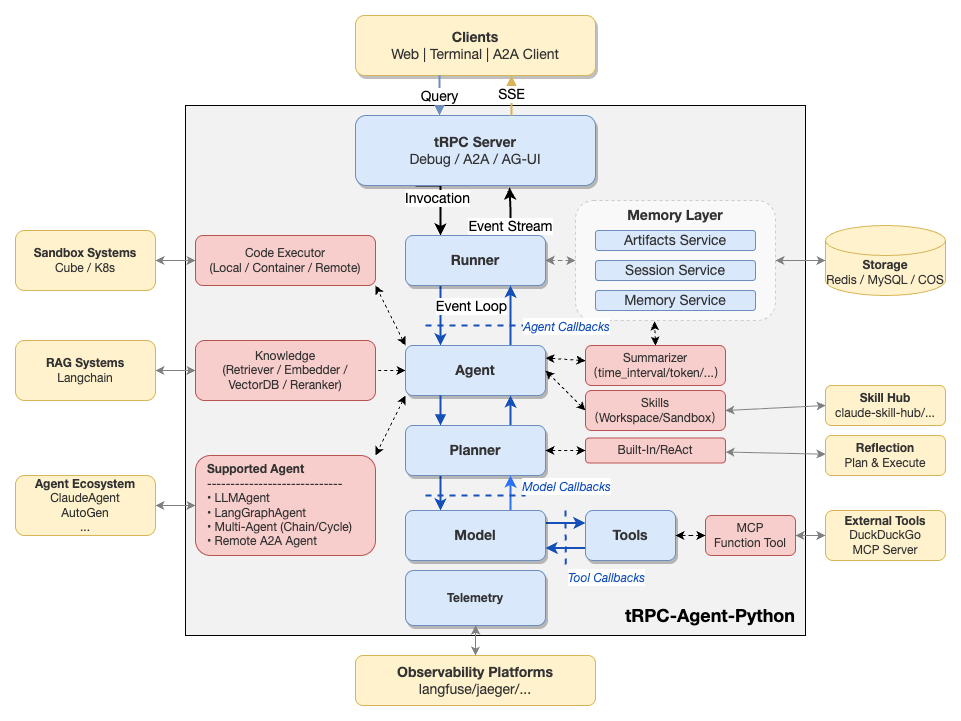
框架采用事件驱动方式组织组件,各层可独立扩展:
● Agent 层:LlmAgent / ChainAgent / ParallelAgent / CycleAgent / TransferAgent
● Agent 生态扩展层:LangGraphAgent / ClaudeAgent / TeamAgent
● 图能力层:GraphAgent(DSL 组件编排能力)
● Runner 层:统一执行入口,负责 Session / Memory / Artifact 等服务协同
● Tool 层:FunctionTool / 文件工具 / MCPToolset / Skill 工具
● Model 层:OpenAIModel / AnthropicModel / LiteLLMModel
● Memory 层:SessionService / MemoryService / SessionSummarizer / Mem0MemoryService
● Knowledge 层:基于 LangChain 的生产级知识库能力(RAG)
● 执行与技能层:CodeExecutor(本地/容器)/ Skills
● 服务层:FastAPI / A2A / AG-UI
● 观测层:OpenTelemetry tracing/metrics,可对接 Langfuse 等平台
● 生态适配层:claude-agent-sdk / mcp / LangChain / LiteLLM / Mem0,通过模型/工具/记忆适配器接入主链路
03 快速开始
前置条件
● Python 3.10+(推荐 Python 3.12)
● 可用的模型服务 API Key(OpenAI-like / Anthropic,或通过 LiteLLM 路由)
安装
安装发布包:
pip install trpc-agent-py按需安装扩展能力:
pip install trpc-agent-py[a2a,ag-ui,knowledge,agent-claude,mem0,langfuse]开发天气查询Agent
# quickstart.pyimport asyncioimport osimport uuid
from trpc_agent_sdk.agents import LlmAgentfrom trpc_agent_sdk.models import OpenAIModelfrom trpc_agent_sdk.runners import Runnerfrom trpc_agent_sdk.sessions import InMemorySessionServicefrom trpc_agent_sdk.tools import FunctionToolfrom trpc_agent_sdk.types import Content, Part

async def get_weather_report(city: str) -> dict:    return {"city": city, "temperature": "25°C", "condition": "Sunny", "humidity": "60%"}

async def main():    model = OpenAIModel(        model_name=os.environ["TRPC_AGENT_MODEL_NAME"],        api_key=os.environ["TRPC_AGENT_API_KEY"],        base_url=os.environ.get("TRPC_AGENT_BASE_URL", ""),    )
    agent = LlmAgent(        name="assistant",        description="A helpful assistant",        model=model,        instruction="You are a helpful assistant.",        tools=[FunctionTool(get_weather_report)],    )
    session_service = InMemorySessionService()    runner = Runner(app_name="demo_app", agent=agent, session_service=session_service)
    user_id = "demo_user"    session_id = str(uuid.uuid4())    user_content = Content(parts=[Part.from_text(text="What's the weather in Beijing?")])
    async for event in runner.run_async(user_id=user_id, session_id=session_id, new_message=user_content):        if not event.content or not event.content.parts:            continue        for part in event.content.parts:            if part.text and event.partial:                print(part.text, end="", flush=True)            elif part.function_call:                print(f"\n🔧 [{part.function_call.name}({part.function_call.args})]", flush=True)            elif part.function_response:                print(f"📊 [{part.function_response.response}]", flush=True)
    print()
if __name__ == "__main__":    asyncio.run(main())
运行Agent
export TRPC_AGENT_API_KEY=xxxexport TRPC_AGENT_BASE_URL=xxxxexport TRPC_AGENT_MODEL_NAME=xxxxpython quickstart.py更多示例请查看: https://github.com/trpc-group/trpc-agent-python/tree/main/examples 目录下各子目录 README.md。
04 trpc-claw
tRPC-Agent 基于 nanobot:https://github.com/HKUDS/nanobot 提供了 trpc-claw 能力,方便快速打造一个 OpenClaw-like 的个人 AI Agent:配置好后一条命令启动,可 7×24 小时在线,通过 Telegram、企业微信等常用 IM 与 Agent 交互,或直接在本地 CLI / UI 使用。
详细配置与高级功能参见:trpc-claw:https://github.com/trpc-group/trpc-agent-python/blob/main/docs/mkdocs/zh/openclaw.md
1. 生成配置文件
mkdir -p ~/.trpc_clawtrpc_agent_cmd openclaw conf_temp > ~/.trpc_claw/config.yaml2. 配置环境变量
export TRPC_AGENT_API_KEY=your_api_keyexport TRPC_AGENT_BASE_URL=your_base_urlexport TRPC_AGENT_MODEL_NAME=your_model3. 本地运行
# 强制本地 CLItrpc_agent_cmd openclaw chat -c ~/.trpc_claw/config.yaml
# 本地 UItrpc_agent_cmd openclaw ui -c ~/.trpc_claw/config.yaml
4. 接入企业微信 / Telegram
在 config.yaml 中启用对应通道,然后 run 启动:
channels: wecom: enabled: true bot_id: ${WECOM_BOT_ID} secret: ${WECOM_BOT_SECRET} # 或 Telegram: # telegram: # enabled: true # token: ${TELEGRAM_BOT_TOKEN}05 致谢
感谢腾讯理财通、腾讯广告等业务团队在真实业务场景中的持续验证与反馈,帮助我们不断打磨框架能力。
也感谢 ADK、Agno、CrewAI、AutoGen 等优秀开源框架带来的启发,让我们能够站在巨人的肩膀上持续前进。
06 项目地址
github: https://github.com/trpc-group/trpc-agent-python
如果 tRPC-Agent-Python 对你有帮助,请花 3 秒钟点一个 Star🌟 —— 这是对我们最直接的鼓励,也能帮助更多开发者发现这个项目。
更多文档:
● 中文文档: https://github.com/trpc-group/trpc-agent-python/tree/main/docs/mkdocs/zh
● 英文文档: https://github.com/trpc-group/trpc-agent-python/tree/main/docs/mkdocs/en
关注腾讯开源公众号
获取更多最新腾讯官方开源信息!

欢迎加入 MCP 技术社区!与志同道合者携手前行,一同解锁 MCP 技术的无限可能!
更多推荐

 0
0 0
0- 0


 已为社区贡献2条内容

所有评论(0)