Spring AI 完整学习路径与项目实践指南(姿势纠正)
很多同学在网上学了一堆AI概念拿起来就开跑,然后AI辅助编程写了一堆代码,结果姿势并不正确留下了技术债。这篇文章主要讲清楚Spirng AI给我们提供的能力和正确的打开方式,不要再绝对相信AI给你的代码了!
一、Spring AI 全景认知
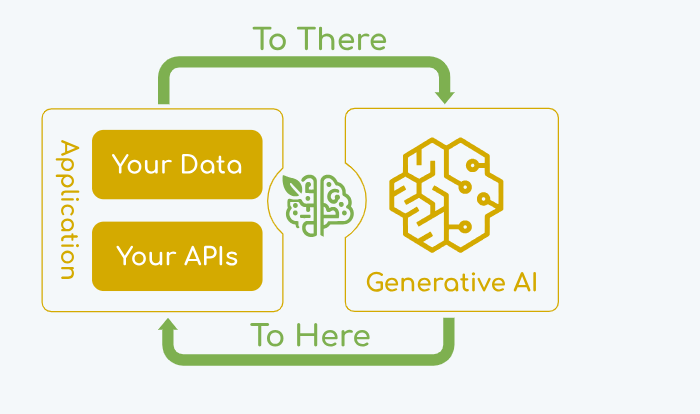
1.1 是什么?
Spring AI 是 Spring 生态下的 AI 应用框架,目标是将 Spring 的设计原则(可移植性、模块化、POJO 编程)带到 AI 领域。核心解决:连接企业数据/API 与 AI 模型。
1.2 核心能力一览
| 能力模块 | 说明 |
|---|---|
| 多模型支持 | OpenAI、Anthropic、Google、Ollama、Azure 等 |
| 可移植 API | 同步/流式调用,统一接口,也支持模型特有功能 |
| 结构化输出 | 将 AI 返回内容直接映射为 POJO |
| 向量数据库 | PGVector、Redis、Chroma、Milvus 等 15+ 种 |
| 工具/函数调用 | 让模型执行客户端函数 |
| RAG 全链路 | ETL 管道 + 向量存储 + 检索增强 |
| Advisors 模式 | 拦截、增强、复用 AI 交互逻辑 |
| Agent 模式 | 链式、并行、路由、编排器等 |
| 可观测性 | 追踪、度量 |
一句话:Spring AI 是 Java 世界的 LangChain,但更贴近 Spring Boot 开发者。
二、学习路径(分阶段)
阶段 1:快速入门
目标:跑通第一个 AI 应用,理解核心 API。
步骤 1:创建项目
使用 Spring Initializr 选择:
-
Spring Web
-
Spring AI OpenAI Starter(或 Ollama)
步骤 2:配置 API Key
properties
spring.ai.openai.api-key=你的key步骤 3:写一个最简单的 Controller
java
@RestController
public class AiController {
    private final ChatClient chatClient;

    public AiController(ChatClient.Builder builder) {
        this.chatClient = builder.build();
    }

    @GetMapping("/chat")
    public String chat(@RequestParam String msg) {
        return chatClient.prompt(msg).call().content();
    }
}
已可运行 http://localhost:8080/chat?msg=讲个笑话
阶段 2:核心 API 深入
目标:掌握 ChatClient、Prompt、Advisor、结构化输出。
2.1 ChatClient 的三种用法
java
// 1. 最简
String r1 = chatClient.prompt("你好").call().content();

// 2. 带系统消息 + 参数
String r2 = chatClient.prompt()
    .system("你是一个{role}专家")
    .user("解释{word}")
    .param("role", "Java")
    .param("word", "Spring AI")
    .call()
    .content();

// 3. 结构化输出
record Actor(String name, List<String> movies) {}
Actor actor = chatClient.prompt("生成一个演员及其5部电影")
    .call()
    .entity(Actor.class);
2.2 使用 Advisor(拦截增强)
java
// 内置 RAG Advisor
ChatClient ragClient = ChatClient.builder(chatModel)
    .defaultAdvisors(new QuestionAnswerAdvisor(vectorStore))
    .build();

// 内置聊天记忆 Advisor
ChatClient memoryClient = ChatClient.builder(chatModel)
    .defaultAdvisors(new MessageChatMemoryAdvisor(chatMemory))
    .build();
2.3 自定义 Advisor(实现 Re-Reading 技术)
java
public class ReReadingAdvisor implements CallAdvisor {
    @Override
    public ChatClientResponse adviseCall(ChatClientRequest req, CallAdvisorChain chain) {
        String newText = req.prompt().getUserMessage().getText()
            + "\nRead again: " + req.prompt().getUserMessage().getText();
        Prompt newPrompt = req.prompt().augmentUserMessage(newText);
        return chain.nextCall(req.mutate().prompt(newPrompt).build());
    }
}
阶段 3:RAG 完整实践
目标:构建“私有文档问答系统”。
3.1 整体流程
text
文档 → 加载 → 切分 → 向量化 → 存入向量库
用户问题 → 向量检索 → 拼接 Prompt → LLM 生成
3.2 最小可用代码
java
// 1. 加载文档
List<Document> docs = new JsonReader("data.json").get();

// 2. 切分
List<Document> chunks = new TokenTextSplitter().apply(docs);

// 3. 向量化并存入 PGVector
vectorStore.add(chunks);

// 4. 问答
String answer = chatClient.prompt()
    .advisors(new QuestionAnswerAdvisor(vectorStore))
    .user("根据文档回答:...")
    .call()
    .content();
3.3 高级:使用 Modular RAG Advisor
java
RetrievalAugmentationAdvisor advisor = RetrievalAugmentationAdvisor.builder()
    .retrievalFunction(query -> vectorStore.similaritySearch(query))
    .build();
阶段 4:Agent 与多模型
目标:实现复杂任务编排,切换不同模型。
4.1 五种 Agent 模式(来自官方示例)
| 模式 | 实现类 | 适用场景 |
|---|---|---|
| 链式 | ChainWorkflow |
任务有固定步骤 |
| 并行 | ParallelizationWorkflow |
可同时处理多个子任务 |
| 路由 | RoutingWorkflow |
按分类选择不同处理逻辑 |
| 编排器-工作者 | OrchestratorWorkersWorkflow |
动态拆分复杂任务 |
| 评估-优化 | EvaluatorOptimizerWorkflow |
需要多轮迭代改进 |
4.2 多模型切换
java
@Configuration
public class MultiModelConfig {
    @Bean
    public ChatClient openAiClient(OpenAiChatModel model) {
        return ChatClient.create(model);
    }
    @Bean
    public ChatClient ollamaClient(OllamaChatModel model) {
        return ChatClient.create(model);
    }
}
阶段 5:生产级特性
目标:可观测、安全、云绑定。
5.1 可观测性
xml
<dependency>
    <groupId>org.springframework.ai</groupId>
    <artifactId>spring-ai-observability</artifactId>
</dependency>
自动集成 Micrometer,可查看 Advisor 执行链的 Trace。
5.2 云绑定(简化多环境配置)
properties
# 通过通用属性绑定到具体 AI 提供商
spring.ai.cloud.bindings.openai.enabled=true
spring.ai.cloud.bindings.openai.credential.api-key=xxx
自动映射到 spring.ai.openai.api-key。
5.3 内容安全(SafeGuardAdvisor)
java
ChatClient.builder(chatModel)
    .defaultAdvisors(new SafeGuardAdvisor(blockedWordsList))
    .build();
三、集成方式(三种主流场景)
场景 A:纯后端 API 服务
-
暴露
/ai/chat接口 -
内部使用
ChatClient+Advisor -
适合:智能客服、内容生成
场景 B:RAG 知识库系统
-
集成
VectorStore+ETL Pipeline -
使用
QuestionAnswerAdvisor -
适合:企业文档问答、政策解读
场景 C:Agent 工作流引擎
-
组合多个
Workflow模式 -
使用
RoutingWorkflow+OrchestratorWorkersWorkflow -
适合:自动化运维、智能分析
四、完整项目实践(手把手)
项目:智能法律咨询助手
技术栈
-
Spring Boot 3.3+
-
Spring AI 1.0.5
-
PGVector(Docker 运行)
-
OpenAI GPT-4
步骤 1:初始化
bash
curl https://start.spring.io/starter.zip?dependencies=web,spring-ai-openai,postgresql,spring-ai-pgvector -o law-assistant.zip步骤 2:配置
properties
spring.ai.openai.api-key=***
spring.datasource.url=jdbc:postgresql://localhost:5432/law
spring.ai.vectorstore.pgvector.index-type=HNSW
步骤 3:加载法律文档
java
@Component
public class LawDataLoader {
    @EventListener(ApplicationReadyEvent.class)
    public void load() {
        var docs = new PagePdfDocumentReader("classpath:law.pdf").get();
        var chunks = new TokenTextSplitter().apply(docs);
        vectorStore.add(chunks);
    }
}
步骤 4:实现咨询接口
java
@PostMapping("/ask")
public AdviceResponse ask(@RequestBody String question) {
    String answer = chatClient.prompt()
        .advisors(new QuestionAnswerAdvisor(vectorStore))
        .system("你是法律专家,只根据提供的法律条文回答")
        .user(question)
        .call()
        .content();
    return new AdviceResponse(answer);
}
步骤 5:增加记忆(多轮对话)
java
ChatMemory chatMemory = new InMemoryChatMemory();
ChatClient memoryClient = ChatClient.builder(chatModel)
    .defaultAdvisors(new MessageChatMemoryAdvisor(chatMemory))
    .build();
最终效果
用户可连续提问,系统自动检索相关法条并基于对话历史回答。
五、学习资料与资源汇总(基于官方)
| 类型 | 链接 | 说明 |
|---|---|---|
| 官网 | spring.io/projects/spring-ai | 项目主页 |
| 参考文档 | docs.spring.io/spring-ai/reference | 核心手册 |
| API 文档 | docs.spring.io/spring-ai/api | JavaDoc |
| 官方示例 | github.com/spring-projects/spring-ai-examples | 完整代码 |
| 社区资源 | awesome-spring-ai | 书籍、视频、文章 |
| 博客系列 | spring.io/blog | 搜 "Spring AI" |
推荐学习顺序:
-
阅读官网首页的 “Getting Started”
-
运行官方
spring-ai-examples/hello-world -
研究
ChatClient+Advisor代码 -
跑通
RAG示例(带 PGVector) -
尝试
effective-agents中的 5 种模式
六、避坑与最佳实践
常见坑
-
模板语法冲突:默认
{}与 JSON 冲突 → 改用< >分隔符 -
流式响应无法映射实体:先聚合再使用
BeanOutputConverter -
多模型时 Builder 冲突:设置
spring.ai.chat.client.enabled=false手动构建
最佳实践
-
始终使用
ChatClient.Builder注入,便于测试 -
RAG 场景务必配置
TokenTextSplitter合理块大小(500-1000 token) -
生产环境启用
Observability监控 token 消耗 -
使用
SafeGuardAdvisor过滤敏感内容 -
为不同模型创建独立的
ChatClientBean,并用@Qualifier区分
七、总结
Spring AI 提供了一条 从简单调用 → RAG → Agent → 生产化 的清晰路径。您只需按照以下节奏:
-
第 1 周:跑通 ChatClient + 结构化输出
-
第 2 周:完成 RAG 文档问答项目
-
第 3 周:实现 1-2 种 Agent 模式
-
第 4 周:加入可观测性、安全、云绑定
即可从 Java 开发者转型为 生成式 AI 应用工程师。
参考资料:
https://spring.io/projects/spring-ai
https://github.com/spring-ai-community/awesome-spring-ai
https://docs.spring.io/spring-ai/reference/api/chatclient.html
https://docs.spring.io/spring-ai/reference/api/advisors.html
https://docs.spring.io/spring-ai/reference/api/prompt.html
https://docs.spring.io/spring-ai/reference/guides/getting-started-mcp.html
https://docs.spring.io/spring-ai/reference/guides/dynamic-tool-search.html
https://docs.spring.io/spring-ai/reference/guides/llm-as-judge.html
https://docs.spring.io/spring-ai/reference/api/structured-output-converter.html
https://docs.spring.io/spring-ai/reference/api/chat-memory.html
https://docs.spring.io/spring-ai/reference/api/tools.html
https://docs.spring.io/spring-ai/reference/api/chat/prompt-engineering-patterns.html
https://docs.spring.io/spring-ai/reference/api/effective-agents.html
https://docs.spring.io/spring-ai/reference/api/cloud-bindings.html
https://docs.spring.io/spring-ai/reference/api/retrieval-augmented-generation.html
https://docs.spring.io/spring-ai/reference/api/etl-pipeline.html
https://docs.spring.io/spring-ai/reference/api/vectordbs.html

欢迎加入 MCP 技术社区!与志同道合者携手前行,一同解锁 MCP 技术的无限可能!
更多推荐
 8
8 0
0- 0


 已为社区贡献4条内容

所有评论(0)