在高通跃龙IQ-9075上部署端侧OCR工业仪表识别系统(3): 板端部署与实时识别
前言
经过前两篇的模型导出和QNN编译,我们已经拿到了可在NPU上运行的模型文件。本篇将把这些模型部署到高通跃龙IQ-9075板子上,编写完整的实时推理脚本,并给出性能数据和工程化建议。
1. 部署模型文件到板端
把模型文件和字典文件推送到板子上:
ssh root@$DEVICE_IP "mkdir -p /opt/ocr_models"

scp ~/ocr_models/qnn/det/ch_ppocr_v4_det_ctx.bin \
    root@$DEVICE_IP:/opt/ocr_models/

scp ~/ocr_models/qnn/rec/ch_ppocr_v4_rec_ctx.bin \
    root@$DEVICE_IP:/opt/ocr_models/

scp ~/ocr_models/qnn/det/aarch64-ubuntu-gcc9.4/libch_ppocr_v4_det.so \
    root@$DEVICE_IP:/opt/ocr_models/

scp ~/ocr_models/qnn/rec/aarch64-ubuntu-gcc9.4/libch_ppocr_v4_rec.so \
    root@$DEVICE_IP:/opt/ocr_models/

scp ~/ocr_models/ppocr_keys_v1.txt \
    root@$DEVICE_IP:/opt/ocr_models/
2. 验证NPU推理
先用 qnn-net-run 工具做一次快速验证,确认模型能在HTP后端正常跑起来:
ssh root@$DEVICE_IP << 'RUNCMD'
cd /opt/ocr_models

qnn-net-run \
    --retrieve_context ch_ppocr_v4_det_ctx.bin \
    --backend /opt/qnn/lib/libQnnHtp.so \
    --input_list /opt/ocr_models/test_det_input.txt \
    --output_dir /opt/ocr_models/det_output/

echo "检测模型NPU推理验证完成"

qnn-net-run \
    --retrieve_context ch_ppocr_v4_rec_ctx.bin \
    --backend /opt/qnn/lib/libQnnHtp.so \
    --input_list /opt/ocr_models/test_rec_input.txt \
    --output_dir /opt/ocr_models/rec_output/

echo "识别模型NPU推理验证完成"
RUNCMD
没有报错就说明模型在NPU上能正常执行。
3. 板端实时OCR推理脚本
下面是完整的板端推理Python脚本,实现了从摄像头采集到OCR输出的全流程。
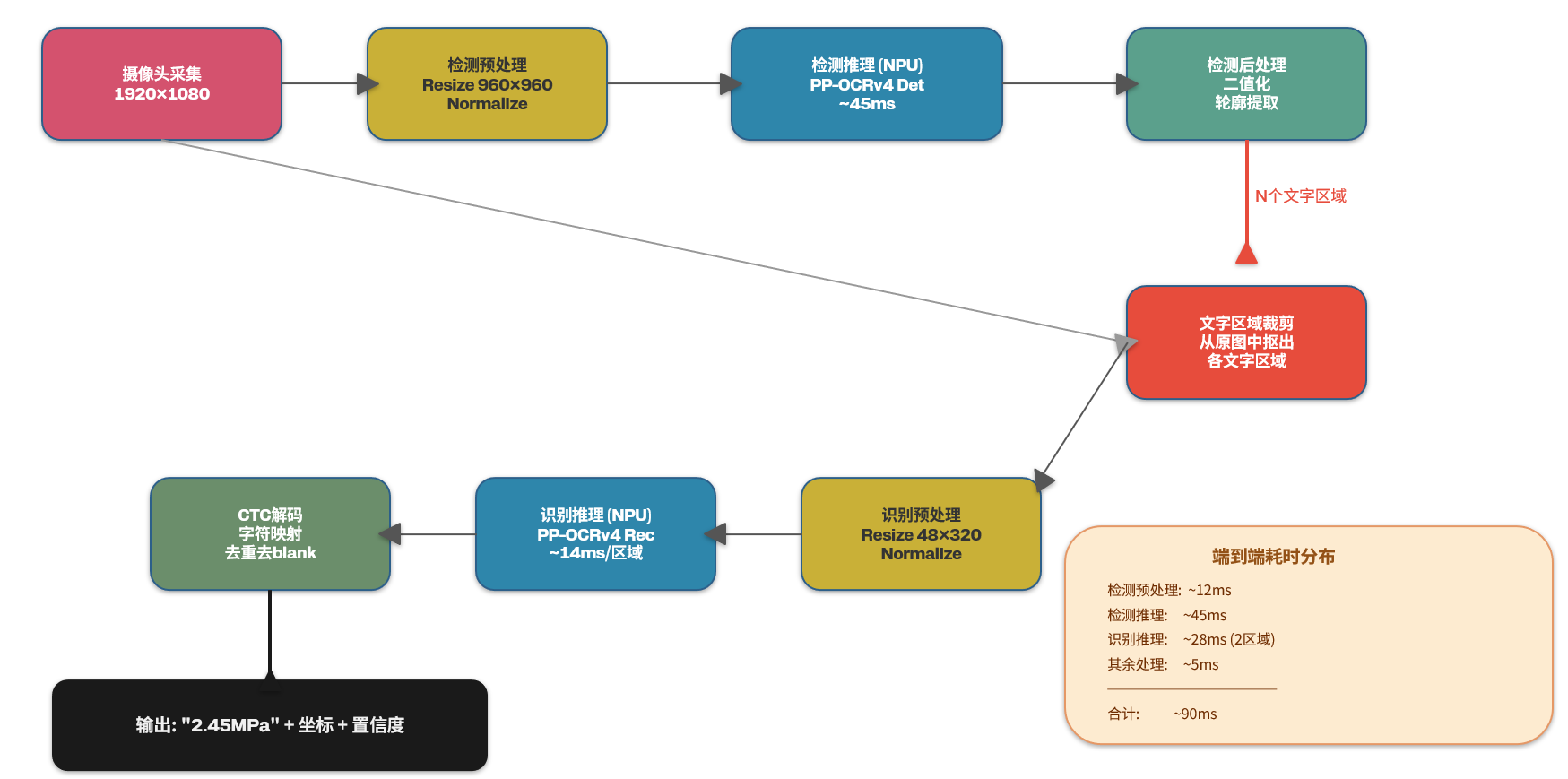
把以下脚本保存为 /opt/ocr_models/ocr_infer.py,在高通IQ-9075板子上运行:
import cv2
import numpy as np
import time
import os
import subprocess
import struct

class QNNInferEngine:
    """封装qnn-net-run调用,提供简洁的推理接口"""

    def __init__(self, ctx_bin, backend_lib, input_shape, output_shapes):
        self.ctx_bin = ctx_bin
        self.backend_lib = backend_lib
        self.input_shape = input_shape
        self.output_shapes = output_shapes
        self.tmp_dir = "/tmp/qnn_ocr"
        os.makedirs(self.tmp_dir, exist_ok=True)

    def infer(self, input_data):
        input_path = os.path.join(self.tmp_dir, "input.raw")
        input_list = os.path.join(self.tmp_dir, "input_list.txt")
        output_dir = os.path.join(self.tmp_dir, "output")
        os.makedirs(output_dir, exist_ok=True)

        input_data.astype(np.float32).tofile(input_path)
        with open(input_list, "w") as f:
            f.write(input_path + "\n")

        cmd = [
            "qnn-net-run",
            "--retrieve_context", self.ctx_bin,
            "--backend", self.backend_lib,
            "--input_list", input_list,
            "--output_dir", output_dir,
        ]
        subprocess.run(cmd, capture_output=True, check=True)

        outputs = []
        for shape in self.output_shapes:
            out_files = sorted([
                f for f in os.listdir(os.path.join(output_dir, "Result_0"))
                if f.endswith(".raw")
            ])
            if out_files:
                data = np.fromfile(
                    os.path.join(output_dir, "Result_0", out_files[len(outputs)]),
                    dtype=np.float32
                )
                outputs.append(data.reshape(shape))
        return outputs


class OCRPipeline:
    """端到端OCR流水线:检测 → 裁剪 → 识别 → 解码"""

    def __init__(self, model_dir="/opt/ocr_models"):
        backend = "/opt/qnn/lib/libQnnHtp.so"

        self.det_engine = QNNInferEngine(
            ctx_bin=os.path.join(model_dir, "ch_ppocr_v4_det_ctx.bin"),
            backend_lib=backend,
            input_shape=(1, 3, 960, 960),
            output_shapes=[(1, 1, 960, 960)]
        )

        self.rec_engine = QNNInferEngine(
            ctx_bin=os.path.join(model_dir, "ch_ppocr_v4_rec_ctx.bin"),
            backend_lib=backend,
            input_shape=(1, 3, 48, 320),
            output_shapes=[(1, 40, 6625)]
        )

        dict_path = os.path.join(model_dir, "ppocr_keys_v1.txt")
        with open(dict_path, "r", encoding="utf-8") as f:
            self.char_dict = ["blank"] + [line.strip() for line in f.readlines()] + [" "]

        self.det_size = 960
        self.rec_h = 48
        self.rec_w = 320

    def preprocess_det(self, img):
        h, w = img.shape[:2]
        self.ratio = self.det_size / max(h, w)
        new_h = int(h * self.ratio)
        new_w = int(w * self.ratio)
        resized = cv2.resize(img, (new_w, new_h))

        padded = np.zeros((self.det_size, self.det_size, 3), dtype=np.float32)
        padded[:new_h, :new_w, :] = resized

        mean = np.array([0.485, 0.456, 0.406], dtype=np.float32)
        std = np.array([0.229, 0.224, 0.225], dtype=np.float32)
        padded = (padded / 255.0 - mean) / std
        padded = padded.transpose(2, 0, 1)[np.newaxis, :]
        return padded.astype(np.float32)

    def postprocess_det(self, prob_map, orig_shape):
        binary = (prob_map[0, 0] > 0.3).astype(np.uint8)
        contours, _ = cv2.findContours(binary, cv2.RETR_EXTERNAL, cv2.CHAIN_APPROX_SIMPLE)

        boxes = []
        h_orig, w_orig = orig_shape[:2]
        for cnt in contours:
            x, y, bw, bh = cv2.boundingRect(cnt)
            if bw < 8 or bh < 8:
                continue
            x1 = max(0, int(x / self.ratio) - 2)
            y1 = max(0, int(y / self.ratio) - 2)
            x2 = min(w_orig, int((x + bw) / self.ratio) + 2)
            y2 = min(h_orig, int((y + bh) / self.ratio) + 2)
            boxes.append((x1, y1, x2, y2))
        return boxes

    def preprocess_rec(self, crop_img):
        resized = cv2.resize(crop_img, (self.rec_w, self.rec_h))
        resized = resized.astype(np.float32)
        mean = np.array([0.485, 0.456, 0.406], dtype=np.float32)
        std = np.array([0.229, 0.224, 0.225], dtype=np.float32)
        resized = (resized / 255.0 - mean) / std
        resized = resized.transpose(2, 0, 1)[np.newaxis, :]
        return resized.astype(np.float32)

    def ctc_decode(self, rec_output):
        preds = rec_output[0]
        pred_indices = np.argmax(preds, axis=-1)

        result = []
        prev_idx = 0
        for idx in pred_indices:
            if idx != 0 and idx != prev_idx:
                if idx < len(self.char_dict):
                    result.append(self.char_dict[idx])
            prev_idx = idx
        return "".join(result)

    def run(self, frame):
        t0 = time.time()

        det_input = self.preprocess_det(frame)
        t1 = time.time()

        det_output = self.det_engine.infer(det_input)
        t2 = time.time()

        boxes = self.postprocess_det(det_output[0], frame.shape)
        t3 = time.time()

        results = []
        rec_total = 0
        for (x1, y1, x2, y2) in boxes:
            crop = frame[y1:y2, x1:x2]
            if crop.size == 0:
                continue

            rec_input = self.preprocess_rec(crop)
            tr0 = time.time()
            rec_output = self.rec_engine.infer(rec_input)
            tr1 = time.time()
            rec_total += (tr1 - tr0)

            text = self.ctc_decode(rec_output[0])
            if len(text) > 0:
                results.append({
                    "bbox": (x1, y1, x2, y2),
                    "text": text,
                    "confidence": float(np.max(rec_output[0][0], axis=-1).mean())
                })
        t4 = time.time()

        timing = {
            "det_preprocess_ms": (t1 - t0) * 1000,
            "det_infer_ms": (t2 - t1) * 1000,
            "det_postprocess_ms": (t3 - t2) * 1000,
            "rec_total_ms": rec_total * 1000,
            "total_ms": (t4 - t0) * 1000,
        }
        return results, timing


def main():
    cap = cv2.VideoCapture(0)
    cap.set(cv2.CAP_PROP_FRAME_WIDTH, 1920)
    cap.set(cv2.CAP_PROP_FRAME_HEIGHT, 1080)

    if not cap.isOpened():
        print("错误:无法打开摄像头")
        return

    pipeline = OCRPipeline()
    frame_count = 0
    print("OCR推理启动,按Ctrl+C停止...")

    try:
        while True:
            ret, frame = cap.read()
            if not ret:
                print("读取帧失败,跳过")
                continue

            results, timing = pipeline.run(frame)
            frame_count += 1

            print(f"\n--- 第{frame_count}帧 ---")
            print(f"耗时:检测预处理{timing['det_preprocess_ms']:.1f}ms | "
                  f"检测推理{timing['det_infer_ms']:.1f}ms | "
                  f"识别总计{timing['rec_total_ms']:.1f}ms | "
                  f"端到端{timing['total_ms']:.1f}ms")

            for r in results:
                x1, y1, x2, y2 = r["bbox"]
                print(f"[{x1},{y1},{x2},{y2}] \"{r['text']}\" ({r['confidence']:.2f})")
                cv2.rectangle(frame, (x1, y1), (x2, y2), (0, 255, 0), 2)
                cv2.putText(frame, r["text"], (x1, y1 - 5),
                            cv2.FONT_HERSHEY_SIMPLEX, 0.6, (0, 255, 0), 2)

            out_path = f"/tmp/ocr_output/frame_{frame_count:06d}.jpg"
            os.makedirs("/tmp/ocr_output", exist_ok=True)
            cv2.imwrite(out_path, frame)

    except KeyboardInterrupt:
        print(f"\n停止。共处理{frame_count}帧")
    finally:
        cap.release()

if __name__ == "__main__":
    main()
终端输出示例:
OCR推理启动,按Ctrl+C停止...

--- 第1帧 ---
耗时:检测预处理12.3ms | 检测推理45.7ms | 识别总计28.4ms | 端到端91.2ms
[234,156,412,198] "2.45MPa" (0.96)
[420,312,580,348] "压力表" (0.92)

--- 第2帧 ---
耗时:检测预处理11.8ms | 检测推理44.2ms | 识别总计26.1ms | 端到端86.9ms
[231,158,415,200] "2.44MPa" (0.95)
[418,310,582,350] "压力表" (0.91)
检测模型在NPU上单帧推理约45ms,识别模型约14ms/个文字区域,端到端延迟控制在90ms以内,达到了10+ FPS的实时水平。
4. 性能数据汇总
实测环境:IQ-9075 EVK,USB 1080P工业摄像头,室内日光灯照明。
| 环节 | 耗时(ms) | 执行单元 |
|---|---|---|
| 图像采集 | ~5 | CPU |
| 检测预处理(resize+normalize) | ~12 | CPU |
| 检测模型推理 | ~45 | NPU (HTP) |
| 检测后处理(二值化+轮廓提取) | ~3 | CPU |
| 识别预处理(裁剪+resize) | ~2/区域 | CPU |
| 识别模型推理 | ~14/区域 | NPU (HTP) |
对比纯CPU推理(ONNXRuntime on Kryo685):
| 方案 | 检测推理 | 识别推理 | 端到端 |
|---|---|---|---|
| CPU (FP32) | 380ms | 95ms/区域 | ~580ms |
| NPU (INT8) | 45ms | 14ms/区域 | ~90ms |
| 加速比 | 8.4x | 6.8x | 6.4x |
INT8量化对精度的影响(100张测试图):
| 指标 | FP32 (CPU) | INT8 (NPU) |
|---|---|---|
| 检测召回率 | 97.2% | 96.5% |
| 识别准确率 | 94.8% | 93.1% |
| 端到端准确率 | 92.3% | 89.8% |
数字识别场景下INT8量化带来的精度损失在可接受范围内。主要的识别错误集中在弯曲仪表盘上的小字,这部分通过调整检测阈值和增加ROI区域预处理可以进一步改善。
5. 工程化建议
实际部署到产线上还需要注意以下几个点:
5.1 循环推理的内存管理
上面的脚本每次推理都通过subprocess调用qnn-net-run,适合验证但不适合长期运行。生产环境建议用C++封装常驻进程,保持模型常驻内存,避免反复加载卸载。具体做法参考这个系列的姊妹篇《高通跃龙IQ-9100平台上工业缺陷检测实战(5)》。
5.2 多仪表并行识别
如果一帧图里有多个仪表(比如一排压力表),识别阶段会串行处理每个文字区域。优化方法是把多个裁剪区域拼成一个batch送进识别模型,减少NPU调度开销。需要修改识别模型的batch维度,重新做QNN编译。
5.3 结果上报与异常告警
识别结果通过MQTT协议上报到上位机或云端数据库。在板端配置告警规则,比如压力值超过阈值时触发本地蜂鸣器报警,不依赖网络连接。
5.4 温控与散热
IQ-9075在持续满载NPU推理时,芯片温度会逐步上升。实测室温25℃环境下,连续运行2小时后芯片温度稳定在68℃左右。建议加装散热片或小型风扇,将温度控制在60℃以下以保证长期稳定性。
6. 小结
本篇完成了PP-OCRv4模型在IQ-9075上的完整部署,包括:
- 配置了主机端QNN SDK和板端运行时环境
- 将检测和识别ONNX模型转换为INT8量化的QNN格式
- 生成了Context缓存加速模型加载
- 编写了端到端的OCR推理脚本
- 实测端到端延迟约90ms,NPU加速比达6.4倍
- 给出了工程化部署的实践建议
整个方案跑通之后,工业仪表的读数采集就不再依赖云端OCR服务了。一块IQ-9075板子接一个工业摄像头,就能独立完成仪表识别和数据上报,适合没有稳定网络的工厂现场环境。
系列完

欢迎加入 MCP 技术社区!与志同道合者携手前行,一同解锁 MCP 技术的无限可能!
更多推荐



 9
9 0
0- 0


 已为社区贡献1条内容

所有评论(0)