chrome浏览器crx插件开发指南
·
谷歌浏览器作为全球最受欢迎的网页浏览器之一,其插件系统为用户提供了一种个性化和定制化浏览体验的方式。Chrome插件大全汇集了各种类型的插件,包括广告拦截器、密码管理器、截图工具、翻译插件等等。这些谷歌浏览器插件都能满足用户的各种需求。无论你是开发者、设计师、学生还是普通用户,你都可以在谷歌浏览器插件大全中找到适合自己的插件,让你的浏览器更加强大和便捷。
以一个最简单的计算器插件为例,帮助大家理解一个插件的大致开发过程。
一、项目结构
calculator/
├── manifest.json          # 插件配置文件
├── calculator.html            # 计算器界面
├── calculator.js              # 计算器逻辑
├── calculator.css             # 计算器样式
└── icons/
    ├── icon16.png        # 小图标
    ├── icon48.png        # 中图标
    └── icon128.png       # 大图标
二、文件内容
manifest.json - 插件配置文件
{
  "manifest_version": 3,
  "name": "简易计算器",
  "version": "1.0.0",
  "description": "一个简单实用的计算器插件",
  "author": "Your Name",

  "action": {
    "default_popup": "calculator.html",
    "default_title": "计算器",
    "default_icon": {
      "16": "icons/icon16.png",
      "48": "icons/icon48.png",
      "128": "icons/icon128.png"
    }
  },

  "icons": {
    "16": "icons/icon16.png",
    "48": "icons/icon48.png",
    "128": "icons/icon128.png"
  },

  "permissions": []
}
页面calculator.html
<!DOCTYPE html>
<html lang="zh-CN">
<head>
    <meta charset="UTF-8">
    <meta name="viewport" content="width=device-width, initial-scale=1.0">
    <title>简易计算器</title>
    <link rel="stylesheet" href="calculator.css">
    <link rel="stylesheet" href="https://cdnjs.cloudflare.com/ajax/libs/font-awesome/6.4.0/css/all.min.css">
</head>
<body>
    <div class="calculator">
        <!-- 显示屏 -->
        <div class="display">
            <div class="expression" id="expression">0</div>
            <div class="result" id="result">0</div>
        </div>

        <!-- 功能按钮行 -->
        <div class="row">
            <button class="btn func" data-action="clear">C</button>
            <button class="btn func" data-action="backspace"><i class="fas fa-backspace"></i></button>
            <button class="btn func" data-action="percentage">%</button>
            <button class="btn operator" data-operator="/">÷</button>
        </div>

        <!-- 数字和操作按钮 -->
        <div class="row">
            <button class="btn number" data-number="7">7</button>
            <button class="btn number" data-number="8">8</button>
            <button class="btn number" data-number="9">9</button>
            <button class="btn operator" data-operator="*">×</button>
        </div>

        <div class="row">
            <button class="btn number" data-number="4">4</button>
            <button class="btn number" data-number="5">5</button>
            <button class="btn number" data-number="6">6</button>
            <button class="btn operator" data-operator="-">−</button>
        </div>

        <div class="row">
            <button class="btn number" data-number="1">1</button>
            <button class="btn number" data-number="2">2</button>
            <button class="btn number" data-number="3">3</button>
            <button class="btn operator" data-operator="+">+</button>
        </div>

        <!-- 最后一行 -->
        <div class="row">
            <button class="btn number" data-number="0">0</button>
            <button class="btn" data-action="decimal">.</button>
            <button class="btn equals" data-action="equals">=</button>
        </div>

        <!-- 附加功能 -->
        <div class="extra-functions">
            <button class="btn small" data-action="sqrt">√</button>
            <button class="btn small" data-action="square">x²</button>
            <button class="btn small" data-action="inverse">1/x</button>
            <button class="btn small" data-action="toggleSign">±</button>
        </div>

        <!-- 计算历史 -->
        <div class="history">
            <h3>计算历史 <i class="fas fa-history"></i></h3>
            <ul id="historyList"></ul>
            <button class="btn clear-history" id="clearHistory">清空历史</button>
        </div>
    </div>

    <script src="calculator.js"></script>
</body>
</html>
样式文件 calculator.css
* {
    margin: 0;
    padding: 0;
    box-sizing: border-box;
    font-family: 'Segoe UI', 'Microsoft YaHei', sans-serif;
}

body {
    width: 350px;
    min-height: 500px;
    background: linear-gradient(135deg, #6a11cb 0%, #2575fc 100%);
    padding: 15px;
    display: flex;
    justify-content: center;
    align-items: center;
}

.calculator {
    background: rgba(255, 255, 255, 0.95);
    border-radius: 20px;
    box-shadow: 0 10px 30px rgba(0, 0, 0, 0.2);
    padding: 20px;
    width: 100%;
    backdrop-filter: blur(10px);
}

/* 显示屏样式 */
.display {
    background: #1a1a1a;
    color: white;
    border-radius: 10px;
    padding: 15px;
    margin-bottom: 20px;
    text-align: right;
    min-height: 80px;
    display: flex;
    flex-direction: column;
    justify-content: flex-end;
}

.expression {
    font-size: 14px;
    color: #aaa;
    min-height: 20px;
    word-break: break-all;
    opacity: 0.8;
}

.result {
    font-size: 32px;
    font-weight: 300;
    word-break: break-all;
    line-height: 1.2;
    margin-top: 5px;
}

/* 按钮样式 */
.row {
    display: flex;
    justify-content: space-between;
    margin-bottom: 12px;
    gap: 12px;
}

.btn {
    flex: 1;
    height: 60px;
    border: none;
    border-radius: 12px;
    font-size: 20px;
    font-weight: 500;
    cursor: pointer;
    transition: all 0.2s ease;
    display: flex;
    align-items: center;
    justify-content: center;
    color: white;
    position: relative;
    overflow: hidden;
}

.btn:active {
    transform: translateY(2px);
    box-shadow: 0 2px 5px rgba(0, 0, 0, 0.2);
}

/* 数字按钮 */
.number {
    background: linear-gradient(135deg, #4a4a4a, #2c2c2c);
    box-shadow: 0 4px 8px rgba(0, 0, 0, 0.2);
}

.number:hover {
    background: linear-gradient(135deg, #5a5a5a, #3c3c3c);
}

/* 操作符按钮 */
.operator {
    background: linear-gradient(135deg, #ff9500, #ff5e3a);
    box-shadow: 0 4px 8px rgba(255, 149, 0, 0.3);
}

.operator:hover {
    background: linear-gradient(135deg, #ffaa33, #ff7a5a);
}

/* 功能按钮 */
.func {
    background: linear-gradient(135deg, #a6a6a6, #8a8a8a);
    box-shadow: 0 4px 8px rgba(166, 166, 166, 0.3);
}

.func:hover {
    background: linear-gradient(135deg, #b6b6b6, #9a9a9a);
}

/* 等号按钮 */
.equals {
    background: linear-gradient(135deg, #007aff, #5856d6);
    box-shadow: 0 4px 8px rgba(0, 122, 255, 0.3);
    font-size: 24px;
}

.equals:hover {
    background: linear-gradient(135deg, #0095ff, #6a68e6);
}

/* 小数点按钮 */
.btn[data-action="decimal"] {
    background: linear-gradient(135deg, #4a4a4a, #2c2c2c);
}

/* 附加功能区域 */
.extra-functions {
    display: flex;
    gap: 12px;
    margin: 15px 0;
}

.btn.small {
    flex: 1;
    height: 45px;
    font-size: 16px;
    background: linear-gradient(135deg, #34c759, #28a745);
    box-shadow: 0 4px 8px rgba(52, 199, 89, 0.3);
}

.btn.small:hover {
    background: linear-gradient(135deg, #44d769, #38b755);
}

/* 历史记录区域 */
.history {
    margin-top: 25px;
    padding-top: 20px;
    border-top: 2px solid #e0e0e0;
}

.history h3 {
    color: #333;
    margin-bottom: 15px;
    font-size: 16px;
    display: flex;
    align-items: center;
    gap: 8px;
}

.history h3 i {
    color: #666;
}

#historyList {
    list-style: none;
    max-height: 150px;
    overflow-y: auto;
    margin-bottom: 15px;
}

#historyList li {
    padding: 8px 12px;
    background: #f5f5f5;
    border-radius: 8px;
    margin-bottom: 8px;
    font-size: 14px;
    color: #555;
    border-left: 3px solid #007aff;
}

.clear-history {
    width: 100%;
    height: 40px;
    background: linear-gradient(135deg, #ff3b30, #d70015);
    color: white;
    border: none;
    border-radius: 8px;
    font-size: 14px;
    cursor: pointer;
    transition: all 0.2s ease;
}

.clear-history:hover {
    background: linear-gradient(135deg, #ff4b40, #e70025);
}

/* 滚动条样式 */
#historyList::-webkit-scrollbar {
    width: 6px;
}

#historyList::-webkit-scrollbar-track {
    background: #f1f1f1;
    border-radius: 3px;
}

#historyList::-webkit-scrollbar-thumb {
    background: #c1c1c1;
    border-radius: 3px;
}

#historyList::-webkit-scrollbar-thumb:hover {
    background: #a1a1a1;
}
操作文件calulator.js
class Calculator {
    constructor() {
        this.currentInput = '0';
        this.previousInput = '';
        this.operator = '';
        this.waitingForNewInput = false;
        this.history = JSON.parse(localStorage.getItem('calculatorHistory')) || [];

        this.initializeElements();
        this.setupEventListeners();
        this.updateDisplay();
        this.loadHistory();
    }

    initializeElements() {
        this.expressionElement = document.getElementById('expression');
        this.resultElement = document.getElementById('result');
        this.historyList = document.getElementById('historyList');
    }

    setupEventListeners() {
        // 数字按钮
        document.querySelectorAll('.number').forEach(button => {
            button.addEventListener('click', () => this.inputNumber(button.dataset.number));
        });

        // 操作符按钮
        document.querySelectorAll('.operator').forEach(button => {
            button.addEventListener('click', () => this.inputOperator(button.dataset.operator));
        });

        // 功能按钮
        document.querySelectorAll('.btn[data-action]').forEach(button => {
            button.addEventListener('click', () => {
                const action = button.dataset.action;
                this.handleAction(action);
            });
        });

        // 清空历史按钮
        document.getElementById('clearHistory').addEventListener('click', () => this.clearHistory());

        // 键盘支持
        document.addEventListener('keydown', (event) => this.handleKeyboard(event));
    }

    inputNumber(number) {
        if (this.waitingForNewInput) {
            this.currentInput = number;
            this.waitingForNewInput = false;
        } else {
            this.currentInput = this.currentInput === '0' ? number : this.currentInput + number;
        }
        this.updateDisplay();
    }

    inputOperator(nextOperator) {
        const inputValue = parseFloat(this.currentInput);

        if (this.previousInput === '') {
            this.previousInput = inputValue;
        } else if (this.operator) {
            const result = this.calculate(this.previousInput, inputValue, this.operator);
            this.currentInput = String(result);
            this.previousInput = result;
            this.addToHistory(`${this.previousInput} ${this.getOperatorSymbol(this.operator)} ${inputValue} = ${result}`);
        }

        this.waitingForNewInput = true;
        this.operator = nextOperator;
        this.updateDisplay();
    }

    handleAction(action) {
        switch(action) {
            case 'equals':
                this.calculateResult();
                break;
            case 'clear':
                this.clear();
                break;
            case 'backspace':
                this.backspace();
                break;
            case 'decimal':
                this.inputDecimal();
                break;
            case 'percentage':
                this.percentage();
                break;
            case 'sqrt':
                this.squareRoot();
                break;
            case 'square':
                this.square();
                break;
            case 'inverse':
                this.inverse();
                break;
            case 'toggleSign':
                this.toggleSign();
                break;
        }
    }

    calculateResult() {
        if (this.operator && this.previousInput !== '') {
            const inputValue = parseFloat(this.currentInput);
            const result = this.calculate(this.previousInput, inputValue, this.operator);

            // 添加到历史记录
            this.addToHistory(`${this.previousInput} ${this.getOperatorSymbol(this.operator)} ${inputValue} = ${result}`);

            this.currentInput = String(result);
            this.previousInput = '';
            this.operator = '';
            this.waitingForNewInput = true;
            this.updateDisplay();
        }
    }

    calculate(firstOperand, secondOperand, operator) {
        switch(operator) {
            case '+':
                return firstOperand + secondOperand;
            case '-':
                return firstOperand - secondOperand;
            case '*':
                return firstOperand * secondOperand;
            case '/':
                return secondOperand !== 0 ? firstOperand / secondOperand : 'Error';
            default:
                return secondOperand;
        }
    }

    clear() {
        this.currentInput = '0';
        this.previousInput = '';
        this.operator = '';
        this.waitingForNewInput = false;
        this.updateDisplay();
    }

    backspace() {
        if (this.currentInput.length > 1) {
            this.currentInput = this.currentInput.slice(0, -1);
        } else {
            this.currentInput = '0';
        }
        this.updateDisplay();
    }

    inputDecimal() {
        if (this.waitingForNewInput) {
            this.currentInput = '0.';
            this.waitingForNewInput = false;
        } else if (!this.currentInput.includes('.')) {
            this.currentInput += '.';
        }
        this.updateDisplay();
    }

    percentage() {
        this.currentInput = String(parseFloat(this.currentInput) / 100);
        this.updateDisplay();
    }

    squareRoot() {
        const value = parseFloat(this.currentInput);
        if (value >= 0) {
            this.addToHistory(`√${value} = ${Math.sqrt(value)}`);
            this.currentInput = String(Math.sqrt(value));
            this.updateDisplay();
        } else {
            this.currentInput = 'Error';
            this.updateDisplay();
        }
    }

    square() {
        const value = parseFloat(this.currentInput);
        this.addToHistory(`${value}² = ${value * value}`);
        this.currentInput = String(value * value);
        this.updateDisplay();
    }

    inverse() {
        const value = parseFloat(this.currentInput);
        if (value !== 0) {
            this.addToHistory(`1/${value} = ${1 / value}`);
            this.currentInput = String(1 / value);
            this.updateDisplay();
        } else {
            this.currentInput = 'Error';
            this.updateDisplay();
        }
    }

    toggleSign() {
        this.currentInput = String(-parseFloat(this.currentInput));
        this.updateDisplay();
    }

    getOperatorSymbol(operator) {
        const symbols = {
            '+': '+',
            '-': '−',
            '*': '×',
            '/': '÷'
        };
        return symbols[operator] || operator;
    }

    updateDisplay() {
        this.resultElement.textContent = this.currentInput;

        let expression = '';
        if (this.previousInput !== '') {
            expression = `${this.previousInput} ${this.getOperatorSymbol(this.operator)}`;
        }
        this.expressionElement.textContent = expression;
    }

    addToHistory(entry) {
        this.history.unshift(entry);
        if (this.history.length > 10) {
            this.history.pop();
        }
        this.saveHistory();
        this.loadHistory();
    }

    loadHistory() {
        this.historyList.innerHTML = '';
        this.history.forEach(entry => {
            const li = document.createElement('li');
            li.textContent = entry;
            this.historyList.appendChild(li);
        });
    }

    clearHistory() {
        this.history = [];
        this.saveHistory();
        this.loadHistory();
    }

    saveHistory() {
        localStorage.setItem('calculatorHistory', JSON.stringify(this.history));
    }

    handleKeyboard(event) {
        const key = event.key;

        // 防止重复处理
        if (event.repeat) return;

        // 数字键
        if (key >= '0' && key <= '9') {
            this.inputNumber(key);
        }

        // 操作符键
        else if (['+', '-', '*', '/'].includes(key)) {
            this.inputOperator(key);
        }

        // 小数点
        else if (key === '.') {
            this.inputDecimal();
        }

        // 等号或回车
        else if (key === '=' || key === 'Enter') {
            event.preventDefault();
            this.calculateResult();
        }

        // 退格
        else if (key === 'Backspace') {
            this.backspace();
        }

        // 清除
        else if (key === 'Escape' || key === 'Delete') {
            this.clear();
        }

        // 百分比
        else if (key === '%') {
            this.percentage();
        }
    }
}

// 初始化计算器
document.addEventListener('DOMContentLoaded', () => {
    new Calculator();
});
如上,按照目录结构创建所有文件后,即可使用浏览器加载插件使用。
三、加载插件
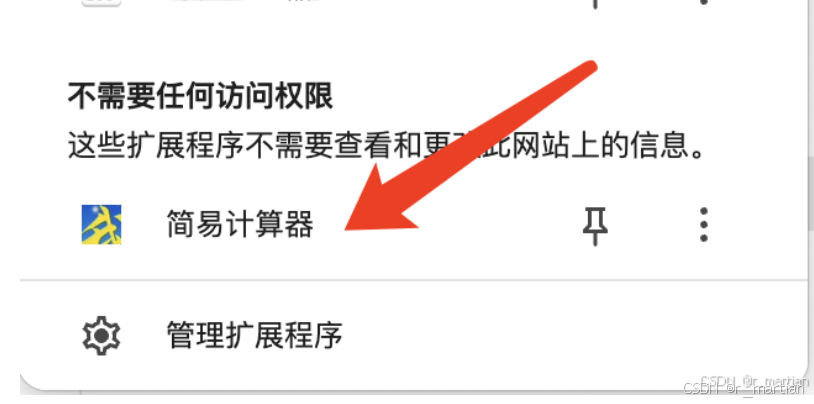
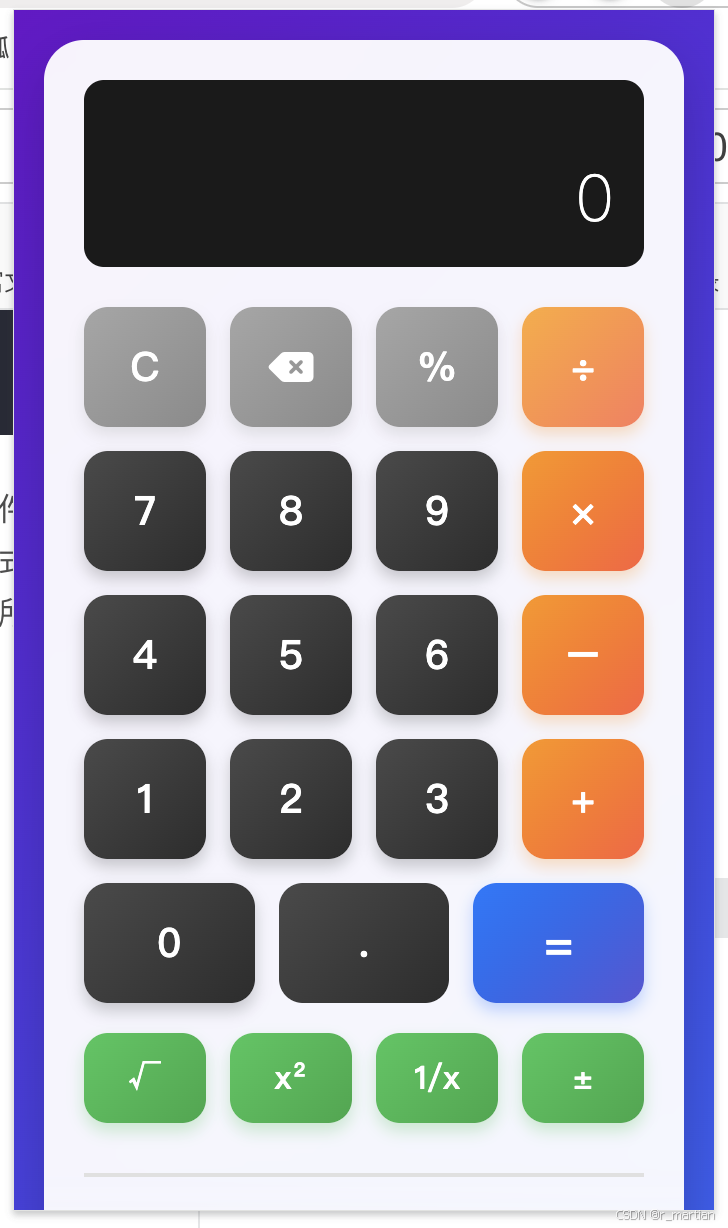
打开浏览器——扩展程序——管理扩展程序——打开开发者模式——加载未打包的扩展程序,即可看到浏览器正常加载插件,如下图所示。

欢迎加入 MCP 技术社区!与志同道合者携手前行,一同解锁 MCP 技术的无限可能!
更多推荐

 27
27 0
0- 0


 已为社区贡献1条内容

所有评论(0)