【Afsim插件开发指南】(自定义脚本)
·
基于Afsim插件实现在wizard编辑器中,添加自定义的脚本类和函数,进而实现自己的算法或者其他操作等。
项目创建流程可以参考《【Afsim插件开发指南】》
代码及说明:
【PluginRegistration.hpp】与宿主程序对接的类
#ifndef __PLUGINREGISTRATION_H__
#define __PLUGINREGISTRATION_H__

#include "WsfApplicationExtension.hpp"

class PluginRegistration : public WsfApplicationExtension
{
public:
	PluginRegistration() = default;
	~PluginRegistration() noexcept override = default;

	//派生自 WsfApplicationExtension的类中,用于重写虚函数以添加自定义脚本功能。子类中实现具体逻辑。
	void AddedToApplication(WsfApplication& aApplication) override;

};

#endif // !__PLUGINREGISTRATION_H__
【PluginRegistration.cpp】
#include "PluginRegistration.hpp"

#include "CustomScript.hpp"
#include "UtPlugin.hpp"
#include "UtScriptTypes.hpp"
#include "WsfApplication.hpp"
#include "WsfPlugin.hpp"
#include "customscript_export.h"

//AFSIM 框架中注册扩展的入口方法,需在应用初始化阶段调用
//UtScriptTypes:管理脚本类型系统的核心类,负责注册和存储脚本类定义。
void PluginRegistration::AddedToApplication(WsfApplication& aApplication)
{
	//注册一个自定义脚本类,如果类成功注册,则返回 true。
	aApplication.GetScriptTypes()->Register(ut::make_unique<ScriptCustomScriptClass>
		("CCustomScript", GetApplication().GetScriptTypes()));
}

extern "C"
{
	//导出函数,允许外部模块访问,此函数用来验证版本信息,与宿主程序版本不一致时,不会被加载
	CUSTOM_SCRIPT_EXPORT void WsfPluginVersion(UtPluginVersion& v)
	{
		v = UtPluginVersion(WSF_PLUGIN_API_MAJOR_VERSION, WSF_PLUGIN_API_MINOR_VERSION, WSF_PLUGIN_API_COMPILER_STRING);
	}
	//注册一个扩展,成功注册后,此类将获得已注册对象的所有权,并负责其删除操作。如果同名扩展已存在则抛出此异常
	CUSTOM_SCRIPT_EXPORT void WsfPluginSetup(WsfApplication& app)
	{
		app.RegisterExtension("customscript", ut::make_unique<PluginRegistration>());
	}
}
【CustomScript.hpp】自己的功能类
#ifndef __UDPOBSERVER_H__
#define __UDPOBSERVER_H__
#include "script/WsfScriptObjectClass.hpp"
#include "WsfObject.hpp"

//WsfObject类提供了具有“名称”和“类型”的对象所需的方法(这几乎是 WSF 中所有主要用户级对象的通用特性)。
//WsfObject:具有名称和类型的对象基类(通过 WsfScriptObjectClass暴露后,可在场景文件或动态脚本中调用,增强仿真逻辑的灵活性。
class CCustomScript : public WsfObject
{

public:
	CCustomScript();
	~CCustomScript() = default;

	int Add(int a, int b);

	int Plus(int a, int b);

	const char* GetScriptClassName() const override;
};

//WsfScriptObjectClass 是一个 UtScriptClass,它定义了 WsfObject 中的方法。
//WsfScriptObjectClass:AFSIM 框架中的脚本包装类,继承自 UtScriptClass,用于将 C++ 对象(如 WsfObject)的方法桥接到脚本语言(如 AFSIM 内置脚本系统)。通过此类,开发者可以在脚本中直接调用对象的成员函数。
//UtScriptClass:AFSIM 基础脚本类的基类,提供类型注册、方法绑定等核心功能,是实现 C++ 与脚本交互的关键组件。
class ScriptCustomScriptClass : public WsfScriptObjectClass
{
public:
	ScriptCustomScriptClass(const std::string& aClassName,
		UtScriptTypes* aTypesPtr);

	~ScriptCustomScriptClass() noexcept override = default;

	//UT_DECLARE_SCRIPT_METHOD 简化了 InterfaceMethods类声明语法。它创建一个名为 METHOD_NAME 的接口方法。
	//AFSIM 框架中的预定义宏,用于自动化脚本接口方法的声明。它通过封装模板代码(如类继承、运算符重载),减少开发者手动编写样板代码的工作量,确保脚本方法与 C++ 对象的绑定符合框架规范。
	//InterfaceMethods:指代实现脚本接口的类方法,通常继承自 UtScriptClass::InterfaceMethod基类。这些方法允许脚本语言(如 AFSIM 内置脚本)直接调用 C++ 对象的逻辑,是连接仿真核心与用户脚本的桥梁。
	//METHOD_NAME:占位符,表示实际方法名(如 CalculateRange或 SetTarget)。开发者使用时需替换为具体标识符,宏会将其展开为完整的类定义和方法绑定代码。
	//效率提升:减少重复代码,降低因手动声明错误导致的运行时问题。
	//框架一致性:确保所有脚本方法遵循 AFSIM 的类型安全和内存管理规范。
	//扩展性:为添加新脚本功能提供标准化入口,支持快速原型开发。
	UT_DECLARE_SCRIPT_METHOD(Add);
	UT_DECLARE_SCRIPT_METHOD(Plus);
	UT_DECLARE_SCRIPT_METHOD(Add_1);
	UT_DECLARE_SCRIPT_METHOD(Plus_1);
	UT_DECLARE_SCRIPT_METHOD(GetPlatformName_1);
	UT_DECLARE_SCRIPT_METHOD(GetPlatformName_2);

};

#endif // !__UDPOBSERVER_H__
【CustomScript.cpp】
#include "CustomScript.hpp"

CCustomScript::CCustomScript()
{
}
//返回自定义脚本类名
const char* CCustomScript::GetScriptClassName() const
{
	return "CCustomScript";
}
//自定义脚本函数,加法
int CCustomScript::Add(int a, int b)
{
	return a + b + 100;
}
//自定义脚本函数,乘法
int CCustomScript::Plus(int a, int b)
{
	return a * b * 100;
}

// ***************************************************************************
#include "script/WsfScriptContext.hpp"
#include "WsfPlatform.hpp"
#include "WsfSimulation.hpp"
ScriptCustomScriptClass::ScriptCustomScriptClass(const std::string& aClassName, UtScriptTypes* aTypesPtr)
	: WsfScriptObjectClass(aClassName, aTypesPtr)
{
	//设置脚本类名,需与自定义类名一致
	SetClassName("CCustomScript");
	//表示这个类是否可以在脚本中构造。当值为 false时,禁止此类操作,通常用于抽象基类或内部类。
	//指在 AFSIM 场景文件或运行时脚本中,通过脚本语句(而非 C++ 代码)创建类的实例。这是框架支持动态仿真配置的核心特性之一。
	//与 UT_DECLARE_SCRIPT_METHOD等宏协同工作,确保脚本只能实例化明确允许的类,避免运行时错误。
	mConstructible = true;

	//将方法注册到此 UtScriptClass,使其可在脚本中调用。如果不另起别名,默认使用<XXX>中的名字。
	//AddMethod 只能在实例化后调用注册函数,如下所示:
	//script_variables
	//	CCustomScript customScript = CCustomScript();
	//end_script_variables
	//script void Add()
	//	int re = customScript.Add(1, 3);
	//	writeln("Add: ", re);
	//end_script
	AddMethod(ut::make_unique<Add>());
	AddMethod(ut::make_unique<Plus>());

	//AddStaticMethod 可以直接调用函数,如下所示:
	//script void AddStatic()
	//	int re = CCustomScript.Add_1(1, 2);
	//	writeln("AddStatic: ", re);
	//end_script
	AddStaticMethod(ut::make_unique<Add_1>("Add_1"));
	AddStaticMethod(ut::make_unique<Plus_1>("Plus_1"));

	//AddStaticMethod(ut::make_unique<Add_1>("Add"));
	//AddMethod(ut::make_unique<Add>());
	//上面两个函数是同名同参函数,同名同参函数采用"最后注册优先"的原则,后注册的方法会覆盖先注册的方法


	//同名不同参函数
	AddMethod(ut::make_unique<GetPlatformName_1>("GetPlatformName"));
	AddMethod(ut::make_unique<GetPlatformName_2>("GetPlatformName"));

	std::cout << "CCustomScript plugin loaded!" << std::endl;
}

UT_DEFINE_SCRIPT_METHOD(ScriptCustomScriptClass, CCustomScript, Add, 2, "int", "int, int")
{
	//调用CCustomScript::Add自定义函数,将参数传递给函数,并将函数处理结果放入返回值中
	aReturnVal.SetInt(aObjectPtr->Add(aVarArgs[0].GetInt(), aVarArgs[1].GetInt()));
}

UT_DEFINE_SCRIPT_METHOD(ScriptCustomScriptClass, CCustomScript, Plus, 2, "int", "int, int")
{
	aReturnVal.SetInt(aObjectPtr->Plus(aVarArgs[0].GetInt(), aVarArgs[1].GetInt()));
}


UT_DEFINE_SCRIPT_METHOD(ScriptCustomScriptClass, CCustomScript, Add_1, 2, "int", "int, int")
{
	//调用括号内容的处理,此处理是将两个参数相加,并将处理结果放入返回值中
	aReturnVal.SetInt(aVarArgs[0].GetInt() + aVarArgs[1].GetInt());
}

UT_DEFINE_SCRIPT_METHOD(ScriptCustomScriptClass, CCustomScript, Plus_1, 2, "int", "int, int")
{
	aReturnVal.SetInt(aVarArgs[0].GetInt() * aVarArgs[1].GetInt());
}

UT_DEFINE_SCRIPT_METHOD(ScriptCustomScriptClass, CCustomScript, GetPlatformName_1, 1, "string", "WsfPlatform")
{
	WsfPlatform* pPlatform = aVarArgs[0].GetPointer()->GetAppObject<WsfPlatform>();
	if (NULL == pPlatform)
	{
		aReturnVal.SetString("");
	}

	aReturnVal.SetString("GetPlatformName_1" + pPlatform->GetName());
}

UT_DEFINE_SCRIPT_METHOD(ScriptCustomScriptClass, CCustomScript, GetPlatformName_2, 1, "string", "int")
{
	WsfSimulation* simPtr = WsfScriptContext::GetSIMULATION(aContext);
	if (NULL == simPtr)
	{
		aReturnVal.SetString("");
	}
	WsfPlatform* pPlatform = simPtr->GetPlatformByIndex(aVarArgs[0].GetInt());
	if (NULL == pPlatform)
	{
		aReturnVal.SetString("");
	}

	aReturnVal.SetString("GetPlatformName_2" + pPlatform->GetName());
}
【customscript_export.h】
#ifndef CUSTOM_SCRIPT_EXPORT_H
#define CUSTOM_SCRIPT_EXPORT_H

#ifdef CUSTOM_SCRIPT_STATIC_DEFINE
#  define CUSTOM_SCRIPT_EXPORT
#  define CUSTOM_SCRIPT_NO_EXPORT
#else
#  ifndef CUSTOM_SCRIPT_EXPORT
#    ifdef customscript_EXPORTS
/* We are building this library */
#      define CUSTOM_SCRIPT_EXPORT __declspec(dllexport)
#    else
/* We are using this library */
#      define CUSTOM_SCRIPT_EXPORT __declspec(dllimport)
#    endif
#  endif

#  ifndef CUSTOM_SCRIPT_NO_EXPORT
#    define CUSTOM_SCRIPT_NO_EXPORT
#  endif
#endif

#ifndef CUSTOM_SCRIPT_DEPRECATED
#  define CUSTOM_SCRIPT_DEPRECATED __declspec(deprecated)
#endif

#ifndef CUSTOM_SCRIPT_DEPRECATED_EXPORT
#  define CUSTOM_SCRIPT_DEPRECATED_EXPORTCUSTOM_SCRIPT_EXPORTCUSTOM_SCRIPT_DEPRECATED
#endif

#ifndef CUSTOM_SCRIPT_DEPRECATED_NO_EXPORT
#  define CUSTOM_SCRIPT_DEPRECATED_NO_EXPORTCUSTOM_SCRIPT_NO_EXPORTCUSTOM_SCRIPT_DEPRECATED
#endif

#if 0 /* DEFINE_NO_DEPRECATED */
#  ifndef CUSTOM_SCRIPT_NO_DEPRECATED
#    define CUSTOM_SCRIPT_NO_DEPRECATED
#  endif
#endif


#endif/* CUSTOM_SCRIPT_EXPORT_H */
使用及测试效果
插件dll存放位置参考《【Afsim插件开发指南】》
运行wizard,写入测试代码
# File generated by Wizard 2.9.0

platform B WSF_PLATFORM

end_platform

script_variables
   CCustomScript customScript = CCustomScript();
end_script_variables

script void Add()
   int re = customScript.Add(1, 3);
   writeln("Add: ", re);
end_script

script void Plus()
   int re = customScript.Plus(1, 3);
   writeln("Plus: ", re);
end_script

script void AddStatic()
   int re = CCustomScript.Add_1(1, 2);
   writeln("AddStatic: ", re);
end_script

script void PlusStatic()
   int re = CCustomScript.Plus_1(1, 2);
   writeln("PlusStatic: ", re);
end_script

script void PlatformName()
   WsfPlatform platform = WsfSimulation.FindPlatform(1);
   string name0 = customScript.GetPlatformName(platform);
   writeln("name0: ", name0);
   string name1 = customScript.GetPlatformName(platform.Index());
   writeln("name1: ", name1);
end_script

execute at_time 0.1 s absolute
   Add();
   Plus();
   AddStatic();
   PlusStatic();
   PlatformName();
end_execute
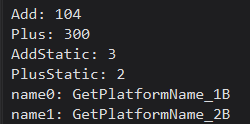
测试效果:
参考文章链接:

欢迎加入 MCP 技术社区!与志同道合者携手前行,一同解锁 MCP 技术的无限可能!
更多推荐

 3
3 0
0- 0


 已为社区贡献18条内容

所有评论(0)