【Afsim插件开发指南】
什么是插件
插件(Plug-in,也称为addin、add-in、addon或add-on)是一种遵循一定规范的应用程序接口编写出来的程序。插件只能运行在程序规定的系统平台下,不能脱离指定的平台单独运行,因为它需要调用原系统提供的函数库或数据。
插件的机制和原理
插件技术通过在软件设计和研发过程中将软件的需求和功能进行划分,使程序分为两个主要部分:主程序和插件。主程序提供基础功能和与插件的接口,插件则实现部分功能。这样,通过增减插件或修改插件内部功能,可以灵活调整软件的功能。
插件的种类
插件技术在各用户软件领域中大致可分为以下三种类型:
-
文本插件:类似批处理命令的简单插件。
-
脚本插件:使用特殊脚本语言实现的插件。
-
程序插件:利用已有的程序开发环境制作的插件。
插件的应用
插件广泛应用于各种软件和平台。例如,在IE浏览器中,安装相关插件后,浏览器能够直接调用插件程序处理特定类型的文件。在网站开发中,插件可以增强网站功能或增加娱乐性,如Google Sitemaps插件和开心农场插件。
插件的技术好处
使用插件技术能够在分析、设计、开发、项目计划、协作生产和产品扩展等方面带来诸多好处:
-
结构清晰:各插件之间相互独立,结构清晰易于理解。
-
易修改和维护:插件与主程序通过接口联系,可以随时删除、插入和修改。
-
可移植性强:插件由一系列小功能结构组成,复用力度大,移植方便。
-
结构容易调整:系统功能的增加或减少只需相应增删插件,不影响整体结构。
-
低耦合度:插件通过与主程序通信实现功能,插件之间耦合度低。
-
灵活多变:可以根据资源情况调整开发方式,资源充足时开发所有插件,资源不足时选择开发部分插件。
插件架构示意图
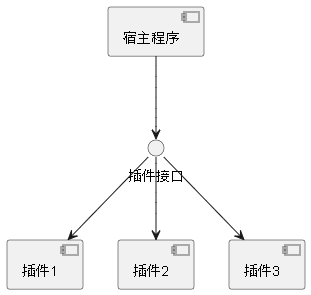
插件如何工作
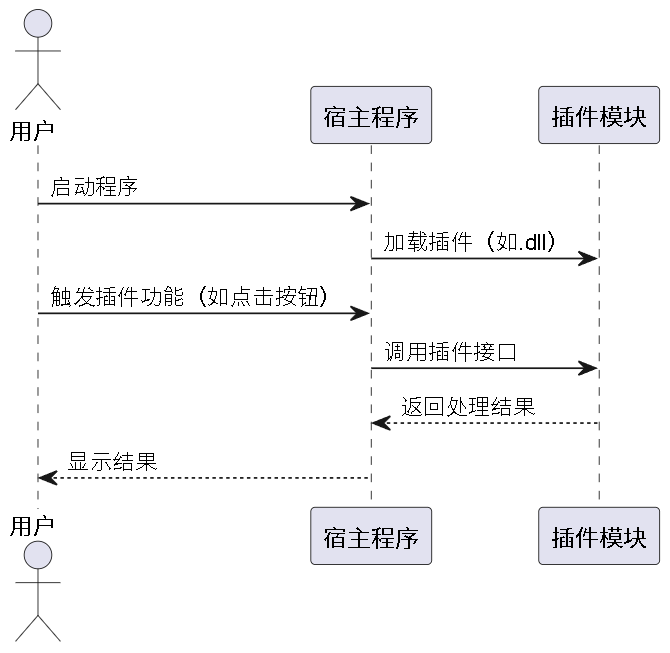
总之,插件技术通过提供灵活、可扩展的功能,使软件开发和维护更加高效和便捷。
afsim插件目录wsf_plugins加载插件过程
- 插件目录扫描:AFSIM启动时扫描指定目录(如wsf_plugins)下的所有文件。
- 文件筛选:识别有效的插件文件。
- 依赖检查:确保插件DLL的依赖项(如MSVC运行库)存在且版本兼容。
- 编译器标记验证:检查插件DLL的编译器标记是否与主程序一致,比如win_1929_64bit_release-hwe。
- 符号导出验证:验证DLL是否导出了AFSIM要求的接口函数,如CreatePluginInstance。
- 实例化和初始化:通过导出函数创建插件实例,并调用初始化方法。
- 注册插件:将插件注册到AFSIM的系统中,使其可用。
如何创建afsim插件
打开visual studio
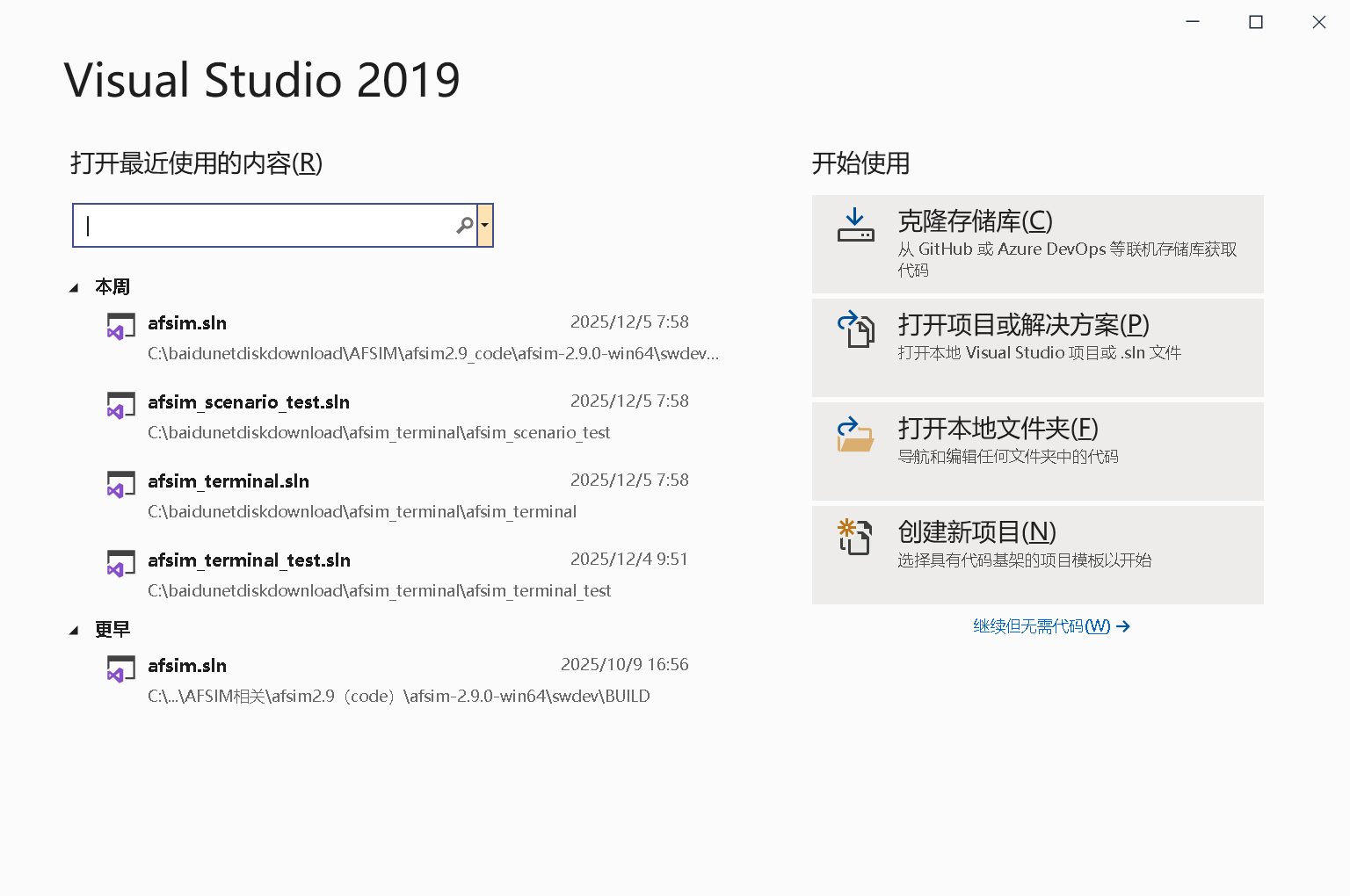
选择创建新项目
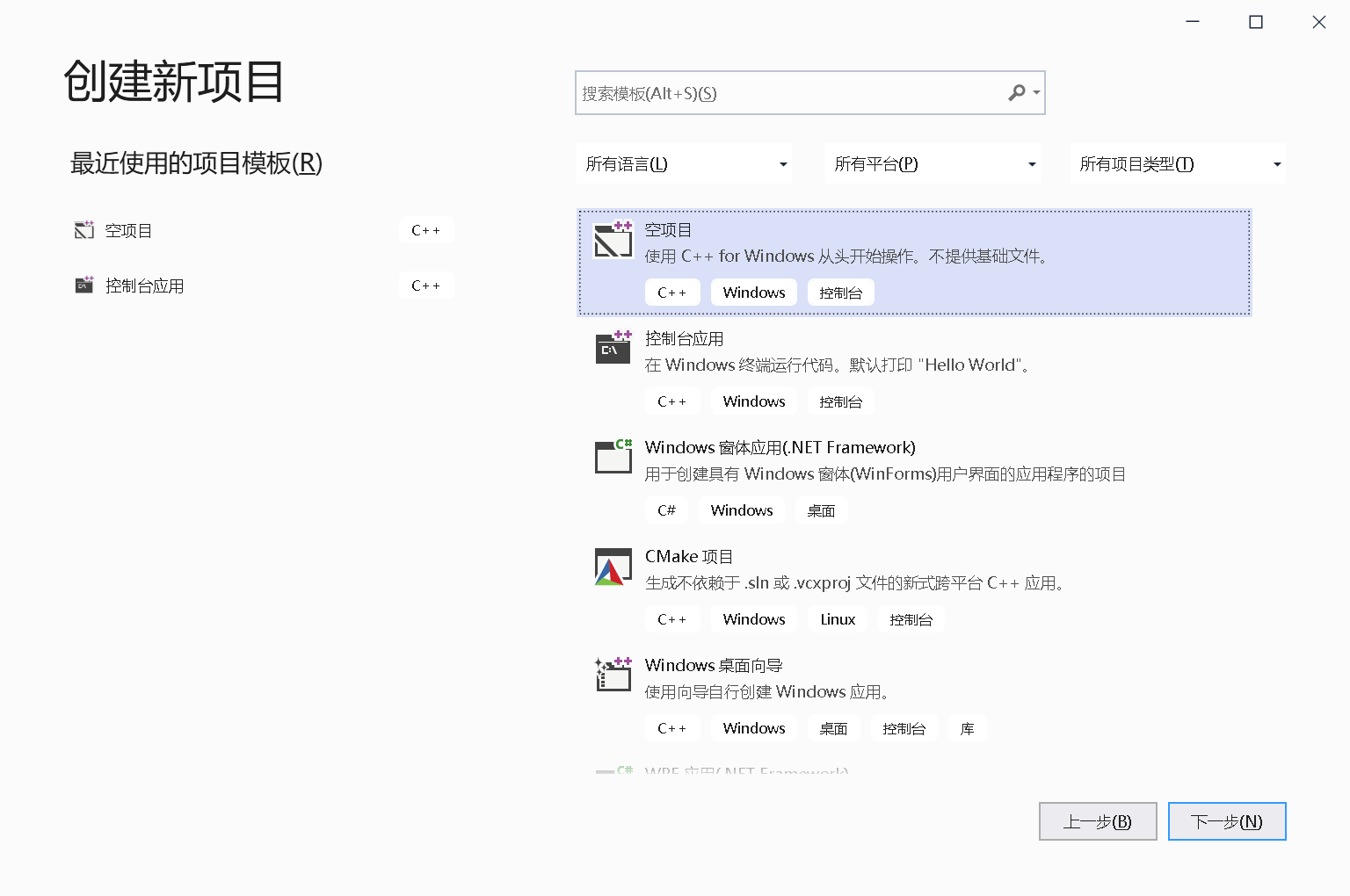
选择创建空项目
填写好项目名称与位置后,点击【创建】按钮。
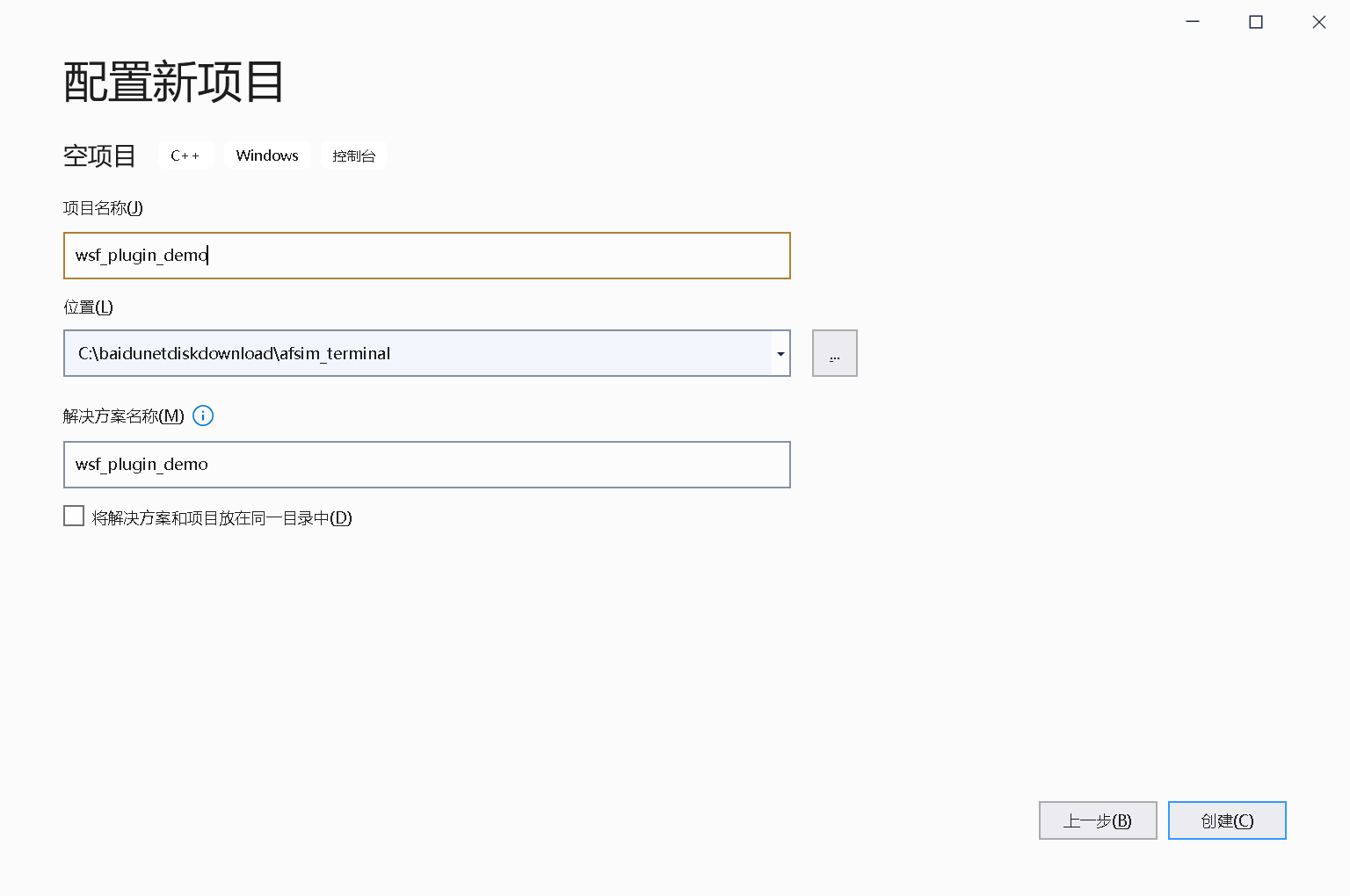
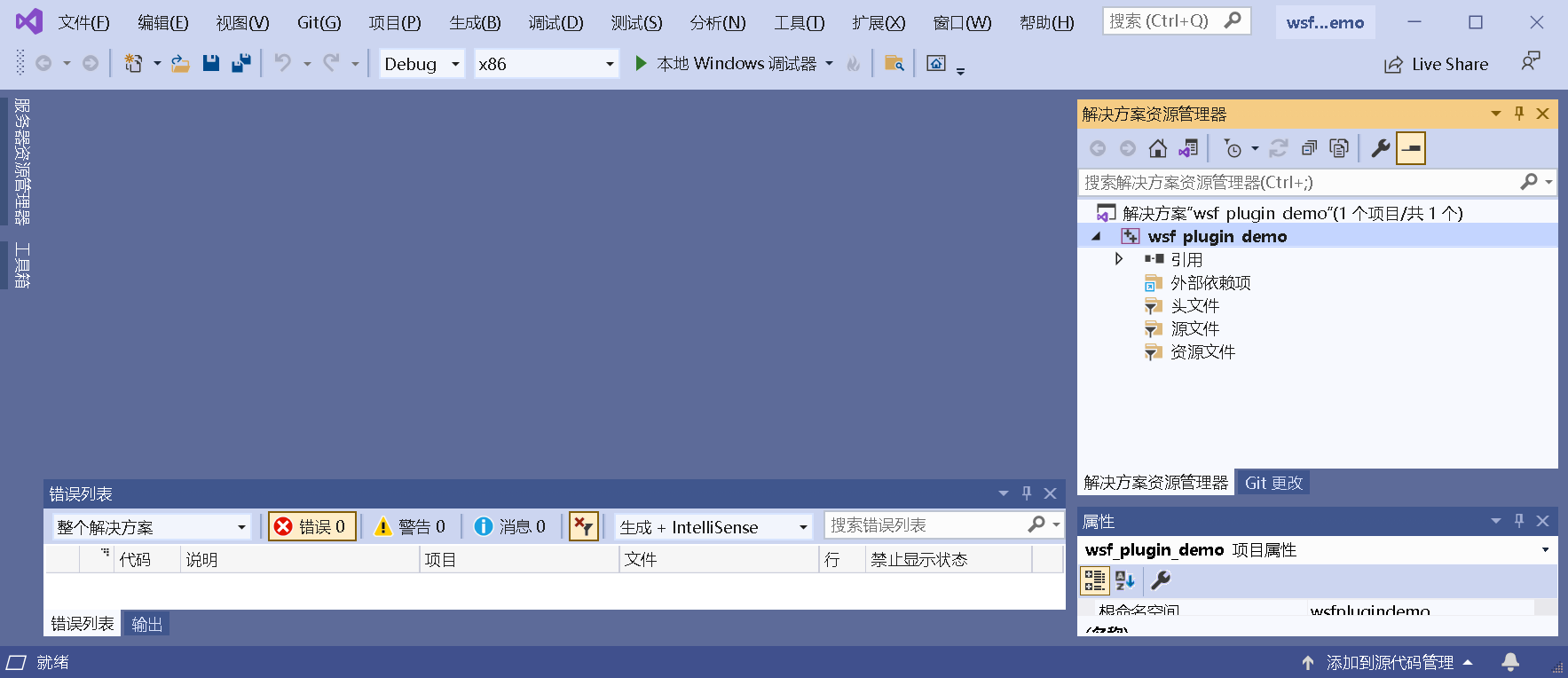
创建出来的空项目
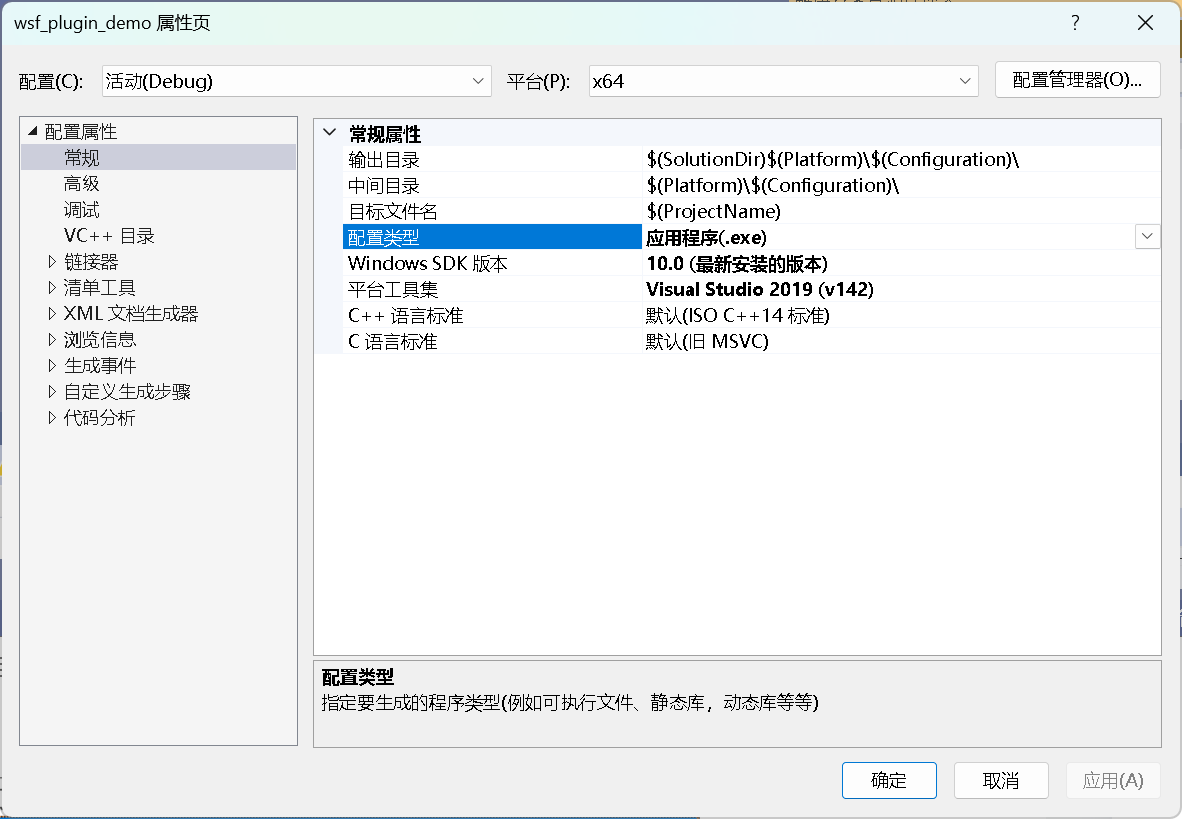
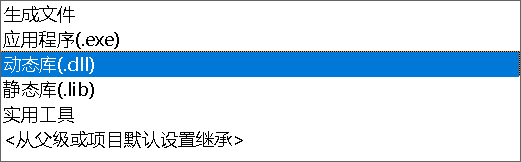
默认输出的是exe工程,需要修改将其输出成插件dll。
右键项目名称->属性->属性配置->常规->配置类型,将应用程序修改成动态库(.dll)
代码可以参考afsim项目中的wsf_air_combat工程
关键代码如下:
与宿主程序对接的代码【RegisterPlugin.hpp】
#ifndef RegisterPlugin_HPP
#define RegisterPlugin_HPP

#include "WsfPluginTemplate.hpp"
#include "WsfScenarioExtension.hpp"
#include "WsfSimulation.hpp"
#include "UtMemory.hpp"

class RegisterPlugin : public WsfScenarioExtension
{
public:
    ~RegisterPlugin() noexcept override = default;

    void SimulationCreated(WsfSimulation & aSimulation) override
    {
        // Simulation对象创建完成后,注册Simulation扩展
        // 字符串需要保持唯一性
        aSimulation.RegisterExtension("wsf_plugin_demo", ut::make_unique<WsfPluginTemplate>());
    }
};

#endif
【RegisterPlugin.cpp】
#include "wsfplugin_export.h"
#include "RegisterPlugin.hpp"
// wsf
#include "WsfPlugin.hpp"
#include "WsfApplication.hpp"
#include "WsfApplicationExtension.hpp"
#include "UtMemory.hpp"

extern"C"
{
    WSF_PLUGIN_EXPORT void WsfPluginVersion(UtPluginVersion& aVersion)
    {
        aVersion = UtPluginVersion(
            WSF_PLUGIN_API_MAJOR_VERSION,
            WSF_PLUGIN_API_MINOR_VERSION,
            WSF_PLUGIN_API_COMPILER_STRING
        );
    }
    WSF_PLUGIN_EXPORT void WsfPluginSetup(WsfApplication& aApplication)
    {
        // 注册本插件工程,字符串需要保持唯一性
        // 此处使用默认Application扩展
        aApplication.RegisterExtension("register_wsf_plugin_demo", ut::make_unique<WsfDefaultApplicationExtension<RegisterPlugin>>());
    }
}
【WsfPluginTemplate.hpp】
#ifndef WsfPluginTemplate_HPP
#define WsfPluginTemplate_HPP

#include "WsfSimulationExtension.hpp"
#include "UtCallbackHolder.hpp"

class  WsfPlatform;
class  WsfSensor;
class  WsfTrack;

class WsfPluginTemplate: public WsfSimulationExtension
{
public:
    WsfPluginTemplate();
    ~WsfPluginTemplate() noexcept override;
    bool Initialize() override;
private:
    void PlatformAdded(double aSimTime, WsfPlatform* aPlatformPtr);
    void PlatformDeleted(double aSimTime, WsfPlatform* aPlatformPtr);
    void SensorTrackUpdated(double aSimTime, WsfSensor* aSensorPtr, const WsfTrack* aTrackPtr);
    void AdvanceTime(double aSimTime);                  // 推进时间
private:
    UtCallbackHolder    mCallbacks;
    double              mPreSimTime = 0.0;
};
#endif
注册回调实现【WsfPluginTemplate.cpp】
#include "WsfPluginTemplate.hpp"
#include "RegisterPlugin.hpp"
// WSF
#include "WsfApplication.hpp"
#include "observer/WsfPlatformObserver.hpp"
#include "observer/WsfTrackObserver.hpp"
#include "observer/WsfSimulationObserver.hpp"
#include "WsfPlatform.hpp"
#include "sensor/WsfSensor.hpp"
#include "WsfSimulation.hpp"
#include "WsfTrack.hpp"

WsfPluginTemplate::WsfPluginTemplate()
{}
WsfPluginTemplate::~WsfPluginTemplate() noexcept
{}
bool WsfPluginTemplate::Initialize()
{
    mCallbacks.Add(WsfObserver::SensorTrackUpdated(&GetSimulation()).Connect(&WsfPluginTemplate::SensorTrackUpdated, this));
    mCallbacks.Add(WsfObserver::SensorTrackInitiated(&GetSimulation()).Connect(&WsfPluginTemplate::SensorTrackUpdated, this));
    mCallbacks.Add(WsfObserver::PlatformAdded(&GetSimulation()).Connect(&WsfPluginTemplate::PlatformAdded, this));
    mCallbacks.Add(WsfObserver::PlatformDeleted(&GetSimulation()).Connect(&WsfPluginTemplate::PlatformDeleted, this));
    mCallbacks.Add(WsfObserver::AdvanceTime(&GetSimulation()).Connect(&WsfPluginTemplate::AdvanceTime, this));
    std::cout << "WsfPluginTemplate plugin loaded!" << std::endl;
    return true;
}
void WsfPluginTemplate::PlatformAdded(double aSimTime, WsfPlatform* aPlatformPtr)
{
    std::cout
        << "PlatformAdded: " << aSimTime << ", "
        << aPlatformPtr->GetName() << ", "
        << aPlatformPtr->GetType() << std::endl;
}
void WsfPluginTemplate::PlatformDeleted(double aSimTime, WsfPlatform* aPlatformPtr)
{
    std::cout
        << "PlatformDeleted: " << aSimTime << ", "
        << aPlatformPtr->GetName() << ", "
        << aPlatformPtr->GetType() << std::endl;
}
void WsfPluginTemplate::SensorTrackUpdated(double aSimTime, WsfSensor* aSensorPtr, const WsfTrack* aTrackPtr)
{
    double longitude, latitude, altitude;
    aTrackPtr->GetLocationLLA(latitude, longitude, altitude);
    std::cout
        << "SensorTrackUpdated: " << aSimTime << ", "
        << aSensorPtr->GetName() << ", "
        << aSensorPtr->GetPlatform()->GetIndex() << ", "
        << aTrackPtr->GetTargetIndex() << ", "
        << latitude << ", "
        << longitude << ", "
        << altitude << std::endl;
}
void WsfPluginTemplate::AdvanceTime(double aSimTime)
{
    double deltaTime = aSimTime - mPreSimTime;
    if (deltaTime < 0.0000001) return;
    mPreSimTime = aSimTime;
    std::cout << "AdvanceTime: " << aSimTime << std::endl;
    // 获取场景所有平台,并获取平台的位置和姿态
    int platformCount = GetSimulation().GetPlatformCount();
    for (int i = 0; i < platformCount; ++i)
    {
        auto platform = GetSimulation().GetPlatformEntry(i);
        std::cout << "PlatformName: " << platform->GetName() << std::endl;
        std::cout << "PlatformType: " << platform->GetType() << std::endl;
        // 位置(经纬高)
        auto lla = platform->GetLocationLLA();
        std::cout << "PlatformLocation: ";
        std::cout << "        Longitude: " << lla.mLon
            << "        Latitude: " << lla.mLat
            << "        Altitude: " << lla.mAlt << std::endl;
        // 姿态(横滚 俯仰 航向)
        auto ned = platform->GetOrientationNED();
        std::cout << "PlatformOrientation: ";
        std::cout << "        Roll: " << ned.mPhi
            << "        Pitch: " << ned.mTheta
            << "        Heading: " << ned.mPsi << std::endl;
    }
}
动态库dll输出定义【wsfplugin_export.h】
#ifndef WSF_PLUGIN_EXPORT_H
#define WSF_PLUGIN_EXPORT_H

#ifdef WSF_PLUGIN_STATIC_DEFINE
#  define WSF_PLUGIN_EXPORT
#  define WSF_PLUGIN_NO_EXPORT
#else
#  ifndef WSF_PLUGIN_EXPORT
#    ifdef wsfplugin_EXPORTS
/* We are building this library */
#      define WSF_PLUGIN_EXPORT __declspec(dllexport)
#    else
/* We are using this library */
#      define WSF_PLUGIN_EXPORT __declspec(dllimport)
#    endif
#  endif

#  ifndef WSF_PLUGIN_NO_EXPORT
#    define WSF_PLUGIN_NO_EXPORT
#  endif
#endif

#ifndef WSF_PLUGIN_DEPRECATED
#  define WSF_PLUGIN_DEPRECATED __declspec(deprecated)
#endif

#ifndef WSF_PLUGIN_DEPRECATED_EXPORT
#  define WSF_PLUGIN_DEPRECATED_EXPORTWSF_PLUGIN_EXPORTWSF_PLUGIN_DEPRECATED
#endif

#ifndef WSF_PLUGIN_DEPRECATED_NO_EXPORT
#  define WSF_PLUGIN_DEPRECATED_NO_EXPORTWSF_PLUGIN_NO_EXPORTWSF_PLUGIN_DEPRECATED
#endif

#if 0 /* DEFINE_NO_DEPRECATED */
#  ifndef WSF_PLUGIN_NO_DEPRECATED
#    define WSF_PLUGIN_NO_DEPRECATED
#  endif
#endif


#endif/* WSF_PLUGIN_EXPORT_H */
项目配置说明
创建afsimsdk目录,存放的是从AFSim源码中抽离的所有头文件和lib文件(此即开发环境的核心内容,一旦有了这个就可以对AFSim进行二次开发了,包括插件开发或项目开发)。
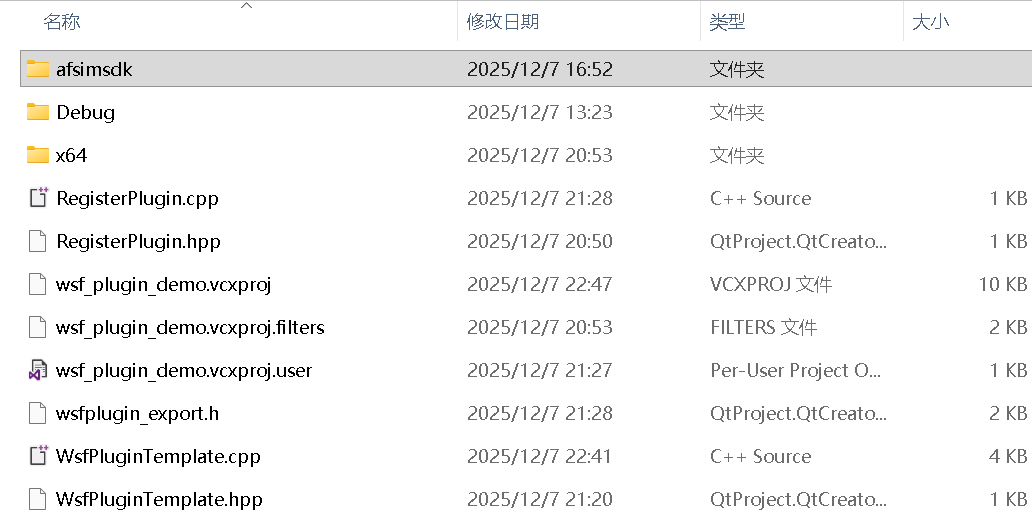
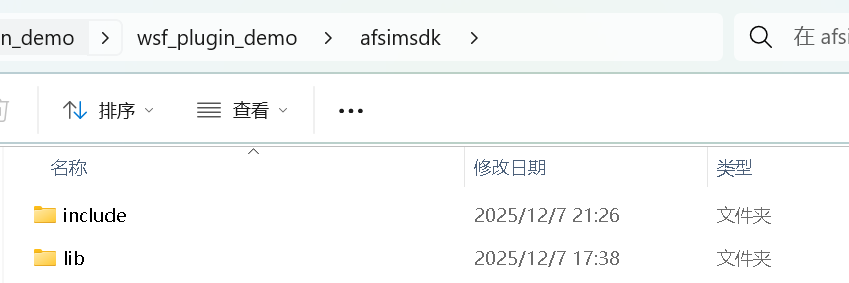
可以通过以下python脚本提取所有头文件。
使用方法【python extract_hpp.py -s "C:\path\to\src" -d "C:\path\to\dst"】
src的路径是afsim项目路径【swdev\src】
import argparse
import os
import shutil
import json
from pathlib import Path

def main():
    parser = argparse.ArgumentParser(description="Extract .hpp files preserving folder structure and print folders.")
    parser.add_argument("-s", "--src", default=".", help="Source root folder to scan (default: current directory)")
    parser.add_argument("-d", "--dst", default=r"c:\baidunetdiskdownload\LX\extracted_hpp", help="Destination root (default: c:\\baidunetdiskdownload\\LX\\extracted_hpp)")
    args = parser.parse_args()

    src_path = Path(args.src).resolve()
    dst_path = Path(args.dst).resolve()
    dst_path.mkdir(parents=True, exist_ok=True)

    # 创建一个用于存储提取后文件夹路径的缓存文件
    cache_file = dst_path / "extracted_paths.json"

    # 如果缓存文件存在,则加载已有的路径信息
    if cache_file.exists():
        with open(cache_file, 'r', encoding='utf-8') as f:
            cached_data = json.load(f)
        seen_dirs = cached_data.get("seen_dirs", [])
        copied_files = cached_data.get("copied_files", [])
    else:
        seen_dirs = []
        copied_files = []

    copied = 0

    for root, dirs, files in os.walk(src_path):
        root_path = Path(root)
        # 输出并记录所有遍历到的文件夹路径
        print(str(root_path))
        if str(root_path) not in seen_dirs:
            seen_dirs.append(str(root_path))

        for fname in files:
            if fname.lower().endswith(".hpp"):
                src_file = root_path / fname
                rel = src_file.relative_to(src_path).parent  # 相对目录
                target_dir = dst_path / rel
                target_dir.mkdir(parents=True, exist_ok=True)

                # 复制文件
                shutil.copy2(src_file, target_dir / fname)
                copied += 1

                # 记录复制的文件路径
                copied_file_path = str(target_dir / fname)
                if copied_file_path not in copied_files:
                    copied_files.append(copied_file_path)

    # 保存路径信息到缓存文件
    cache_data = {
        "seen_dirs": seen_dirs,
        "copied_files": copied_files
    }

    with open(cache_file, 'w', encoding='utf-8') as f:
        json.dump(cache_data, f, ensure_ascii=False, indent=2)

    print(f"\n扫描完成。总共复制 .hpp 文件: {copied}")
    print(f"目标位置: {dst_path}")
    print(f"缓存文件位置: {cache_file}")

if __name__ == "__main__":
    main()
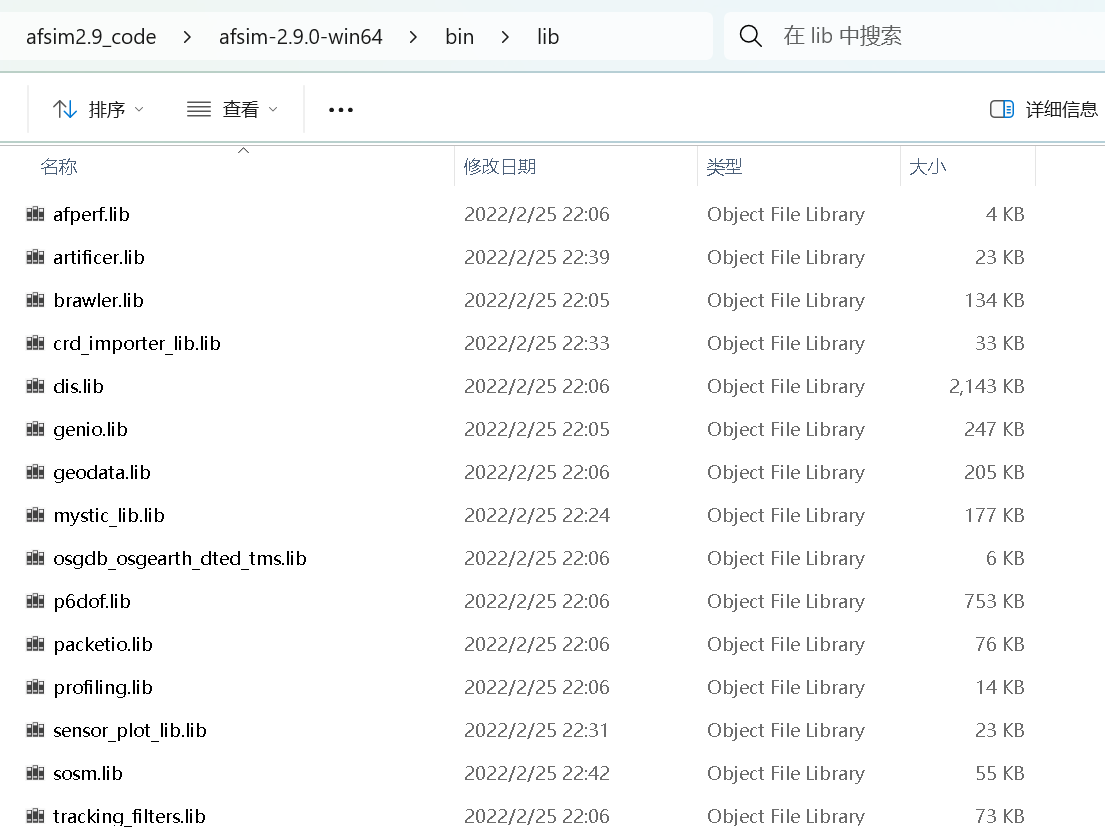
lib中的文件从【\bin\lib】中拷贝过去即可。
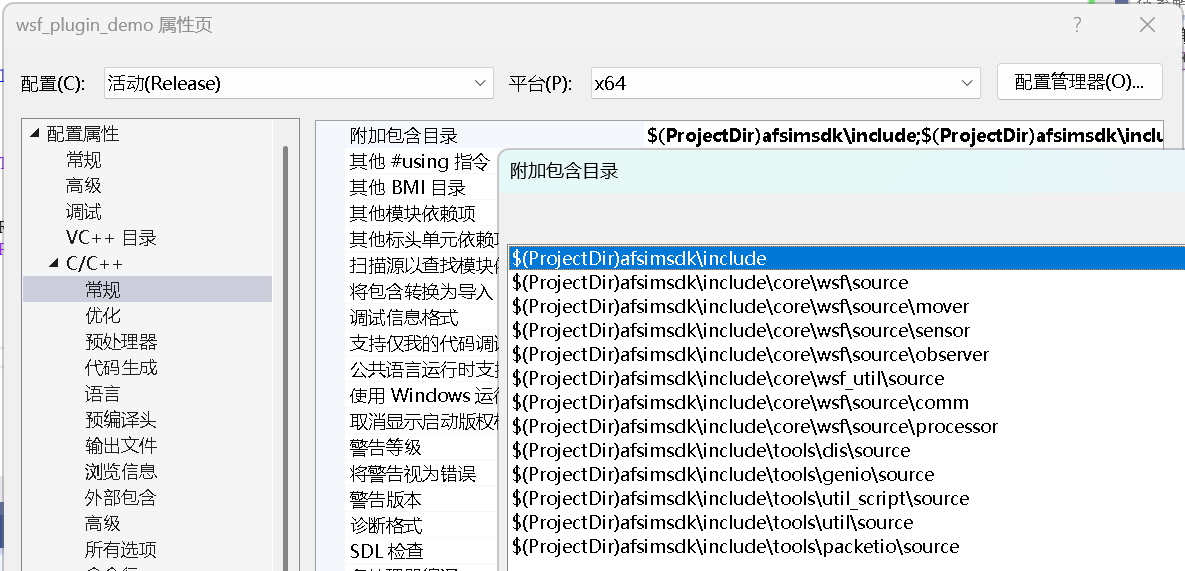
引入相关头文件路径
根据编译时提示找不到的头文件,到提取的头文件路径中找到对应的路径即可。
宏定义配置
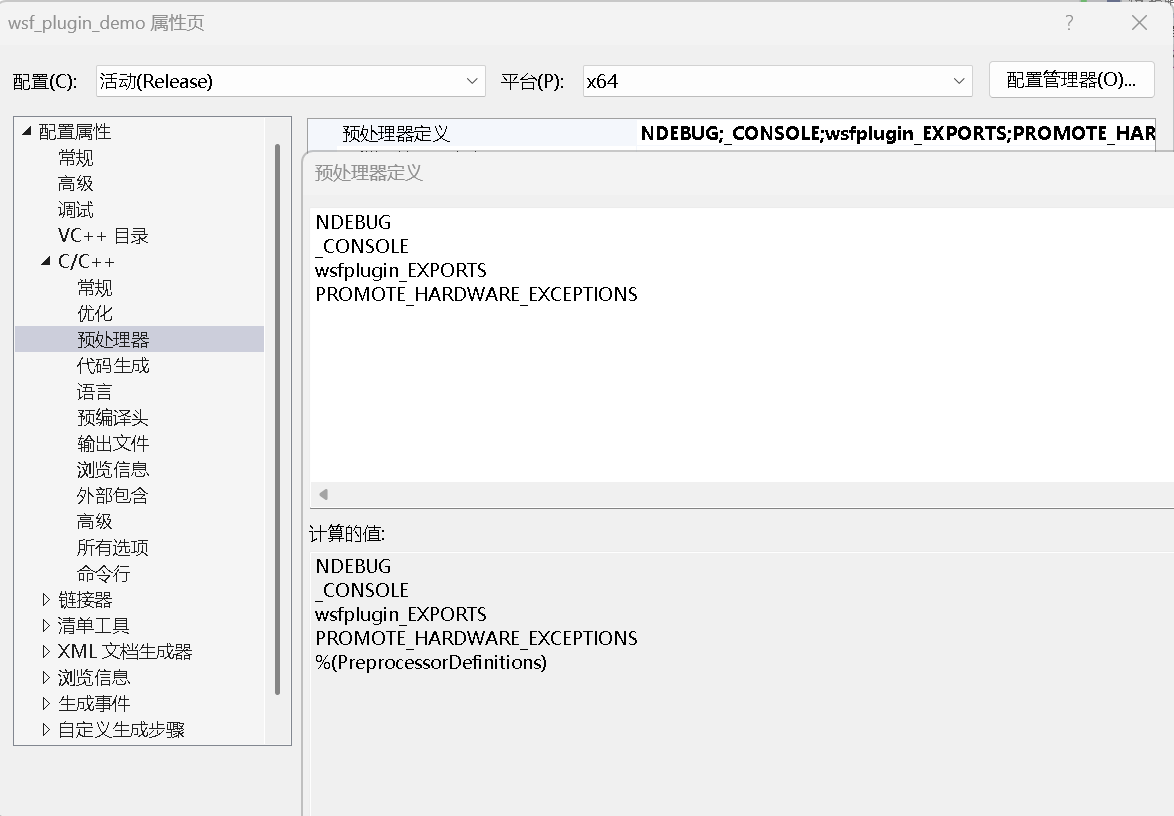
wsfplugin_EXPORTS 是上面【wsfplugin_export.h】输出动态库dll的宏。
PROMOTE_HARDWARE_EXCEPTIONS 是版本信息win_1929_64bit_release-hwe,不定义的话,编译器标记信息会缺少字段,与宿主工程对比编译器标记不通过,导致无法加载插件。
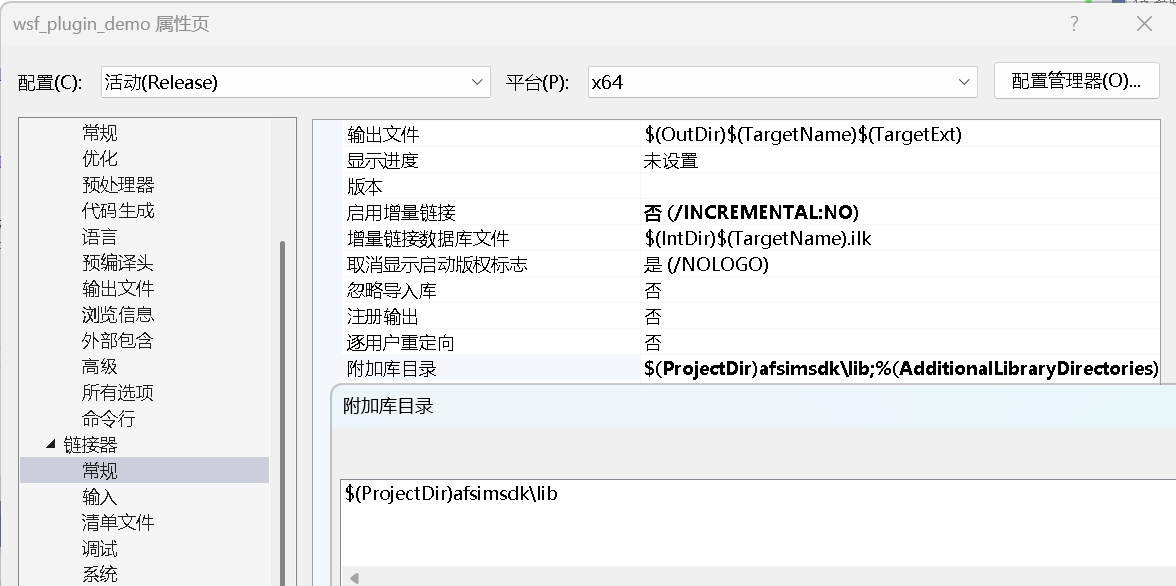
引用库路径配置
也可以不配置,在引用库文件配置中,换成路径+库名。
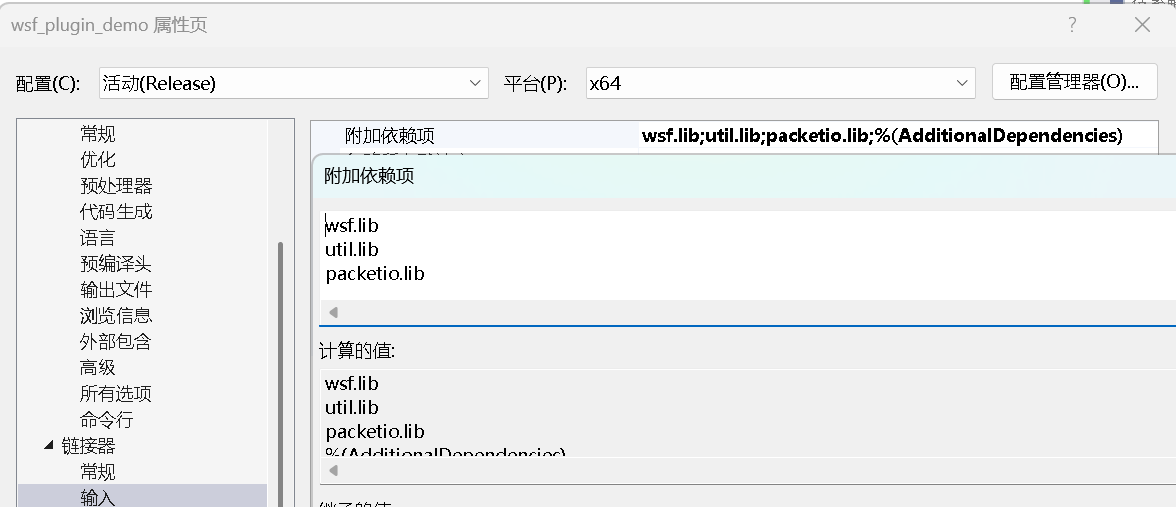
引用库文件配置
编译时会有link不过的错误,根据错误提示,追加相关库。
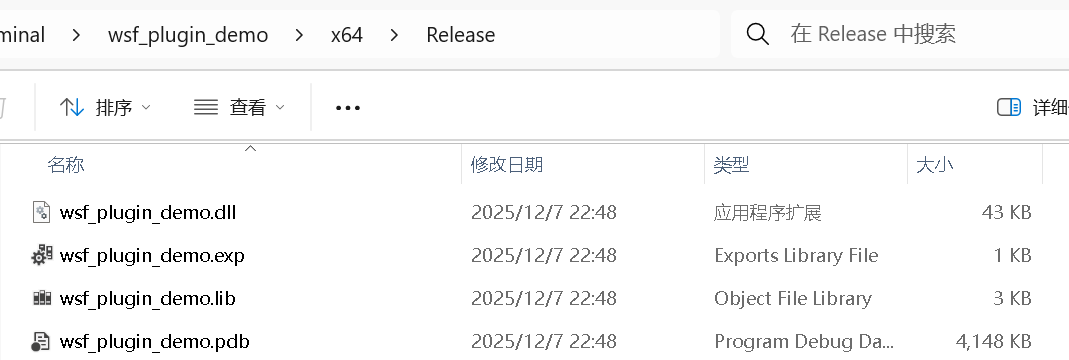
编译afsim插件
右键生成,生成路径如下。
验证afsim插件
将dll文件拷贝到【swdev\BUILD\Release\wsf_plugins】路径下。
然后使用swdev\BUILD\Release下的mission.exe来验证插件是否能够正常加载。
在此目录中打开cmd命令行工具,并输入mission.exe -rt(这个命令不会加载任何场景文件,但可以验证插件是否能够加载),结果如下:
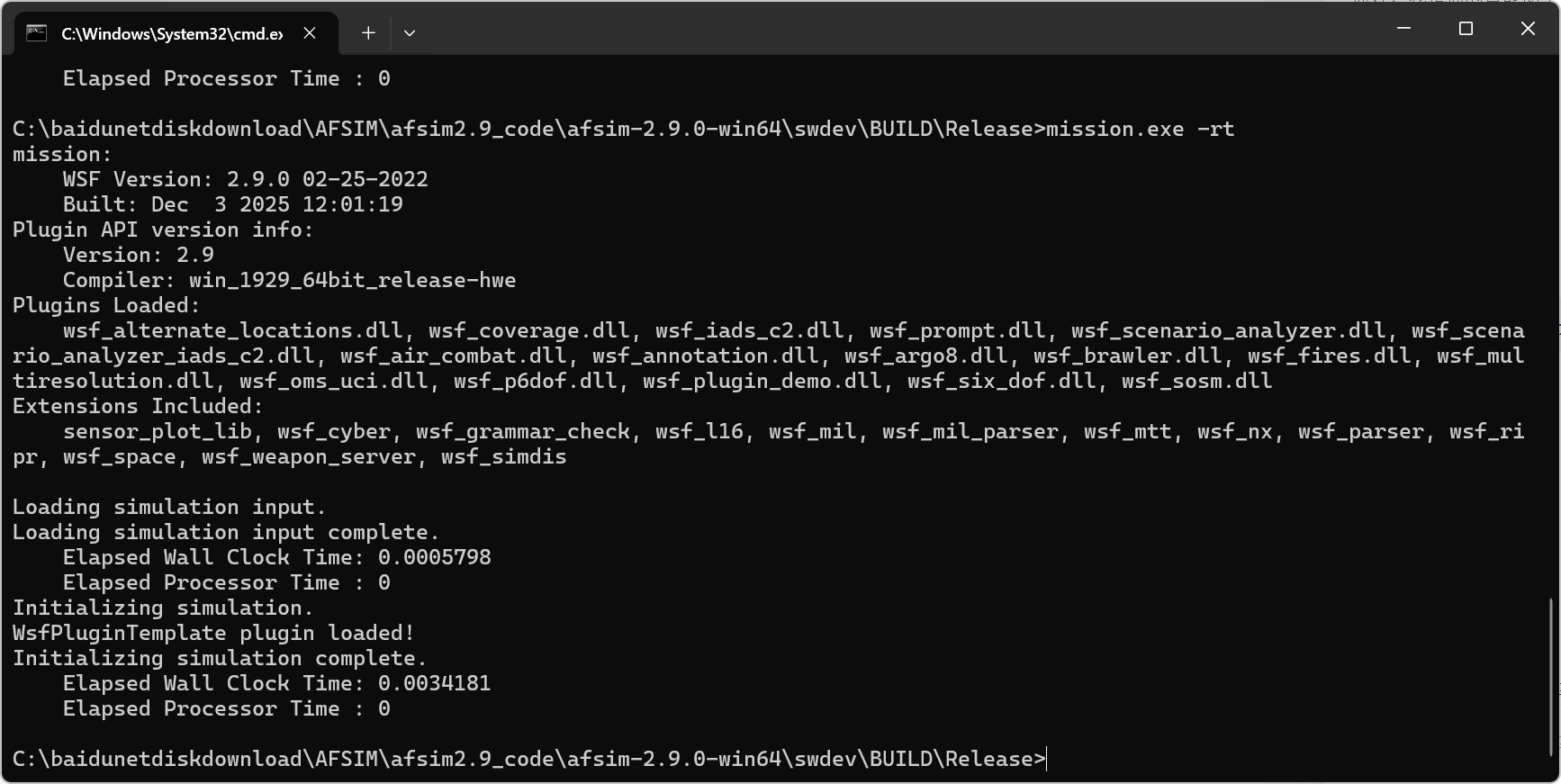
文件输出了插件初始化函数中【WsfPluginTemplate::Initialize()】打印的内容【WsfPluginTemplate plugin loaded!】,说明正常加载了插件dll。
成功后,就可以在此插件项目中开发其他内容了。
参考链接:

欢迎加入 MCP 技术社区!与志同道合者携手前行,一同解锁 MCP 技术的无限可能!
更多推荐

 15
15 0
0- 0


 已为社区贡献18条内容

所有评论(0)