Arcs-mini mcp功能测试
使用聆思科技的Arcs-mini的开发板测试,发现可以通过大模型调用本地的MCP服务,实现通过大模型开灯,光灯,调节屏幕亮度,和显示表情等功能。对这部分内容比较感兴趣。进行初步测试。
1.测试大模型语音开关led等。
根据官方文档配置网络,然后根据官方文档替换唤醒词(https://docs2.listenai.com/x/cpmSpoptA),将原来的“小聆小聆”改为“小菊小菊”,测试视频如下:
Arcs-mini 测试
测试官方的mcp例程,进行LED灯MCP功能测试,测试开关和闪烁LED。测试视频如下:
Arcs-mini mcp
2.代码分析,通过查看代码,mcp可以通过注册的方式增加,用户可以根据自己的需求创建相应本地mcp服务,只需通过相应的接口进行mcp注册,大模型就可以调用相关mcp服务。
mcp通过MCP_REGISTER_TOOL_STATIC宏进行静态注册
// 注册LED开关控制工具
MCP_REGISTER_TOOL_STATIC(led_switch,
                         "控制LED开关状态,可以是开启或关闭",
                         "1.0",
                         led_switch_params,
                         1,
                         led_switch_handler,
                         false,
                         NULL);

// 注册LED闪烁控制工具
MCP_REGISTER_TOOL_STATIC(led_blink,
                         "控制LED闪烁模式,可以是关闭、普通、快速或慢速",
                         "1.0",
                         led_blink_params,
                         1,
                         led_blink_handler,
                         false,
                         NULL);
大模型根据问题,向开发板发送调用MCP服务请求,程序解析运动请求后,通过mcp_integration_process_message函数镜像mcp服务处理。
/* ==================== 统一消息处理接口 ==================== */

cJSON *mcp_integration_process_message(const cJSON *aiui_msg)
{
    if (!aiui_msg || !g_integration_manager.initialized) {
        return NULL;
    }

    // 检查是否为 MCP 相关消息
    const cJSON *action = cJSON_GetObjectItem(aiui_msg, "action");
    if (!cJSON_IsString(action) || strcmp(action->valuestring, "mcp") != 0) {
        return NULL;  // 不是 MCP 消息,不处理
    }

    // 检查初始化请求
    if (mcp_integration_is_initialize_request(aiui_msg)) {
        LISA_LOGI(TAG, "Processing MCP initialize request");
        return mcp_integration_handle_initialize(aiui_msg);
    }

    // 检查工具列表请求
    if (mcp_integration_is_tools_list_request(aiui_msg)) {
        LISA_LOGI(TAG, "Processing MCP tools/list request");
        return mcp_integration_handle_tools_list(aiui_msg);
    }

    // 检查工具调用
    if (mcp_integration_is_tool_call(aiui_msg)) {
        LISA_LOGI(TAG, "Processing MCP tool call");
        return mcp_integration_handle_tool_call(aiui_msg);
    }

    // 未知的 MCP 消息类型
    LISA_LOGW(TAG, "Unknown MCP message type");
    return NULL;
}
解析json请求符合mcp服务格式后,调用mcp_integration_handle_tool_call函数处理。
cJSON *mcp_integration_handle_tool_call(const cJSON *tool_msg)
{
if (!tool_msg || !g_integration_manager.initialized) {
LISA_LOGE(TAG, "Invalid parameters for tool call request");
return NULL;
}
const cJSON *data = cJSON_GetObjectItem(tool_msg, "data");
if (!data) {
LISA_LOGE(TAG, "No data in tool call request");
return NULL;
}
// 提取调用 ID
const cJSON *id = cJSON_GetObjectItem(data, "id");
if (!cJSON_IsString(id)) {
LISA_LOGE(TAG, "No valid ID in tool call request");
return NULL;
}
const char *call_id = id->valuestring;
// 记录开始时间用于统计
uint32_t start_time = lisa_os_get_tick_ms();
// 提取工具调用信息
char *tool_name = NULL;
mcp_param_t *params = NULL;
uint32_t param_count = 0;
mcp_result_t extract_result = mcp_integration_extract_tool_call(tool_msg, &tool_name, ¶ms, ¶m_count);
if (extract_result != MCP_RESULT_SUCCESS) {
LISA_LOGE(TAG, "Failed to extract tool call information: %d", extract_result);
// 创建错误响应
cJSON *error_response = cJSON_CreateObject();
if (error_response) {
cJSON_AddStringToObject(error_response, "id", call_id);
cJSON_AddStringToObject(error_response, "action", "mcp");
cJSON_AddStringToObject(error_response, "method", "tools/call");
cJSON *error_result = cJSON_CreateObject();
if (error_result) {
cJSON_AddNumberToObject(error_result, "code", extract_result);
cJSON_AddStringToObject(error_result, "message", "Failed to extract tool call information");
cJSON_AddItemToObject(error_response, "error", error_result);
}
}
return error_response;
}
LISA_LOGI(TAG, "Calling tool: %s with %d parameters for ID: %s", tool_name, param_count, call_id);
// 同步调用工具
mcp_response_t mcp_response = {0};
mcp_result_t call_result = mcp_call_tool_sync(tool_name, params, param_count, &mcp_response);
// 计算执行时间
uint32_t exec_time = lisa_os_get_tick_ms() - start_time;
// 更新统计信息
_update_stats(call_result, exec_time);
// 创建标准响应格式
cJSON *response = cJSON_CreateObject();
if (!response) {
LISA_LOGE(TAG, "Failed to create tool call response object");
lisa_mem_free(tool_name);
_free_params(params, param_count);
return NULL;
}
// 添加基本响应字段
cJSON_AddStringToObject(response, "id", call_id);
cJSON_AddStringToObject(response, "action", "mcp");
cJSON_AddStringToObject(response, "method", "tools/call");
if (call_result == MCP_RESULT_SUCCESS) {
// 成功响应
cJSON *result = cJSON_CreateObject();
if (result) {
// 添加工具执行结果
if (mcp_response.content) {
cJSON *content_copy = cJSON_Duplicate(mcp_response.content, true);
if (content_copy) {
cJSON_AddItemToObject(result, "content", content_copy);
}
} else {
cJSON_AddStringToObject(result, "content", "Tool executed successfully");
}
// 添加执行时间
cJSON_AddNumberToObject(result, "executionTime", exec_time);
// 添加工具名称
cJSON_AddStringToObject(result, "tool", tool_name);
cJSON_AddItemToObject(response, "result", result);
}
LISA_LOGI(TAG, "Tool call completed successfully: %s (ID: %s, time: %dms)", tool_name, call_id, exec_time);
} else {
// 错误响应
cJSON *error_result = cJSON_CreateObject();
if (error_result) {
cJSON_AddNumberToObject(error_result, "code", call_result);
// 使用 MCP 响应中的错误信息,或提供默认错误信息
const char *error_msg = mcp_response.error_msg ? mcp_response.error_msg : "Tool execution failed";
cJSON_AddStringToObject(error_result, "message", error_msg);
cJSON_AddStringToObject(error_result, "tool", tool_name);
cJSON_AddNumberToObject(error_result, "executionTime", exec_time);
cJSON_AddItemToObject(response, "error", error_result);
}
LISA_LOGE(TAG, "Tool call failed: %s (ID: %s, result: %d, time: %dms)", tool_name, call_id, call_result, exec_time);
}
// 清理资源
lisa_mem_free(tool_name);
_free_params(params, param_count);
return response;
}经过解析mcp服务所需的参数结构和数量,然后执行mcp_call_tool_sync执行相应mcp服务。
/* ==================== 工具执行接口实现 ==================== */

mcp_result_t mcp_call_tool_sync(const char *tool_name,
                               const mcp_param_t *params,
                               uint32_t param_count,
                               mcp_response_t *response)
{
    if (!g_mcp_manager.initialized) {
        return MCP_RESULT_ERROR;
    }

    if (!tool_name || !response) {
        return MCP_RESULT_INVALID_PARAM;
    }

    // 查找工具
    lisa_mutex_lock(g_mcp_manager.registry_mutex, LISA_OS_WAIT_FOREVER);
    mcp_tool_registry_t *registry = _find_registry_entry(tool_name);
    if (!registry || !registry->is_enabled) {
        lisa_mutex_unlock(g_mcp_manager.registry_mutex);
        return MCP_RESULT_NOT_FOUND;
    }

    mcp_tool_def_t *tool_def = registry->tool_def;
    lisa_mutex_unlock(g_mcp_manager.registry_mutex);

    // 验证参数
    mcp_result_t validate_result = _validate_params(tool_def, params, param_count);
    if (validate_result != MCP_RESULT_SUCCESS) {
        return validate_result;
    }

    // 准备执行上下文
    mcp_context_t ctx = {0};
    ctx.tool_name = tool_name;
    ctx.call_id = _generate_call_id();
    ctx.params = (mcp_param_t *)params;
    ctx.param_count = param_count;

    // 记录开始时间
    uint64_t start_time = lisa_os_get_tick_ms();

    // 执行工具
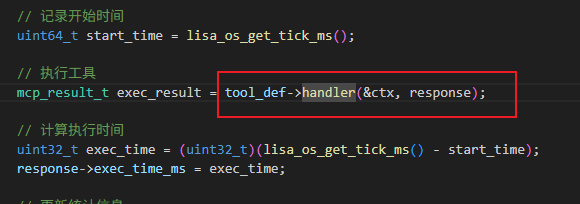
    mcp_result_t exec_result = tool_def->handler(&ctx, response);

    // 计算执行时间
    uint32_t exec_time = (uint32_t)(lisa_os_get_tick_ms() - start_time);
    response->exec_time_ms = exec_time;

    // 更新统计信息
    lisa_mutex_lock(g_mcp_manager.registry_mutex, LISA_OS_WAIT_FOREVER);
    _update_tool_stats(registry, exec_result, exec_time);
    lisa_mutex_unlock(g_mcp_manager.registry_mutex);

    lisa_mem_free((void *)ctx.call_id);
    return exec_result;
}
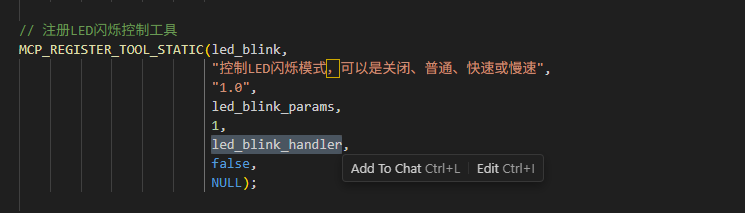
程序会调用注册是的handler函数,执行控制led灯。
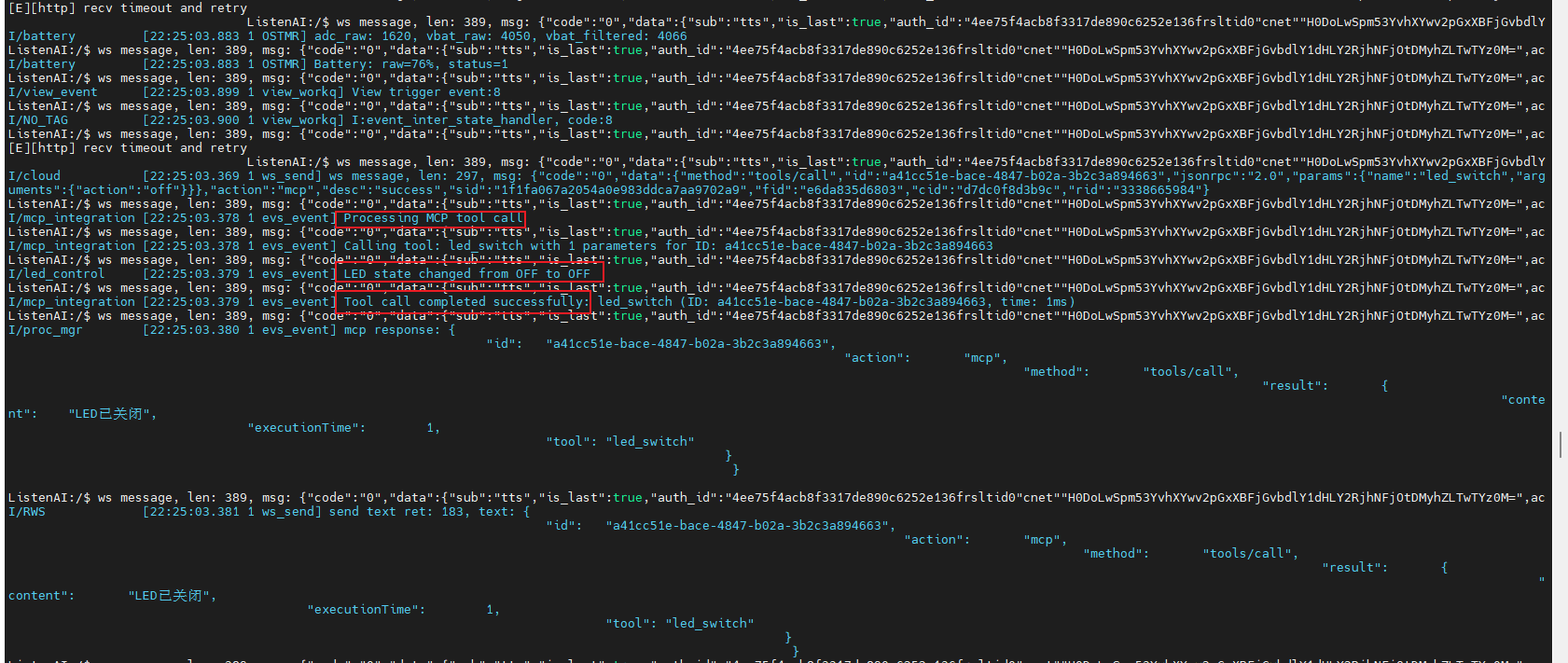
控制成功后会返回状态。
3.自定义mcp测试。
先增加个简单控制风扇的mcp,让AI先按照led灯的结构编写mcp注册和回调函数。
#include "fan_control.h"
#include "aiui_mcp.h"
#include "lisa_log.h"
#include "cJSON.h"
#include <string.h>
#include <stdio.h>

// 假设存在风扇控制的API,这里声明它们
// 实际项目中可能需要根据硬件接口实现这些函数
extern void app_fan_init(void);
extern void app_fan_on(void);
extern void app_fan_off(void);

#define TAG "fan_control"

// 风扇状态管理
static int fan_state = 0;  // 0=关闭,1=开启

// 初始化风扇控制模块
__attribute__((constructor)) static void fan_control_init(void)
{
    app_fan_init();
}

// 风扇开关控制处理函数
static mcp_result_t fan_switch_handler(const mcp_context_t *ctx, mcp_response_t *response)
{
    if (!ctx || !response) {
        return MCP_RESULT_INVALID_PARAM;
    }

    const char *action = NULL;

    // 解析参数
    for (uint32_t i = 0; i < ctx->param_count; i++) {
        if (strcmp(ctx->params[i].name, "action") == 0) {
            if (cJSON_IsString(ctx->params[i].value)) {
                action = ctx->params[i].value->valuestring;
            }
        }
    }

    if (!action) {
        response->content = cJSON_CreateString("错误:缺少必需的 action 参数");
        response->result = MCP_RESULT_INVALID_PARAM;
        return MCP_RESULT_INVALID_PARAM;
    }

    int new_state = -1;
    if (strcmp(action, "on") == 0 || strcmp(action, "turn_on") == 0) {
        new_state = 1;
    } else if (strcmp(action, "off") == 0 || strcmp(action, "turn_off") == 0) {
        new_state = 0;
    } else {
        response->content = cJSON_CreateString("错误:action 只能是 'on'、'turn_on'、'off' 或 'turn_off'");
        response->result = MCP_RESULT_INVALID_PARAM;
        return MCP_RESULT_INVALID_PARAM;
    }

    int old_state = fan_state;
    fan_state = new_state;

    // 调用风扇控制API
    if (fan_state) {
        app_fan_on();
    } else {
        app_fan_off();
    }

    LISA_LOGI(TAG, "Fan state changed from %s to %s",
              old_state ? "ON" : "OFF",
              fan_state ? "ON" : "OFF");

    char result_msg[256];
    snprintf(result_msg, sizeof(result_msg),
            "风扇已%s", fan_state ? "开启" : "关闭");
    response->content = cJSON_CreateString(result_msg);
    response->result = MCP_RESULT_SUCCESS;

    return MCP_RESULT_SUCCESS;
}

// 风扇开关工具参数定义
static mcp_param_def_t fan_switch_params[] = {
    MCP_PARAM_DEF("action", MCP_PARAM_STRING, true,
                  "风扇开关操作,可以是 'on'、'turn_on'、'off' 或 'turn_off'",
                  NULL),
    MCP_PARAM_DEF_END
};

// 注册风扇开关控制工具
MCP_REGISTER_TOOL_STATIC(fan_switch,
                         "控制风扇开关状态,可以是开启或关闭",
                         "1.0",
                         fan_switch_params,
                         1,
                         fan_switch_handler,
                         false,
                         NULL);

int get_fan_state(void)
{
    // 返回风扇当前状态
    // 注意:这里返回的是软件状态,不是实际硬件状态
    return fan_state;
}
然后通过选择扩展接口的gpio控制风扇。
#include "fan.h"
#include "lisa_log.h"
#include "Driver_GPIO.h"
#include "IOMuxManager.h"

#define TAG "fan"

// Fan control pin configuration
#define FAN_GPIO_PORT       GPIOA
#define FAN_PIN_NUM         4
#define FAN_PIN_MASK        (0x01 << FAN_PIN_NUM)
#define FAN_IOMUX_PAD       CSK_IOMUX_PAD_A
#define FAN_IOMUX_FUNC      CSK_IOMUX_FUNC_DEFAULT

/**
 * @brief Control fan
 * @param state true: fan on, false: fan off
 */
static void fan_hw_control(bool state)
{
    // Using GPIOB Pin 2 for fan control (example)
    uint32_t pin_value = state;  // Fan is active high

    GPIO_PinWrite(FAN_GPIO_PORT(), FAN_PIN_MASK, pin_value);
}

void fan_hw_init(void)
{
    /* Initialize GPIOB module */
    GPIO_Initialize(FAN_GPIO_PORT(), NULL, NULL);

    /* Configure IO Mux for fan pin */
    IOMuxManager_PinConfigure(FAN_IOMUX_PAD, FAN_PIN_NUM, FAN_IOMUX_FUNC);  /* Fan - Pin2 */

    /* Configure fan - GPIOB Pin2 */
    GPIO_SetDir(FAN_GPIO_PORT(), FAN_PIN_MASK, CSK_GPIO_DIR_OUTPUT);
    GPIO_PinWrite(FAN_GPIO_PORT(), FAN_PIN_MASK, 0); /* Fan off (low level) */
}

void fan_hw_on(void)
{
    fan_hw_control(true);
}

void fan_hw_off(void)
{
    fan_hw_control(false);
}

void app_fan_init(void)
{
    fan_hw_init();
    LISA_LOGI(TAG, "Fan service initialized");
}

void app_fan_on(void)
{
    LISA_LOGI(TAG, "Turning fan ON");
    fan_hw_on();
}

void app_fan_off(void)
{
    LISA_LOGI(TAG, "Turning fan OFF");
    fan_hw_off();
}代码编写完成了,加入相应的cmake,然后按照官方文档进行编译下载测试。(开发环境搭建与烧录 | 聆思文档中心)
测试视频如下:
VID_20251115_092937

欢迎加入 MCP 技术社区!与志同道合者携手前行,一同解锁 MCP 技术的无限可能!
更多推荐

 3
3 0
0- 0


 已为社区贡献1条内容

所有评论(0)