Hermes Agent 服务配置指南
·
Hermes Agent 服务配置指南
本文档涵盖 API Server、Dashboard、Gateway 的配置和自启动方法。
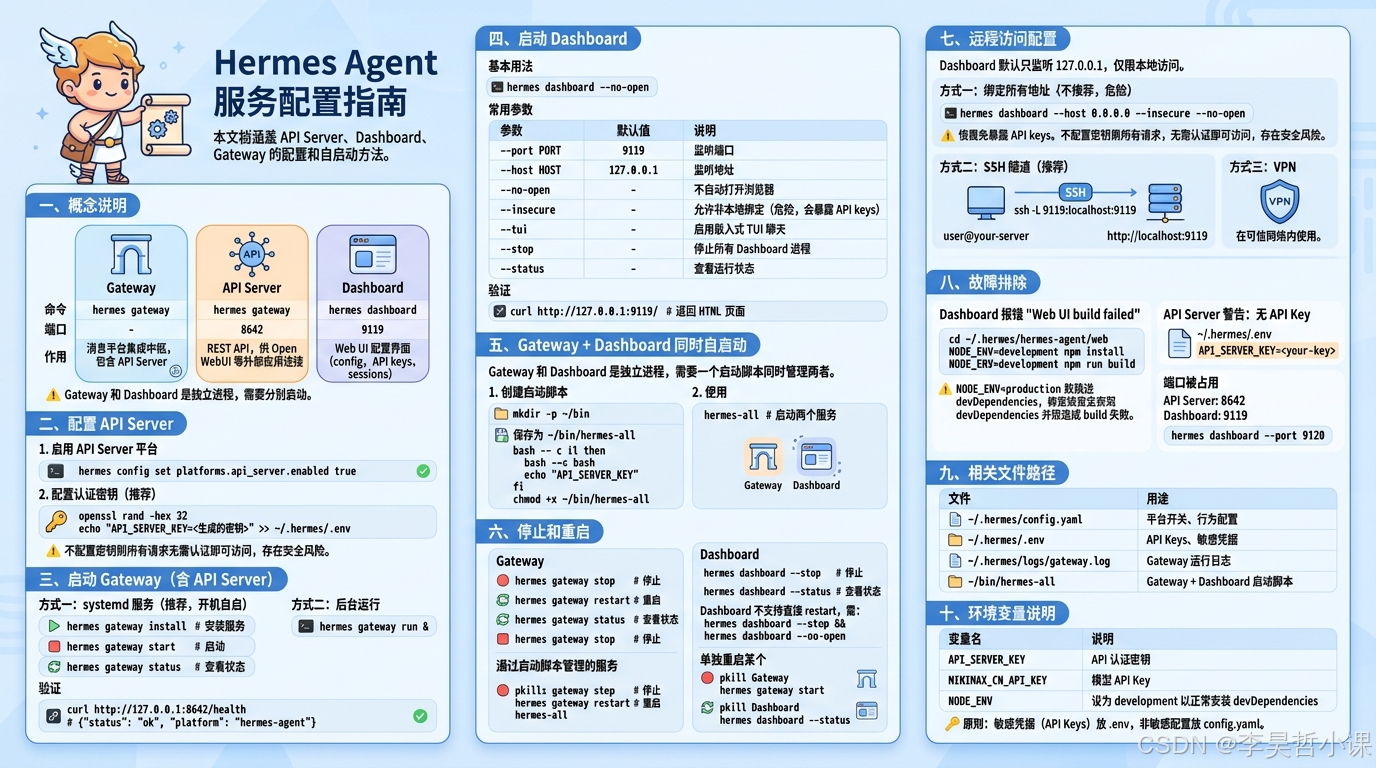
一、概念说明
| 组件 | 命令 | 端口 | 作用 |
|---|---|---|---|
| Gateway | hermes gateway |
- | 消息平台集成中枢,包含 API Server |
| API Server | hermes gateway |
8642 | REST API,供 Open WebUI 等外部应用连接 |
| Dashboard | hermes dashboard |
9119 | Web UI 配置界面(config、API keys、sessions) |
Gateway 和 Dashboard 是两个独立进程,需要分别启动。
二、配置 API Server
1. 启用 API Server 平台
hermes config set platforms.api_server.enabled true
2. 配置认证密钥(推荐)
# 生成随机密钥
openssl rand -hex 32

# 添加到 ~/.hermes/.env
echo "API_SERVER_KEY=<生成的密钥>" >> ~/.hermes/.env
⚠️ 不配置密钥则所有请求无需认证即可访问,存在安全风险。
三、启动 Gateway(含 API Server)
方式一:systemd 服务(推荐,开机自启)
hermes gateway install   # 安装服务
hermes gateway start     # 启动
hermes gateway status    # 查看状态
hermes gateway restart   # 重启
hermes gateway stop      # 停止
方式二:后台运行
hermes gateway run &
验证
curl http://127.0.0.1:8642/health
# {"status": "ok", "platform": "hermes-agent"}
四、启动 Dashboard
基本用法
hermes dashboard --no-open
常用参数
| 参数 | 默认值 | 说明 |
|---|---|---|
--port PORT |
9119 | 监听端口 |
--host HOST |
127.0.0.1 | 监听地址 |
--no-open |
- | 不自动打开浏览器 |
--insecure |
- | 允许非本地绑定(危险,会暴露 API keys) |
--tui |
- | 启用嵌入式 TUI 聊天 |
--stop |
- | 停止所有 Dashboard 进程 |
--status |
- | 查看运行状态 |
验证
curl http://127.0.0.1:9119/
# 返回 HTML 页面
五、Gateway + Dashboard 同时自启动
Gateway 和 Dashboard 是独立进程,需要一个启动脚本同时管理两者。
1. 创建启动脚本
mkdir -p ~/bin
保存为 ~/bin/hermes-all:
#!/bin/bash
# Hermes Gateway + Dashboard 启动脚本

unset NODE_ENV

hermes gateway run &
GATEWAY_PID=$!
sleep 3
hermes dashboard --no-open &
DASHBOARD_PID=$!

echo "Gateway PID: $GATEWAY_PID"
echo "Dashboard PID: $DASHBOARD_PID"
echo "Gateway:  http://127.0.0.1:8642"
echo "Dashboard: http://127.0.0.1:9119"

wait $GATEWAY_PID $DASHBOARD_PID
chmod +x ~/bin/hermes-all
2. 使用
hermes-all # 启动两个服务
六、停止和重启
Gateway
hermes gateway stop      # 停止
hermes gateway restart   # 重启
hermes gateway status    # 查看状态
Dashboard
hermes dashboard --stop   # 停止
hermes dashboard --status # 查看状态
Dashboard 不支持直接 restart,需:
hermes dashboard --stop && hermes dashboard --no-open
通过启动脚本管理的服务
# 停止所有
pkill -f "hermes_cli.main gateway run"
pkill -f "hermes dashboard"

# 重启所有
pkill -f "hermes_cli.main gateway run"
pkill -f "hermes dashboard"
sleep 1
hermes-all
单独重启某个
# 重启 Gateway(Dashboard 保持运行)
pkill -f "hermes_cli.main gateway run"
sleep 1
hermes gateway run &

# 重启 Dashboard(Gateway 保持运行)
hermes dashboard --stop
sleep 1
hermes dashboard --no-open &
七、远程访问配置
Dashboard 默认只监听 127.0.0.1,仅限本地访问。
方式一:绑定所有地址(不推荐,危险)
hermes dashboard --host 0.0.0.0 --insecure --no-open
⚠️ --insecure 会把 Dashboard 暴露到网络,任何能访问你机器的人都能看到 API Keys。
方式二:SSH 隧道(推荐)
在远程机器上执行:
ssh -L 9119:localhost:9119 user@your-server
然后访问 http://localhost:9119。
方式三:VPN
在可信网络内使用。
八、故障排除
Dashboard 报错 “Web UI build failed”
cd ~/.hermes/hermes-agent/web
NODE_ENV=development npm install
NODE_ENV=development npm run build
注意:
NODE_ENV=production会跳过 devDependencies(包括 TypeScript),导致构建失败。
API Server 警告:无 API Key
确保 ~/.hermes/.env 中存在:
API_SERVER_KEY=<your-key>
端口被占用
- API Server 默认:
8642 - Dashboard 默认:
9119
修改端口:
hermes dashboard --port 9120
九、相关文件路径
| 文件 | 用途 |
|---|---|
~/.hermes/config.yaml |
平台开关、行为配置 |
~/.hermes/.env |
API Keys、敏感凭据 |
~/.hermes/logs/gateway.log |
Gateway 运行日志 |
~/bin/hermes-all |
Gateway + Dashboard 启动脚本 |
十、环境变量说明
| 变量名 | 说明 |
|---|---|
API_SERVER_KEY |
API 认证密钥 |
MINIMAX_CN_API_KEY |
模型 API Key |
NODE_ENV |
设为 development 以正常安装 devDependencies |
原则:敏感凭据(API Keys)放
.env,非敏感配置放config.yaml。

欢迎加入 MCP 技术社区!与志同道合者携手前行,一同解锁 MCP 技术的无限可能!
更多推荐

 10
10 0
0- 0


 已为社区贡献5条内容

所有评论(0)